
CyberPower CP1500PFCLCD
4.5Editor score
Pure sine wave output
12 outlets total
LCD status panel
This guide compares the top 10 battery backup for workstation PC options to help you choose the right UPS for power protection and data safety.
A reliable battery backup for workstation PC is essential for maintaining productivity during unexpected power outages. These devices protect your critical hardware from surges and provide enough time to save work and shut down safely.
We evaluated ten top-rated uninterruptible power supplies based on capacity, waveform type, outlet count, and advanced features. Our analysis focuses on models that deliver consistent performance for demanding workstation environments.
Each pick highlights key specifications and real-world benefits for different user needs. Prices and availability change frequently so verify current details before purchasing your next power protection solution.
4.5Editor score

4.7Editor score

4.4Editor score
The following table presents a side-by-side overview of all ten models. It highlights key specifications to help you quickly identify the unit that best matches your workstation power requirements.


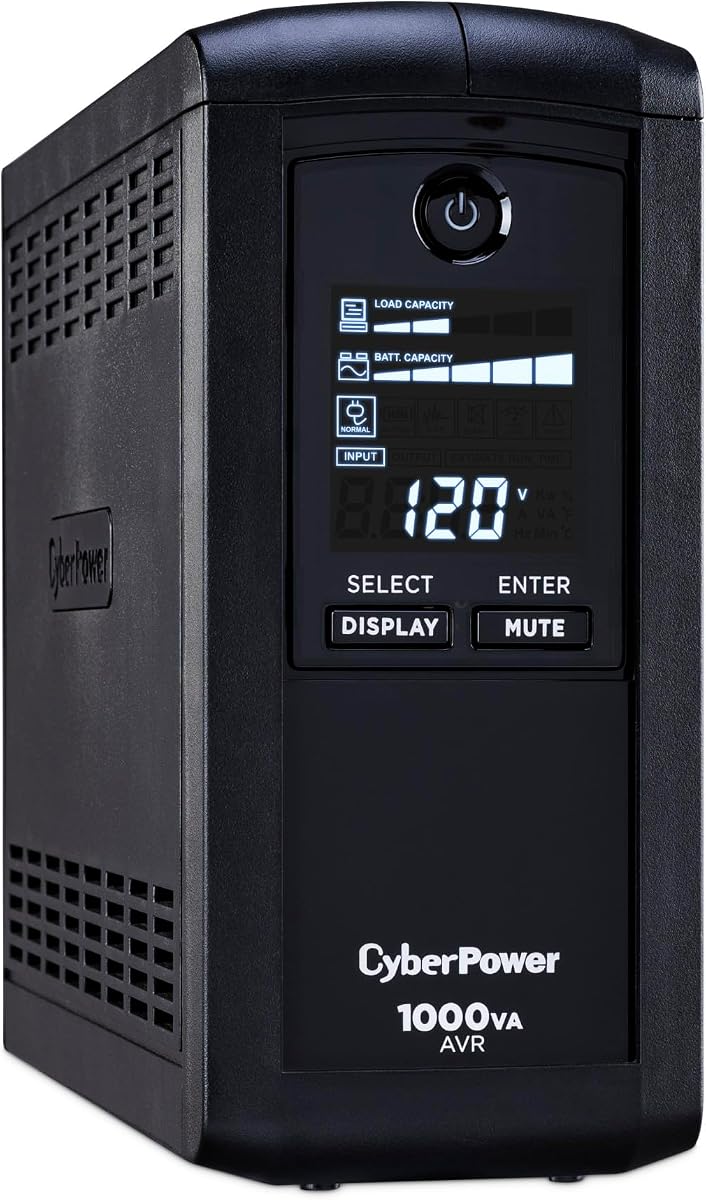


This CyberPower UPS stands out as the top choice for workstation protection with its pure sine wave output and strong capacity. It received an impressive rating from users due to its reliable performance during power events.
We may earn a commission when you buy through this link, at no additional cost to you.
The unit features a robust 1500VA rating with pure sine wave technology ensuring compatibility with Active PFC power supplies found in modern workstations. The color LCD provides immediate insight into load and battery status while the AVR corrects minor fluctuations.
While the cost is higher than basic models the investment protects expensive hardware from data loss or hardware failure. The connected equipment guarantee further adds peace of mind for professional environments.
Workstation users needing high wattage and pure sine wave should buy this model. It remains the premier choice for balancing performance and protection features in current market offerings.
The pure sine wave output ensures your Active PFC power supplies operate without issues during backup mode.
The color LCD panel displays battery status and load levels at a glance.
We may earn a commission when you buy through this link, at no additional cost to you.
This model offers exceptional value through an extended five year warranty covering the battery. It achieved the highest rating in our list making it a reliable choice for users prioritizing warranty coverage.
We may earn a commission when you buy through this link, at no additional cost to you.
The device provides 1500VA capacity with simulated sine wave suitable for most conventional power supplies. A color LCD enhances visibility and USB ports allow device charging while the AVR prevents unnecessary battery drain.
Though it lacks pure sine wave the five year warranty significantly reduces long term ownership costs. The extensive outlet count supports all workstation peripherals efficiently.
Buy this unit if a long warranty is your priority. It delivers strong protection and user friendly features for typical workstation setups.
The five year warranty provides the longest protection in its class covering battery and equipment.
Integrated USB ports allow you to charge phones directly from the UPS unit.
We may earn a commission when you buy through this link, at no additional cost to you.
This premium UPS utilizes advanced lithium iron phosphate technology offering a ten year lifespan far exceeding standard lead acid units. It received strong ratings for its longevity and pure sine wave performance.
We may earn a commission when you buy through this link, at no additional cost to you.
With 2000VA capacity and 1600W output it handles powerful workstation loads effortlessly. The battery technology reduces total cost of ownership and the pure sine wave protects sensitive electronics.
The extra weight is due to the large battery capacity which provides superior runtime. While expensive upfront the decade long battery life offers significant value over time.
Select this for high performance needs and long term reliability. It is ideal for users willing to pay more for superior battery technology.
LiFePO4 chemistry ensures over 3000 charge cycles and ten years of service life.
Pure sine wave output keeps Active PFC supplies stable during power outages.
We may earn a commission when you buy through this link, at no additional cost to you.
This model delivers solid performance with 1500VA capacity and a color LCD for clear status monitoring. Users appreciate its straightforward design and reliable surge protection features.
We may earn a commission when you buy through this link, at no additional cost to you.
It uses simulated sine wave which works well for standard power supplies. The AVR function extends battery life by correcting minor fluctuations without switching to battery.
The unit is slightly heavier than entry models but offers ample power for most setups. It fits those seeking CyberPower reliability without the highest price tier.
Choose this for balanced performance and features. It is suitable for typical workstations needing dependable power protection.
The color LCD keeps you informed of battery health and load levels instantly.
We may earn a commission when you buy through this link, at no additional cost to you.
This UPS brings pure sine wave protection to a lower wattage class making it cost effective for smaller workstations. Ratings reflect steady performance and compatibility with active PFC supplies.
We may earn a commission when you buy through this link, at no additional cost to you.
At 1000VA and 600W it suits standard office PCs effectively. The AVR corrects voltage issues to prolong battery life and the LCD panel ensures clear visibility.
Limitations include fewer outlets than larger models. However the pure sine wave makes it a unique budget friendly option for sensitive gear.
Buy this for basic workstation needs. It offers essential pure sine protection without the premium cost.
Pure sine wave ensures Active PFC power supplies receive clean power during backups.
We may earn a commission when you buy through this link, at no additional cost to you.
This unit adds data line protection which safeguards modems and routers during storms. It achieved a high rating for its utility in networked workstation environments.
We may earn a commission when you buy through this link, at no additional cost to you.
With 900VA capacity it supports essential computing equipment. The AVR function ensures power quality and the design remains compact for easy placement.
While wattage is limited for high end setups the data protection offers unique value. It is well suited for office workstations with network connections.
Select this for network protection benefits. It provides reliable backup with extra surge defense for data lines.
This model protects network connections from surges that travel through telephone lines.
We may earn a commission when you buy through this link, at no additional cost to you.
This versatile UPS delivers standard protection with an intelligent display for monitoring. Ratings highlight its consistent performance for typical office equipment.
We may earn a commission when you buy through this link, at no additional cost to you.
It provides 1000VA and 600W which handles most workstations. The LCD shows runtime and load data while AVR maintains power quality.
The outlet count is slightly lower than some peers but adequate for most users. It offers a straightforward solution without complex features.
Choose this for reliable everyday protection. It balances cost and function well for standard setups.
The LCD panel displays runtime and capacity for better power awareness.
We may earn a commission when you buy through this link, at no additional cost to you.
This model focuses on energy efficiency with ECO mode that powers off connected peripherals when the computer sleeps. Users like the environmental benefits and cost savings.
We may earn a commission when you buy through this link, at no additional cost to you.
With 850VA it suits lightweight workstations. The unit provides 12 outlets and the LCD keeps you updated on system status.
Limitations include limited wattage for high power needs. However the energy saving features make it distinct in the lineup.
Buy this for energy conscious workspaces. It is ideal for setups that want to reduce idle power consumption.
ECO mode automatically turns off peripheral outlets when the computer is in sleep mode.
We may earn a commission when you buy through this link, at no additional cost to you.
This slim model is designed for tight spaces while providing substantial outlets. Ratings show users appreciate its space saving footprint and protection levels.
We may earn a commission when you buy through this link, at no additional cost to you.
It offers 900VA with high efficiency design reducing power consumption. The outlets are spaced to fit large plugs and the unit is lightweight.
While it lacks an LCD the physical design suits crowded desks. It fits those needing basic protection in limited space.
Choose this for compact setups. It offers reliable backup where space is at a premium.
The slim profile allows the UPS to fit easily under or beside your workstation.
We may earn a commission when you buy through this link, at no additional cost to you.
This entry level UPS offers basic protection with an LCD for visibility. Ratings indicate it serves basic office needs well.
We may earn a commission when you buy through this link, at no additional cost to you.
With 850VA it supports lightweight desktops. The AVR corrects voltage and the LCD provides essential status info.
Runtime is limited for heavy equipment but sufficient for simple shutdowns. It is an affordable option for smaller systems.
Buy this for basic protection needs. It offers essential features for entry level workstation setups.
This model covers essential needs including surge protection and short backup runtime.
We may earn a commission when you buy through this link, at no additional cost to you.
Selecting the right battery backup for workstation PC requires understanding several technical factors. These elements ensure your hardware receives adequate power during outages.
VA (Volt-Ampere) and wattage ratings determine the total power the UPS can deliver. You must calculate your workstation's total load to ensure the UPS can support it. Always choose a unit with a wattage rating higher than your equipment total.
Check your power supply wattage and add peripherals to find the load. Select a UPS with at least 20 percent headroom for safety.
Waveforms can be pure sine wave or simulated sine wave. Active PFC power supplies typically require pure sine wave to function correctly. Simulated sine wave is acceptable for standard power supplies.
Determine your workstation power supply type. Choose pure sine wave if you have Active PFC supplies to avoid compatibility issues.
Most UPS units use lead acid batteries which need replacement every few years. Lithium iron phosphate batteries last longer and offer higher efficiency. Consider lifespan when choosing your unit.
If long term value is key lithium battery units offer better lifecycle costs despite higher initial price.
Ensure the UPS has enough outlets for all your devices. Some outlets may be battery backed while others are surge only. Consider the spacing between outlets for large adapters.
Choose a unit with at least one more outlet than your current devices need for future expansion.
AVR corrects minor voltage fluctuations without draining the battery. This feature extends battery life and protects equipment from brownouts. It is essential for unstable electrical environments.
Always select a model with built-in AVR to minimize unnecessary battery cycling during power issues.
An LCD panel displays battery status load and estimated runtime. Color displays offer better visibility than basic LEDs. Monitoring helps you anticipate issues before they affect work.
Look for a color LCD for clear status updates on load and battery health.
Warranty periods vary by model and often include the battery. Equipment guarantees protect your hardware against surge damage. Longer warranties indicate manufacturer confidence.
Compare warranty terms and connected equipment guarantees to ensure long term protection.
Many UPS units include software for safe PC shutdowns during outages. USB or serial ports enable communication with your workstation. Proper software setup prevents data loss.
Verify software compatibility with your OS and ensure USB communication ports are available.
Install the UPS by connecting it to a wall outlet first. Then plug your workstation peripherals into the battery backed outlets. Ensure the unit is plugged in continuously to keep the battery charged.
Download the included management software to configure automatic shutdowns. This ensures your files save safely when the battery runs low. Regularly test the unit by unplugging it briefly.
Replace the battery every few years as recommended by the manufacturer. Keeping the UPS in a cool dry place extends battery life. Avoid placing it near heat sources or direct sunlight.
Runtime depends on the load and battery capacity. A typical unit provides 10 to 30 minutes for standard workstations. Heavier loads reduce runtime significantly while lighter loads extend it.
Yes if your power supply has Active PFC. Pure sine wave ensures stable power to sensitive electronics. Simulated sine wave works for standard supplies but may cause issues with modern PSUs.
No a UPS provides only short term backup for shutdowns. Generators supply long term power during extended outages. Use both for complete protection in critical environments.
Test your UPS every three months by unplugging it briefly. This ensures the battery is holding a charge. Regular testing prevents failure during actual power outages.
When the battery degrades the UPS will not provide backup power. You must replace the battery to restore functionality. Most units alert you with a warning alarm when needed.
Yes it is safe and recommended to keep it plugged in. This allows the battery to stay charged. Modern units have circuits to prevent overcharging during normal use.
We reviewed ten top models ranging from entry to premium tiers. The CyberPower CP1500PFCLCD leads with pure sine wave and strong capacity. The GOLDENMATE 2000VA offers long term value with lithium technology.
Prioritize wattage capacity and waveform based on your specific hardware needs. Ensure your unit has enough outlets and communication software for your setup. Proper selection safeguards your investment against power risks.
Prices and availability vary so check current details before purchasing. Verify compatibility with your power supply and OS software. A good UPS ensures continuity for your critical workstation tasks.