
NGTeco Standalone Time Clock
4.3Editor score
Zero setup hassle operation
USB data export capability
Supports up to 500 users
This guide compares the top biometric fingerprint scanner time clock models for accuracy, security, and ease of use to help you choose the right system.
Finding the right time tracking system is essential for modern businesses. A biometric fingerprint scanner time clock ensures accuracy and prevents buddy punching effectively.
We evaluated ten top models based on security features, user capacity, and ease of setup. Our analysis covers standalone units and cloud-connected systems for all business sizes.
Each pick highlights specific strengths like offline mode or remote access. Please note that product availability and pricing may change frequently on retailer sites.
4.3Editor score

4.1Editor score

4.7Editor score
The following table provides a quick side-by-side comparison of all ten featured models to help you identify the best fit for your specific operational needs.

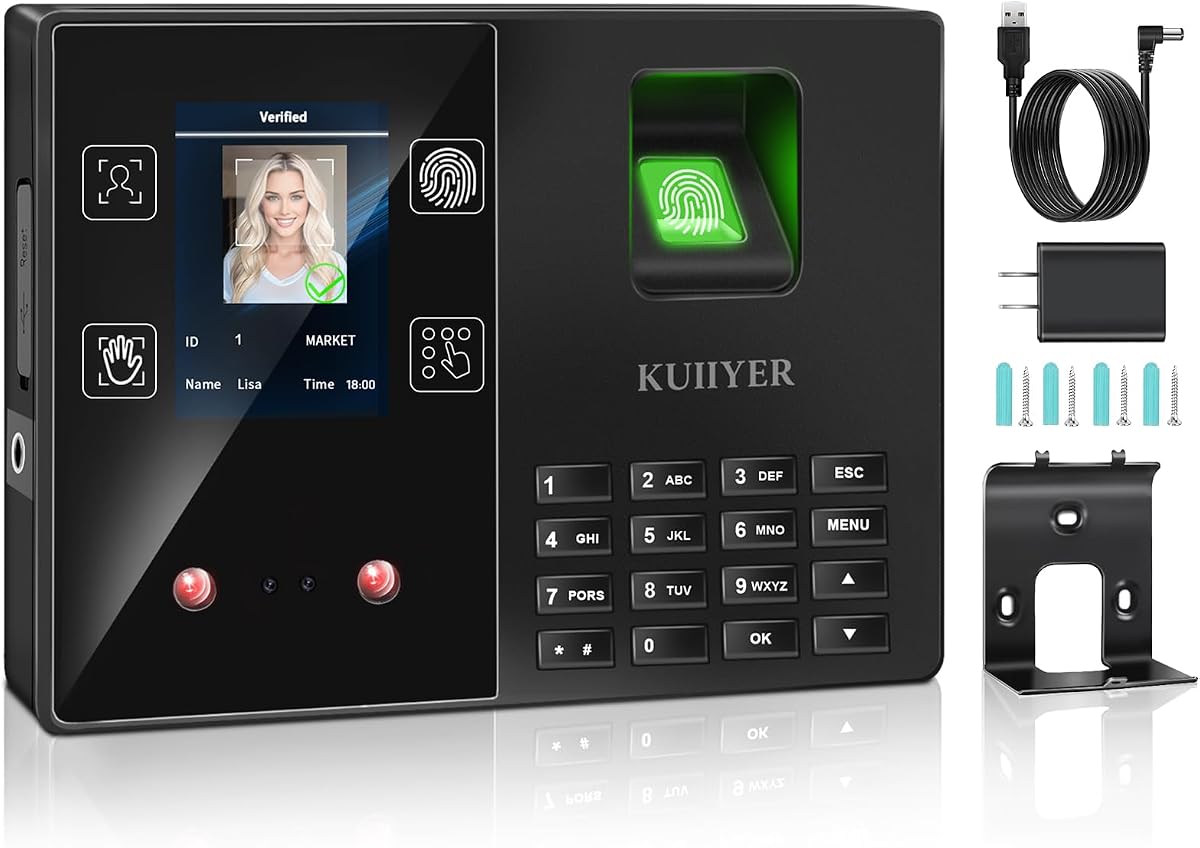


This top ranked unit offers face palm fingerprint badge and pin options for secure entry and exit. It rates well for automation and reduces paperwork needs significantly.
We may earn a commission when you buy through this link, at no additional cost to you.
The web based punch system allows remote monitoring from anywhere via the included mobile app. Payroll processing is streamlined with real time alerts and CSV exports.
While powerful the subscription plan after the free trial adds ongoing cost. It may be too advanced for very small teams needing only simple clock ins.
Choose this if you want maximum flexibility and remote control. It fits businesses ready to invest in a full attendance ecosystem.
Using multiple biometric options eliminates buddy punching effectively and ensures only authorized staff clock in.
Connect to WiFi or LAN to send punches to the cloud for instant data access and management.
We may earn a commission when you buy through this link, at no additional cost to you.
This device gets started in minutes without any WiFi or complex software installation. It rates high for ease of use and reliable standalone operation.
We may earn a commission when you buy through this link, at no additional cost to you.
Attendance data exports via USB drive with ready to use Excel reports. This makes payroll integration simple and cuts supply costs by removing paper cards.
The lack of internet connection means no remote viewing or app control. It is best for offices where data stays local and simple management is key.
Select this for straightforward tracking needs without hidden fees. It is ideal for small businesses focused on efficiency and affordability.
Fully independent time tracking allows you to manage data without relying on external servers or internet access.
An internal backup system preserves every punch during unexpected power loss to keep records retrievable.
We may earn a commission when you buy through this link, at no additional cost to you.
This model stands out for its fast fingerprint recognition and flexible app control features. It holds the highest rating in this lineup for performance.
We may earn a commission when you buy through this link, at no additional cost to you.
Real time punch detection ensures accurate records and auto calculates work hours efficiently. The mobile app allows editing punches quickly via the same local network.
Editing requires devices on the same local network which may limit remote management. It is slightly pricier than standalone units but offers better connectivity.
Buy this for a balance of speed and connectivity. It suits businesses wanting reliable clock-ins with modern admin tools.
Advanced sensor authenticates wet or dry fingerprints in half a second for quick and secure clock-ins.
Backed by US based customer service and a one year warranty for ongoing assistance and peace of mind.
We may earn a commission when you buy through this link, at no additional cost to you.
This device makes tracking effortless with a cloud based system designed for business efficiency. It rates lower due to mixed user feedback on reliability.
We may earn a commission when you buy through this link, at no additional cost to you.
Payroll tasks are automated with attendance data which handles tax filings smoothly. You can view attendance in real time from any device for flexibility.
Some users find the interface less intuitive than competitors despite claims. It may face issues with consistency compared to top rated units.
Consider this if cloud integration is your top priority. It is best for businesses comfortable with cloud systems and flexible interfaces.
Complete payroll tasks with ease by automating data handling and tax filings directly through the system.
View track and manage attendance in real time from any device to provide flexibility and control.
We may earn a commission when you buy through this link, at no additional cost to you.
This clock offers four punch methods including face and palm for flexible entry. It rates average due to mixed performance and feedback consistency.
We may earn a commission when you buy through this link, at no additional cost to you.
It supports up to 1000 users with a TFT color display and intelligent voice in multiple languages. Data can be managed via USB without app or network needs.
Complex setup may challenge non tech savvy managers despite simple claims. Reliability can vary which affects its standing compared to premium units.
Choose this if you need high user capacity and multiple biometric options. It works well for mid sized teams needing offline management.
Supports face fingerprint palm and PIN identification with high capacity for various needs and teams.
Offers twelve different languages and intelligent voice prompts for easy use across diverse staff.
We may earn a commission when you buy through this link, at no additional cost to you.
This is a USB device rather than a standalone clock. It rates low for standalone use but works well as an accessory for existing systems.
We may earn a commission when you buy through this link, at no additional cost to you.
It connects easily to computers for quick setup and supports multiple enrollments with stable performance. Its compact design fits office desktops and control points.
Without accompanying software it cannot track time on its own. It is not suitable for businesses needing a dedicated timekeeping unit.
Opt for this only if you need an external scanner for access control. It complements software systems effectively.
The plug and play USB interface allows easy connection with computers for quick setup and reliable operation.
Compact and lightweight design makes it convenient for office desktop use and portable access control.
We may earn a commission when you buy through this link, at no additional cost to you.
This device is designed with privacy in mind as a standalone with no WiFi needed. It rates well for its secure local data transfer via USB.
We may earn a commission when you buy through this link, at no additional cost to you.
Automatic hour calculation removes manual work and includes five RFID cards for easy use. It supports multiple languages for diverse teams.
Lack of remote access limits flexibility compared to cloud models. It is best for offices prioritizing privacy over connectivity.
Select this if you need a simple secure solution. It is ideal for businesses wanting straightforward use with zero monthly fees.
Data stays local and secure via USB transfer without needing internet or network setup.
Ready to use out of the box with no monthly fees or software installation costs.
We may earn a commission when you buy through this link, at no additional cost to you.
This cloud clock offers real time access and flexible shift configurations for complex schedules. It rates average due to mixed user feedback on connectivity.
We may earn a commission when you buy through this link, at no additional cost to you.
Free cloud service provides auto hour calculations and basic reports via browser. Supports up to 200 users with secure AWS storage.
Advanced features like GPS require a TimeEntrix subscription adding cost. Internet dependency may be a hurdle for remote locations.
Choose this if you need shift flexibility and remote access. It suits businesses with stable networks and varying shift patterns.
Flexible shift configurations suit all team structures including rotating split shifts and multi department operations.
Offline punch capture syncs automatically to the cloud once network is restored to prevent data loss.
We may earn a commission when you buy through this link, at no additional cost to you.
This clock works without WiFi or internet for fully private local control. It rates average and offers a simple straightforward approach to time tracking.
We may earn a commission when you buy through this link, at no additional cost to you.
Automatic hour totals help reduce payroll errors and eliminate paper cards. Easy setup video guides and multilingual support are available.
It lacks cloud connectivity and advanced features like reporting found elsewhere. Best for teams wanting basic functionality without complexity.
Opt for this if you need simple local tracking. It fits businesses prioritizing privacy and low cost management.
Keep data private under your control without any network setup or internet requirements.
Get up and running in minutes with step by step video guides requiring no technical experience.
We may earn a commission when you buy through this link, at no additional cost to you.
This model delivers stable connectivity with dual band WiFi and remote app access. It rates well for its intuitive management tools and backup power.
We may earn a commission when you buy through this link, at no additional cost to you.
Configure flexible overtime rules and auto compute hours for payroll ready data. The built in battery keeps tracking during power cuts.
Advanced features require a subscription which adds ongoing cost. Cloud dependency may limit use where internet is unstable.
Buy this for reliable remote management and reporting. It suits businesses needing consistent connectivity and overtime handling.
Equipped with 2.4GHz and 5GHz WiFi for fast stable connectivity and uninterrupted performance.
Built-in battery keeps the clock running during power cuts to maintain continuous tracking.
We may earn a commission when you buy through this link, at no additional cost to you.
Selecting the right time clock involves balancing security, connectivity, and budget. This guide outlines key factors to consider.
Look for devices supporting multiple methods such as fingerprint face palm or RFID cards to ensure security.
Choose options that match your team size and preferred verification style.
Decide between standalone devices that store data locally versus cloud models that offer remote access.
Cloud units suit managers needing oversight from anywhere while standalone units prioritize privacy.
Ensure the device can handle your total employee count plus future growth.
Select models with higher memory if you plan to expand your workforce soon.
Check if the system exports data compatible with your payroll software or format.
Prefer tools with auto calculation and CSV exports to reduce manual errors.
Consider how easy it is to enroll staff and configure shifts without IT support.
Choose user friendly interfaces if your team lacks technical resources.
Verify backup systems or cloud encryption to protect attendance records during failures.
Prioritize devices with power loss protection or secure cloud storage.
Evaluate one-time purchase costs versus ongoing subscription fees for software features.
Decide what fits your budget best by comparing long-term total ownership.
Look for reliable customer service and warranty terms to resolve issues quickly.
Prefer sellers offering US-based support and clear replacement policies.
Begin by enrolling all employees using the provided interface or app. Ensure fingers are clean and dry for best recognition results.
Connect the device to power and network if required then test a few clock-ins to verify data sync.
Regularly clean the sensor lens with a soft dry cloth and update firmware when available to maintain performance.
Yes many models operate independently offline and store data locally. They can export records via USB without needing any internet access.
Most units allow exporting data via USB drive or email. Cloud models sync to web portals automatically for easy access.
Yes advanced models calculate overtime based on set rules. You can configure rates and view overtime reports directly.
Some include free basic features but charge for advanced tools like GPS. Always check terms before committing to a plan.
Many units have backup batteries or save data internally. This ensures no punch records are lost during short outages.
Yes most scanners allow RFID cards or PIN codes as backups. This helps if fingerprints fail or staff prefer alternative methods.
Biometric verification reduces buddy punching by verifying identity. This is far more secure than shared cards or paper systems.
Cloud units with mobile apps let you edit shifts and view attendance on the go. Look for models supporting app management.
Our top picks balance speed connectivity and cost. The NGTeco standalone leads for simplicity while the biometric model wins for advanced security.
Prioritize your need for remote access versus data privacy. Consider total cost including any ongoing subscriptions.
Prices change often so check current listings before buying. Select the model that fits your budget and operational style today.