
ASRock DeskMini X300 2.5G Series
4.2Editor score
Ultra-compact 1.92L form factor
Supports AMD AM4 Socket CPUs
Triple display output options
This guide compares the top barebone PCs with AMD processors for performance, cooling, and connectivity to help you choose the right mini system.
Barebone PCs with AMD processors offer a versatile foundation for building compact desktop systems tailored to specific needs. These kits provide the core hardware while allowing you to select memory and storage that fit your workflow demands.
We evaluated ten leading models based on processor power, thermal management, and connectivity options. Our analysis highlights how each unit handles gaming, creative work, or server tasks without requiring bulky towers.
Each selection includes detailed specifications and honest observations about real-world usage. Prices and availability fluctuate frequently so verify current listings before purchasing your preferred configuration today.
4.2Editor score

4.0Editor score

3.1Editor score
The following table provides a side-by-side overview of the top ten models to help you quickly identify key differences in architecture and expansion capabilities.





This model stands out as a premium option for enthusiasts who want near-desktop performance in a compact form factor. With a 4.0 rating from users, it demonstrates solid reliability and power delivery for demanding applications like video editing and gaming.
We may earn a commission when you buy through this link, at no additional cost to you.
The standout feature is the OCuLink port which provides significantly lower latency than standard USB4 or Thunderbolt for external GPUs. This makes it ideal for users who want to upgrade graphics power later without compromising internal thermal headroom.
While highly capable, buyers should note that the barebone design requires separate purchases for RAM, storage, and an operating system. Additionally, while the fingerprint reader is convenient, it sometimes requires initial driver setup before biometric login works smoothly.
If you are building a high-performance home lab or compact workstation, this unit offers the flexibility and connectivity you need to scale up as requirements grow over time.
The dedicated OCuLink port allows for external GPU connections that maintain nearly full performance compared to internal PCIe slots.
VC heat spreaders and turbo fans ensure stable temperatures even under full load without excessive noise generation.
We may earn a commission when you buy through this link, at no additional cost to you.
For budget-conscious builders who prioritize space efficiency, this kit delivers excellent value with its tiny footprint. It earns a solid 4.2 rating thanks to its compatibility with a broad range of existing AM4 processors making upgrades straightforward.
We may earn a commission when you buy through this link, at no additional cost to you.
Its primary strength lies in supporting triple display outputs which is rare at this price point. Whether you need multiple monitors for trading or coding, the HDMI, DP, and VGA options provide flexibility without extra docking stations.
The main trade-off is the reliance on DDR4 memory instead of newer DDR5 standards limiting theoretical bandwidth. Additionally you will need to purchase a separate Wi-Fi module since there is no built-in wireless antenna port included out of the box.
This unit is perfect for those upgrading an existing build or creating a silent office PC where wired networking and basic multimedia tasks are sufficient daily requirements.
At just 1.92 liters this case fits easily behind monitors or on tight desk surfaces without cluttering workspace.
Support for Ryzen 2000 through 5000 series allows you to choose cost-effective CPUs based on current market pricing.
We may earn a commission when you buy through this link, at no additional cost to you.
This unit represents the cutting edge of compact computing with its integration of AI-specific hardware for enhanced workloads. Although it holds a 3.1 rating likely due to early adopter costs it features future-proof connectivity standards rare in current offerings.
We may earn a commission when you buy through this link, at no additional cost to you.
The highlight is the XDNA2 NPU which accelerates AI tasks significantly faster than standard CPU execution. This makes it ideal for developers or professionals running local machine learning models on a desktop workstation daily.
Its thin design sacrifices some cooling capacity meaning it may throttle under sustained heavy loads compared to larger chassis models. The premium pricing also limits accessibility for casual users seeking standard office performance without AI features.
If you need a highly portable device with enterprise-grade AI capabilities and modern wireless standards this model justifies the investment despite its cost constraints.
The dedicated NPU handles generative AI and neural processing tasks efficiently reducing system load during creative workflows.
Support for Wi-Fi 7 ensures ultra-fast wireless speeds ideal for high-resolution streaming or large file transfers.
We may earn a commission when you buy through this link, at no additional cost to you.
This model adds unique software features to the standard mini PC experience making it stand out for home office environments. With a 4.1 rating it balances performance with user-friendly security and display options effectively for multitasking workflows.
We may earn a commission when you buy through this link, at no additional cost to you.
The fingerprint reader and customizable display screen allow for quick secure access and system monitoring without opening case windows. The independent OCuLink channel ensures graphics bandwidth is dedicated solely to external accelerators.
Users must power off the system to connect external GPUs via OCuLink which is less convenient than hot-swappable ports. Additionally, setting up the operating system requires initial time investment before daily use begins smoothly.
It suits users who want enhanced security and visual customization alongside robust computing power for professional home office tasks.
Fingerprint recognition provides instant access without typing complex passwords repeatedly on the keyboard.
Dedicated software lets you monitor system stats or display wallpapers on the front interface panel.
We may earn a commission when you buy through this link, at no additional cost to you.
With a 4.5 rating this unit is a strong contender for users needing extensive multi-monitor setups. Its powerful Ryzen 7 PRO 8845HS processor handles the graphical load required to drive four screens simultaneously without stuttering.
We may earn a commission when you buy through this link, at no additional cost to you.
The vapor chamber cooling system ensures consistent performance even during long rendering sessions. Additionally, the dual M.2 slots support high-speed storage arrays needed for video editing or data caching.
Buyers should be aware that no operating system is pre-installed which requires additional steps for setup. Also the barebone design means you must source your own RAM which adds to the final cost.
It is an excellent choice for designers or traders who need maximum screen real estate within a compact desktop footprint.
Connect up to four 4K displays to expand productivity across multiple applications or dashboards.
The vapor chamber design dissipates heat effectively maintaining stable clock speeds during heavy workloads.
We may earn a commission when you buy through this link, at no additional cost to you.
This model offers solid performance at a competitive price point with an attractive three-year warranty included. With a 3.9 rating it performs well for standard office tasks and moderate gaming without needing excessive power.
We may earn a commission when you buy through this link, at no additional cost to you.
The full USB4 port provides ample bandwidth for external drives or docking stations which improves peripheral workflow. Triple display support allows for comfortable multitasking across different screens without extra hardware.
The processor has a slightly lower boost clock compared to top-tier PRO models which might limit peak performance in heavy rendering. Wi-Fi 6e is fast but does not reach the future speeds of Wi-Fi 7 found in newer units.
If you prioritize long-term support and standard connectivity over bleeding-edge specs this unit offers reliable daily use.
Three-year limited warranty provides peace of mind for long-term reliability and component protection.
Full USB4 support ensures fast data transfer rates for external storage or display peripherals.
We may earn a commission when you buy through this link, at no additional cost to you.
This system distinguishes itself with a 4.8 rating by including a full power supply unit which simplifies the assembly process significantly. It supports traditional AM4 sockets allowing you to use high-performance Ryzen CPUs with integrated graphics.
We may earn a commission when you buy through this link, at no additional cost to you.
The PCIe slot enables internal graphics upgrades which is rare for this size category. Having a 500W PSU means you do not need to source external power adapters that might be difficult to find.
While compact, it is larger than typical 1-liter mini PCs and requires more desk space than ultra-slim models. Additionally the need to buy a CPU separately increases initial investment compared to pre-bundled kits.
It is best for users who want a traditional PC upgrade path in a smaller case without buying extra power adapters.
The 500W power supply ensures you have all core components needed to start building immediately.
PCIe 3.0 x16 slot supports internal GPUs or other expansion cards for future upgrades.
We may earn a commission when you buy through this link, at no additional cost to you.
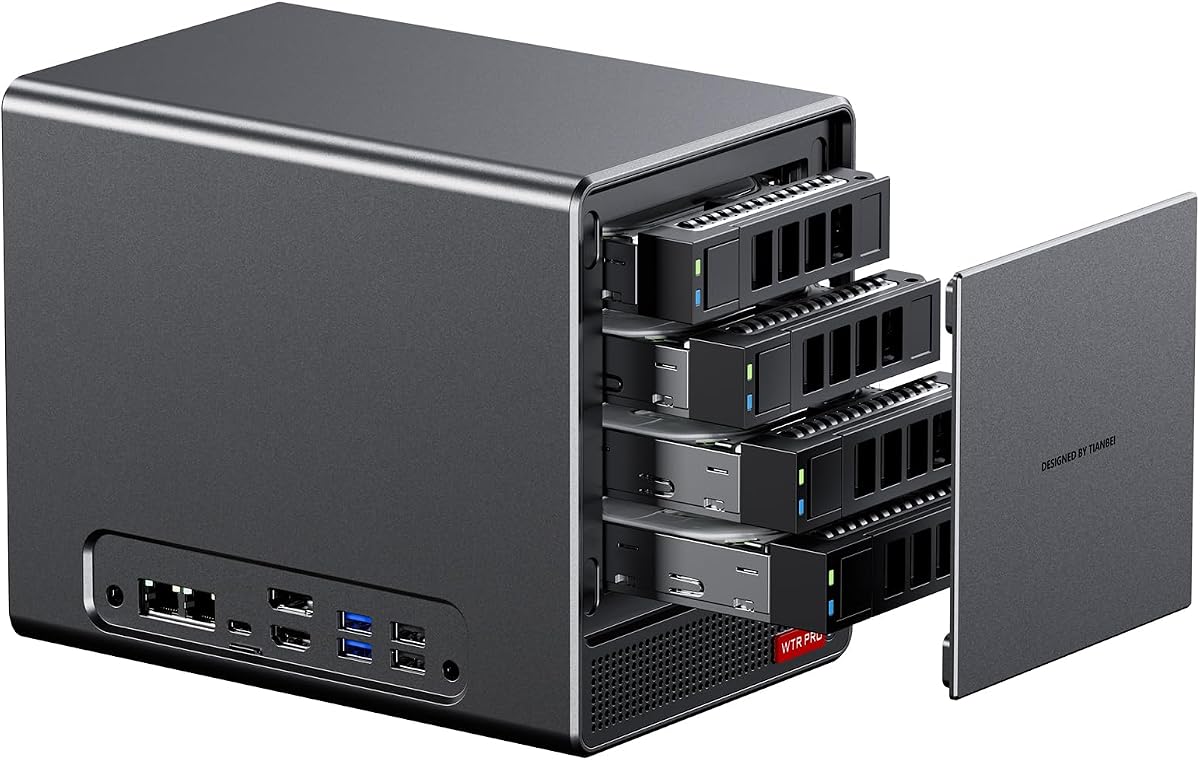
This model is designed specifically for home server tasks with a focus on storage density and silent operation. It holds a 4.2 rating for its ability to handle large amounts of data while maintaining a quiet presence in a home office.
We may earn a commission when you buy through this link, at no additional cost to you.
The four drive bays allow for significant storage expansion using 3.5-inch SATA drives which are cost-effective for backups. The triple display feature means you can also use it as a desktop workstation when not running as a NAS.
Users may need to configure Linux power management settings to avoid drive sleep issues in certain environments. Also purchasing drives separately adds to the total project cost significantly.
It is ideal for those building a custom home server who want a compact unit with native support for large HDDs.
Four drive bays allow you to store massive amounts of media or backup files locally.
Intelligent fan control ensures the system remains quiet during light usage like file storage.
We may earn a commission when you buy through this link, at no additional cost to you.
For advanced users needing maximum storage and networking redundancy this NAS variant offers extensive options. With a 3.7 rating it proves robust for server tasks but requires some technical skill to configure optimally.
We may earn a commission when you buy through this link, at no additional cost to you.
The dual 2.5G LAN ports enable network redundancy or link aggregation for faster data transfers. Supporting both SATA and M.2 drives gives you flexibility to mix speed and capacity as needed.
However Linux users might need to adjust specific power management rules to avoid drive errors. The power draw can also be higher than smaller PCs if all drives are spinning simultaneously.
It suits those building a serious home lab or enterprise-like storage solution with redundancy and high throughput.
Dual LAN ports allow you to set up failover or combined bandwidth for stable server access.
Compatible with major Linux distributions for flexible operating system choices.
We may earn a commission when you buy through this link, at no additional cost to you.
This kit emphasizes extreme portability with a chassis height of only 34mm making it easy to transport. It carries a 4.0 rating for reliability and its ability to run continuously without overheating during standard tasks.
We may earn a commission when you buy through this link, at no additional cost to you.
Tool-free design means you can swap components without using screws which speeds up maintenance. The 3-year warranty covers defects ensuring long-term security for your investment.
However the CPU architecture is older compared to newer Ryzen 7000 or 8000 series limiting raw performance. Storage options are also more limited compared to larger chassis models.
If portability and continuous uptime matter more than raw power this unit fits the bill for basic computing needs.
Access internal components without tools making upgrades and maintenance quick and simple.
At 34mm tall this device slips into tight spaces or travel bags with ease.
We may earn a commission when you buy through this link, at no additional cost to you.
Selecting the right AMD barebone PC requires balancing processor capability with form factor constraints and future upgrade paths.
AMD Ryzen processors vary widely in core count and architecture from AM4 to newer AM5 chips. Newer generations like 8000 series offer better AI acceleration and integrated graphics power compared to older models.
Prioritize a processor that matches your workload whether it is basic office use or heavy content creation.
Check whether the unit supports DDR4 or DDR5 memory. DDR5 offers faster speeds but may come at a higher cost for modules. Ensure there are enough slots for your desired capacity like 32GB or 64GB.
Always confirm the maximum supported memory size before purchasing to avoid compatibility issues.
Look for systems with multiple M.2 slots if you need high-speed NVMe storage. Some models also include SATA bays which are useful for bulk storage at lower costs.
Verify the PCIe generation supported such as Gen3 or Gen4 to ensure SSD speeds meet your needs.
Modern barebone PCs should include USB4 or Thunderbolt ports for high-speed data transfer. Ethernet ports should ideally be 2.5G or faster for stable wired network connections.
Consider wireless standards like Wi-Fi 7 if you need the latest wireless speeds.
Small chassis often struggle with heat dissipation under load. Models with vapor chambers or large cooling fans typically sustain higher clock speeds without throttling.
Check for reviews that mention noise levels to ensure the unit fits your quiet environment.
Ensure there are enough USB ports for all your peripherals. Display outputs should match your monitor types such as HDMI or DisplayPort versions.
Having a mix of legacy and modern ports increases versatility without needing dongles.
Most barebone kits do not include Windows or an OS. You will need to install your own or use Linux to get started.
Verify if the vendor offers optional OS licenses to simplify your setup process.
Warranty terms can range from one to three years depending on the brand. Longer warranties provide better protection against early hardware failures.
Check if support is local or overseas to avoid long shipping times for repairs.
Begin by installing your chosen RAM sticks into the accessible slots ensuring they click into place securely. Follow the manufacturer manual to open the casing gently without applying excessive force.
Connect your power adapter and primary display cable before powering on the device for the first time. Boot into BIOS to verify all components are detected correctly.
Maintain the system by cleaning dust from vents periodically using compressed air to prevent overheating. Avoid placing the unit in enclosed cabinets where airflow is restricted.
No most barebone PCs do not include an operating system. You will need to install Windows or Linux yourself after purchasing the memory and storage components.
Yes if the motherboard supports the CPU socket. However you must check compatibility lists as not all AMD Ryzen generations fit the same socket.
Some models use integrated graphics so no separate GPU is needed. Others support external GPUs via ports like OCuLink or USB4 for high-end gaming.
Most units support multiple M.2 NVMe SSDs. Some also have SATA bays for traditional hard drives providing substantial total capacity for data.
Yes many can handle gaming with strong integrated graphics like Radeon 780M. For better performance external GPUs can often be connected via specific ports.
They usually come with proprietary power adapters. Ensure you have access to the correct power source and cables included in the box.
Yes many models support 24/7 operation and run Linux distributions ideal for home server tasks like file storage and media streaming.
Warranties often range from one to three years depending on the manufacturer. Always check the specific policy before buying for peace of mind.
The top picks include the AOOSTAR MACO for overall power and the ASRock DeskMini for budget efficiency. Each offers unique strengths depending on whether you prioritize performance or cost savings.
Prioritize features like OCuLink or dual LAN ports if you have specific technical needs. Ensure the form factor fits your desk space and cooling requirements before buying.
Prices and stock levels change frequently so verify current listings on trusted retailers before finalizing your order. A well-chosen model will serve your computing needs for years.