
MELOGAGA RGB Speakers
4.2Editor score
Ultra compact slim design
Seven color RGB lighting
Inline rotary volume control
This guide compares the top 10 best cheap PC speakers for 2026 to help you find high quality audio on a budget without breaking the bank.
Finding affordable audio solutions is essential for anyone building a desktop setup on a tight budget. Cheap PC speakers offer a way to enhance multimedia experiences without requiring a significant financial investment or complex installation processes.
We have evaluated ten top rated models based on sound quality, build durability, ease of use, and overall value. Our comparison focuses on real world performance metrics and user feedback to ensure you make an informed purchasing decision.
Each pick in this list highlights specific strengths and ideal use cases for different types of users. Please note that prices and availability are subject to change, so verify current details before completing your purchase online.
4.2Editor score

4.6Editor score

4.2Editor score
The following table provides a side by side overview of every model included in this review. Compare key specifications, design features, and connectivity options to find the perfect match for your desk setup needs.



The Creative Pebble 2.0 stands out as the top choice for budget conscious buyers seeking quality audio. With a high user rating and thoughtful engineering, it delivers impressive sound for its price point.
We may earn a commission when you buy through this link, at no additional cost to you.
Its unique angled drivers project audio directly toward you, creating an immersive experience. The passive radiators enhance low frequencies, giving music and movies more depth than typical small speakers.
While it lacks a headphone jack and maximum volume is moderate, these tradeoffs are acceptable for most casual listeners. The build quality feels solid and the design fits well in modern office environments.
If you want reliable performance without cluttering your desk with wires, this model is the ideal recommendation. It offers the best balance of features and value in the current market.
The forty five degree tilt ensures sound reaches your ears directly for better clarity and detail in games and movies.
Using a single USB cable for power and audio eliminates the need for separate adapters or extra outlets.
We may earn a commission when you buy through this link, at no additional cost to you.
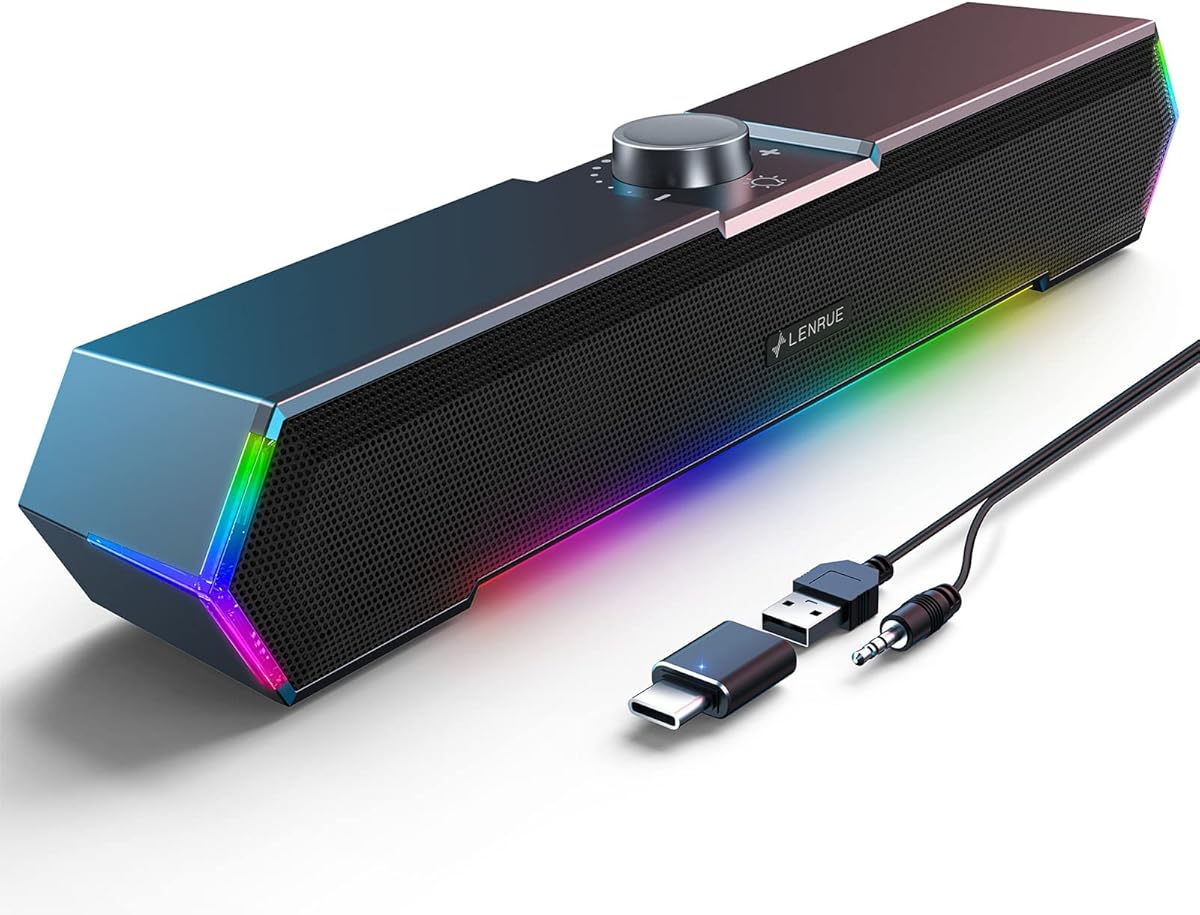
For gamers and enthusiasts who love visual flair, the MELOGAGA RGB Speakers offer a compelling entry point. They combine functional audio with dynamic lighting to enhance your desk aesthetic significantly.
We may earn a commission when you buy through this link, at no additional cost to you.
The dual drivers provide crisp sound suitable for everyday tasks like browsing or casual gaming. The inline volume control makes quick adjustments simple without needing to reach for software settings.
The lighting is always on which might bother some users in dark rooms. Bass is present but not deep, so bass heavy tracks may lack some impact compared to larger systems.
Choose this if you prioritize style and cost over high fidelity audio. It is an excellent starter option for those setting up their first dedicated speaker system.
The RGB lights cycle through seven colors adding a modern gaming vibe to any workspace or study area.
Slim design allows placement on crowded desks without taking up valuable workspace for keyboard or mouse.
We may earn a commission when you buy through this link, at no additional cost to you.
The FUNLOGY Speaker brings premium engineering to the budget category with its high wattage and award winning design. It delivers rich audio that rivals more expensive options on the market today.
We may earn a commission when you buy through this link, at no additional cost to you.
Its thirty degree tilt optimizes sound delivery while the gold plated input ensures signal clarity. Users report minimal static noise even during system boot up or shutdown sequences.
While it costs a bit more than basic models, the increased power and build quality justify the expense. It is a robust choice for users needing volume and clarity in noisy environments.
This model is recommended for those who want near premium features without breaking the bank. It excels in gaming and multimedia where dynamic range matters most.
Gold plated connections reduce interference and noise for cleaner audio performance across all genres of media.
Recognized by VGP standards the speaker combines style and function with a durable matte finish and reliable construction.
We may earn a commission when you buy through this link, at no additional cost to you.
Designed for tight workspaces, these soundbar speakers clip directly onto your monitor. This unique mounting style frees up desk real estate while keeping audio close to your listening position.
We may earn a commission when you buy through this link, at no additional cost to you.
The adaptive channel switching ensures left and right audio remains correct regardless of where the unit sits. Touch controls add a modern touch for muting and volume adjustments without fumbling with wires.
It may not fit all monitor frames and could block a small part of the screen edge. Users must check dimensions before buying to ensure a secure fit.
Ideal for minimalist setups where desk clutter is a major concern. It is a practical solution for productivity focused users who value organization above all.
Patented clamp allows secure attachment to top or side of screens without tools or adhesives for easy setup.
Built-in sensors detect orientation to maintain proper stereo imaging even if the bar is upside down.
We may earn a commission when you buy through this link, at no additional cost to you.
This compact model is built for mobility and ease of use across multiple devices. It offers essential features like a headphone jack for private listening without needing a separate adapter.
We may earn a commission when you buy through this link, at no additional cost to you.
The volume control is simple and effective located right on the speaker for quick access. It is ideal for students or professionals moving between office and home setups regularly.
Sound power is modest at two point two watts so it may struggle in loud rooms. The plastic construction feels less premium but is durable enough for daily handling.
Choose this if portability is your main priority. It is a reliable backup option for laptops where internal audio is insufficient.
Connect headphones directly to the speaker for private audio use without unplugging the main speaker system.
No drivers required for immediate audio playback upon connecting to any USB port on your computer.
We may earn a commission when you buy through this link, at no additional cost to you.
These speakers are engineered for compatibility across a wide range of operating systems. Whether you use Windows Mac or Linux the plug and play design ensures they work right out of the box.
We may earn a commission when you buy through this link, at no additional cost to you.
The single cable handles both power and audio reducing desk clutter significantly. Bass enhancement technology provides a fuller sound profile than typical compact alternatives in this price bracket.
The design is purely functional without any RGB lights or premium materials. This keeps costs down but might not appeal to users seeking visual customization.
Recommended for office environments or mixed system households where reliability matters. It is a workhorse solution that delivers consistent performance.
Support for Windows and macOS Linux ChromeOS means no driver headaches for any type of computer user.
Combining power and audio in one cable saves ports and keeps the workspace clean and organized.
We may earn a commission when you buy through this link, at no additional cost to you.
The G11 focuses on delivering a modern look with functional audio. Touch activated lights add ambiance while the surge stereo technology ensures distortion free sound during high volume playback.
We may earn a commission when you buy through this link, at no additional cost to you.
It sits neatly under monitors to save space. The USB C adapter makes it future proof for newer laptops lacking traditional USB ports.
It lacks wireless connectivity and headphone ports limiting flexibility. Users who need mobile audio options might find these constraints restrictive.
Ideal for desktop gaming setups where visual impact is key. It balances style and performance well for average users.
Uses multiple amplifier ICs to clean up signal noise ensuring crisp audio without static or distortion.
Designed to fit directly under screens to maintain a clean desk layout without protruding into workspace.
We may earn a commission when you buy through this link, at no additional cost to you.
These speakers prioritize simplicity and ease of use. The column shaped design allows them to stand upright saving space while providing decent stereo separation for everyday listening.
We may earn a commission when you buy through this link, at no additional cost to you.
Long cables ensure flexible placement options without straining connections. Anti-slip pads keep them secure on any desk surface regardless of texture or slope.
Sound quality is adequate for voice and background music but lacks depth. It is a functional tool rather than an audiophile choice.
Great for basic office tasks or casual entertainment. It is a no fuss option for users who want audio without complexity.
Cables reach up to thirty one inches allowing speakers to be positioned optimally for sound staging.
Rubberized pads prevent sliding to maintain placement even when typing aggressively or bumping the desk.
We may earn a commission when you buy through this link, at no additional cost to you.
The Amazon Basics 2.0 model offers a sturdy reliable audio solution backed by a trusted manufacturer. The metal finish provides durability and a sleek look that fits professional environments.
We may earn a commission when you buy through this link, at no additional cost to you.
A bottom radiator enhances bass response to give music more body. The in-line volume control makes adjusting levels easy without touching your computer.
It is heavier than plastic alternatives which adds stability but reduces portability. Some users may prefer modern RGB aesthetics over this classic design.
Recommended for home offices where durability and sound clarity are valued. It is a timeless option that rarely disappoints.
Passive radiator at the base increases low frequency output for richer sound during playback.
Scratch free padded base and metal finish ensure the speakers look good and last longer.
We may earn a commission when you buy through this link, at no additional cost to you.
The Uakinat Speaker delivers loud sound at a very competitive price point. With upgraded power technology it ensures clear audio that cuts through ambient noise in busy spaces.
We may earn a commission when you buy through this link, at no additional cost to you.
Cables are pre-glued to reduce tangles making setup fast and tidy. The inline volume knob gives quick control over output levels without digging through menus.
The glued cables limit flexibility if you need to reroute wires. Build quality is utilitarian focusing on function rather than aesthetics or premium materials.
Best for users on the strictest budget who need volume. It provides excellent value for money for casual home use.
Six watts total power ensures high volume levels suitable for larger rooms or loud environments.
Cables glued together reduce clutter to keep your workspace neat and organized.
We may earn a commission when you buy through this link, at no additional cost to you.
Selecting the right speakers involves balancing sound quality, power source, and build durability within your budget constraints.
Most cheap PC speakers are USB powered which simplifies setup by drawing power directly from your computer. This eliminates the need for wall outlets and adapters making the desk look cleaner.
Look for models with a single USB cable if you want to minimize wiring. Ensure your USB port provides enough power to avoid audio distortion at high volumes.
Even budget speakers can deliver good bass if they include passive radiators or dual drivers. This technology enhances low frequencies without needing large physical enclosures.
Prioritize models that mention clear mids and crisp highs in their specifications for balanced audio. Avoid speakers that sound tinny or muffled during voice calls.
Check if the speakers support both USB and 3.5mm audio connections. Some setups require analog inputs for older hardware or specific audio configurations.
Ensure compatibility with your operating system. Most modern models work on Windows and Mac but verifying driver requirements saves time.
Measure your desk space before buying to ensure the speakers fit comfortably. Compact models are great for small setups while larger units offer more power.
Consider aesthetics that match your setup. Matte finishes or RGB lighting can enhance your visual experience but should not compromise build quality.
Physical volume controls are more convenient than relying on software sliders. Look for inline knobs or front panel buttons for easy adjustments.
Some models include mute buttons or touch sensors which add usability. These small features improve daily interaction with the speakers significantly.
Solid construction ensures longevity and consistent performance over time. Metal finishes or reinforced plastic resist wear better than flimsy materials.
Check for anti-slip pads to keep speakers stable. Secure footing prevents accidental bumps that can damage internal components.
Ensure the speakers work with your specific laptop or desktop setup. Some units support USB-C which is essential for modern ultrabooks.
Review system requirements to confirm support for your OS version. Compatibility lists often include Windows macOS and Chrome OS explicitly.
Warranty terms vary by brand so check for coverage duration and support availability. Reliable customer service helps resolve technical issues quickly.
Look for money-back guarantees to reduce risk. A clear return policy ensures you can swap out defective units without hassle.
Connect the USB power plug to an available port on your computer or a powered hub to ensure stable energy supply.
Use the inline volume knob to adjust levels gradually avoiding sudden jumps that could distort audio output.
Keep speakers away from direct sunlight or heat sources to protect plastic and electronic components from damage.
Most models in this guide are USB powered meaning they draw energy directly from your computer. This eliminates the need for a separate power adapter and simplifies cable management.
Yes the majority of these USB speakers work seamlessly with macOS without additional drivers. Ensure your system audio settings recognize the USB device after connection.
Absolutely many of these models deliver enough clarity and bass for immersive gaming experiences. Look for stereo sound and responsive low frequencies for best results.
USB provides both power and audio while AUX carries audio only. USB powered speakers are easier to setup as they require fewer cables to function.
Only select models feature a built-in headphone jack for private listening. Check the specifications carefully if you need this specific connectivity option.
Ensure your computer system volume is maxed out and the inline knob is turned fully clockwise. Sometimes adjusting mixer settings or updating audio drivers resolves low volume.
The Creative Pebble 2.0 and MELOGAGA RGB Speakers lead the pack for their balance of sound quality and value. These models set the standard for affordable audio solutions in 2026.
Prioritize models with passive radiators if you want better bass without spending much. USB power simplifies setup and ensures you never run out of battery.
Prices and availability fluctuate frequently so verify current deals before purchasing. Always check return policies to ensure your satisfaction with the chosen audio gear.