
ProtoArc XK04 Foldable Compact Keyboard
4.5Editor score
Pocket-sized foldable design
Bluetooth 5.1 connectivity
USB-C rechargeable
This guide compares the top compact editing keyboards for creators, offering detailed reviews and specs to help you choose the best tool for your workflow.
Finding the right compact editing keyboard can transform your creative workflow significantly. Whether you are editing video or designing graphics, having the right input device matters.
We evaluated ten top models based on portability, key layout, connectivity, and specific editing features. Our analysis focuses on real-world usability for professionals and enthusiasts alike.
Each pick highlights unique strengths and trade-offs to help you decide. Note that prices and availability may change, so verify details before purchasing your next device.
4.5Editor score

4.7Editor score

4.4Editor score
This table provides a side-by-side view of the top ten compact editing keyboards, highlighting key specs to help you compare features quickly.



This compact editing keyboard stands out for professional video creators using DaVinci Resolve. It ranks highest with a 4.7 rating due to its specialized design features.
We may earn a commission when you buy through this link, at no additional cost to you.
The built-in search dial and keyboard shortcuts matching edit functions allow for rapid workflow acceleration. Its Bluetooth and USB connectivity ensure flexibility across setups.
While it is pricier than generic options, the included Studio Activation Card adds significant value. The bundle justifies the cost for serious editors who need precision tools.
If you edit video professionally, this is the top choice. For general typing, other options might suffice, but for DaVinci users, this is unmatched.
Shortcuts are mapped directly to editing functions, reducing mouse dependency and speeding up your workflow significantly.
The included DaVinci Resolve Studio Activation Card provides premium software access, making it a complete package for creators.
We may earn a commission when you buy through this link, at no additional cost to you.
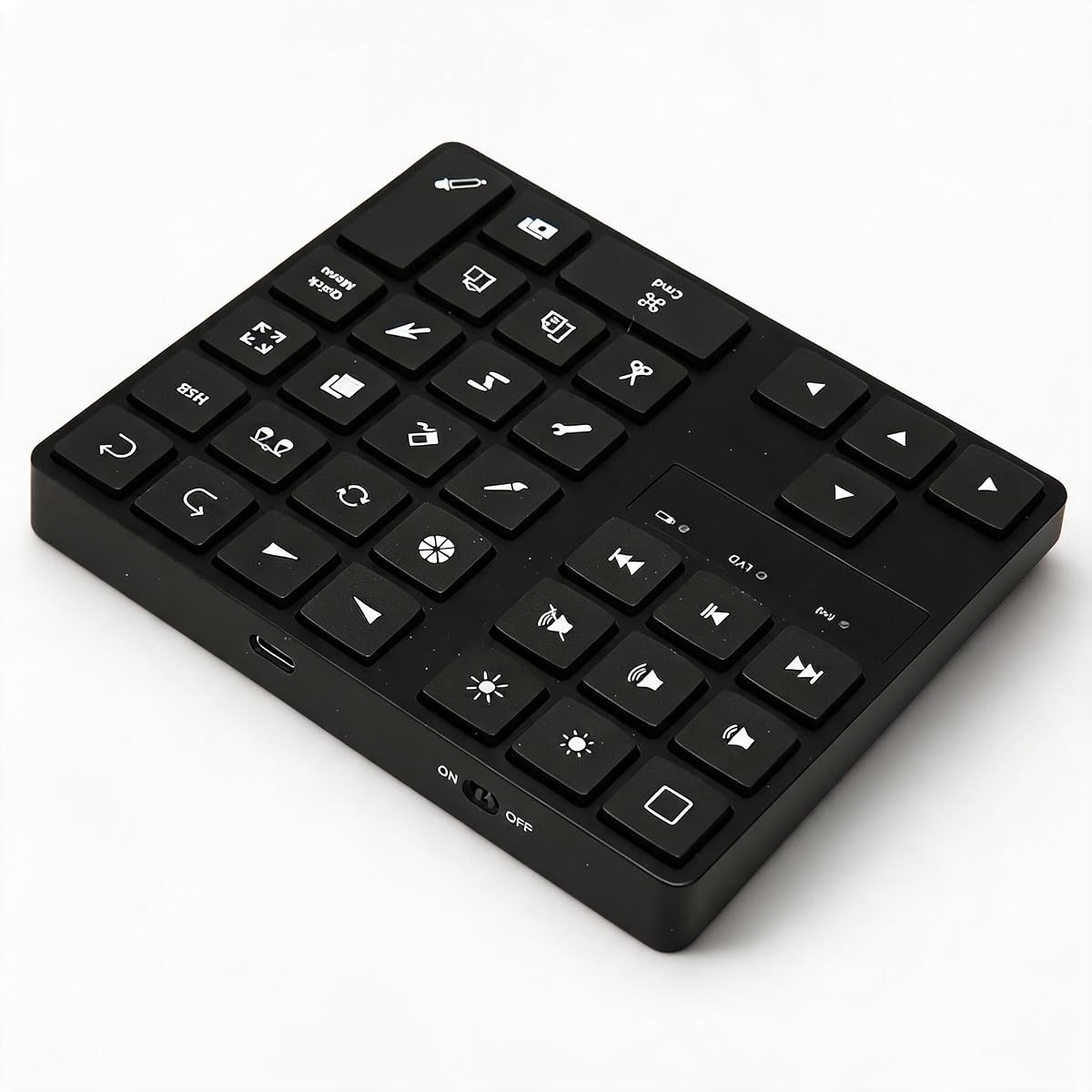
The ProtoArc XK04 offers exceptional portability at a low price. It scores highly for users needing a travel companion for tablets and phones.
We may earn a commission when you buy through this link, at no additional cost to you.
Its two-fold design fits easily into bags, and the Bluetooth 5.1 ensures stable connections. The rechargeable battery lasts long in standby mode.
Keycaps are small, which might take adjustment for long typing sessions. However, for on-the-go use, this trade-off is acceptable for most users.
Ideal for travelers and mobile workers, this keyboard balances cost and function well. It is a smart buy for budget-conscious editors on the move.
The compact folding mechanism allows it to fit in pockets, making it perfect for commuting or travel scenarios.
Auto-sleep standby up to 150 days ensures the keyboard is ready whenever you need it without frequent charging.
We may earn a commission when you buy through this link, at no additional cost to you.
Logitech MX Keys Mini delivers a premium typing experience with smart features. It balances minimalist design with powerful functionality for multi-device setups.
We may earn a commission when you buy through this link, at no additional cost to you.
Smart illumination lights up when hands approach, adjusting to lighting conditions. The ergonomic keys suit fingertips perfectly for accurate typing.
Though it lacks some advanced editing dials, it excels in general productivity. The ability to switch between devices effortlessly is a major advantage.
Best for professionals needing a high-quality compact board. It justifies the cost with reliability and comfort for daily creative tasks.
Keys light up automatically as hands approach, adjusting brightness to suit changing lighting conditions in any environment.
Pair with up to 3 devices and switch seamlessly, allowing you to work across multiple computers or laptops fluidly.
We may earn a commission when you buy through this link, at no additional cost to you.
The K380s offers a slim, eco-friendly design with impressive battery life. It is ideal for users who prioritize sustainability and portability.
We may earn a commission when you buy through this link, at no additional cost to you.
Recycled plastic construction reduces environmental impact while maintaining durability. The easy-switch buttons allow seamless transitions between devices.
Typing feel is laptop-like but basic compared to premium models. It lacks specialized editing shortcuts, making it better for general use.
Great for students and casual editors needing a reliable, long-lasting keyboard. It is a solid choice for everyday connectivity and style.
Battery life up to 3 years with auto-sleep mode ensures worry-free usage without frequent battery changes or charging.
Connect across Windows, macOS, iPadOS, and ChromeOS with Bluetooth, offering broad compatibility for all your devices.
We may earn a commission when you buy through this link, at no additional cost to you.
This wireless shortcut keyboard includes a rotating dial perfect for adjusting brush sizes or zoom levels. It supports 40 customizable shortcuts for various apps.
We may earn a commission when you buy through this link, at no additional cost to you.
The dial provides clear feedback and can rotate to zoom in, out, or rotate the canvas. It is designed to work with one hand comfortably.
Requires downloading drivers for full customization, which might be a hurdle for some users. Once set up, it offers significant productivity gains.
Best for artists and editors needing quick access to tools. The affordability and flexibility make it a strong contender for creative workflows.
Turn the dial to zoom, rotate, or adjust brush size, letting your inspiration flow without stopping to navigate menus.
Assign up to forty shortcuts across four sets for efficient access to your most-used commands in creative software.
We may earn a commission when you buy through this link, at no additional cost to you.
Macally offers a simple solution for those needing a compact keyboard without fuss. The 2.4G dongle ensures a stable connection for PCs and Chromebooks.
We may earn a commission when you buy through this link, at no additional cost to you.
It includes 12 shortcut keys and a 78-key layout, balancing utility with size. The plug-and-play nature means immediate setup out of the box.
Lacks Bluetooth connectivity, limiting it to devices with USB-A ports. For basic editing or typing, it provides reliable performance at a low cost.
Best for users needing a straightforward replacement keyboard. It saves desk space while ensuring you stay productive without complex setups.
The 2.4GHz USB-A dongle provides a reliable wireless connection between the keyboard and your computer or laptop without drivers.
Ready for travel without number pad, this small keyboard fits easily into bags and saves desk space effectively.
We may earn a commission when you buy through this link, at no additional cost to you.
This model is unique for including a number pad while maintaining a compact form. It suits users who need data entry in a small space.
We may earn a commission when you buy through this link, at no additional cost to you.
Spill-resistant design adds durability, making it practical for office environments. The Bluetooth connection ensures flexibility without dongles.
Battery life up to 12 months is excellent. While not optimized for creative editing specifically, it serves general computing needs reliably.
Best for administrative users or hybrid setups requiring a numpad. It balances essential features with a compact, durable design.
Compact layout still includes number pad, arrow keys, and handy F-key shortcuts, perfect for users needing numerical entry.
Built for quality with spill-resistant design and deep-profile keys, this keyboard is built to withstand everyday use.
We may earn a commission when you buy through this link, at no additional cost to you.
Designed to relieve wrist strain, this ergonomic keyboard positions your hand neutrally. It is ideal for artists needing comfort during long sessions.
We may earn a commission when you buy through this link, at no additional cost to you.
Wired connection ensures zero lag, critical for studio environments. 35 programmable shortcuts eliminate repetitive mouse clicks significantly.
Being one-handed limits its utility as a primary keyboard. It works best as a secondary input tool for specific commands and macros.
Best for creatives suffering from repetitive strain. It provides comfort and efficiency without requiring complex setup or pairing.
The angled, sculpted key well promotes a neutral wrist posture, reducing muscle fatigue during long drawing or design sessions.
USB-C wired connection guarantees instant, lag-free performance, perfect for studio environments where consistent responsiveness is critical.
We may earn a commission when you buy through this link, at no additional cost to you.
Cherry Stream provides a reliable wired experience with whisper-quiet keys. It is perfect for shared workspaces where noise is a concern.
We may earn a commission when you buy through this link, at no additional cost to you.
SX scissor technology ensures a precise pressure point for frequent typists. The integrated metal plate offers stability and prevents slipping.
While it lacks wireless flexibility, the reliability is unmatched. Multimedia keys add convenience for basic media control.
Best for stationary editors prioritizing typing quality. It offers durability and precision without the need for battery management.
CHERRY SX scissor technology ensures a precise pressure point and an unbeatable typing experience perfect for frequent typists.
Rubberized fold-out feet and an integrated metal plate give the compact keyboard stability and prevent it from slipping.
We may earn a commission when you buy through this link, at no additional cost to you.
Microsoft Designer offers a modern aesthetic optimized for comfortable mouse positioning. It suits users wanting a clean, minimal workspace look.
We may earn a commission when you buy through this link, at no additional cost to you.
Low-profile design complements any workspace, while optimized spacing ensures fast typing. Switching between devices is seamless via Bluetooth.
Lacks specialized editing dials, making it more for general use. However, its quality and design justify its place in creative setups.
Best for designers valuing style and ergonomics. It provides a clean, efficient input solution for daily professional tasks.
Compact design saves desktop space and allows for close, comfortable mouse position, reducing wrist strain during editing.
Expressive input key allows quick access to emojis, symbols, and more, enhancing your workflow efficiency quickly.
We may earn a commission when you buy through this link, at no additional cost to you.
Choosing the right compact editing keyboard involves balancing portability, features, and comfort for your workflow.
Portability is key for creators on the move. Look for foldable designs or slim profiles that fit easily into bags without compromising usability.
A truly portable keyboard should be lightweight and compact, making it easy to set up anywhere.
Decide between Bluetooth and wired options based on your devices. Bluetooth offers flexibility, while wired ensures zero lag and stable connections.
Check compatibility with your OS and devices to ensure seamless connectivity.
Ergonomics matter for long editing sessions. Look for key shapes that support natural finger movement and adjustable tilt for comfort.
A good layout balances size with usability, allowing precise control over edits.
For editing efficiency, programmable keys and shortcuts save time. Customizable macros allow quick access to frequently used commands.
Check if the keyboard supports driver software for advanced customization options.
Long battery life or rechargeable options ensure uninterrupted work. USB-C rechargeability is increasingly preferred for modern setups.
Look for auto-sleep features to conserve power when not in use.
Durable materials and spill-resistant designs protect your investment. High-quality key switches ensure longevity and consistent typing feel.
Invest in keyboards that withstand daily use without wear.
Ensure the keyboard supports your creative applications. Some specialized keyboards include software bundles or specific app integrations.
Check system requirements to ensure smooth operation with your editing tools.
Budget ranges vary widely. Balance cost against features to find the best value for your specific needs and usage patterns.
Consider long-term benefits when evaluating the overall value proposition.
Pair your keyboard with your device via Bluetooth or USB. Follow the manufacturer's instructions for initial setup and driver installation if needed.
Clean the keys regularly with a soft cloth to maintain performance. Avoid spills and store the keyboard in a protective case when traveling.
Update firmware regularly to ensure optimal performance. Adjust settings and shortcuts through the provided software to maximize your workflow.
Most compact editing keyboards support macOS via Bluetooth. Check compatibility before purchase to ensure all features work seamlessly on your system.
Yes, many models allow customization through driver software. Look for programmable keys to assign your preferred shortcuts for editing tasks.
Most compact options are designed for tablets. Bluetooth connectivity ensures easy pairing with iPads and Android devices for on-the-go editing.
Battery life varies from months to years depending on usage. Rechargeable models typically offer longer lifespan with USB-C charging convenience.
Wired connections ensure zero lag which is critical for precise editing. However, modern Bluetooth models offer low-latency performance suitable for most users.
High-quality compact keyboards often last several years with proper care. Durability depends on build quality and frequency of use.
The Blackmagic Speed Editor stands out for professionals needing specialized editing shortcuts. For general use, the Logitech MX Keys Mini offers premium comfort and reliability.
Prioritize features that align with your workflow, whether it is portability or programmable shortcuts. The right keyboard can significantly enhance your editing experience.
Prices and availability may change, so verify the latest details before making your purchase decision.