
Crucial P310 1TB SSD
4.7Editor score
Up to 7100MB/s read
Works with laptops and desktops
Includes data recovery software
This guide compares ten Crucial internal NVME SSD models including P310, T500, and P510 to help you choose the right storage for your laptop or desktop.
Choosing the right internal storage is critical for modern computing performance. Crucial offers a range of NVME SSDs that deliver speed and reliability for everyday tasks and demanding workloads alike.
We compared ten real Crucial models based on their interface speed, capacity options, and target use cases. This list covers everything from budget-friendly upgrades to high-end Gen5 performance drives.
Each pick highlights specific strengths like gaming compatibility or creative workflows. Prices and availability change often so verify current details before making your final purchase decision online.
4.7Editor score
4.8Editor score

4.6Editor score
The following table provides a side-by-side look at key specifications for each model. This helps you quickly identify which drive matches your specific capacity and speed needs.


The Crucial P310 stands out as a top budget choice for those needing reliable Gen4 speeds without breaking the bank. It delivers up to 7100MB/s read speeds which makes it highly responsive for daily computing tasks.
We may earn a commission when you buy through this link, at no additional cost to you.
Users appreciate its broad compatibility across laptops desktops and handheld gaming consoles like ROG Ally X. The inclusion of Acronis data recovery software adds significant value for data migration and backup needs.
While it uses advanced G8 NAND with thermal control it lacks an integrated heatsink which may be a consideration for sustained heavy workloads. However for most users this trade-off is acceptable given the price point.
If you need a straightforward upgrade for your laptop or desktop the P310 offers excellent value. It balances performance and affordability well making it our top budget recommendation for general use.
This drive works seamlessly with a wide range of systems including select gaming consoles and older Gen3 platforms.
Acronis data recovery software is included to help you clone drives and recover lost files easily.
We may earn a commission when you buy through this link, at no additional cost to you.
This variant of the P310 is specifically tailored for users looking to expand storage on their PlayStation 5. It includes an integrated heatsink to ensure stable performance during long gaming sessions on the console.
We may earn a commission when you buy through this link, at no additional cost to you.
The performance mirrors the standard P310 with read speeds up to 7100MB/s but the form factor and cooling are optimized for the PS5 slot requirements. It also works great with laptops and desktops needing extra Gen4 power.
While the heatsink adds cost it removes the need for aftermarket thermal solutions which simplifies installation. If you primarily game on PS5 this model is the most convenient choice available for expansion.
For console gamers this drive offers a plug and play solution that meets Sony specs. The thermal management ensures throttling is minimized keeping your games loading quickly and smoothly.
This drive meets the specific specifications required by PlayStation 5 for internal storage expansion with ease.
The integrated heatsink helps maintain optimal temperatures during extended usage on gaming consoles and desktops.
We may earn a commission when you buy through this link, at no additional cost to you.
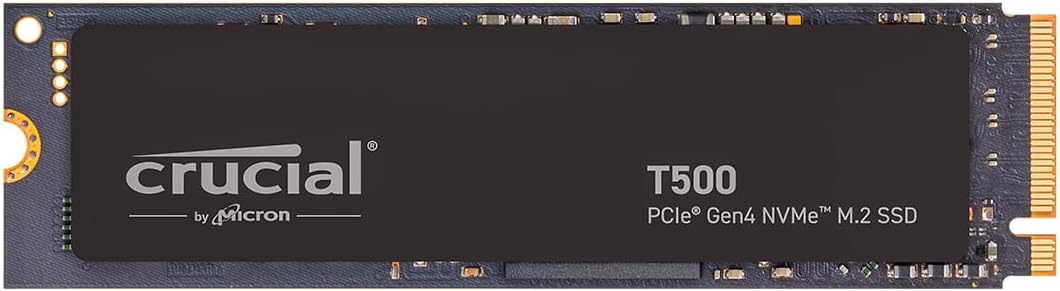
The Crucial T500 earns the Editor's Choice badge for its superior performance and endurance features. It uses TLC NAND which is generally more durable and consistent than QLC alternatives found in budget drives.
We may earn a commission when you buy through this link, at no additional cost to you.
Speeds reach up to 7300MB/s read and 6800MB/s write making it ideal for heavy workloads like video editing or large game libraries. DirectStorage support ensures faster game loading times for next gen titles.
The included one month Adobe Creative Cloud subscription adds significant value for creatives. This bundle makes it a compelling package for professionals needing reliable storage for photo and video projects.
If you prioritize reliability and speed over budget this drive is the standout pick. It balances raw performance with professional features that justify the extra cost for demanding users.
Using TLC NAND ensures higher endurance and more consistent performance over time compared to budget tier options.
One month of free Adobe Creative Cloud access is included to support your creative workflow immediately.
We may earn a commission when you buy through this link, at no additional cost to you.
Storage needs often grow faster than expected and the 2TB version of the P310 addresses that need directly. It provides ample room for large media files and game libraries without sacrificing speed.
We may earn a commission when you buy through this link, at no additional cost to you.
Performance remains consistent with the 1TB model offering up to 7100MB/s read speeds. This ensures that even with large capacities the drive does not slow down your system during heavy data access.
The price per terabyte is attractive making it a smart choice for users who need bulk storage. It is especially useful for content creators or gamers who need to keep many assets readily available.
Choose this model if capacity is your main priority and you can manage heat with a motherboard heatsink. It delivers massive storage with reliable performance for modern computing environments.
With 2TB of space you can store thousands of photos videos and games without managing files constantly.
Buying in higher capacities often lowers the price per gigabyte providing better value for your money.
We may earn a commission when you buy through this link, at no additional cost to you.
The Crucial P510 brings the next generation of storage performance to a more accessible price point. It offers Gen5 speeds that significantly outpace previous generations for users with compatible hardware.
We may earn a commission when you buy through this link, at no additional cost to you.
Read speeds of up to 11000MB/s make this drive capable of handling demanding tasks with ease. It is a solid entry point for enthusiasts who want to future proof their system without spending too much.
The TLC NAND ensures reliability while the included Adobe bundle adds extra value for creatives. This combination of high performance and software incentives makes it a versatile choice for various workflows.
If your motherboard supports PCIe Gen5 this drive is an excellent upgrade path. It balances cutting edge speed with practical features that benefit everyday users and professionals alike.
Gen5 NVMe technology delivers double the bandwidth of Gen4 for incredibly fast data transfer rates.
Includes Acronis cloning software and one month of Adobe Creative Cloud for immediate creative utility.
We may earn a commission when you buy through this link, at no additional cost to you.
The Crucial T710 is the flagship option for users seeking maximum performance and security. It delivers up to 14900MB/s read speeds which is among the fastest available for consumer SSDs today.
We may earn a commission when you buy through this link, at no additional cost to you.
Security is a key feature with AES-256-bit hardware encryption to protect sensitive data. This makes it suitable for professionals handling confidential files on high performance workstations.
Designed for modern platforms like Intel 13th/14th Gen and AMD Ryzen 7000 it ensures optimal throughput. However it requires a compatible heatsink to sustain these speeds without throttling.
Choose this drive if you need the absolute fastest storage available and have the cooling to support it. It justifies the cost with top tier specs and robust security features.
AES-256-bit encryption ensures your data is secured directly on the drive for enhanced privacy.
With nearly 15000MB/s read speeds data transfer times are minimized for maximum efficiency.
We may earn a commission when you buy through this link, at no additional cost to you.
The Crucial E100 serves as a budget friendly entry point for those upgrading from older SATA drives. It offers solid Gen4 speeds that are significantly faster than legacy hard drives.
We may earn a commission when you buy through this link, at no additional cost to you.
With 480GB capacity it is perfect for boot drives or systems where large local storage is not a priority. The drive provides a reliable way to boost system responsiveness without a large investment.
Durability is a key strength as it generates less heat and noise than mechanical drives. This makes it suitable for quiet environments and portable laptops needing efficiency.
If you need a basic upgrade to get your PC running faster this drive is ideal. It delivers reliable performance and value for users who do not need massive storage.
Moving from SATA to Gen4 NVMe provides noticeable speed improvements for boot times and app loading.
The drive includes a limited three year warranty to ensure peace of mind with your purchase.
We may earn a commission when you buy through this link, at no additional cost to you.
This model focuses on providing high capacity storage at a very competitive price point. It uses Micron QLC NAND to keep costs low while still delivering Gen4 speeds for general tasks.
We may earn a commission when you buy through this link, at no additional cost to you.
It is well suited for storing large media libraries or game collections where write endurance is less critical. The drive works seamlessly with most modern systems offering a quick upgrade path.
While QLC NAND may not be ideal for heavy write workloads it is sufficient for typical consumer use. The price advantage makes it a strong contender for budget conscious buyers.
Choose this version if you need to store many files but have a strict budget. It offers a reliable balance of cost and performance for everyday computing needs.
QLC NAND allows for lower production costs which translates to better value for customers.
Delivers standard Gen4 speeds that are suitable for most daily computing and gaming tasks.
We may earn a commission when you buy through this link, at no additional cost to you.
The T500 with heatsink offers the ultimate performance package for console gaming expansion. It combines the superior endurance of TLC NAND with a robust cooling solution for sustained performance.
We may earn a commission when you buy through this link, at no additional cost to you.
Read speeds up to 7300MB/s ensure games load quickly and remain stable during play. The integrated heatsink simplifies installation by removing the need for additional thermal components.
This drive is perfect for users who want the best possible performance from their PS5 without compromises. The included Adobe Creative Cloud access adds value for creatives who also game.
If budget allows this is the best choice for console users seeking reliability and speed. It sets the standard for high quality storage upgrades on next gen systems.
The integrated heatsink maintains stable temperatures even during long gaming sessions.
Built with TLC NAND to ensure long term reliability and consistent write performance.
We may earn a commission when you buy through this link, at no additional cost to you.
The Crucial T700 is designed for professionals needing high throughput and long term reliability. It delivers Gen5 speeds with a five year warranty for peace of mind over long periods.
We may earn a commission when you buy through this link, at no additional cost to you.
Compatibility is optimized for Intel 13th/14th Gen and AMD Ryzen 7000 platforms ensuring peak performance. This makes it a reliable choice for high end workstations requiring consistent data access.
The drive requires a compatible heatsink to avoid throttling under heavy loads. While the price is high the robust warranty and performance justify it for business or critical work.
Choose this model if you need dependable high speed storage for a workstation environment. It offers a strong balance of speed longevity and support for serious users.
A five year warranty provides extensive protection against defects and performance issues.
Designed specifically for demanding environments where reliability and speed are critical.
We may earn a commission when you buy through this link, at no additional cost to you.
Selecting the right storage drive involves understanding key technical factors that impact real world performance. This section outlines the most important considerations to help you make an informed decision.
PCIe interface generations determine the maximum theoretical speed of your drive. Gen4 drives offer up to 7000MB/s read speeds which are sufficient for most gaming and general productivity tasks. Gen5 drives push these limits further with speeds up to 15000MB/s requiring a compatible motherboard slot.
Choose Gen4 for most users seeking value and Gen5 for those who need maximum throughput and future proofing.
NAND flash quality affects endurance and consistency. TLC NAND provides better performance and longevity compared to QLC NAND which is more cost effective but may throttle under heavy writes. Most Crucial models use advanced G8 or G9 NAND for reliability.
Prioritize TLC NAND for professional workloads and QLC for budget focused storage expansion needs.
Most internal SSDs use the M.2 2280 form factor which fits in laptops and desktops. High performance drives may benefit from an integrated heatsink to prevent throttling during sustained data transfers. Check your system compatibility before purchasing.
Ensure your motherboard supports the chosen form factor and consider a heatsink for sustained heavy workloads.
Capacity options range from 480GB to 2TB depending on the model. Larger capacities often provide better value per gigabyte but require more investment. Consider your current storage usage and future growth needs when selecting a size.
Select at least 1TB for gaming or creative work to avoid space constraints.
A solid warranty reflects manufacturer confidence in product durability. Crucial typically offers a 3 to 5 year limited warranty depending on the model. This coverage protects against failures and ensures you have support if issues arise.
Opt for models with longer warranty periods for critical workloads and important data storage.
Modern NVMe SSDs are backward compatible with older slots but may not reach full speeds. Ensure your system supports the specific PCIe generation of the drive you select. Check BIOS settings for NVMe support if upgrading an older system.
Verify motherboard specs and BIOS support to ensure optimal compatibility before purchase.
Different tasks require different performance profiles. Gaming benefits from fast read speeds while creative workloads need high write endurance. Identify your primary use case to narrow down the right model.
Match the drive specs to your specific workloads for the best overall experience.
Some Crucial drives include software bundles like Acronis cloning or Adobe Creative Cloud access. These tools can simplify migration and add value to the purchase. Check what is included with each model to maximize utility.
Look for models that include useful tools to streamline your setup and workflow.
Install the SSD in a compatible M.2 slot on your motherboard ensuring it is securely fastened. Use the included screw or mounting hardware to prevent vibration and connection issues.
Update your BIOS and drivers to ensure your system recognizes the drive and can utilize its full speed. Enable NVMe mode in the BIOS if necessary for optimal performance.
Monitor drive temperatures using system software to ensure thermal conditions are safe. If your system lacks airflow consider installing a compatible heatsink to prevent overheating during long sessions.
Yes several Crucial models like the P310 and T500 with heatsinks meet PlayStation 5 specifications. Ensure the drive has a heatsink for thermal management.
Most Crucial NVMe SSDs use the M.2 2280 form factor which fits many modern laptops. Older systems with only SATA slots will not be compatible without adapters.
Modern operating systems include built-in NVMe drivers but updating chipset drivers from your motherboard manufacturer ensures best performance and stability.
TLC offers higher endurance and speed suitable for intensive tasks while QLC provides cost effective storage with slightly lower write performance.
Yes NVMe SSDs provide significantly faster boot times and file transfers compared to SATA drives improving overall system responsiveness.
Not necessarily you can use cloning software to transfer your existing OS to the new drive without reinstalling applications or settings.
You can use Crucial Storage Executive or third party tools to monitor drive health and performance metrics easily.
With average usage these SSDs are expected to last several years exceeding the typical upgrade cycle for most consumer systems.
We reviewed ten Crucial NVMe SSDs ranging from budget Gen4 options to high end Gen5 models. The T500 stands out as our top choice for its balance of speed and endurance.
Consider your specific needs such as gaming or creative work to decide between TLC and QLC options. Cooling solutions are essential for high performance models to ensure stable operation.
Prices and availability can change rapidly so always check current listings before making a final purchase decision online.