
Fosmon Fast Charging for Xbox Controller Charger Station Dock
4.5Editor score
Dual 2 MAX charging dock
SGS certified batteries
Smart charging with LED
Explore our expert guide comparing the top 10 Xbox controller charging stations for reliability, speed, and design to enhance your gaming setup.
Finding the right power solution keeps your gaming sessions uninterrupted. A reliable station ensures your controllers are always ready when you need them most.
We evaluated ten top-rated docking stations based on battery capacity, charging speed, and build quality. Each option offers unique features for different player needs.
Our detailed breakdown helps you choose the perfect fit for your setup. Keep in mind that availability and specific model details may vary over time.
4.5Editor score

4.6Editor score

4.4Editor score
This side-by-side comparison highlights key specifications across all ten selected products to help you make an informed decision for your gaming needs.



This upgraded station stands out with its massive 6200mWh battery packs offering extended play time for serious gamers. The unique X-shaped LED indicators provide clear visual feedback without disturbing your viewing experience.
We may earn a commission when you buy through this link, at no additional cost to you.
Its dual charging capability ensures you never run out of power mid-session. The included covers fit both Series X and standard One controllers providing excellent versatility for mixed setups.
The main trade-off is the lack of third-party controller support which limits compatibility for some users. However, the safety certifications and long cycle life make up for this limitation effectively.
For households with multiple players this station delivers reliable performance. It is highly recommended for those seeking extended battery life and clear charging status updates.
The high capacity batteries significantly reduce the frequency of recharging compared to standard options available on the market.
The unique LED design ensures you can monitor status without bright lights interfering with your gaming ambiance.
We may earn a commission when you buy through this link, at no additional cost to you.
Fosmon offers a highly reliable solution at a competitive price point making it ideal for budget-conscious gamers. The SGS certification ensures your equipment is protected against common electrical issues during charging.
We may earn a commission when you buy through this link, at no additional cost to you.
The smart charging board automatically stops power flow when batteries are full preventing overcharging and extending battery lifespan. Dual indicators clearly show status for each controller slot simultaneously.
While it lacks support for Elite 2 controllers the standard models work perfectly. The lifetime warranty adds significant value compared to other similarly priced options.
This dock is perfect for casual gamers seeking reliability without breaking the bank. Its straightforward functionality and safety features make it a top budget pick.
SGS certification provides peace of mind regarding the electrical safety and build quality of the charging components.
The limited lifetime warranty distinguishes this product from competitors by offering long-term support and assurance.
We may earn a commission when you buy through this link, at no additional cost to you.
This premium stand from Razer matches your controller color exactly ensuring your gaming setup looks cohesive and stylish. The magnetic contact system secures the controller firmly during charging without needing precise alignment.
We may earn a commission when you buy through this link, at no additional cost to you.
It supports nearly all Xbox controllers including older models making it versatile for collectors. The ergonomic design allows one-handed navigation while the unit is docked for seamless menu access.
The price is higher than standard docks but the build quality and aesthetic integration justify the cost for many users. However, the single controller limit may not suit households with multiple players.
For gamers prioritizing design and compatibility this stand is unmatched. It delivers premium performance and visual appeal for those willing to invest in quality accessories.
The stand shares the same striking colors as official controllers creating a seamless visual experience on your desk.
Older generations of Xbox controllers are supported ensuring longevity of this accessory regardless of console upgrades.
We may earn a commission when you buy through this link, at no additional cost to you.
As an officially licensed accessory this stand offers assurance of compatibility and build quality with your console ecosystem. Its minimalist design complements modern consoles without cluttering your entertainment setup.
We may earn a commission when you buy through this link, at no additional cost to you.
The 1100 mAh battery provides sufficient daily usage while the included USB cable ensures you have everything needed to start immediately. The two-year warranty adds a layer of security for your investment.
Since it only charges one controller it is best suited for individual players. Users needing multiple docks must buy additional units which may increase the overall cost compared to dual solutions.
This stand is ideal for solo gamers seeking official reliability and simple functionality. It delivers consistent performance and seamless integration with your current gaming hardware.
Official approval guarantees that the accessory meets Microsoft standards for safety and device compatibility.
The sleek profile ensures it fits neatly on any shelf or desk without taking up excessive space.
We may earn a commission when you buy through this link, at no additional cost to you.
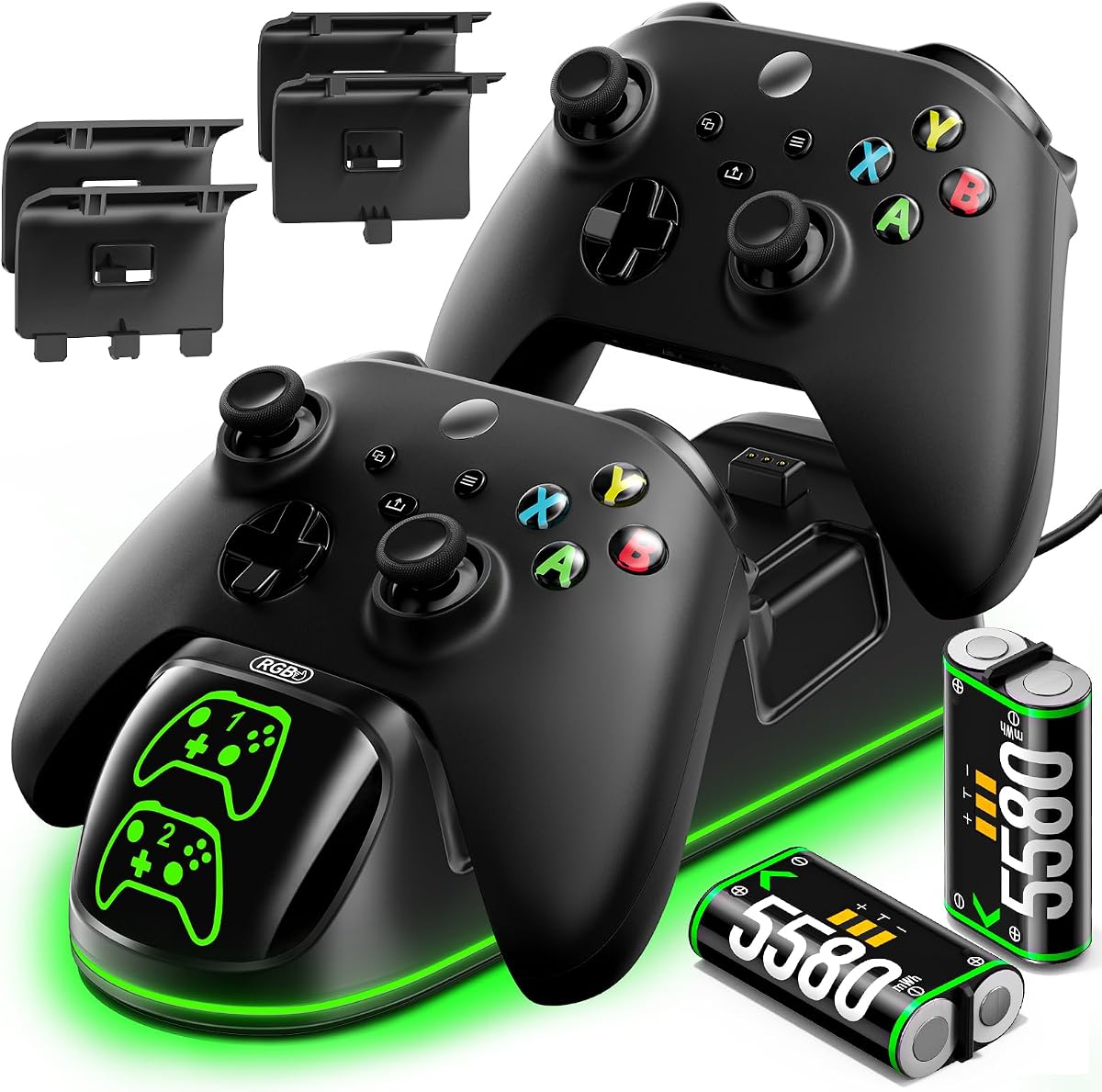
OlVO delivers exceptional performance with rapid charging times that minimize downtime between gaming sessions. The 5580mWh battery capacity ensures long hours of play without frequent interruptions.
We may earn a commission when you buy through this link, at no additional cost to you.
Both controller slots charge simultaneously ensuring your partners stay powered up alongside you. The inclusion of a USB-C cable shows attention to modern connectivity standards and convenience.
The main limitation is the lack of support for Elite 2 controllers which restricts its use to standard and Elite series 1 models. However, the speed and battery life make this a strong contender.
For households prioritizing speed this dual dock is highly recommended. It balances rapid charging capability with high capacity for an optimal gaming experience.
Full charges in roughly 2.5 hours ensure controllers are ready quickly for the next gaming session.
The included USB-C cable ensures compatibility with newer power adapters and devices.
We may earn a commission when you buy through this link, at no additional cost to you.
The magnetic secure charging system makes docking easy without precise alignment ensuring a reliable connection every time. This design feature reduces wear on ports by allowing consistent contact points.
We may earn a commission when you buy through this link, at no additional cost to you.
Official licensing ensures full compatibility with Xbox Series X and One controllers. The LED indicators switch from amber to white clearly signaling charge status without ambiguity.
While it supports only one controller the compact design saves space on crowded entertainment centers. The storage compartment adds utility by keeping your controller organized when not in use.
This dock is ideal for players who value ease of use and secure connections. Its sleek design and reliable magnetic technology make it a practical choice.
The magnetic alignment ensures consistent and secure contact for reliable charging without manual adjustments.
Designed to save space while maintaining a professional look on any gaming surface.
We may earn a commission when you buy through this link, at no additional cost to you.
This charging station features a unique robot helmet-inspired aesthetic that adds a touch of superhero momentum to your setup. It stands out visually compared to standard black plastic options available.
We may earn a commission when you buy through this link, at no additional cost to you.
Dual charging slots support extended gameplay sessions for multiple players. The LED indicator can be toggled on or off allowing you to control ambient lighting as needed.
The design may not appeal to users seeking minimalism but it offers distinct character for themed setups. The included covers ensure compatibility across different controller generations.
For gamers who want their gear to look distinctive this station delivers both style and function. It is a great choice for custom gaming environments.
The robot-inspired front panel adds character and visual interest to your gaming desk or shelf.
A dedicated button allows you to turn off lights for distraction-free gaming without affecting charging.
We may earn a commission when you buy through this link, at no additional cost to you.
Nyko provides a straightforward dual dock solution at an accessible price point ideal for casual gamers. The extra USB port allows you to charge other devices conveniently from the same hub.
We may earn a commission when you buy through this link, at no additional cost to you.
Plug and play setup means you can start using it immediately without complex configuration. Green LED lights indicate charging status clearly without being overly bright.
Battery capacity is lower compared to high-end options which may require more frequent recharging. However, for standard sessions this is often sufficient for most users.
This station is perfect for those seeking basic functionality without extra cost. It offers reliable dual charging and utility for multi-device setups.
The extra USB port adds value by allowing simultaneous charging of other compatible accessories.
No software or complex steps are required to begin charging your controllers instantly.
We may earn a commission when you buy through this link, at no additional cost to you.
Designed specifically for Pulse Red controllers this stand matches the color and material of your device perfectly. The high-quality materials ensure durability and a premium feel for your setup.
We may earn a commission when you buy through this link, at no additional cost to you.
Magnetic contact points ensure a secure connection every time you dock. The ergonomic design allows one-hand navigation while docked for seamless menu access.
Since it only supports one controller it is best for individual users. Limited color options mean it fits best if your controller matches the red variant.
This stand is ideal for fans of the Pulse Red edition seeking visual consistency. It combines aesthetic appeal with reliable official licensing for peace of mind.
The matching color creates a cohesive look that enhances the presentation of your console setup.
Engineered to support navigation even while the controller is securely docked for convenience.
We may earn a commission when you buy through this link, at no additional cost to you.
This station offers immersive gaming atmosphere with nine customizable RGB lighting options. The high-capacity batteries ensure extended gameplay without frequent recharging interruptions.
We may earn a commission when you buy through this link, at no additional cost to you.
Automatic power adjustment protects your controllers from overcharging ensuring safe usage. The dual charging capability supports multiple players effectively for competitive setups.
The lighting can be toggled off if preferred though it adds flair to most gaming environments. Overall it balances visual customization with reliable performance.
For gamers who enjoy colorful setups this dock delivers excellent ambiance and function. It is a top choice for those wanting style alongside technical reliability.
Switch between nine lighting modes to match your room style or mood instantly.
Automatic power adjustment safeguards devices against common electrical faults during charging cycles.
We may earn a commission when you buy through this link, at no additional cost to you.
Choosing the right charging solution involves balancing features with your specific gaming habits and setup needs.
Higher capacity batteries like 6000mWh offer longer play times between charges reducing the need for frequent docking. For long sessions look for packs that support at least 15 hours of gameplay per charge.
Prioritize high capacity options if you play for extended periods without interruptions.
Fast charging docks can replenish batteries in under three hours ensuring minimal downtime. Some models feature quick charge technology that delivers half the power in just one hour.
If you need quick top-ups between sessions prioritize fast charging models.
Dual docks allow simultaneous charging for two controllers which is essential for multiplayer households. Single docks work for solo players but require extra units for groups.
Select a dual dock if multiple players share the same console regularly.
Look for built-in protection against overcharging overheating and short circuits to ensure device longevity. SGS or certified safety standards indicate reliable engineering and reduced risk of damage.
Always choose models with overcharge protection to safeguard your controllers.
Verify that the station fits all your current controller versions including Series X S and Elite. Officially licensed products ensure seamless integration while themed designs offer aesthetic value.
Confirm compatibility with your specific controller models before purchasing.
Included cables such as USB-C ensure you can connect to modern power sources easily. Some docks also offer extra USB ports for charging other devices simultaneously.
Check the cable type included to ensure it matches your available power outlets.
Higher prices often reflect better build quality and longer warranties. Look for at least a one-year warranty to protect your investment against defects.
Balance your budget with the warranty coverage to ensure long-term value.
Always align the controller connectors with the docking station contacts to ensure a secure fit and proper charging. Most stations indicate status through LED lights changing color when fully charged.
Store batteries at room temperature and avoid direct sunlight or extreme heat to preserve their lifespan. Do not leave controllers docked for extended periods after full charge to prevent unnecessary battery stress.
Clean the charging contacts occasionally with a dry cloth to remove dust or debris that might hinder performance. Proper maintenance ensures your station remains reliable for years of gaming.
Most stations support Xbox One S X Series X and S controllers. Always check compatibility details for Elite 2 models as some docks exclude them.
Charging times vary by model but typically range from two to four hours for a full charge. Check product specs for exact duration before purchase.
Yes most stations include removable packs. Some models allow you to swap them easily while others require a small effort to open the compartment.
Some models support one-handed navigation allowing play while docked. Others require you to remove the controller from the dock for full functionality.
Many stations only support official Microsoft controllers. Third-party support varies so verify product descriptions before purchasing for non-standard controllers.
Most stations connect via USB cables that can be plugged into your console wall adapter or PC. Ensure you have a suitable USB power source available.
We have reviewed ten top solutions offering a range of options for different needs and budgets. Whether you need speed battery life or aesthetic design there is a perfect station for your setup.
Prioritize safety features and capacity to ensure your gaming sessions remain uninterrupted. Match the dock to your specific controller models to avoid compatibility issues down the line.
Always check the latest product details and availability before purchasing. Prices and stock levels may change so verify the current offering on the retailer site.