
PS5/Slim/Pro Cooling Station with Controller Charging Station
4.5Editor score
Low noise turbo cooling fan
Fast dual controller charging in 2.5 hours
Smart overcharge protection chip
Explore our expert guide comparing the top cooling stand for PS5 console options featuring fans, chargers, and storage to keep your system cool and organized.
Keeping your PlayStation 5 console running smoothly is essential for long gaming sessions without overheating issues. A dedicated cooling stand for PS5 console helps maintain optimal temperatures while offering extra features like controller charging and storage for accessories.
We have carefully compared ten top-rated cooling stations available on the market to find the best options for different needs and budgets. Each product was evaluated based on cooling performance, build quality, compatibility with PS5 models, and additional features like USB hubs and RGB lighting.
Our detailed reviews highlight the pros and cons of each cooling stand to help you make an informed decision for your gaming setup. Please note that availability and pricing may change over time, so checking current listings is recommended before purchasing your preferred model.
4.5Editor score
4.4Editor score

4.5Editor score
The following table provides a side-by-side comparison of the ten top-rated cooling stands for PS5 console to help you quickly identify the best fit for your setup.


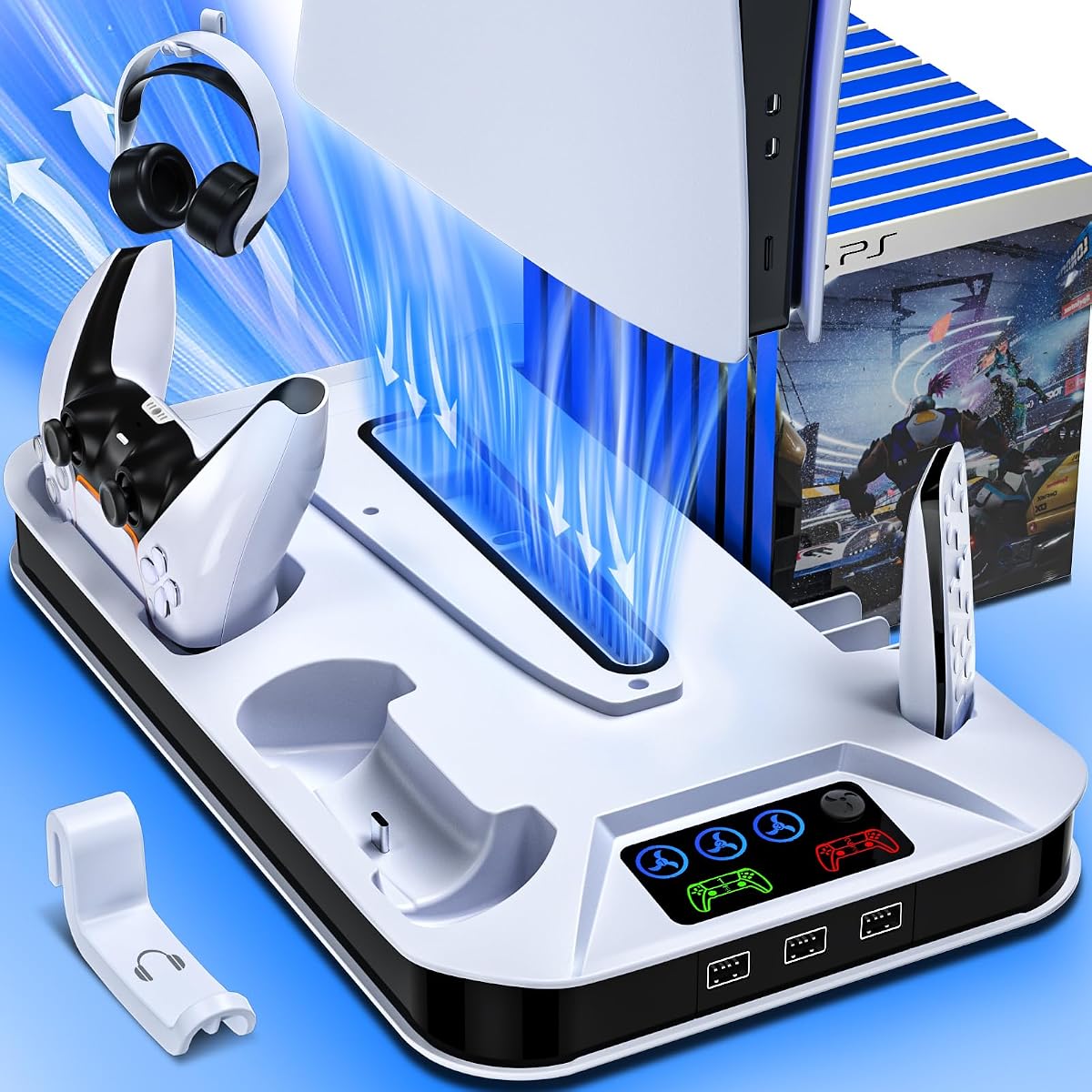
This cooling stand for PS5 console is highly rated for its comprehensive features that include a powerful turbo fan and dual controller charging dock. It is designed to fit all PS5 models including standard slim and pro versions with ease.
We may earn a commission when you buy through this link, at no additional cost to you.
The high efficiency turbo fan provides three speed settings to cool down the console effectively during long gameplay sessions. The charging dock can fully charge two controllers simultaneously in about three hours using LED indicators for status.
While it does not support the Edge controller it offers three USB hubs for charging other devices safely with overcharge protection. The stand also includes a safety screw to lock the console securely in place preventing accidental knocks.
This product is ideal for gamers who want an all-in-one solution to keep their console cool and accessories organized efficiently. Its multifunctional design saves space and maintains a neat gaming area for everyone.
The turbo fan dissipates hot air from the bottom of the console to prevent overheating and extend its service life.
An intelligent protective chip guards against overcharging overheating and short circuits ensuring controller safety even during overnight charging.
We may earn a commission when you buy through this link, at no additional cost to you.
This horizontal cooling stand offers a unique scalable design that fits all PS5 models from 2020 to 2024 including the Pro. It supports both original and Edge controllers with a push design docking system.
We may earn a commission when you buy through this link, at no additional cost to you.
The stand features high performance turbo fans with three speed settings controlled by a touch switch for customized cooling power. Charging is fast taking only 3 to 3.5 hours for two controllers with clear LED indicators.
Installation is straightforward requiring no complex tools and includes EVA foam for digital editions to ensure stability. However it lacks extra USB hubs which might limit charging options for other accessories.
Ideal for gamers preferring a horizontal setup this stand consolidates charging and cooling into one unit to save desk space. It keeps your gaming area tidy and organized for a better experience.
The scalable design meets placement needs for different console models including Disc and Digital editions with ease.
Even first time users can complete assembly quickly with simple steps like placing foam and fixing screws.
We may earn a commission when you buy through this link, at no additional cost to you.
This intelligent cooling stand features automatic fan speed adjustment based on console temperature using a built-in probe. It supports both manual and auto modes with memory function for fan and lighting settings.
We may earn a commission when you buy through this link, at no additional cost to you.
The stand can fully charge two controllers in about 2.5 hours with clear LED indicators showing status. Nine RGB lighting effects add a dazzling atmosphere to your gaming setup with adjustable brightness and modes.
While the RGB lights enhance the aesthetic they might not be preferred by everyone. The panel adapter needs removal for Slim digital versions which is a small setup step to keep in mind.
This option is perfect for gamers who want smart temperature control and customizable lighting to match their style. It keeps your console cool and charges controllers efficiently without extra effort.
The built-in temperature probe automatically adjusts fan speed to match console needs reducing operating temperature effectively.
RGB lighting with breathing modes and brightness control adds a vibrant touch to your entertainment desktop setup.
We may earn a commission when you buy through this link, at no additional cost to you.
This budget-friendly cooling stand offers excellent value with a low noise turbo fan and dual controller charging in 2.5 hours. It includes three USB hubs and a headset holder to keep accessories organized and accessible.
We may earn a commission when you buy through this link, at no additional cost to you.
The smart circuit protection chip stops charging at 80 percent to prevent overcharging and extend controller lifespan. LED indicators clearly show fan speeds and charging status for easy monitoring during use.
While it does not support Edge controllers it is perfect for standard PS5 users wanting reliable cooling without breaking the bank. The panel adapter must be removed for Slim digital versions which is a minor detail.
Ideal for cost-conscious gamers this stand ensures your console stays cool and controllers are ready for play. It combines functionality with affordability to enhance your gaming setup effectively.
The low-noise turbo cooling fan enhances air circulation without disturbing your gaming sessions with excessive noise.
Charging stops at 80 percent to protect controllers from overcharging and ensure safety even when charged overnight.
We may earn a commission when you buy through this link, at no additional cost to you.
This cooling station is meticulously designed to ensure a perfect fit for all PS5 models with a safety screw to prevent scratches. The turbo fan has three speed levels with a memory function that remembers your preferred mode after restart.
We may earn a commission when you buy through this link, at no additional cost to you.
It supports both original and Edge controllers with clear LED indicators for charging status. Three USB ports allow quick charging for multiple devices while a dedicated slot keeps the media remote organized.
While it lacks RGB lighting it focuses on practical cooling and organization without unnecessary features. The multiple power options include built-in cable compatible with various sources like USB HUBs for flexibility.
This stand is ideal for gamers who value reliability and fit over flashy lighting effects. It keeps your console cool and accessories tidy with thoughtful design touches for daily use.
The simple touch button lets you switch between speeds and the memory function recalls your last preference automatically.
Built-in cable compatibility with USB HUBs offers flexible power sources for convenient setup anywhere.
We may earn a commission when you buy through this link, at no additional cost to you.
This premium cooling stand features intelligent temperature controlled fan speed that adjusts automatically based on console heat. It includes nine RGB honeycomb lighting modes with breathing options to enhance your gaming atmosphere.
We may earn a commission when you buy through this link, at no additional cost to you.
Dual controllers can be charged in just 2.5 hours with clear LED indicators for status. The manual switch lets you toggle between four speed levels and the memory function resumes last settings after restart.
The RGB lighting adds a unique aesthetic but might not suit those who prefer a clean look. There are no USB hubs for extra devices so focus is on cooling and charging for PS5 gear.
Ideal for gamers seeking premium features this stand keeps your console cool and charging efficient with style. The temperature control ensures optimal performance while the lighting personalizes your setup.
The fan adjusts speed based on console temperature ranges to maintain optimal cooling without manual input.
Honeycomb lighting with single and multi-color modes creates a vibrant environment for your entertainment area.
We may earn a commission when you buy through this link, at no additional cost to you.
This horizontal stand features a scalable design that fits all PS5 models from 2020 to 2024 including the Pro. It supports Edge controllers with a push design docking system and includes a three-speed turbo fan.
We may earn a commission when you buy through this link, at no additional cost to you.
Installation takes just minutes with EVA foam and screws and no tools required for a quick setup. Charging is fast taking 3 to 3.5 hours for two controllers with clear LED status indicators.
To enable charging in rest mode you must adjust PS5 power settings to supply power to USB ports. The lack of USB hubs means focus is on cooling and charging rather than extra device ports.
Ideal for gamers wanting a horizontal setup this stand consolidates your gaming area into one compact unit. It keeps your console cool and controllers charged while freeing up shelf space.
The adaptable structure meets placement needs for different console generations with excellent fit and stability.
Holding the console horizontally integrates charging to eliminate separate stations and scattered accessories.
We may earn a commission when you buy through this link, at no additional cost to you.
This stand features an upgraded larger turbo fan with auto mode or three-speed manual control via touchscreen. It charges two controllers in about two hours with clear LED indicators for charging status.
We may earn a commission when you buy through this link, at no additional cost to you.
The smart chips stop charging at 70 percent to prevent overcharging damage and extend battery life. It includes slots for headsets game cards and a media remote to keep your gaming area tidy.
The auto fan adjusts speed based on temperature ranges from low at cool temps to high when hot. This ensures reliable performance without manual intervention during intense gaming sessions.
Ideal for gamers who want efficient cooling and fast charging this stand offers great organization and protection. It replaces official stands with enhanced features for a better experience.
Touchscreen manual control or auto mode lets you choose based on load quiet at low heat powerful when hot.
Includes slots for headsets game cards and media remote to keep all accessories within easy reach.
We may earn a commission when you buy through this link, at no additional cost to you.
This stand features a powerful turbo fan with three silent speeds indicated by color LEDs that you can select by double-clicking. It includes a ring of LEDs with four modes and eight RGB colors for vibrant visuals.
We may earn a commission when you buy through this link, at no additional cost to you.
Dual controllers can be fully charged in about three hours with clear LED indicators. Two USB A hub ports allow powering additional devices while a screw secures the console firmly to the stand.
The RGB lighting enhances immersion but can be turned off with a long press if desired. It holds 12 game disks and a headset to keep your desktop organized during gaming sessions.
Ideal for gamers who value aesthetics this stand combines silent cooling with customizable lighting. It keeps your console cool and accessories ready for play with thoughtful storage options.
Three adjustable fan speeds are indicated by color LEDs allowing you to select efficient low-noise cooling.
Ring LEDs with multiple modes and colors let you create cool gaming scenes or turn them off completely.
We may earn a commission when you buy through this link, at no additional cost to you.
This cooling station features concealed built-in cables and security screws for a stable secure connection with your console. It includes three USB and one Type-C port to charge a wide range of devices including laptops and phones.
We may earn a commission when you buy through this link, at no additional cost to you.
Dual controllers can be charged in three hours with LED indicators for status. The turbo fan has three-stage speed settings to blow hot air away from the bottom of the console effectively.
The sturdy materials ensure it withstands daily use without shaking or damaging products. It focuses on functionality with a clean design that harmonizes with the PS5 aesthetic.
Ideal for those needing multiple charging ports this stand offers versatile connectivity alongside reliable cooling. It keeps your setup professional and protected with a two-year warranty included.
Three USB ports plus one Type-C allow charging diverse devices from phones to laptops efficiently.
Sturdy materials ensure the stand withstands daily use without shaking protecting your console securely.
We may earn a commission when you buy through this link, at no additional cost to you.
Choosing the right cooling stand for PS5 console requires considering several factors to ensure compatibility performance and value for your gaming setup.
Look for stands with powerful turbo fans that have multiple speed settings to handle different heat levels. Adjustable fans let you balance cooling power with noise levels during gameplay.
Prioritize models with high-efficiency fans that actively dissipate heat from the bottom of the console.
Ensure the stand supports your specific PS5 model whether standard slim or pro disc or digital. Check if panel adapters are included and if removal is needed for certain versions.
Confirm compatibility with original and Edge controllers if you plan to use advanced controller features.
Check the charging speed and number of controller docks available. Stands that support simultaneous charging of two controllers reduce downtime between sessions.
Look for smart chips that prevent overcharging to extend the lifespan of your controllers.
USB hubs add convenience for charging headsets cameras and other devices without extra cables. Consider how many ports you need for your accessory ecosystem.
More ports allow you to centralize charging and keep your setup organized and tidy.
Durable materials and security screws ensure the console stays stable and protected from scratches. Non-slip pads add extra stability on desks or shelves.
High-quality construction prevents shaking or movement during intense gameplay sessions.
RGB lighting can enhance aesthetics but consider if it suits your environment. Headset holders and game disc storage help keep accessories organized and accessible.
These features add value but may increase price so prioritize what matters most to you.
Some stands offer automatic fan speed adjustment based on temperature which simplifies use. Manual controls give you direct command over cooling power for specific needs.
Auto modes can be more energy-efficient while manual options provide customization for intense gaming.
Compare features against price to find the best balance of performance and affordability. Budget options may lack extra ports but still offer solid cooling.
Invest in stands that offer protection features to extend the life of your console and accessories.
To begin place the cooling stand on a stable surface and secure your PS5 console using the provided screws. Ensure the safety screw is tightened properly to prevent any accidental movement or knocks.
Connect the stand to power either via a wall outlet or directly through the PS5 console using the included cable. Adjust the fan speed based on your needs by pressing the control buttons or switch.
Regularly dust the stand and fans to maintain optimal airflow and cooling performance. Keep cables organized and avoid blocking vents to ensure your system runs efficiently.
Yes most stands are designed to fit the PS5 Slim but you may need to remove the panel adapter for digital versions. Check the product details to ensure compatibility with your specific model before purchasing.
Only some models specifically mention compatibility with the Edge controller. Others are designed for original PS5 controllers only so verify before buying if you own an Edge controller.
Most stands have dual controller charging docks allowing two controllers to be charged simultaneously. Some models include USB hubs for charging additional accessories like headsets at the same time.
Yes several stands feature automatic fan speed adjustment based on console temperature. This allows passive cooling without manual input ensuring optimal performance during different game loads.
Most models with RGB lights have a button or long press to turn the lighting off. This lets you keep the aesthetic feature available without it being active during gameplay.
Charging times vary but most stands fully charge two controllers in about 2.5 to 3 hours. LED indicators show the charging status so you know when they are ready to use.
Many products come with warranties ranging from one to two years. Check the seller details for warranty terms and customer support options before purchasing.
Installation is simple usually involving placing EVA foam for digital editions securing screws and connecting power. No complex tools are needed so you can set it up quickly.
Our top picks highlight a range of options from budget-friendly to premium stands with auto cooling and RGB features. Each model offers unique strengths to suit different gaming needs and preferences effectively.
Prioritize cooling performance and compatibility with your PS5 model to ensure your console stays protected during use. Additional features like USB hubs and smart charging can add significant value to your setup.
Remember to check current availability and listings before purchasing as details may change over time. Investing in a reliable cooling stand will enhance your gaming experience with better temperature control and organization.