
Learning Resources Code & Go Robot Mouse
4.5Editor score
Screen-free coding basics
Designed for ages four plus
Includes maze grids and cards
This guide compares the top ten coding toys for kids in 2026, evaluating screen-free options, robotics kits, and educational apps to find the best learning
Coding toys have revolutionized how children learn technology by turning abstract programming concepts into tangible play experiences. These tools help young minds develop logical thinking, problem-solving skills, and creativity through interactive robotics and coding activities that engage them without relying solely on screens.
We evaluated ten leading products based on educational value, ease of use, durability, and age appropriateness. Our analysis includes screen-free options for younger learners and advanced robotics kits for teens, ensuring every child can find a suitable entry point into the world of coding and engineering.
Each pick in this list highlights unique features and learning outcomes to help you choose the right toy for your child. Please note that availability and specific pricing may change over time, so checking current listings before purchasing is always recommended for the most accurate information.
4.5Editor score

4.1Editor score

4.6Editor score
This side-by-side comparison outlines the key specifications and learning focuses of each selected coding toy to help you make an informed decision based on your child's age and interests.






This robotic chameleon kit offers a unique blend of screen-free coding and hands-on engineering that stands out in the crowded market of educational toys. With a rating of 4.1 stars, it has garnered attention for its ability to teach programming logic without the need for tablets or computers.
We may earn a commission when you buy through this link, at no additional cost to you.
The key strength lies in its innovative design where kids use physical colored action cards to program movements and reactions. The robot features a color sensor and infrared sensor that allow it to camouflage or react to touch, providing immediate feedback that reinforces learning concepts effectively.
One trade-off is the complexity of the build process which might require parental help for children under twelve years of age. However this investment of time ensures that kids understand the mechanical components behind the robot enhancing the overall educational value significantly.
Parents looking for a high-quality STEM gift that combines creativity with technical learning will find this kit an excellent choice. It is particularly suitable for children who enjoy building projects and want to see their code come to life through a real-world robotic reptile.
The use of physical cards instead of digital interfaces encourages tactile learning and reduces screen time concerns for parents.
Three distinct play modes allow children to explore different aspects of robotics from coding to autonomous reactions.
We may earn a commission when you buy through this link, at no additional cost to you.
The Makeblock mBot is designed as an entry-level coding robot that bridges the gap between simple toys and serious engineering projects. Its high rating of 4.6 stars reflects its popularity among parents and educators for being both fun and educational for kids aged eight to twelve.
We may earn a commission when you buy through this link, at no additional cost to you.
One of its main advantages is the clear build instructions that allow children to assemble the robot in about fifteen minutes. Once built it can be used as a remote control car or programmed using Scratch and Arduino providing a smooth learning curve for beginners.
While the kit is comprehensive some users may find that the remote controller and batteries are not included which adds to the initial setup cost. Despite this the open-source nature of the system allows for endless expansion with additional modules and parts.
This product is ideal for children who show an interest in electronics and want to learn programming step by step. The ability to integrate with LEGO parts and other modules makes it a versatile choice for long-term exploration and creativity.
The kit supports moving from visual block coding to text-based Arduino programming as skills develop over time.
Compatibility with add-on packs ensures that the robot can grow with the child's increasing technical abilities.
We may earn a commission when you buy through this link, at no additional cost to you.
Packaged as a tiny programmable robot ball the Sphero Mini brings a lot of fun into a small form factor that kids love. With a rating of 4.6 stars it is praised for its ability to teach coding through interactive play and gaming experiences.
We may earn a commission when you buy through this link, at no additional cost to you.
The app allows users to code using drag and drop blocks or even write JavaScript making it suitable for a range of skill levels. The drive modes include joystick and tilt controls which provide immediate physical feedback for programming commands.
A limitation of this device is its reliance on a mobile device for programming and control which means screen-free coding is not an option. Additionally the battery life of one hour might require frequent charging sessions during extended play times.
This robot is perfect for tech-savvy kids who want to explore robotics through a gaming lens. The included traffic cones and pins encourage setting up obstacle courses which helps in understanding sequencing and spatial logic effectively.
The robot can act as a game controller for arcade-style games blending education with entertainment seamlessly.
Support for both block-based and text-based coding makes it a scalable tool as children advance in their skills.
We may earn a commission when you buy through this link, at no additional cost to you.
The Code & Go Robot Mouse is a favorite among educators and parents for introducing young children to programming concepts in a playful way. It has earned a strong rating of 4.5 stars for its simplicity and effectiveness in teaching sequencing and problem-solving.
We may earn a commission when you buy through this link, at no additional cost to you.
Designed specifically for kids as young as four this toy uses physical buttons and coding cards to program the mouse to navigate mazes. The hands-on nature of the play ensures that children can understand logic without needing any screen interaction or apps.
One drawback is that it requires three AAA batteries which are not included in the package. While the toy is durable and fun the variety of activities is limited to maze navigation which might eventually become repetitive for older children.
This kit is an ideal starting point for families on a budget who want to foster early STEM skills. Its simplicity makes it perfect for classroom centers or home play sessions where basic coding logic is the primary learning objective.
The design is tailored for emerging programmers ages four and up allowing them to build confidence through trial and error.
Color-coded coding cards help children visualize sequences and understand the order of operations intuitively.
We may earn a commission when you buy through this link, at no additional cost to you.
Mech-5 stands out as a mission-based robot that combines mechanical engineering with coding basics in a challenging building kit. With a rating of 4.5 stars it appeals to children who enjoy detailed assembly tasks and want to understand how machines work inside.
We may earn a commission when you buy through this link, at no additional cost to you.
The robot can throw lift kick and draw by snapping coding buttons onto a coding wheel which offers a unique interface for programming actions. This hands-on approach ensures that kids engage with both the physical construction and the logic behind the movements.
A notable trade-off is the time required to build the robot which can take multiple hours. This might be a barrier for those looking for quick play but for others it adds to the sense of accomplishment and learning.
This kit is best suited for children aged ten and older who are ready for a more complex STEM experience. It effectively bridges the gap between building and coding encouraging a holistic understanding of engineering principles.
By focusing on the physical build the kit teaches how gears and joints translate code into real-world motion.
Structured missions guide children through progressive levels of complexity ensuring continuous learning and engagement.
We may earn a commission when you buy through this link, at no additional cost to you.
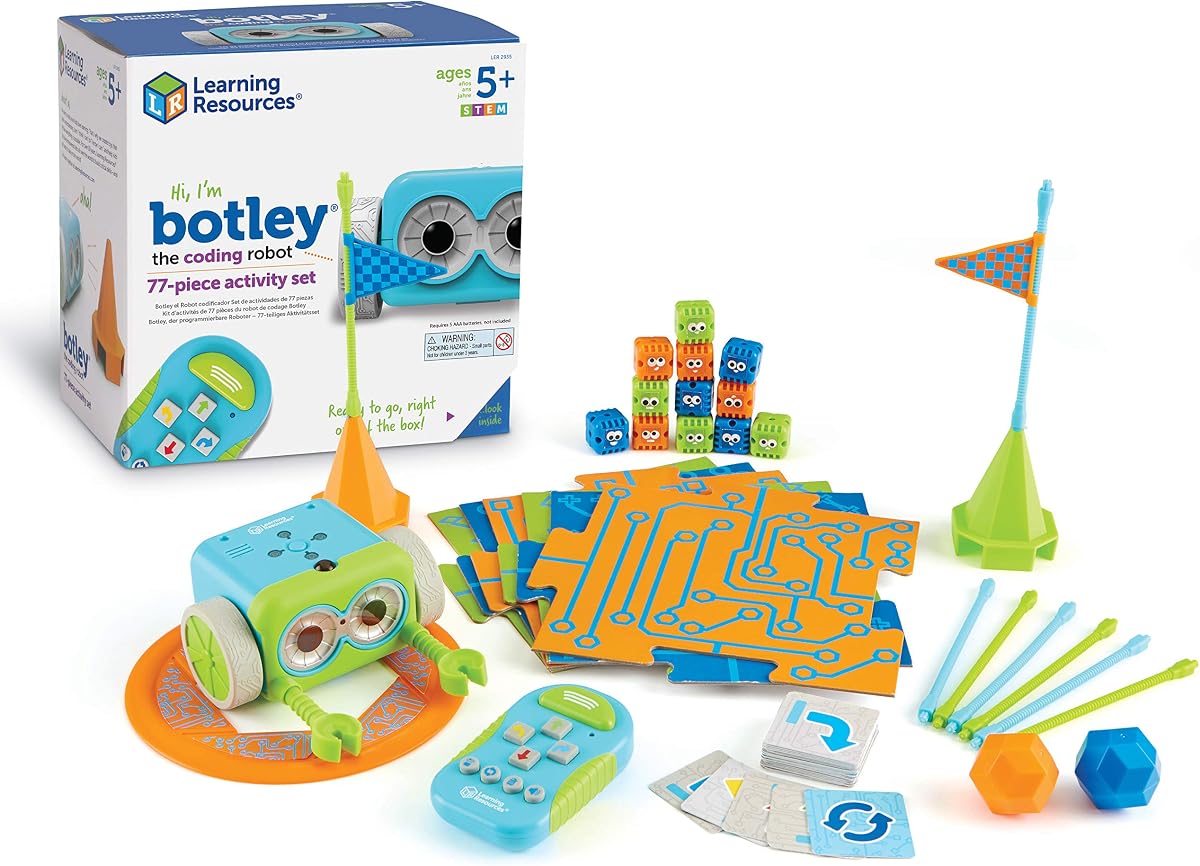
Botley is a robust coding robot that offers screen-free play with advanced features like object detection and looping commands. Its high rating of 4.6 stars highlights its success in teaching logic and problem-solving through active physical play.
We may earn a commission when you buy through this link, at no additional cost to you.
The remote programmer allows kids to send commands to the robot without needing a tablet or phone which makes it versatile for different learning environments. The ability to follow black-line paths and avoid objects adds depth to the coding challenges available.
Users should note that the robot requires five AAA batteries which are not included and assembly may need a screwdriver. These minor hurdles are outweighed by the extensive activity set that includes detachable arms and obstacle pieces.
This set is ideal for children aged five and up who are ready for slightly more complex programming challenges. The inclusion of hidden features and looping commands keeps the toy engaging for long periods as skills improve.
Looping commands allow children to create complex sequences that repeat actions teaching them about loops efficiently.
The included tiles and pieces let kids build custom courses that test the robot's navigation and sensing abilities.
We may earn a commission when you buy through this link, at no additional cost to you.
The Ozobot Evo is designed to introduce children to coding through color codes and digital apps making it a versatile tool for classrooms and homes. With a rating of 4.6 stars it is highly regarded for its educational resources and adaptability across ages.
We may earn a commission when you buy through this link, at no additional cost to you.
This kit includes color code markers that allow kids to draw lines and patterns for the robot to follow without screens. The online platform offers over seven hundred free lessons which provides a comprehensive curriculum for long-term use.
A limitation is the higher price compared to simpler toys and the need to purchase markers separately for some activities. However the investment offers significant value due to the range of lessons and durability suitable for classroom environments.
This product is perfect for educators and parents looking for a structured learning path that grows with the child. The five skill levels ensure that children from beginners to advanced coders can find challenges that match their abilities.
Using colors to program the robot makes coding accessible and visual for young learners without needing complex interfaces.
The extensive library of lessons covers STEAM subjects ensuring a well-rounded educational experience beyond just coding.
We may earn a commission when you buy through this link, at no additional cost to you.
Botley 2.0 builds on the original with added features like 45-degree turns and more complex obstacle interactions. It maintains a solid rating of 4.5 stars by offering a refined experience that challenges kids to solve more advanced problems.
We may earn a commission when you buy through this link, at no additional cost to you.
The robot includes sounds and lights that provide multisensory feedback enhancing the engagement during play. With sixteen secret code combinations kids are encouraged to explore creative solutions and extend the play life of the toy.
While similar to the original version the added complexity and components make it a worthwhile upgrade for those seeking deeper learning. It still requires batteries which are not included but the included pieces provide ample room for creativity.
This set is ideal for children who have basic coding experience and want to tackle more complex navigation challenges. The stackable pieces allow for custom course creation which supports imaginative storytelling and problem-solving.
The ability to turn at 45 degrees allows for more intricate path designs compared to standard 90-degree rotations.
Secret codes and custom obstacles encourage kids to invent their own rules and challenges for unique gameplay.
We may earn a commission when you buy through this link, at no additional cost to you.
Dash is a premium robot designed to be ready for use right out of the box without any assembly. Its strong rating of 4.6 stars reflects its reliability and the engaging experience it provides through its apps and features.
We may earn a commission when you buy through this link, at no additional cost to you.
The robot supports five different apps across iOS Android and Fire OS making it versatile for different devices in the family. With up to five hours of play time it offers extended engagement for long coding sessions and classroom use.
One limitation is that it requires a tablet or phone for control which might not be ideal for screen-free environments. The price is also higher than basic toys but the build quality and feature set justify the cost for many users.
This robot is best for families who want a high-quality device that supports long-term skill development. The ability to program Dash to sing dance and respond to voice commands makes it a fun and educational friend for kids.
The lack of assembly means kids can start coding immediately reducing setup frustration and increasing engagement time.
Different apps offer varying levels of complexity ensuring that the robot remains challenging as skills grow.
We may earn a commission when you buy through this link, at no additional cost to you.
TaleBot Pro is designed specifically for toddlers and preschoolers to introduce early coding concepts through storytelling and music. With a high rating of 4.7 stars it is praised for its accessibility and ability to engage young children in learning.
We may earn a commission when you buy through this link, at no additional cost to you.
The robot provides instant voice feedback when buttons are pressed allowing children to learn sequences and loops without reading. The recording function lets kids add their own stories to the robot making it a creative outlet for imaginative play.
While the robot is simple it is perfectly suited for its target age group of three to five years. Some might find the limited functionality too basic for older kids but it is an excellent tool for early cognitive development.
This toy is ideal for parents looking for a screen-free way to teach basic programming logic. The compatibility with Lego blocks and multiple language support make it a flexible choice for diverse learning environments.
Voice interactions and recording help improve language skills alongside coding logic for a holistic learning experience.
Touch-based controls and simple interfaces make it accessible for young children and those with special needs.
We may earn a commission when you buy through this link, at no additional cost to you.
Choosing the right coding toy involves considering age appropriateness, screen time goals, and the specific skills you want to foster.
The first factor to consider is the recommended age range for the toy. Some robots are designed for younger children with simple button interfaces while others require more complex assembly and programming logic suitable for older kids.
Always check the minimum age requirement to ensure the toy matches your child's current developmental stage.
Decide whether you prefer a screen-free experience that uses physical buttons or cards or an app-based system that utilizes tablets and phones. Screen-free toys are great for reducing screen time while app-based toys often offer more advanced coding options.
Balance your family's screen time goals with the educational benefits offered by each type of toy.
Identify what skills you want your child to learn such as sequencing, logic, or mechanical engineering. Some toys focus on storytelling and language while others teach robotics or block coding.
Choose a toy that aligns with the specific educational outcomes you hope to achieve.
Consider how easy the toy is to set up and use. Some kits require hours of assembly and might need adult help while others are ready to use right out of the box.
If you want immediate play, opt for models with minimal setup requirements.
Look for toys made with durable materials that can withstand active play. Metal components and sturdy plastics often last longer than cheap plastic alternatives.
Invest in well-built models if you plan to use the toy in a classroom or for multiple children.
Check if the robot is compatible with additional parts or modules that allow for expansion. Open-source systems often offer a wider range of accessories.
Expandable toys provide better long-term value as your child's skills grow.
Review the battery needs of the toy to ensure you are prepared for maintenance. Some robots require specific battery types that are not included in the package.
Consider rechargeable options if available to reduce ongoing costs and waste.
Compare the price against the features and educational value offered. Higher priced toys often include more components and longer play potential.
Set a budget that allows for quality features without overspending on unnecessary extras.
Start by reading the manual thoroughly to understand the assembly process and initial setup steps. Many kits require specific battery types which should be installed carefully to avoid damaging the contacts.
Engage your child in the build process if possible as it helps them understand the mechanical components before they start coding. This preparation makes the programming phase more intuitive and fun.
Store the pieces in a dedicated container to prevent loss and keep the workspace organized. Avoid exposing the robot to water or extreme temperatures to maintain its longevity and functionality.
Yes, coding toys are a valuable investment because they teach critical thinking and problem-solving skills that are essential for the future. These tools make learning technology fun and interactive which encourages children to explore STEM subjects further.
Children as young as three can start with simple sequencing toys that use physical blocks. Most coding toys are designed for ages four to six which is when logical thinking begins to develop rapidly.
Not all robots require a tablet as many options are screen-free and use physical buttons or cards. However, some advanced models do rely on apps for programming so check the product details before buying.
Coding toys teach sequencing and logic which are foundational skills for computer science and math. They also improve problem-solving abilities and patience which are beneficial across all school subjects.
Absolutely, coding toys are designed for all genders and encourage creativity and engineering skills equally. Many brands specifically focus on inclusive designs that appeal to diverse interests and learning styles.
Many coding toys are classroom-ready and come with lesson plans or activity guides for teachers. They are durable enough for shared use and support collaborative learning among students.
This guide has highlighted ten top coding toys that range from simple mechanical kits to advanced robotics systems. Whether you choose the Thames & Kosmos Pet or the Botley Mouse each option offers unique learning opportunities for different ages.
Prioritize toys that match your child's interests and your family's screen time preferences. A tool that sparks curiosity will lead to longer engagement and better learning outcomes over time.
Remember to check current listings for any updates or special offers before making your purchase. The right coding toy can open up a world of creativity and technical skill development for your child.