
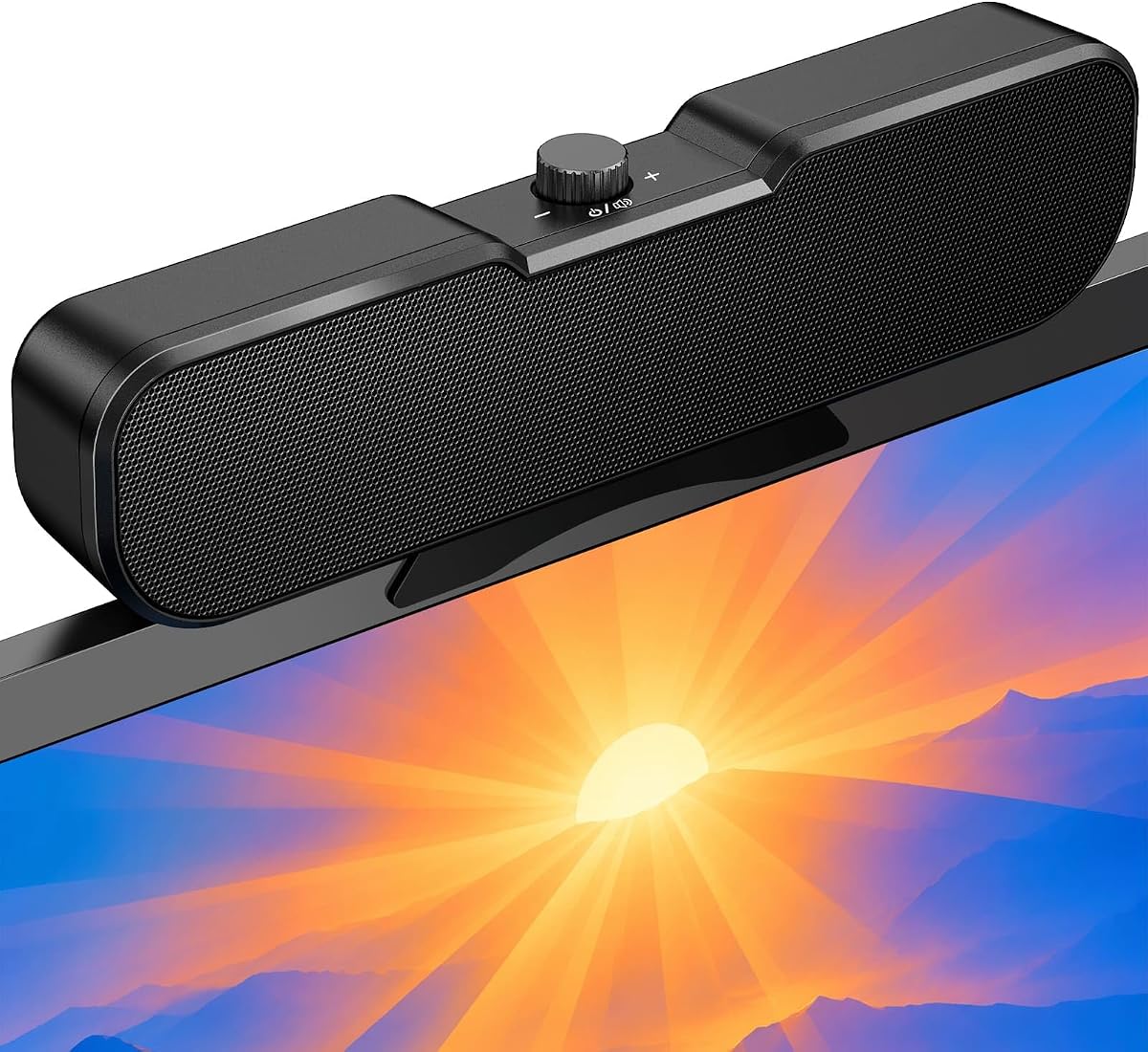
Inwa Computer Speakers for Desktop PC
4.2Editor score
Affordable price point under twenty dollars
Simple three button top controls
Spring clip fits monitors up to inch
This guide compares the best clip on speakers for laptop to help you find top audio upgrades with clear sound and easy mounting options.
Finding the right audio solution for your laptop can transform your daily work and entertainment experience. Clip on speakers offer a convenient way to boost sound without cluttering your desk. They attach directly to monitors or laptop screens for instant volume improvements.
We evaluated ten top models based on sound quality, connectivity options, and ease of installation. Our analysis focuses on USB powered designs that work seamlessly with modern laptops. Each product was assessed for bass response, clarity, and build durability over time.
Each pick highlights unique strengths like adaptive channel switching or RGB lighting effects. Prices and availability change frequently so check current listings before buying. These recommendations aim to simplify your search for portable yet powerful laptop audio accessories today.
4.2Editor score

4.5Editor score

4.2Editor score
This side-by-side comparison outlines the key specifications and features of ten popular clip on speaker models. We highlight connectivity options, sound output capabilities, and mounting styles to help you decide which fits your setup best.


This model stands out for its adaptive channel switching technology that ensures left and right audio remain correct regardless of clamp position. It delivers loud sound with deep bass thanks to dual ultra-magnetic drivers and passive radiators. Users appreciate the touch controls and USB-C adapter included for modern laptops.
We may earn a commission when you buy through this link, at no additional cost to you.
The speaker works well with Windows, macOS, ChromeOS, and Linux systems. Its design allows clipping to the top, side, or bottom of monitors easily. The G-Sensor feature automatically adjusts audio channels within seconds when moved. This eliminates manual setup confusion and keeps stereo imaging accurate during use.
While performance is strong, users must ensure their audio drivers are updated and USB ports function properly. It is not compatible with monitors or TVs lacking audio output via USB. These limitations are minor compared to the audio quality and space-saving benefits it offers for most laptop setups.
Ideal for professionals needing clear audio without desk clutter. The patented clamp allows smooth desk placement if preferred. Overall it balances sound quality and convenience better than many rivals. Consider this if you prioritize adaptive features and bass response in a clip-on form factor.
The G-Sensor ensures audio channels switch automatically when repositioned so stereo stays accurate without manual adjustment.
Dual passive radiators enhance low frequencies providing deep bass that small laptop speakers usually lack.
We may earn a commission when you buy through this link, at no additional cost to you.
OHAYO combines premium features like Bluetooth 5.3 connectivity with robust wired performance. The G-Sensor switches channels in under half a second ensuring seamless stereo when repositioned. RGB lighting modes sync with audio rhythms adding visual flair to any workspace without affecting sound quality.
We may earn a commission when you buy through this link, at no additional cost to you.
It delivers 16W output with dual magnetic drivers and a passive radiator for balanced sound across frequencies. The smooth roller wheel allows precise volume adjustments and power control. A built-in microphone supports clear pickup up to 1.5 meters making it useful for video conferences.
Users should note it requires USB power even in Bluetooth mode and is not meant for ultra-thin laptop screens. Compatibility covers Windows, macOS, and Android but excludes gaming consoles like Xbox. These constraints are acceptable given the versatility and feature set it provides.
Best suited for users wanting both wireless freedom and wired reliability. The RGB customization enhances gaming or creative setups significantly. If you value modern connectivity and visual integration this model delivers a premium experience worth the investment.
Bluetooth 5.3 ensures stable connections up to 20 meters allowing wireless use alongside wired PC mode.
RGB modes include audio sync effects that visualize music rhythm dynamically enhancing the overall user experience.
We may earn a commission when you buy through this link, at no additional cost to you.
Cirqon offers exceptional value with a straightforward design centered on ease of use. The single volume knob controls power and adjustment effortlessly. Its upgraded clamp fits screens between 0.1 and 0.98 inches securely supporting independent standing if needed.
We may earn a commission when you buy through this link, at no additional cost to you.
Sound remains clear without distortion even at max volume which suits daily office tasks well. A high-quality USB-C adapter ensures compatibility with Mac and Android devices. The included cable tie helps keep desks neat and organized without extra accessories.
It lacks advanced features like Bluetooth or channel switching but excels in core functionality. Users must verify their monitor USB port supports audio output since incompatible units exist. For budget-conscious buyers seeking reliability this model meets essential needs effectively.
Ideal for students or home office users needing simple sound upgrades. The compact profile saves space while delivering sufficient loudness. If you prioritize function over flair this speaker provides a no-fuss solution that works consistently across devices.
One intuitive knob handles power and volume reducing complexity for quick adjustments during work or play.
Upgraded non-slip clamp grips screens firmly preventing movement while protecting surfaces with padding.
We may earn a commission when you buy through this link, at no additional cost to you.
This model simplifies setup by relying on system volume controls instead of physical buttons on the speaker. It clips gently to monitor tops or sides within a wide thickness range. The patented clamp design also allows smooth desk placement for flexible positioning.
We may earn a commission when you buy through this link, at no additional cost to you.
Dual super-magnetic drivers and a passive radiator deliver rich bass and loud stereo sound. USB-C adapter support expands compatibility to newer laptops without USB-A ports. The design focuses on saving space while enhancing audio clarity for everyday tasks.
Users must adjust volume via computer settings which some find less convenient than hardware knobs. It is incompatible with TVs or projectors lacking USB audio. These trade-offs suit minimalists who prefer clean setups and reliable wired performance without extra controls.
Perfect for users who want plug-and-play audio with minimal fuss. The deep bass adds presence to movies and music. If you manage volume primarily from your computer this speaker enhances sound quality effectively without cluttering your workspace.
Removing physical buttons reduces clutter and relies on system controls for streamlined operation and fewer parts.
Passive radiator technology boosts low frequencies providing richer sound than typical compact speakers offer.
We may earn a commission when you buy through this link, at no additional cost to you.
This speaker distinguishes itself with an M-Button for instant muting and a tactile volume wheel for precise control. The spring-loaded clip fits monitors up to 1.26 inches thick securely. It stands alone on desks or clips to monitor tops for space saving.
We may earn a commission when you buy through this link, at no additional cost to you.
Dual high-performance drivers and passive radiator deliver immersive stereo with enhanced bass. USB and Type-C cables ensure compatibility with Mac Windows and mobile devices. The single cable handles both power and audio reducing clutter and setup time.
It lacks Bluetooth connectivity which limits wireless flexibility for mobile devices. Clamping requires specific monitor thicknesses so checking dimensions beforehand is wise. For wired setups needing quick audio control this model offers a practical and reliable solution for users.
Ideal for gamers or office workers needing fast mute and volume changes. The design keeps desktops tidy while improving sound. If you value tactile controls and broad OS compatibility this speaker meets daily needs efficiently without unnecessary complexity.
One-touch mute button allows quick silence during calls or distractions without navigating system menus manually.
Wheel provides smooth scrolling control superior to push buttons for granular volume adjustments during use.
We may earn a commission when you buy through this link, at no additional cost to you.
Inwa offers robust stereo sound with 10 watts of power and built-in passive radiator. Three top buttons manage volume and mute intuitively. The spring clip attaches easily to monitor tops sides or bottoms and silicone pads protect surfaces from damage.
We may earn a commission when you buy through this link, at no additional cost to you.
A single USB cable powers audio eliminating need for extra AUX cables. The included USB-A to USB-C converter expands compatibility across modern devices. Lifetime technical support adds confidence for buyers concerned about long-term reliability or setup issues.
Sound projection lifts forward for better stereo separation compared to standard laptop speakers. Controls are accessible but lack advanced features like lighting or wireless. This model suits users prioritizing clear audio and responsive support over flashy extras or connectivity options.
Best for professionals needing reliable audio without complexity. The stereo lift enhances voice clarity during video calls. If you want consistent performance and accessible customer help this speaker delivers solid value and straightforward operation.
Speaker bar lifts sound forward creating wider stereo image that improves immersion during media or work.
Lifetime technical support ensures assistance is available within 24 hours if issues arise after purchase.
We may earn a commission when you buy through this link, at no additional cost to you.
This model focuses on delivering surprisingly clear and balanced sound through dual 5W high-sensitive drivers. The ultra-narrow clip secures to monitor tops or sits flat on desks. An adjustable angle feature lets you direct audio precisely where needed for better listening.
We may earn a commission when you buy through this link, at no additional cost to you.
Simple one-touch controls for power volume and mute stay accessible without interrupting workflow. The USB-A to USB-C adapter ensures compatibility across Windows macOS ChromeOS and Linux. It upgrades built-in laptop audio effectively without requiring extra software installation.
Users should verify sound card drivers are current for optimal performance. The lack of wireless limits use with phones unless cables are managed. For stationary desktop setups prioritizing sound clarity and directional control this model is a strong practical choice.
Ideal for users seeking balanced audio upgrades at reasonable cost. The adjustable angle optimizes sound delivery to seating positions. If clarity and ease of use matter most this speaker meets expectations reliably and consistently.
Angle adjustment directs sound toward listeners improving perceived volume and clarity without moving the speaker.
Dual 5W drivers tuned for sensitivity ensure balanced tones across highs and mids for accurate playback.
We may earn a commission when you buy through this link, at no additional cost to you.
This variant emphasizes adaptive channel switching that guarantees correct stereo imaging regardless of clamp placement. Dual ultra-magnetic drivers and passive radiators create rich bass and high volume. Touch buttons provide easy mute and volume adjustments on the front face.
We may earn a commission when you buy through this link, at no additional cost to you.
Compatible with Windows macOS ChromeOS and Linux it works via USB or USB-C adapters. The G-Sensor switches channels instantly if moved. This feature eliminates manual reconfiguration and ensures immersive sound during media consumption or video calls.
Ensure your system audio drivers are updated and USB ports function correctly to avoid issues. It is not intended for TVs or projectors. These requirements are minor given the seamless audio experience and versatile mounting options it offers.
Best for users valuing automatic calibration and strong bass. The touch interface modernizes control compared to rotary knobs. If consistent stereo and deep lows are priorities this speaker delivers reliably across various desktop configurations.
G-Sensor ensures left right channels stay aligned automatically without manual tweaking after relocation.
Touch buttons reduce mechanical wear and offer responsive control for volume and mute functions.
We may earn a commission when you buy through this link, at no additional cost to you.
OHAYO integrates customizable RGB lighting that syncs with audio rhythm in real time with low latency. It switches seamlessly between Bluetooth 5.3 and wired PC modes. The built-in microphone supports clear calls up to 1.5 meters and the roller wheel enables precise volume tuning.
We may earn a commission when you buy through this link, at no additional cost to you.
Dual magnetic drivers and a passive radiator deliver balanced sound with 16W output. G-Sensor auto switching ensures correct stereo when repositioned. RGB brightness is adjustable and power consumption remains low to avoid impacting sound quality during use.
USB power is mandatory even for Bluetooth which may limit cordless setups. Ultra-thin laptop screens may suffer from unstable clamping. These constraints are outweighed by the feature-rich design that blends performance with visual appeal for gamers and creatives.
Ideal for those wanting aesthetic customization alongside strong audio. The dual connectivity supports versatile setups. If lighting and wireless options matter this speaker delivers a premium experience with reliable sound and clear communication features.
RGB modes visualize music rhythm enhancing immersion and personalizing your workspace visually during use.
Switch between Bluetooth for wireless and USB for stable wired connection based on current needs.
We may earn a commission when you buy through this link, at no additional cost to you.
Cirqon prioritizes compact and lightweight design to save valuable desk space. The single knob controls power and volume for effortless access. An upgraded non-slip clamp fits screens from 0.1 to 0.98 inches thick securely without slipping or damaging surfaces.
We may earn a commission when you buy through this link, at no additional cost to you.
It includes a high-quality USB-C adapter for broad compatibility including Mac and Android devices. Sound remains clear without distortion even at max volume. A cable tie is included to keep the USB connection neat and organized for tidy setups.
Advanced features like wireless or RGB are absent to keep costs low. Monitor USB ports must support audio output for this speaker to work. These limitations suit budget buyers focused on core functionality and space efficiency above extras.
Best for students or small offices needing straightforward audio upgrades. The compact size carries easily between locations. If you prefer simplicity and reliable performance this model offers consistent value without unnecessary complexity or cost.
Slim profile reduces footprint allowing more room on desk for peripherals and notes during work.
Single knob integrates power and volume functions reducing confusion and minimizing physical parts on device.
We may earn a commission when you buy through this link, at no additional cost to you.
Selecting the right clip on speakers requires evaluating connectivity, sound output, and mounting flexibility to match your laptop setup and daily needs.
Most clip on speakers use USB for both power and audio which simplifies wiring. Some models include USB-C adapters for newer laptops while others offer Bluetooth for wireless use. Consider which ports your device has and whether you prefer wired stability or wireless freedom.
Choose USB for reliable power and audio without extra cables but look for Bluetooth if you need mobility.
Look for dual drivers and passive radiators which significantly improve bass response in compact form factors. Higher wattage often means louder volume but driver quality matters more for clarity. Read reviews focusing on distortion at max volume to ensure clean audio.
Prioritize models with passive radiators if bass depth is important for music or media playback.
Clamp designs vary in grip strength and compatibility with monitor thicknesses. Soft silicone pads protect screens while sturdy clamps prevent slipping. Some speakers can stand alone on desks if mounting is not possible or preferred.
Ensure the clamp fits your monitor thickness and surface type to avoid damage or instability.
Controls can range from simple knobs to touch buttons or dials. Mute buttons add convenience during calls. Touch interfaces look modern but may be less tactile than physical knobs. Choose based on ease of access when mounted.
Physical knobs offer precise control whereas touch controls provide a sleeker appearance and feel.
Verify OS compatibility including Windows macOS ChromeOS and Linux. Some models require updated audio drivers to function correctly. Ensure your USB port supports audio output especially if using monitor-based USB ports.
Check system requirements beforehand to avoid compatibility issues after purchase.
Extra features like RGB lighting or adaptive channel switching can enhance experience but add cost. Built-in microphones help with video calls. Consider which features add real value to your workflow versus those that are purely decorative.
Focus on core audio and mounting quality before investing in premium extras.
Compact designs save desk space and are easier to transport between locations. Weigh the speaker if you plan to move it frequently. Lightweight models reduce risk to monitor frames during transport.
Choose slim and lightweight options if portability is a priority for your setup.
Prices vary based on features and build quality. Budget models cover basic needs while premium options add wireless and customization. Determine your maximum spend and prioritize features that align with daily use.
Balance cost against essential features to get the best value for your specific requirements.
Attach the speaker to a clean monitor surface or desk ensuring the clamp grips securely without over-tightening. Connect the USB cable to a functioning port on your laptop or dock.
Turn on the speaker and select it as the playback device in your operating system audio settings. Adjust volume using the speaker controls or system settings as preferred.
Clean the speaker with a soft dry cloth and avoid liquids on the electronic components. Store in a dry place when not in use to prolong lifespan and prevent damage.
Most models support Windows macOS ChromeOS and Linux via USB. Ensure your laptop has an available USB port or USB-C with adapter. Some speakers require audio output via USB which not all monitor ports provide.
No they draw power from the USB connection to your computer. This eliminates the need for separate power adapters or batteries making setup simpler and cable management easier.
Yes many models deliver loud sound and deep bass suitable for gaming. Some offer Bluetooth for mobile gaming or adaptive channel switching for accurate stereo positioning during immersive sessions.
Check that your audio drivers are updated and USB port functions properly. Lower volume slightly or adjust system settings to prevent overload. Ensure speaker placement does not block driver output.
Compatibility depends on USB audio output support. Many models are incompatible with TVs lacking USB audio capabilities. Verify device specifications before purchasing to avoid connection issues.
With proper care they can last several years. Avoid dropping or exposing to moisture and clean regularly. Manufacturer support varies so choose brands with reliable customer service for warranty needs.
Most recommend against clamping on ultra-thin laptop screens to prevent instability or damage. Use monitor tops or desk placement instead to ensure safety and consistent audio performance.
Most provide stereo sound with dual drivers. True surround sound requires multi-speaker setups which clip-on models do not support. Focus on stereo clarity and bass for best results.
The top picks highlight versatility from budget-friendly simplicity to premium features like Bluetooth and adaptive channel switching. Each option improves sound quality without cluttering your workspace.
Prioritize connectivity and mounting compatibility to match your laptop and monitor setup. Consider additional features like RGB or mute controls based on your daily tasks and aesthetic preferences.
Prices fluctuate so verify current listings before purchasing. These models offer reliable upgrades to laptop audio enhancing both work productivity and entertainment experiences.