
MAYFLASH Arcade Stick F700
4.5Editor score
Bluetooth and wired connection
Compatible with multiple platforms
Supports Sanwa components
This guide compares the top arcade stick for PS5 models including HORI, Nacon, and Mayflash to help you choose the best fightstick for competitive gaming.
Finding the right arcade stick for PS5 can transform your fighting game experience. A quality fightstick offers precision, durability, and a tournament-grade feel that standard controllers cannot match.
We compared ten top-rated models based on compatibility, build quality, and component reliability. Our analysis focuses on official licensing, joystick mechanisms, and customization options available for PlayStation users.
Each pick highlights key features and performance traits to guide your decision. Note that availability and pricing may fluctuate, so check current listings before purchasing your new fightstick.
4.5Editor score

4.6Editor score

4.2Editor score
Below is a side-by-side comparison of the top ten arcade sticks for PS5. Review each model's specifications to find the perfect match for your fighting game needs.




The HORI PlayStation 5 Fighting Stick Alpha stands out as a top-tier option for serious fighters. It holds a strong rating and delivers tournament-grade performance right out of the box. Its official licensing ensures seamless compatibility with PlayStation systems without extra dongles or adapters.
We may earn a commission when you buy through this link, at no additional cost to you.
This fightstick features HORI's proprietary Hayabusa buttons and joystick which are renowned for precision and durability. The open design allows users to easily access internal components for customization or maintenance. This flexibility makes it ideal for players who want to personalize their setup over time.
While the price is higher than budget models, the build quality justifies the investment. The only minor trade-off is that some aftermarket parts may not be as readily available as Sanwa components. However, the included components are robust enough for most competitive scenarios.
Competitors looking for reliability and official support should consider this model. It balances performance, durability, and ease of use effectively. For anyone serious about fighting games on PS5, this is a highly recommended choice.
The Hayabusa switches offer a tactile feel that enhances control during rapid inputs.
Sony licensing guarantees full feature support and avoids compatibility issues on PS5.
We may earn a commission when you buy through this link, at no additional cost to you.
The Nacon Daija Arcade Fight Stick brings professional-grade features to the PS5 ecosystem. It is officially licensed and developed with input from pro gamers. This focus on competition ensures it meets the demands of high-level play in titles like Street Fighter and Tekken.
We may earn a commission when you buy through this link, at no additional cost to you.
Its standout feature is the full button mapping software available on PC and Mac. Users can create custom profiles tailored to specific games. Additionally, it includes two different joystick heads and customizable front plates to suit personal preferences. The textured palm rest provides excellent stability during long sessions.
The software interface might require a learning curve for casual users. The weight of the unit is also substantial which might not suit portable setups. However, these are minor inconveniences for the level of control and customization offered.
For players who prioritize customization and professional features, this stick is ideal. It offers a complete package with everything needed to start competing. The included accessories add significant value to the overall purchase.
Create game-specific profiles to optimize controls for each fighting title you play.
The textured palm rest ensures your hands stay steady during intense matches.
We may earn a commission when you buy through this link, at no additional cost to you.
The MAYFLASH F700 offers exceptional value for budget-conscious gamers. It supports PS5 fighting games and connects via Bluetooth or wired USB. This versatility makes it a great choice for players who switch between consoles frequently. The included 2.4G receiver has a hidden storage compartment which is a thoughtful design touch.
We may earn a commission when you buy through this link, at no additional cost to you.
It supports Sanwa components for customization if you want to upgrade later. The firmware is updatable to ensure compatibility with new systems like Switch 2. Turbo functions are supported to help with combo execution. Despite its lower cost, performance remains solid for casual and competitive play.
The stick is designed only for fighting games and will not work for other genres. The build material is lighter than premium sticks which might feel less sturdy. These limitations are acceptable given the price point and feature set provided.
Newcomers to fightsticks will find this an accessible entry point. It provides essential features without breaking the bank. For those wanting wireless freedom on PS5, this is a strong candidate to consider.
Bluetooth connectivity eliminates cable clutter while maintaining low latency performance.
Keep your stick up to date with new system releases through simple firmware updates.
We may earn a commission when you buy through this link, at no additional cost to you.
The Qanba N3 Drone 2 is a reliable official choice for PS5 users. It carries the Sony license ensuring full compatibility out of the box. The Qanba OV7 OMRON joystick provides a smooth and precise feel essential for fighting games. Its wired connection ensures stable input without interference.
We may earn a commission when you buy through this link, at no additional cost to you.
It includes a 3.5mm microphone input which allows headset use during online matches. The control panel is straightforward and easy to use for all skill levels. The build is sturdy enough to withstand regular use without flex. This makes it a dependable tool for daily practice and tournaments.
There is no wireless option available for this model which limits portability. The buttons are standard rather than customizable which might limit personalization. However, these are standard trade-offs for an entry-level licensed stick.
Gamers seeking a no-fuss official stick should look to this option. It delivers core functionality without unnecessary complexity. For PS5 owners wanting a certified controller, this offers peace of mind.
Sony licensing ensures you never face connection issues with your PlayStation system.
The mic input lets you chat with teammates without needing extra hardware.
We may earn a commission when you buy through this link, at no additional cost to you.
The F700 Elite upgrades the standard F700 with premium Sanwa components. These buttons and joystick are widely regarded as the gold standard in the community. The package includes an anti-slip rubber mat to keep the stick stable on any surface. This attention to detail enhances the overall user experience.
We may earn a commission when you buy through this link, at no additional cost to you.
Connectivity is flexible with Bluetooth 2.4G and wired options available. Turbo functions allow you to automate complex inputs for easier execution. The headset support ensures you can communicate during online play. It maintains the same compatibility as the standard model across multiple platforms.
While it costs more than the base model the included accessories justify the price. Like the standard version it only supports fighting games not general titles. For players wanting top-tier parts out of the box this is worth the extra investment.
Competitors looking for Sanwa reliability without custom assembly should choose this. It combines convenience with high-quality parts effectively. For PS5 fighting enthusiasts this is a solid upgrade over budget options.
Sanwa components deliver consistent response and longevity for competitive gaming.
The included anti-slip mat ensures your stick stays put during aggressive play.
We may earn a commission when you buy through this link, at no additional cost to you.
The MAYFLASH F500 comes with Magic Boots for seamless PS5 and PS4 use. This bundle simplifies setup significantly by removing the need for a separate controller. It also supports Xbox Series S and Xbox One which broadens its appeal across ecosystems. Turbo functions help users execute combos efficiently.
We may earn a commission when you buy through this link, at no additional cost to you.
Headset output is supported on PS4 and Xbox One for audio and chat. The plug-and-play nature makes it accessible for players of all experience levels. The build quality is decent though it may not match premium tournament sticks. Still it offers great versatility for multi-console households.
Xbox compatibility requires a wired controller connection which adds a slight complexity. The overall build feels lighter than higher-end models. These factors are offset by the comprehensive platform support and included accessories.
Users with multiple consoles will appreciate this flexible solution. It provides broad compatibility at a reasonable price. For those needing one stick for PS5 and Xbox this is a strong contender.
Magic Boots allow direct connection to PS5 without needing another controller.
Use this stick across PlayStation and Xbox systems with minimal setup.
We may earn a commission when you buy through this link, at no additional cost to you.
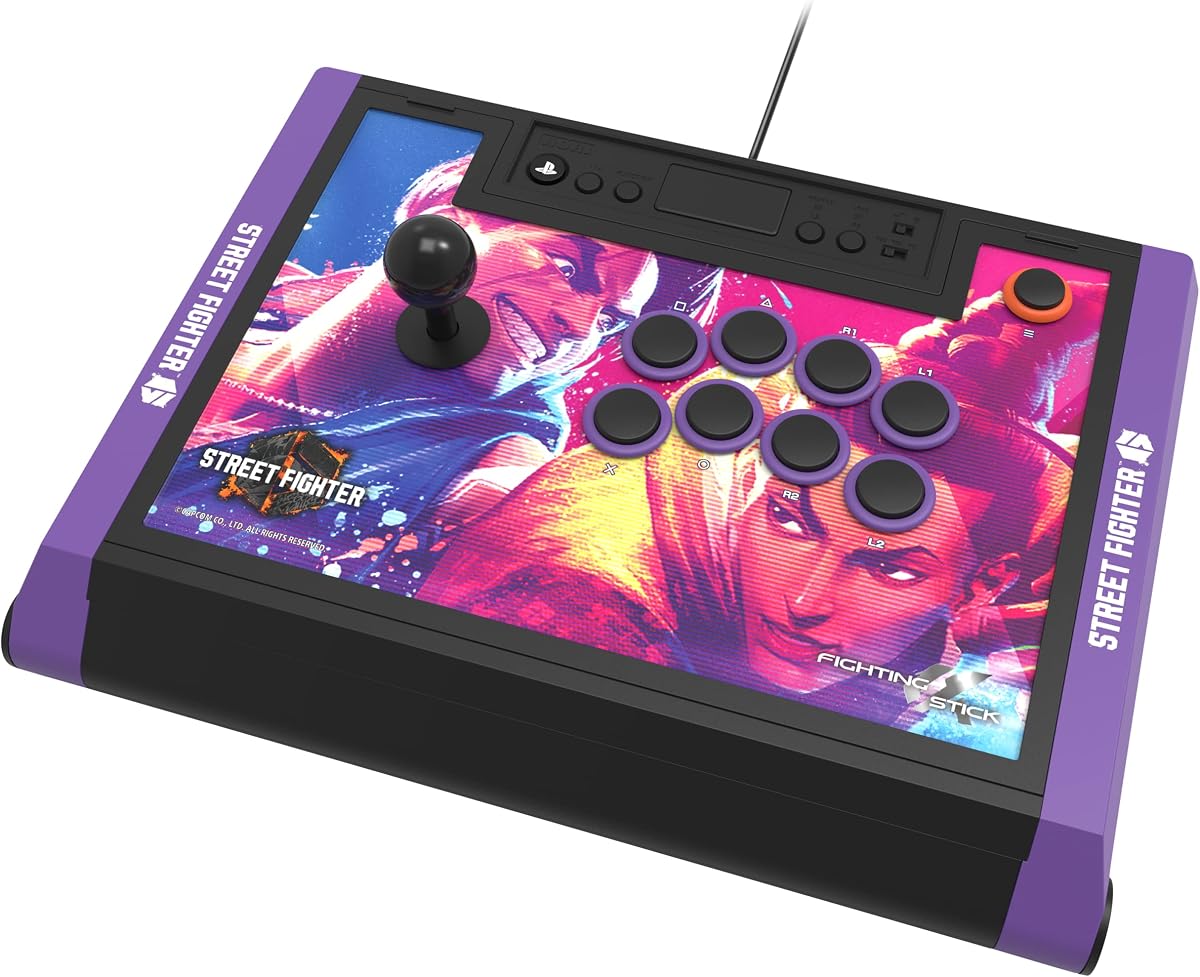
This edition of the HORI Alpha features exclusive Street Fighter 6 artwork and branding. It maintains all the high-quality features of the standard version including Hayabusa components. It is officially licensed by Sony and Capcom ensuring full functionality. The tournament-grade build quality remains consistent across all Alpha models.
We may earn a commission when you buy through this link, at no additional cost to you.
The top panel artwork is customizable via downloadable images which adds a unique touch. Players can still open the unit to swap internal parts if desired. This makes it a great choice for fans wanting both performance and style. The included link to character images enhances the customization experience.
Special edition models often cost more than the base version. The themed top panel might limit some customization options for purists. However, the performance remains identical to the standard Alpha which mitigates these concerns.
SF6 fans seeking a dedicated fightstick will love this version. It combines utility with collectible design elements. For those who want a pro stick with a personal flair this is ideal.
SF6 themed designs bring extra excitement to your setup and gaming space.
Enjoy the same top-tier performance as the standard Alpha in a themed design.
We may earn a commission when you buy through this link, at no additional cost to you.
The Qanba Q7 Obsidian 2 is an official Sony peripheral with distinct customization features. It includes Qanba OBSF buttons and a joystick that accepts Sanwa JLF tops. This allows for easy swaps to change feel and aesthetics. The 3.5mm mic input supports headsets for online communication.
We may earn a commission when you buy through this link, at no additional cost to you.
A physical switch on the unit changes modes between PS5 PS4 and PC. This ensures compatibility across systems without needing software configuration. The full control panel provides all necessary buttons for fighting games. It is built to withstand regular use while maintaining precision.
The lack of wireless connectivity limits portability for this model. The mode switch is manual which might be a minor inconvenience for some users. Despite this, the flexibility and official support remain strong selling points.
Those who prefer Qanba parts and modding will appreciate this stick. It balances quality with adaptability. For PS5 users wanting a customizable licensed option this is a good fit.
Swap joystick tops easily to adjust to your preferred height and feel.
Quickly toggle between console and PC modes with a dedicated physical switch.
We may earn a commission when you buy through this link, at no additional cost to you.
This version of the HORI Alpha is tailored for fans of TEKKEN 8. It includes official artwork and licensing from Sony and Bandai Namco. The hardware matches the standard Alpha with Hayabusa components and tournament readiness. Downloadable alternate artwork allows further personalization without opening the unit.
We may earn a commission when you buy through this link, at no additional cost to you.
The build quality is robust ensuring it lasts through intense practice sessions. You can open the stick to replace internal parts if you prefer. This combination of theme and performance makes it appealing to dedicated TEKKEN players. It functions exactly like other Alpha models.
Special editions typically carry a higher price tag than base models. The themed artwork may limit aesthetic choices for non-fans. However, the underlying performance remains elite which is the priority for serious gamers.
TEKKEN enthusiasts will find this a perfect match for their setup. It combines functional excellence with visual identity. For fans wanting a pro stick that honors the game this is recommended.
Official branding adds authenticity to your gaming setup and competition gear.
Tournament-grade construction ensures you never compromise on responsiveness.
We may earn a commission when you buy through this link, at no additional cost to you.
The GuileKeys GK-18 offers a unique leverless design with eighteen keys. This layout reduces input errors for certain types of games. It features Kailh Choc switches for a low-profile feel and fast response. The OLED screen displays mode info clearly during gameplay.
We may earn a commission when you buy through this link, at no additional cost to you.
RGB lighting allows deep customization with multiple modes and colors. Hot-swappable switches let you change the tactile feel without soldering. It includes tournament lock and macro keys to enhance control. Input latency is under one millisecond ensuring near instant reaction.
Note that an additional converter is required for PS4 and PS5 compatibility. The all-button layout requires adjustment if switching from a joystick. These are standard considerations for leveragingless devices that benefit some players.
Players seeking innovation and customization should consider this stick. It provides a distinct alternative to traditional designs. For those interested in leverless play on PS5 this offers modern features.
An all-button layout offers precision for specific fighting game techniques.
Hot-swap switches and RGB lighting let you personalize your controller feel.
We may earn a commission when you buy through this link, at no additional cost to you.
Selecting the right arcade stick depends on your gameplay style budget and customization needs. This section outlines key factors to consider before buying.
Official licensing ensures full compatibility with PS5 systems without extra hardware. Unlicensed controllers may require adapters or dongles which can add latency or fail to work.
Prioritize officially licensed products for a seamless experience on PlayStation.
High-quality components like Sanwa or Hayabusa provide precision and durability. These parts are built to withstand the physical demands of competitive fighting games.
Look for sticks that use reputable components or allow upgrades to them.
Wired sticks offer stable latency-free connection which is ideal for tournaments. Wireless options provide convenience and reduce cable clutter but require charging or batteries.
Choose wired for competitive play and wireless for casual home use.
Many sticks allow you to swap buttons or joysticks to suit your preference. Open panel designs make internal access easier for upgrades or repairs.
Consider sticks with open access if you plan to modify your setup.
Ensure the stick works with your current console and future systems. Some supports also connect to PC or Switch which adds versatility.
Check compatibility lists to avoid issues with your specific devices.
A solid build prevents the stick from sliding or tipping during play. Weighted sticks stay in place better than lightweight ones but are harder to move.
Select a weight that matches your play style and desk space.
Some models include software for button mapping and profile management. This helps tailor controls for different games without changing hardware.
Look for software support if you play multiple fighting titles.
A 3.5mm mic port allows headset connection for chat during online matches. This feature is essential for team-based games or community events.
Choose a stick with mic input if you want to talk while playing.
To use your stick connect it to your PS5 via USB and wait for recognition. If required navigate to device settings to assign it to a controller profile. Ensure you have firmware updated if supported by the manufacturer for latest compatibility.
Clean the buttons and joystick regularly to remove dust and debris. Use compressed air for internal cleaning if the panel opens. Check for wear on rubber pads and replace them to maintain grip and stability.
Store the stick in a dry safe place when not in use. Avoid exposing it to direct sunlight or extreme temperatures which can damage components. Using a cover helps protect the surface from scratches and spills during storage.
Not all sticks are natively compatible without adapters. Look for officially licensed models that mention PS5 support specifically. Some older sticks require extra dongles to function on the PS5 console.
Many PS4 fightsticks work on PS5 but only for fighting games. You may need a controller or adapter for non-fighting titles. Check the product description for PS5 compatibility details before purchasing.
Wired connections generally offer lower latency and more consistent performance. Wireless is convenient but requires charging and can suffer interference. For competitive play wired is preferred over wireless options.
Many models allow button replacement especially those with open designs. You may need specific parts like Sanwa or Hayabusa components. Always check if the stick supports part swaps before buying.
Most PS5 fightsticks also support PC via USB. They typically work as XInput or DInput devices. Check the product specs to confirm PC compatibility and required drivers.
Ensure the stick is officially licensed for PS5. Unlicensed units may not function. Try restarting the console and checking USB ports for debris. Updating firmware may resolve connection issues if available.
Some sticks include companion software on PC for remapping buttons. Others require physical switches or menus on the device. Refer to the manufacturer guide for specific configuration steps.
Street Fighter 6 Tekken 8 and Mortal Kombat 1 are top titles. These games fully support fightsticks for precise input. Check the controller requirements in game settings for optimal setup.
This guide highlights ten top models for fighting games on PS5 from budget to premium options. Each stick offers unique features that cater to different player needs and preferences.
Focus on components licensing and build quality when making your choice. These factors ensure you get a reliable tool that enhances rather than hinders your performance in matches.
Always verify current availability and listings before purchasing. Prices and stock can change quickly so confirm details on the retailer's website for the best deal.