
MATX Case, Micro ATX Case B2Pro, Full Aluminum MATX Computer Case Fits MATX/ATX/SFX Power Supply &240 Cooling
5.0Editor score
Full aluminum 3.0mm frame
Compact 17.8L capacity
Mesh side panels for cooling
Discover the top aluminum PC cases for 2026. We compare build quality, airflow, compatibility, and design to help you choose the perfect chassis for your next
Aluminum PC cases offer a premium blend of durability and style that steel enclosures often lack. Their superior thermal conductivity helps dissipate heat more efficiently while providing a sleek modern aesthetic for any desktop setup. Whether you are building a high-performance workstation or a compact gaming rig, selecting the right aluminum chassis is crucial for long-term reliability and visual appeal.
We evaluated ten top-rated aluminum cases based on material thickness, cooling potential, and component compatibility. Our analysis focuses on real-world usability including cable management, fan support, and ease of assembly. Each product was scrutinized for its structural integrity and ability to house modern hardware like E-ATX motherboards and large graphics cards without compromising airflow or aesthetics.
Every pick below highlights specific strengths such as portability, open-frame flexibility, or silent operation. You will find detailed breakdowns of specifications and practical insights for your specific needs. Please note that prices fluctuate frequently so check current listings before purchasing to ensure you get the best value for your investment today.
5.0Editor score
4.4Editor score

4.6Editor score
This side-by-side comparison evaluates the top ten aluminum PC cases available today. We break down key specifications including size, cooling support, and material quality to help you find the ideal match for your hardware requirements and workspace constraints.




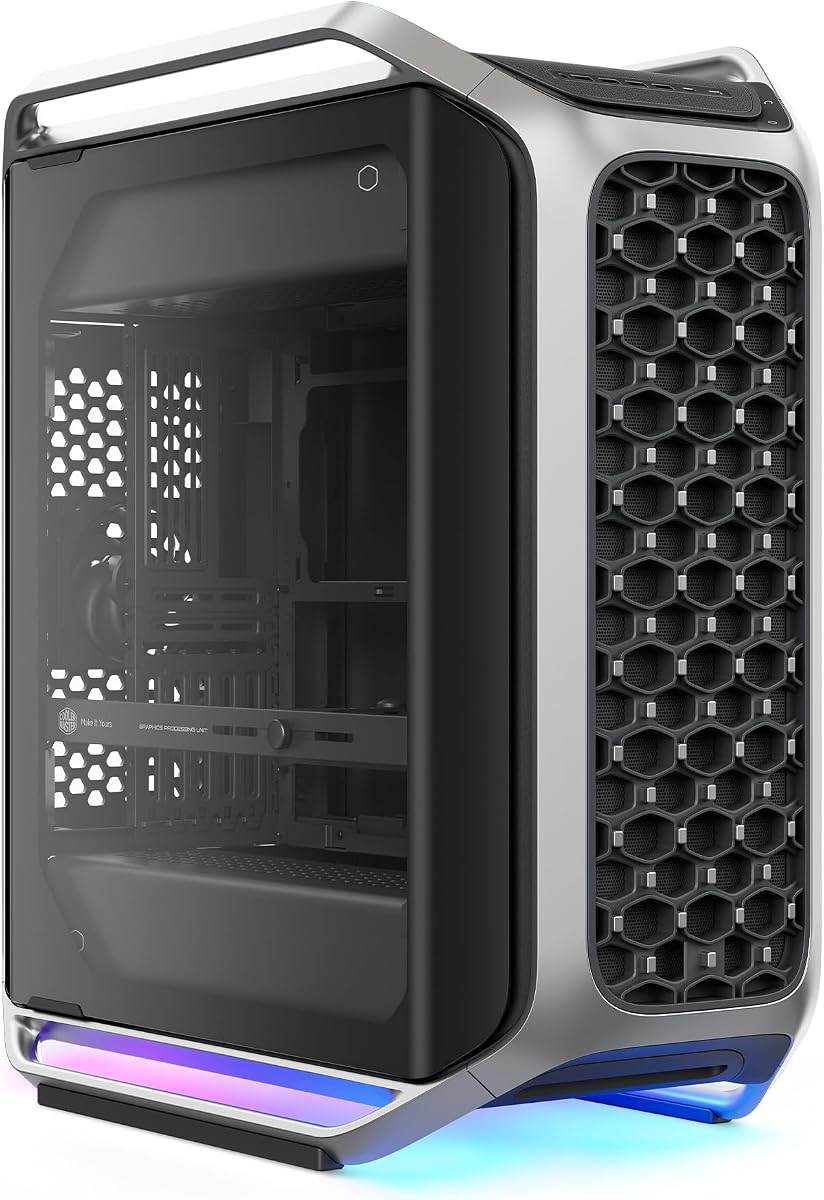
The Cooler Master Cosmos Alpha stands out as a flagship chassis combining iconic design with modern aluminum functionality. It scores high for its premium curved aluminum frame and full tempered glass panels that create a stunning visual showcase for internal components. This case is ideal for builders seeking a unique look without sacrificing thermal performance or component support.
We may earn a commission when you buy through this link, at no additional cost to you.
Its Extreme Hardware Compatibility supports E-ATX and EEB motherboards along with GPUs up to 400mm and PSUs up to 240mm. The Freeform 2.0 Rotatable Layout allows you to orient internal components left or right for optimal airflow or desk placement. This flexibility ensures your build looks great and performs efficiently regardless of how you place it on your desk.
While the Cosmos Alpha offers superior build quality, its large size may be a constraint for smaller desks. The weight of the aluminum construction also makes it less portable than compact alternatives. However, these trade-offs are acceptable for users prioritizing aesthetics and maximum component support over portability or space-saving design.
If you want a premium aluminum chassis that doubles as a display piece, the Cosmos Alpha is a top recommendation. It excels for flagship builds where hardware compatibility and visual impact matter most. Check current prices and availability to confirm it fits your specific motherboard and GPU requirements before purchasing.
The rotatable design allows custom component orientation for better airflow or aesthetic presentation.
Front I/O includes 4 USB-A and 2 USB-C ports for fast data transfer with modern devices.
We may earn a commission when you buy through this link, at no additional cost to you.
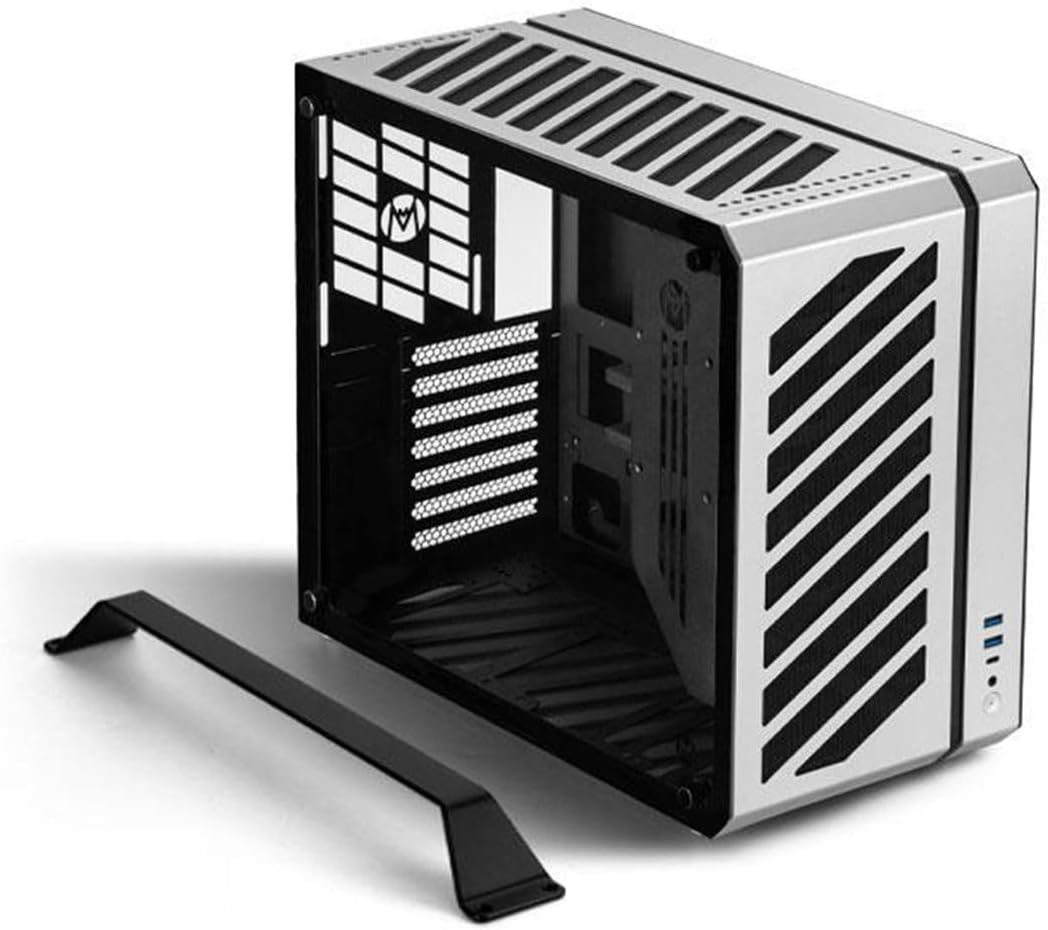
The MATX Case B2Pro delivers exceptional value with a full aluminum chassis that feels robust despite its compact 17.8L capacity. Rated 5.0 stars it features a silver anodized surface and thick 3.0mm frame that resists damage and corrosion. This makes it a great budget choice for users wanting premium materials without paying flagship prices.
We may earn a commission when you buy through this link, at no additional cost to you.
Its unique exterior design includes mesh side panels that provide perfect heat dissipation for the chassis. The footprint stand and handle design make it convenient to stand and move on the desktop. It supports MATX and ITX motherboards along with ATX or SFX power supplies fitting three-slot GPUs up to 340mm in length.
Builders should note this case is not a finished product at shipment and requires installation according to instructions. While assembly may take extra time the result is a durable portable chassis ideal for LAN parties or limited desk spaces. The trade-off of manual assembly is worth the cost savings and build satisfaction it provides.
For small form factor enthusiasts on a budget the B2Pro offers impressive aluminum quality and functionality. It balances size compatibility and thermal performance well for compact builds. Review the assembly requirements carefully to ensure you are comfortable putting it together before ordering.
At 14.61×6.61×11.26 inches it fits easily on most desks without sacrificing component support.
Mesh side panels and high tower CPU clearance ensure components stay cool during heavy loads.
We may earn a commission when you buy through this link, at no additional cost to you.
The Open Air Frame PC Test Bench is a rugged aluminum shell designed for builders who prioritize component access over enclosed aesthetics. Made from aerospace magnesium aluminum alloy with 8mm thickness it offers excellent durability and corrosion resistance. It supports standard MATX and ATX motherboards along with integrated water cooling solutions up to 360mm.
We may earn a commission when you buy through this link, at no additional cost to you.
Its open design makes installing hardware and managing cables incredibly easy without removing panels or fighting tight spaces. Metal support rods and anti-slip pads stabilize the frame on any flat surface during use. This setup is perfect for benchmarking testing overclocking or frequent component swapping in a controlled environment.
Lack of dust filters and panels means components are exposed to room debris and airflow is unfiltered. You must regularly clean parts to prevent dust buildup which can affect performance. Also note the product ships unassembled so you will need to follow instructions to set it up before use.
This case is ideal for enthusiasts or testers needing a durable platform for high-intensity hardware trials. If you value accessibility and robust aluminum construction over dust protection this bench meets those needs well. Ensure your workspace is clean to maximize the longevity of components inside this open design.
Compatible with 120 to 360mm water cooling drains for high-performance thermal management.
Fits standard MATX boards and supports four hard drives for expanded storage needs.
We may earn a commission when you buy through this link, at no additional cost to you.
The Mechanic Master C34 proves you do not need a massive chassis to build a powerful desktop with aluminum quality. Its ultra-compact design saves space while supporting standard ATX motherboards full-size PSUs and GPUs up to 335mm. A built-in carry handle makes transport to LAN events or between rooms effortless without removing components.
We may earn a commission when you buy through this link, at no additional cost to you.
Flexible cooling support accommodates air coolers up to 162mm or a 240mm liquid radiator for efficient thermal management. The internal layout is optimized for easier building with cable management space to keep wires tidy. A metal front I/O panel includes USB 3.0 and USB Type-C ports for modern connectivity.
Due to its small size installing large components may require patience and precise cable routing. Using an SFX/L power supply is recommended for a cleaner build experience though standard ATX units still fit. The compact form factor means airflow may be restricted compared to larger cases so choose components wisely.
Portability lovers seeking a small yet capable aluminum case will find the C34 compelling. It balances build quality with ease of transport in a single sleek unit. Verify your GPU and cooler dimensions fit the constraints before purchasing to avoid compatibility issues.
The integrated handle allows quick transport between workstations without disassembling your system.
Metal front I/O combines functionality with a premium feel that matches the aluminum body.
We may earn a commission when you buy through this link, at no additional cost to you.
The Cooler Master MasterFrame 500 uses a FreeForm 2.0 Aluminum Exo-structure to enable flexible configurations for any build style. This open-frame design supports everything from Mini-ITX to E-ATX motherboards making it versatile for diverse system needs. Pre-installed dual 200mm fans ensure powerful airflow right out of the box for effective cooling.
We may earn a commission when you buy through this link, at no additional cost to you.
Customization-ready features include interchangeable panels and an open layout allowing modders to personalize their setup easily. Extensive cooling support accommodates up to seven fans and 360mm radiators for strong thermal performance under load. The aluminum construction adds rigidity and a sleek aesthetic that stands out in any gaming room.
Open-frame designs inherently expose internal components to dust and accidental contact during use. You will need to clean filters and surfaces more often than with enclosed cases. While dust protection is limited the superior airflow and modularity often outweigh this drawback for performance-focused users.
For those wanting maximum airflow and modularity in a durable aluminum chassis the MasterFrame 500 is excellent. It is ideal for modders and enthusiasts who prioritize cooling efficiency over dust containment. Check component dimensions against the open frame specs to ensure a perfect fit before assembly.
Open-frame layout allows various installation scenarios to suit different desk setups or displays.
Dual 200mm intake fans deliver strong airflow to keep components cool during intensive tasks.
We may earn a commission when you buy through this link, at no additional cost to you.
The Mechanic Master C34Pro offers a rare blend of portability and E-ATX support in a compact chassis. It measures 429mm by 205mm by 349mm with a 30.6L capacity fitting 420mm GPUs and 360mm radiators comfortably. A portable carry handle makes setup and transport convenient for users who move their rig frequently between rooms or events.
We may earn a commission when you buy through this link, at no additional cost to you.
Its modular flexibility supports ATX and E-ATX motherboards with PCIe slot adjustments for MATX expansion. The multi-zone fan mounts and dust filters ensure optimized airflow for stable cooling under heavy loads. Multiple power supply mounting positions including front bottom and side allow various build layouts for better cable management.
The case uses a 2mm aluminum shell plus 1mm steel frame which is robust but mixes materials. Some users may prefer an all-aluminum enclosure for pure aesthetics or thermal conductivity. Additionally the lower rating suggests potential quirks in assembly or fit that warrant checking recent user reviews before buying.
If you need an aluminum case that fits large E-ATX boards but remains portable this C34Pro is a strong contender. It balances flagship component support with transport-friendly features better than most competitors. Verify the mixed material build meets your expectations before ordering to ensure satisfaction with your purchase.
Fits massive GPUs up to 420mm and supports high-end CPUs with large coolers.
Optimized airflow with dust filters ensures stable cooling during gaming or rendering tasks.
We may earn a commission when you buy through this link, at no additional cost to you.
The Fractal Design Define 7 XL delivers a premium full tower experience with a refined brushed aluminum front door and steel interior. It is built for silence and expansion offering room for large motherboards up to E-ATX and SSI-EEB formats. The modular layout lets you convert between storage focused and open water cooling layouts as needed.
We may earn a commission when you buy through this link, at no additional cost to you.
Its internal layout easily accommodates up to 18 HDDs and 5 SSDs in the default storage configuration. Convert to open layout for custom water loops with reservoirs and radiators up to 480mm. Versatile multi-brackets convert unused fan positions into HDD or pump mounts maximizing the utility of every corner.
This case is extremely large and heavy making it best for permanent desktop setups rather than portability. The premium aluminum finish and silent design come at a higher price point than standard cases. However the build quality and modularity justify the cost for users needing maximum storage and cooling capacity.
Workstation builders needing massive storage or silent high-end performance will love the Define 7 XL. It sets a standard for premium aluminum and steel full towers on the market. Ensure you have the physical space and budget before investing in this flagship chassis.
A refined front door with reversible hinges and magnetic latching adds a touch of class.
Multi-brackets allow unused fan positions to become mounts for drives or pumps as needed.
We may earn a commission when you buy through this link, at no additional cost to you.
The Lian Li V100-ATX brings high-end features to a mid-tower chassis with excellent user ratings of 4.8 stars. It includes four pre-installed PWM-controlled ARGB fans and an integrated LED strip for vibrant lighting options. The design supports ATX Micro-ATX Mini-ITX and back-connect ATX motherboards for cleaner cable routing and flexible builds.
We may earn a commission when you buy through this link, at no additional cost to you.
Each side panel features a tool-less mounting mechanism allowing easy and fast access to internal components. This simplifies upgrades and maintenance without needing screwdrivers or complex disassembly. It fits high-end hardware with support for GPUs up to 420mm and top radiators up to 360mm for strong cooling.
While this case offers great value and features it uses mixed materials rather than a full aluminum body. If your primary goal is an all-aluminum exterior this may not be the top choice. However the internal quality and tool-less design make it a solid option for mainstream builders seeking premium features.
For users prioritizing ARGB lighting ease of use and flexible motherboard support the V100 shines. It balances cost and performance effectively for most mid-range systems. Verify the material composition meets your aesthetic preferences before purchasing if aluminum is a hard requirement.
Comes with 4x ARGB fans and a 26-LED strip synchronized with motherboard software.
Tool-less mounting on side panels streamlines your build and upgrade process significantly.
We may earn a commission when you buy through this link, at no additional cost to you.
The LIAN LI O11D EVO is a hybrid case using tempered glass and aluminum to create a stunning visual showcase. You can remove the front support pillar for an uninterrupted view of internal components without losing structural integrity. It provides ample room for the latest gaming hardware with massive GPU clearance and seven expansion slots.
We may earn a commission when you buy through this link, at no additional cost to you.
Two 1.5mm L-shaped RGB strips sit at the top and bottom of the tempered glass for customizable lighting. Builders benefit from adjustable motherboard height options that offer different fan and CPU cooler configurations. The cable management system includes Velcro straps and dual-layered clips to tidy up both large and small cables efficiently.
While the aluminum parts add durability the glass panels require frequent cleaning to keep dust from being visible. The removed support pillar improves aesthetics but might worry users preferring maximal rigidity. These trade-offs are acceptable for those prioritizing visual impact and easy cable management in a premium chassis.
If you want a chassis that displays your build with style and supports high-end components this O11D EVO is ideal. It balances aluminum rigidity with glass transparency perfectly for modern gaming setups. Check your GPU size against the 455mm clearance to ensure compatibility before ordering.
Removable front pillar allows an uninterrupted view of your components without affecting stability.
Dual-layered clips and a protruding PSU bracket provide extra space to organize cables neatly.
We may earn a commission when you buy through this link, at no additional cost to you.
The JOYJOM Mini ITX Case is an ultra-compact aluminum chassis with only 4.3L capacity for true small form factor builds. It includes a PCIe 3.0 Riser cable to fit your graphics card in this tight space. The body uses 2.0mm aluminum alloy providing good heatsink performance and a beautiful appearance for minimal desk setups.
We may earn a commission when you buy through this link, at no additional cost to you.
It supports standard ITX motherboards and FLEX small 1U power supplies along with GPUs up to 17cm in length. The compact dimensions make it ideal for portable rigs or media centers where space is extremely limited. Cable management is simple due to the small internal volume but requires careful planning during assembly.
Builders must ensure their GPU cooler and PSU meet strict size constraints to avoid fitting issues. The aluminum construction dissipates heat well but internal fans may be needed for high-power GPUs. This case is perfect for users prioritizing minimalism and portability over maximum component support or airflow.
For hobbyists seeking the smallest possible aluminum build this JOYJOM case delivers excellent value and design. It simplifies portable gaming or media setups significantly. Verify all component dimensions match the narrow specs before purchasing to ensure a successful and compact build.
At just 7.3×4.1×8.8 inches it fits in bags or tight spaces easily.
Includes the case and PCIe riser cable so you have essential parts for assembly.
We may earn a commission when you buy through this link, at no additional cost to you.
Choosing the right aluminum PC case involves weighing several factors that impact performance aesthetics and usability.
Look for cases with thick aluminum frames typically above 2mm to ensure durability and rigidity. Thicker material resists bending and helps dissipate heat more effectively than thinner alternatives.
Prioritize models with high-quality anodized or brushed finishes to protect against corrosion and enhance longevity.
Verify that the case supports your intended motherboard size such as ATX E-ATX or Mini-ITX to avoid fitting issues. Some aluminum cases are designed specifically for micro or mini formats while others support full towers.
Check the manual or product specs to confirm clearance for large boards and expansion slots before purchasing.
Aluminum conducts heat well but airflow design matters for cooling internal components during heavy loads. Mesh panels or open-frame designs allow better air circulation compared to solid enclosures.
Ensure the case supports enough fans or radiators to maintain safe temperatures for your CPU and GPU.
If you plan to transport your PC to events or different rooms look for integrated handles or compact dimensions. Aluminum cases can be heavy so handles help move the chassis without risking damage.
Consider the total weight and size relative to your carrying method to ensure convenient transport.
Evaluate the number of drive bays and expansion slots available for future upgrades like extra storage or PCIe cards. Modular aluminum designs allow you to reconfigure internal layouts as your needs change over time.
Choose a chassis with flexible mounting options to accommodate new components without needing a new case.
Look for features like tool-less panels and rubber grommets that simplify build and cable organization. Good cable management keeps airflow clear and reduces dust accumulation inside the case.
Read reviews about build ease to avoid models that require complex assembly or tight cable routing.
Decide whether you prefer a minimalist aluminum look or something with glass panels and RGB lighting. The style should match your desk setup and personal preference for visual impact.
Consider how the case will fit into your room and if the design complements your existing hardware.
Aluminum cases range from affordable budget options to premium high-end models so set a realistic budget early. Compare features like included fans and mounting options to find the best value for your money.
Prioritize build quality and performance over flashy features if your main goal is reliability and cooling.
Always handle the case gently to avoid scratching the aluminum finish or stressing the frame during assembly. Place it on a stable surface and secure panels firmly to prevent vibration damage while in use.
Clean dust regularly from filters and aluminum surfaces using compressed air or a soft cloth to maintain airflow. Avoid harsh chemicals that might corrode or dull the finish over time as proper cleaning extends lifespan.
Ensure your components are mounted securely without forcing screws or panels to prevent warping. Check all mounting points before powering on to avoid internal shorts or mechanical failures during operation.
Aluminum cases generally dissipate heat more efficiently due to better thermal conductivity. However effective cooling also depends on airflow design fan placement and panel materials like mesh or glass.
Use compressed air to blow dust from vents and internal components regularly. Wipe the exterior with a soft microfiber cloth dampened with mild soapy water then dry thoroughly.
Quality aluminum cases feature anodized or coated finishes that resist corrosion and rust. Proper maintenance and avoiding moisture exposure will keep your case looking new for years.
Yes aluminum cases often support water cooling radiators up to 360mm or more depending on the model. Check specific radiator mount locations and clearance for your chosen cooling loop components.
Many aluminum cases include handles and compact designs making them ideal for transport. Ensure the case is sturdy enough to protect components during frequent movement and setup.
Most aluminum cases weigh between 10 and 20 pounds depending on size and thickness. Larger full towers may exceed this so consider portability if you move your system often.
We highlighted top aluminum cases like the Cooler Master Cosmos Alpha for premium builds and the MATX Case B2Pro for budget-conscious users. Each option offers unique strengths in materials cooling and design to fit different needs.
Prioritize compatibility and thermal performance first then consider aesthetics and portability features. Matching the case to your hardware and usage ensures satisfaction and long-term reliability for your system.
Always check current prices and availability before buying as deals change frequently. Review recent user feedback to confirm the case meets your expectations for build quality and features today.