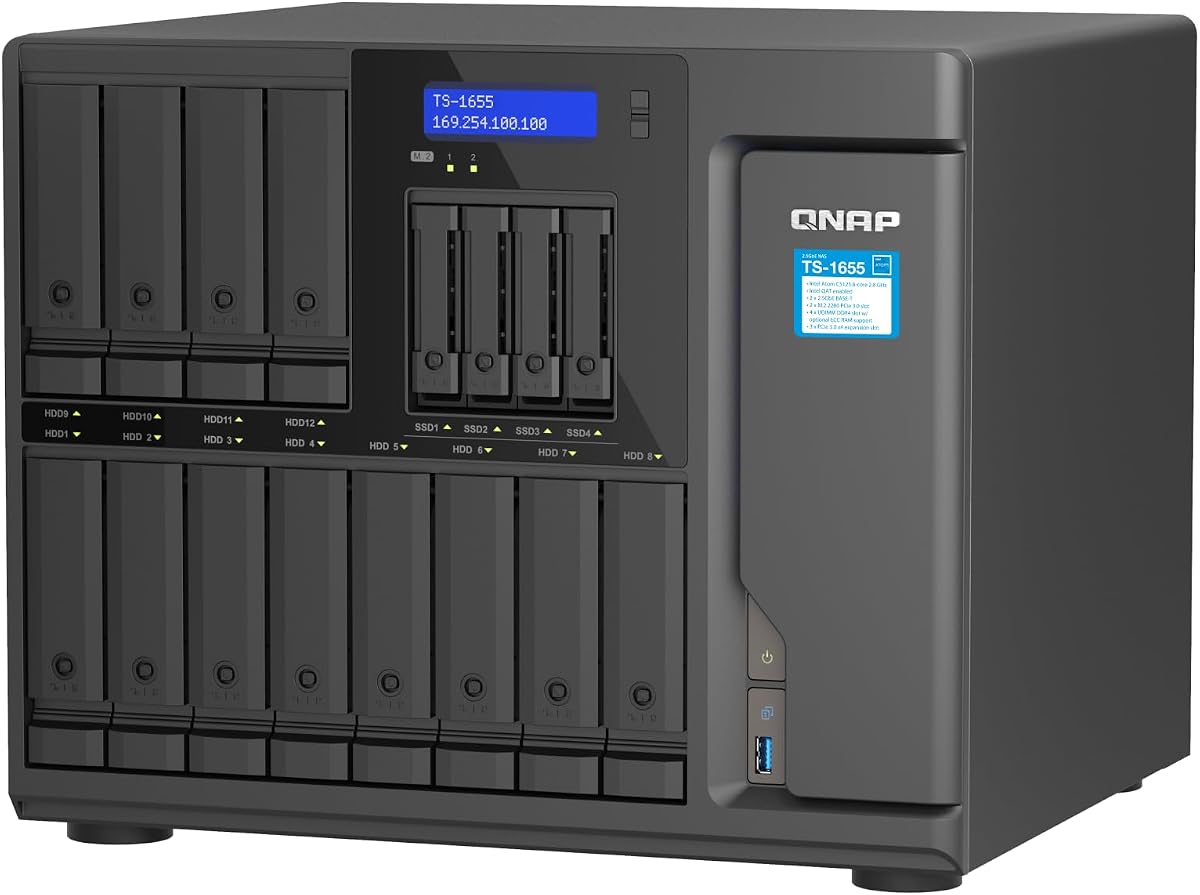
QNAP TS-1655-8G-US
4.5Editor score
Intel Atom 8-core processor
Upgradable to 128GB RAM
Dual M.2 NVMe slots
Discover the top 16 bay NAS enclosures for enterprise and home labs. We compare features, performance, and scalability to help you choose the right storage
Finding the right storage solution for your data needs is crucial in today's digital landscape. Whether you are managing a home lab or an enterprise server, a robust enclosure ensures reliability. These devices provide the foundation for scalable storage systems.
We evaluated leading models based on capacity, connectivity, and build quality. Our analysis covers diverse options from budget-friendly DAS units to high-end rackmount systems. Each product was selected for its ability to handle demanding workloads effectively.
Every pick highlights key strengths and potential trade-offs for informed decisions. Prices and availability fluctuate, so verify current details before purchasing. This guide helps you navigate the complex market of high-capacity storage enclosures.
4.5Editor score

4.5Editor score

4.3Editor score
This table provides a side-by-side view of the top ten enclosures. It highlights essential specifications like drive count, interface type, and form factor to simplify your selection process.


This QNAP Hybrid NAS offers exceptional performance for power users needing robust storage. It supports 12 3.5-inch and 4 2.5-inch drives, providing versatile capacity options. The Intel Atom processor ensures smooth operation for virtualization and media tasks.
We may earn a commission when you buy through this link, at no additional cost to you.
Its standout features include dual 2.5GbE ports for accelerated file access and large backup tasks. The dual M.2 NVMe slots allow for SSD cache acceleration or dedicated storage pools. This flexibility makes it ideal for demanding enterprise workflows and creative studios.
While the price is premium, the long-term availability and ECC RAM support justify the investment. Users should note that initial configuration requires familiarity with QNAP systems. However, the system stability and feature set make it a top choice.
Ideal for professionals requiring high reliability and expandability in a single unit. This model balances raw power with practical storage management tools. We recommend it for those prioritizing performance over budget constraints.
The mix of SATA and NVMe slots allows you to optimize speed and capacity. SSDs can be used for caching to improve overall system responsiveness.
Dual 2.5GbE RJ45 ports ensure fast data transfers. This is crucial for multi-user environments handling large video files or databases.
We may earn a commission when you buy through this link, at no additional cost to you.
The Synology RS4021xs+ is designed for business continuity and high-performance computing. It supports up to 234,698 random read IOPS. This makes it suitable for compute-intensive services and virtual machines.
We may earn a commission when you buy through this link, at no additional cost to you.
Its 8-core Intel processor and dual PCIe slots allow for significant customization. You can add M.2 NVMe cache adapters or high-bandwidth network cards. The redundant power supplies ensure uptime during power failures.
The price reflects its enterprise capabilities and support. It requires a professional rack setup which adds to the total cost. However, the reliability and scalability are unmatched in this class.
Best for enterprises needing robust, scalable storage with minimal downtime. This unit is a heavy investment but pays off in stability. It is our top premium pick for serious business environments.
Supports up to 40 drive bays with two RX1217(RP) units. This allows growth as data needs increase without replacing the main unit.
Redundant power supplies are critical for business continuity. This feature prevents data loss or service interruption during hardware failures.
We may earn a commission when you buy through this link, at no additional cost to you.
This CENMATE enclosure is ideal for individuals needing extensive storage without complexity. It supports 2.5/3.5 inches HDD and SSD with up to 240TB capacity. The USB 3.0 interface ensures fast data transfers up to 5Gbps.
We may earn a commission when you buy through this link, at no additional cost to you.
Built with aluminum-alloy materials, it includes three cooling fans for security. This design maximizes data safety while keeping temperatures stable. The daisy chain feature allows expansion up to 720TB with three devices.
While cost-effective, users should be aware of fan noise around 40-50 decibels. It may not suit noise-sensitive environments. However, the value proposition is excellent for home labs or backups.
Perfect for budget-conscious users needing high capacity. It offers robust hardware for a fraction of enterprise costs. We recommend it for personal or small office use cases.
Each bay supports up to 20TB drives. Daisy chain expansion offers further growth potential without needing new ports.
Three built-in fans prevent overheating during heavy use. This is vital for maintaining drive longevity in a 12-bay unit.
We may earn a commission when you buy through this link, at no additional cost to you.
The Synology DX1222 is a dedicated disk expansion unit designed to work with specific Synology DiskStation models. It allows you to add 12 drive bays to your existing system. This modular approach is perfect for growing businesses.
We may earn a commission when you buy through this link, at no additional cost to you.
Configuration is done via Synology DSM unified tools. You can manage new storage in minutes without technical expertise. The 5-year warranty provides peace of mind for critical data.
This unit is not a standalone NAS but relies on a main controller. Users should check compatibility before purchasing. It is an investment in a larger ecosystem.
Best for expanding existing Synology infrastructure. It simplifies scaling storage without replacing the entire server. Highly recommended for those already using DSM.
Designed specifically for selected Synology units. It works out of the box when connected to a compatible DiskStation.
Unified tools allow centralized storage management. Admins can expand capacity without complex networking setups.
We may earn a commission when you buy through this link, at no additional cost to you.
This Full Tower case is perfect for DIY enthusiasts building custom NAS solutions. It supports up to 15 hot-swappable hard drives. The chassis accommodates various motherboard sizes from ITX to EATX.
We may earn a commission when you buy through this link, at no additional cost to you.
The 1.0mm SGCC material ensures durability. It includes slots for GPUs and multiple USB ports. This makes it versatile for workstation tasks beyond just storage.
Shipping takes 30-40 days which is a significant wait. You will need to source PSU and motherboard separately. This adds complexity but offers total control over specs.
Ideal for those wanting a custom build with maximum flexibility. It supports heavy hardware configurations. Recommended for experienced builders needing expandable chassis.
Supports multiple motherboard form factors and GPUs. This allows for high-performance computing in addition to storage.
Drive bays are hot swappable for easy maintenance. You can replace drives without shutting down the system.
We may earn a commission when you buy through this link, at no additional cost to you.
The Asustor Lockerstor 10 is designed for enthusiasts requiring high bandwidth. It features AMD Ryzen processor and ECC DDR5 RAM. Dual 10GbE ports allow for massive data throughput.
We may earn a commission when you buy through this link, at no additional cost to you.
Support for four NVMe SSDs enables dramatic cache acceleration. This is useful for databases and video editing workflows. USB4 ports provide professional connectivity for external storage.
While it has only 10 bays, the speed and efficiency are significant. It is optimized for 4K/8K media and AI tasks. The price reflects its high-end components.
Best for creative studios needing speed. It supports heavy virtualization and containerized applications. Highly recommended for power users prioritizing performance.
Dual 10GbE and 5GbE ports ensure link aggregation. This is critical for multi-user environments handling heavy traffic.
ECC memory ensures system stability for mission-critical workloads. This helps prevent data corruption during long operations.
We may earn a commission when you buy through this link, at no additional cost to you.
The Synology DS3622xs+ consolidates backups and virtual machines. Its 6-core Intel Xeon processor offers capable performance. You can leverage up to 48 GB memory for efficiency.
We may earn a commission when you buy through this link, at no additional cost to you.
Scale up to 36 bays using two DX1222 expansion units. This supports growth for large enterprises. Networking options include 10/25GbE and Fibre Channel.
While the price is high, the features justify it for businesses. It offers robust tools for video management systems. This unit is a solid server solution.
Ideal for businesses needing reliable server power. It supports extensive memory and networking upgrades. Recommended for admins managing critical data assets.
Can scale up to 36 drive bays with expansion. This provides room for data growth without new infrastructure.
Over 260,000 random read IOPS for speed. This ensures quick access to virtual machines and backups.
We may earn a commission when you buy through this link, at no additional cost to you.
The QNAP TL-R1600PES-RP-US is a 3U short depth rackmount JBOD. It supports 16 3.5-inch SATA drives for petabyte storage. This design fits well in small media cabinets.
We may earn a commission when you buy through this link, at no additional cost to you.
Redundant power supplies ensure stable operation. The Mini-SAS HD interface connects to QNAP NAS systems. It allows flexible expansion without changing core systems.
Note that the rail kit is sold separately. This adds to the setup effort. However, the space efficiency is excellent for crowded server rooms.
Best for server rooms with space constraints. It offers reliable storage with redundancy. Recommended for enterprises needing petabyte-level capacity.
Short depth design fits small cabinets. This makes it easy to install without major remodeling.
Redundant power supplies ensure service continuity. Stable power is critical for server uptime.
We may earn a commission when you buy through this link, at no additional cost to you.
This TL-D1600S is a high-performance desktop JBOD. It supports 12 3.5-inch and 4 2.5-inch drives. The included QXP-1600eS PCIe card connects directly to servers.
We may earn a commission when you buy through this link, at no additional cost to you.
Designed for Windows and Linux computers. It provides a simple way to add massive storage. The SATA 6Gbps speed ensures fast file access.
Users need an available PCIe slot. This limits use to desktops with expansion slots. However, the performance and ease of use are strong.
Ideal for workstations needing extra capacity. It connects directly to computers for speed. Recommended for desktop users avoiding cloud storage.
PCIe interface ensures direct and fast connection. This avoids bottlenecks from external USB interfaces.
Compatible with Windows, Linux, and servers. It offers great flexibility for various environments.
We may earn a commission when you buy through this link, at no additional cost to you.
The QNAP TS-1655-8G-US delivers high performance. It supports long-term availability for business planning. The Atom processor ensures efficient handling of tasks.
We may earn a commission when you buy through this link, at no additional cost to you.
Dual 2.5GbE ports accelerate intensive file access. Dual M.2 NVMe slots allow for SSD storage pools. This offers great flexibility for storage needs.
Upgradability to 128GB RAM supports large workloads. It is reliable for virtualization and media transfer. The build quality is robust.
Best for those planning long-term growth. It offers stability for mission-critical environments. Highly recommended for enterprises seeking reliability.
Long-term availability ensures consistent support. This is vital for businesses planning years ahead.
Upgradable to 128GB ECC RAM for large workloads. This supports complex applications and virtualization.
We may earn a commission when you buy through this link, at no additional cost to you.
Selecting the right enclosure depends on specific needs. We analyze key factors to help you choose the perfect model.
Consider the physical size of drives you plan to use. Most enclosures support both 2.5 and 3.5-inch drives. Check the maximum supported capacity per bay.
Verify that your selected model handles the drive size and weight you need.
Network speed directly impacts data transfer rates. Look for 10GbE or higher for professional use. USB 3.0 or better is essential for DAS units.
Higher speeds ensure smooth performance for video editing or large backups.
Decide between desktop, tower, or rackmount units. Rackmount units save space in server rooms. Desktop units fit under a desk easily.
Ensure your physical space can accommodate the chosen form factor.
Efficient cooling prevents drive overheating. Active fans are common in high-bay units. Check decibel ratings if noise is a concern.
Balance cooling efficiency with acceptable noise levels.
Choose a unit that can grow with your needs. Look for expansion options or daisy chain support. Modular designs allow adding storage later.
Scalability protects your investment against future data growth.
Durable materials like aluminum improve longevity. Metal cases dissipate heat better than plastic. Check warranty terms for peace of mind.
Invest in solid construction to protect expensive drives.
Redundant power supplies prevent outages in business settings. Ensure the PSU wattage meets the drive requirements. High-end units often include dual PSUs.
Reliable power is critical for uninterrupted data access.
Some units are NAS appliances with built-in OS. Others are JBOD enclosures requiring a host OS. Ensure compatibility with your operating system.
Software tools streamline setup and management significantly.
Start by placing the unit on a stable, flat surface. Ensure there is adequate airflow around the vents to prevent overheating.
Insert drives carefully according to the hot-swap instructions. Label each drive to make identification easier during maintenance.
Monitor temperatures regularly using the provided tools. Update firmware to ensure security and performance stability.
NAS units include their own operating system and network connectivity. DAS units connect directly to a host via USB or PCIe. NAS allows shared access while DAS is local.
Most units listed support hot swapping. Check the specific specs to confirm. This feature allows replacing drives without shutting down the system.
Consumption depends on drive count and activity. Typically, expect 100W to 300W. Redundant power supplies add to the overall power draw.
Some units include SATA or PCIe cables. Others use USB or Mini-SAS HD. Check the package contents to ensure you have the necessary cables.
Exceeding limits can cause data loss or hardware damage. Always stay within supported drive capacities. Refer to the manufacturer guidelines.
Enable encryption features if available. Regular backups protect against failures. Strong admin passwords and updates are essential.
We have reviewed ten top options for high-capacity storage. Each offers unique features for different budgets and needs.
Prioritize connectivity and cooling when making your choice. Reliability should be your main focus for business data.
Prices change frequently, so check current listings before buying. We hope this guide helps you secure the right storage solution.