
Anycubic Kobra 3 Camera
4.5Editor score
DIY frame replacement option
Compatible with Kobra series
Ultra clear resolution
Compare the top 3D printer camera for remote monitoring to ensure print success with HD video, time-lapse features, and reliable app integration.
Monitoring your prints remotely helps catch issues early and saves material waste. A good camera offers clear visuals, easy setup, and stable connectivity for peace of mind.
We reviewed ten popular cameras based on compatibility, resolution, app features, and user feedback to find the best options for various printer brands and budgets.
Each pick highlights key strengths and weaknesses to help you decide quickly. Note that pricing and availability may change so check current listings before buying.
4.5Editor score

4.3Editor score

4.5Editor score
This side-by-side table lists key specifications for all ten cameras including compatibility resolution connection type and special features to help you compare at a glance.




The Creality Official Nebula Camera stands out with its WiFi connection and auto time-lapse features making it a top choice for remote monitoring. It offers a compact design and hassle-free setup using the Creality Cloud app for seamless tracking of your prints from anywhere.
We may earn a commission when you buy through this link, at no additional cost to you.
This camera excels at automating time-lapse videos without extra settings so you can capture every layer automatically. The built-in 940nm infrared fill light ensures clear night vision allowing 24-hour monitoring without disrupting the print environment or requiring external lights.
While the focus is manual and compatibility is mostly with Creality models the trade-off is minimal for users already in that ecosystem. The system detects anomalies and pauses prints to save material which adds significant value for safety and efficiency during long jobs.
Ideal for owners of Ender or Sonic Pad printers this camera balances features and ease of use well. It provides reliable real-time monitoring and a polished app experience so you can focus on designing rather than watching the printer run.
The embedded code system captures an image per layer so you get a time-lapse video without extra effort or setup steps.
The 940nm infrared light illuminates the bed for clear night monitoring without visible light that might disturb sleep or pets.
We may earn a commission when you buy through this link, at no additional cost to you.
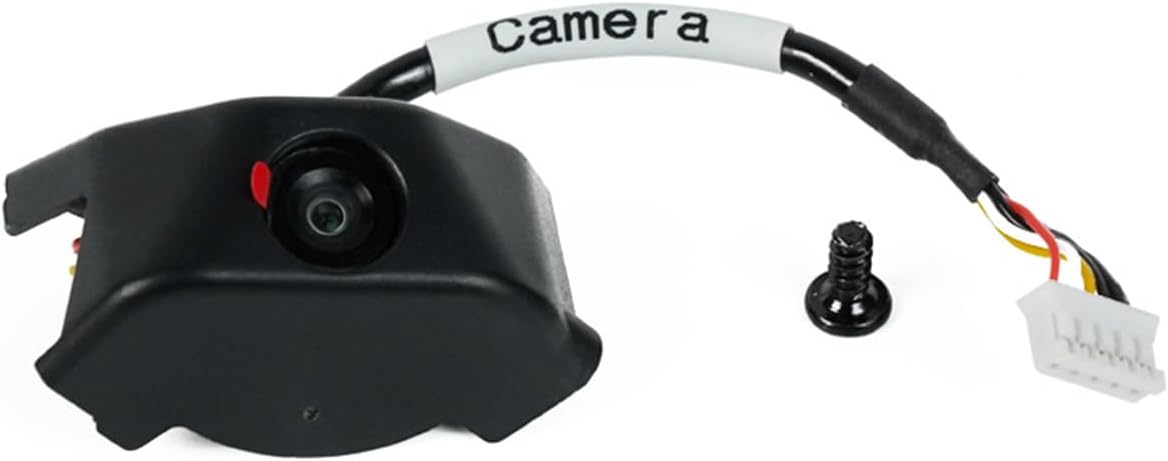
The Anycubic Kobra 3 camera offers excellent value with its ultra-clear resolution and straightforward assembly process. Users can replace the frame for a customized look while enjoying real-time monitoring through the Anycubic app to catch issues early.
We may earn a commission when you buy through this link, at no additional cost to you.
This kit works seamlessly with the Kobra 3 and series cameras printers providing clear visuals that help identify layer adhesion or filament jams quickly. The DIY frame feature adds a fun creative element letting you personalize your printer setup to match your style.
Though you need to assemble the frame yourself the instructions are clear and it only takes a few minutes to complete. Compatibility extends to Klipper printers too so you get flexibility if you plan to upgrade your firmware or hardware later on.
For budget-conscious makers who own Kobra models this camera delivers reliable monitoring without breaking the bank. Its strong rating reflects user satisfaction with the image quality and the peace of mind gained from watching prints remotely.
You can create unique frames to add personality to your printer while maintaining a solid fit for the camera unit.
The Anycubic app provides instant access to your prints on any device so you can monitor progress during work or travel.
We may earn a commission when you buy through this link, at no additional cost to you.
The Creality K1 AI Camera delivers full HD 1080P visuals optimized for the K1 series printers. It features a reserved interface for effortless installation and integrates perfectly with Creality Cloud for smooth remote monitoring and time-lapse generation.
We may earn a commission when you buy through this link, at no additional cost to you.
High-definition capture ensures every detail of your print is visible on your phone so you can spot issues like stringing or warping early. The automatic time-lapse feature logs progress and saves the video in your account ready to share with friends or social media.
Since this camera is tailored for the K1 Max it fits perfectly without needing extra mounts or cables. The simplicity of setup saves time while the clear visuals and strong connectivity provide a premium experience worth the investment for owners.
If you own a K1 printer this camera is the most convenient way to monitor remotely. It balances high quality with ease of use making it a smart upgrade for anyone wanting to enhance their 3D printing workflow.
A reserved port on the printer allows quick connection without drilling or modifying the enclosure for a clean professional look.
1080P resolution captures fine details so you can check texture quality and layer lines from a distance effectively.
We may earn a commission when you buy through this link, at no additional cost to you.
This official kit is designed for Flashforge Adventurer 5M and AD5X printers ensuring a perfect fit and full feature support. Users get real-time monitoring and process recording through the Flash Maker app which simplifies tracking prints from a browser or phone.
We may earn a commission when you buy through this link, at no additional cost to you.
Installation is straightforward with provided videos and guides so you can set it up quickly without technical headaches. The HD image quality captures clear details of your prints and the system allows you to identify issues early to save material and time.
While it is tailored specifically for Flashforge printers this exclusivity means better integration and fewer compatibility issues than third-party options. The ability to export and share videos adds value for documentation or sharing progress with your online community.
For Flashforge owners this camera kit provides a polished reliable experience. It offers the confidence of official support and seamless app integration making it a solid choice for those invested in the Flashforge ecosystem.
Being an official accessory ensures better support and firmware compatibility so you can rely on long-term updates and stability.
Capture the full print process to review later or share online which helps in learning from mistakes and showcasing achievements.
We may earn a commission when you buy through this link, at no additional cost to you.
This Nebula Camera model highlights its night vision capability allowing you to monitor prints around the clock without extra lighting. It features a manual focus lens for sharp images and connects via USB for reliable power and data transfer to your printer.
We may earn a commission when you buy through this link, at no additional cost to you.
The 24-hour monitoring support means you can track overnight prints safely and the auto switch function adjusts to low light conditions automatically. Users appreciate the clear visuals that help identify anomalies quickly so you can pause a failed print before wasting material.
While the manual focus gives you control over sharpness it may require some adjustment to get the best frame on your specific setup. Compatibility with various Creality models like Ender 3 V3 KE makes it a versatile choice for owners upgrading their setup.
Ideal for long runs or overnight printing this camera provides peace of mind with its infrared support. The combination of HD quality and practical features ensures you can stay connected to your projects at any time of day.
The built-in fill light allows clear imaging in dark rooms so you do not need external lamps during long print sessions.
A USB port connection simplifies wiring and power needs reducing cable clutter on your desk during operation.
We may earn a commission when you buy through this link, at no additional cost to you.
This camera kit offers simple remote control for Adventurer 5M and AD5X printers through the Flash Maker app. It is an official accessory designed for easy installation and smooth integration into your existing setup without requiring extra tools or complex wiring.
We may earn a commission when you buy through this link, at no additional cost to you.
Users can view printing status from anywhere which helps catch failures early and saves filament. The straightforward design focuses on essential monitoring features making it accessible for beginners or those who just want reliable tracking without extra settings.
While it lacks advanced features like time-lapse automation it covers the basics well for daily use. Compatibility is specific to certain Flashforge models but within that range it performs consistently and supports a stable connection for real-time viewing.
For Flashforge users seeking a reliable no-fuss solution this kit provides what you need. Its simplicity and official support make it a dependable choice for ensuring your prints run smoothly without constant physical checks.
The kit includes all necessary components for a quick setup so you can start monitoring your prints almost immediately.
The Flash Maker app provides an intuitive interface to view your prints from any browser or mobile device easily.
We may earn a commission when you buy through this link, at no additional cost to you.
Anycubic offers another version of its Kobra 3 camera focusing on real-time monitoring and DIY framing options. It connects via USB and supports the Anycubic app for easy viewing of your prints from anywhere. Clear resolution ensures you can spot filament jams or layer issues promptly.
We may earn a commission when you buy through this link, at no additional cost to you.
This model is compatible with Kobra 2 and 3 series as well as Klipper printers providing wide reach. The DIY frame lets you customize appearance while the support team offers technical guidance if you encounter setup issues during assembly.
While you need to assemble the frame the process is simple and documented well. The camera itself is compact and fits cleanly inside standard enclosures so you do not sacrifice interior space for monitoring capabilities.
Users looking for an affordable customizable option will appreciate this kit. It balances functionality with flexibility and the strong customer service adds confidence for long-term use in your printing workflow.
Support for multiple Kobra models and Klipper means you can use it across different setups without needing a new camera.
Access to technical support ensures you can get help quickly if you face any issues during installation or use.
We may earn a commission when you buy through this link, at no additional cost to you.
This Nebula Camera highlights anomaly monitoring which reminds you to pause prints when issues arise to avoid wasting filament. It includes night vision and HD resolution for clear visibility at all times. Setup involves connecting a USB cable and using the Creality Cloud app for WiFi access.
We may earn a commission when you buy through this link, at no additional cost to you.
Time-lapse photography captures exciting moments without extra settings making it easy to document your work. The manual focus lens allows you to adjust the image for optimal sharpness and the system supports a broad range of Creality printers including Ender 5 Max.
While the app requires initial WiFi setup the process is user-friendly and well-documented. The anomaly feature adds a layer of safety that many find valuable for longer unattended runs where issues might otherwise go unnoticed.
Users prioritizing safety and convenience will find this camera useful. Its smart monitoring features combined with clear visuals offer a balanced solution for keeping an eye on your prints remotely.
The system detects anomalies and pauses printing automatically to help prevent wasted time and material during long jobs.
Built-in time-lapse features make it easy to record prints and share progress with others without extra software.
We may earn a commission when you buy through this link, at no additional cost to you.
This Nebula Camera includes spaghetti detection which helps eliminate waste by alerting you of misprints quickly. It supports 24-hour monitoring and time-lapse photography so you can visualize progress over time. Connection is via USB and the Creality Cloud app allows WiFi control from any device.
We may earn a commission when you buy through this link, at no additional cost to you.
Manual focus ensures HD quality and lets you adjust the image for best results on your specific printer. The time-lapse feature allows you to capture the entire process and share it easily without needing external editing software.
The detection feature is useful for beginners who might not recognize a spaghetti mess immediately. However it does require the app to be logged in which adds a step during initial setup but offers great control once configured.
If you want smarter monitoring with visual documentation this camera is a strong option. Its features provide a good balance of automation and manual control for reliable remote tracking of your projects.
Advanced detection helps identify tangled filament so you can stop the print before it ruins a build plate.
Capture and share full print processes to showcase your work to friends or your community with a single click.
We may earn a commission when you buy through this link, at no additional cost to you.
This Flashforge kit provides high definition monitoring for AD5M and AD5X printers. It exports video files to USB for viewing offline and connects easily thanks to a longer cable for fits your enclosure. It integrates with the Flash Maker app for remote access.
We may earn a commission when you buy through this link, at no additional cost to you.
The HD camera offers clear visuals so you can inspect prints without being at the machine. Video export allows you to save process files physically which can be useful for documentation or sharing when online access is limited.
Installation is simplified by the cable length which reduces tension on the mount. While you must export videos manually this step ensures you keep a local copy of your prints without relying on cloud storage space.
For Flashforge owners this kit adds convenience and control. It offers official compatibility and straightforward use so you can focus on printing while the camera handles the monitoring and recording tasks.
Exporting videos to USB keeps a local backup which is helpful if you need offline access to your recorded prints.
A longer cable simplifies routing and reduces strain inside the enclosure for a cleaner installation.
We may earn a commission when you buy through this link, at no additional cost to you.
Selecting the right camera involves checking compatibility with your printer and evaluating features that matter to your workflow. This guide outlines key factors to consider before making a purchase.
Ensure the camera is officially supported by your printer model. Many cameras like the Nebula or Flashforge kits only work with specific brands and models so check the manual or product page for compatibility lists.
Matching your camera to your printer ensures stable connectivity and proper feature support like firmware integration.
Cameras typically connect via USB or directly to the printer's mainboard. USB is easy but may lack remote access without extra routers. Direct connections often offer better integration but require specific boards or adapters.
Choose a connection that fits your network setup and desired level of remote access.
Higher resolution like 1080P gives clearer views of small details which helps in spotting failures early. Low resolution might miss subtle defects that lead to ruined prints.
Prioritize HD quality if you need to inspect fine features on your prints remotely.
Infrared night vision allows monitoring in dark rooms without visible light that might disturb you or pets. This is crucial for overnight prints where you cannot rely on ambient lighting.
Look for built-in IR fill lights if you plan to print at night.
The companion app should offer real-time viewing time-lapse generation and anomaly detection. Some apps allow you to pause prints from your phone which adds a layer of safety.
Check app reviews to ensure it is stable and user-friendly before buying.
Some kits require DIY assembly or frame mounting while others plug and play. If you are not comfortable with tools choose a model with simple mounting or official brackets.
Easier setup saves time and ensures you can start monitoring quickly after delivery.
Automated time-lapse generation saves you the hassle of editing video later. Cameras with embedded systems capture each layer and compile them automatically.
This feature is great for sharing your work or reviewing print speed visually.
Reliable customer service ensures you can get help with firmware updates or hardware issues. Check warranty terms and availability of technical support.
Strong support increases the longevity of your camera and reduces frustration.
Connect the camera to your printer using the provided USB cable or port. Ensure it is securely mounted inside the enclosure so the lens has a clear view of the print bed without obstruction.
Download the official app recommended by the manufacturer and create an account. Connect the camera to your local network via WiFi following the setup instructions. Adjust the focus manually if your model supports it to optimize image clarity.
Regularly wipe the lens with a soft cloth to prevent dust accumulation. Keep the firmware updated through the app to ensure compatibility and access to new features like anomaly detection or time-lapse improvements.
No a camera is optional but useful for long or unattended prints. It helps catch failures early and saves material which is especially helpful for expensive filaments.
Yes but it may require extra software like OBS or Klipper plugins for remote access. Dedicated cameras offer better integration and easier setup for specific printer brands.
The camera connects to your home WiFi network allowing you to access the feed via an app or browser. This lets you view prints from anywhere with internet access.
Most modern cameras support automatic time-lapse recording. They capture images per layer and compile them into a video after the print finishes.
It is a feature that identifies tangled filament during printing. The camera analyzes the image and pauses the print if it detects a failure to save material.
Yes if you print overnight. Night vision uses infrared light to capture clear images in the dark without affecting the print or disturbing household members.
Not necessarily standard home WiFi works for most users. However if you plan to host high quality streams you may want a stable connection to avoid lag.
Many models save videos to the cloud or allow export to USB. Check the manual for specific steps on how to download or save your recorded clips.
We have covered ten reliable cameras ranging from budget picks like the Anycubic Kobra to premium options like the Creality K1 AI Camera. Each offers unique strengths in compatibility features and ease of use.
Prioritize compatibility with your specific printer model first then consider features like night vision or auto time-lapse based on your printing habits. A camera that fits your workflow will bring more value than one with extra features you never use.
Prices and stock may change so always check the latest listings before buying. With the right camera you can monitor prints remotely and print with confidence.