
SCRIB3D P1 3D Printing Pen with Display
4.4Editor score
Adjustable speed control
Compatible with PLA and ABS
Includes stencil book
This guide compares the best 3D printing pens for kids by safety, ease of use, and creativity features to help parents choose the right tool.
Finding the right 3D printing pen for kids involves balancing safety with creative potential. Good pens should be easy to hold, safe for younger users, and offer enough features to inspire imagination without frustration.
We evaluated each model based on safety certifications, filament compatibility, ease of use, and included accessories. Our list covers options for beginners, advanced creators, and all ages to ensure a perfect match.
Each pick highlights key strengths like speed control, display features, and safety. Note that prices fluctuate frequently, so check current listings before purchasing to ensure you get the best deal today.
4.4Editor score
4.4Editor score

4.4Editor score
Here is a side-by-side comparison of the top 10 pens to help you quickly identify the best fit for your child's needs and skill level.




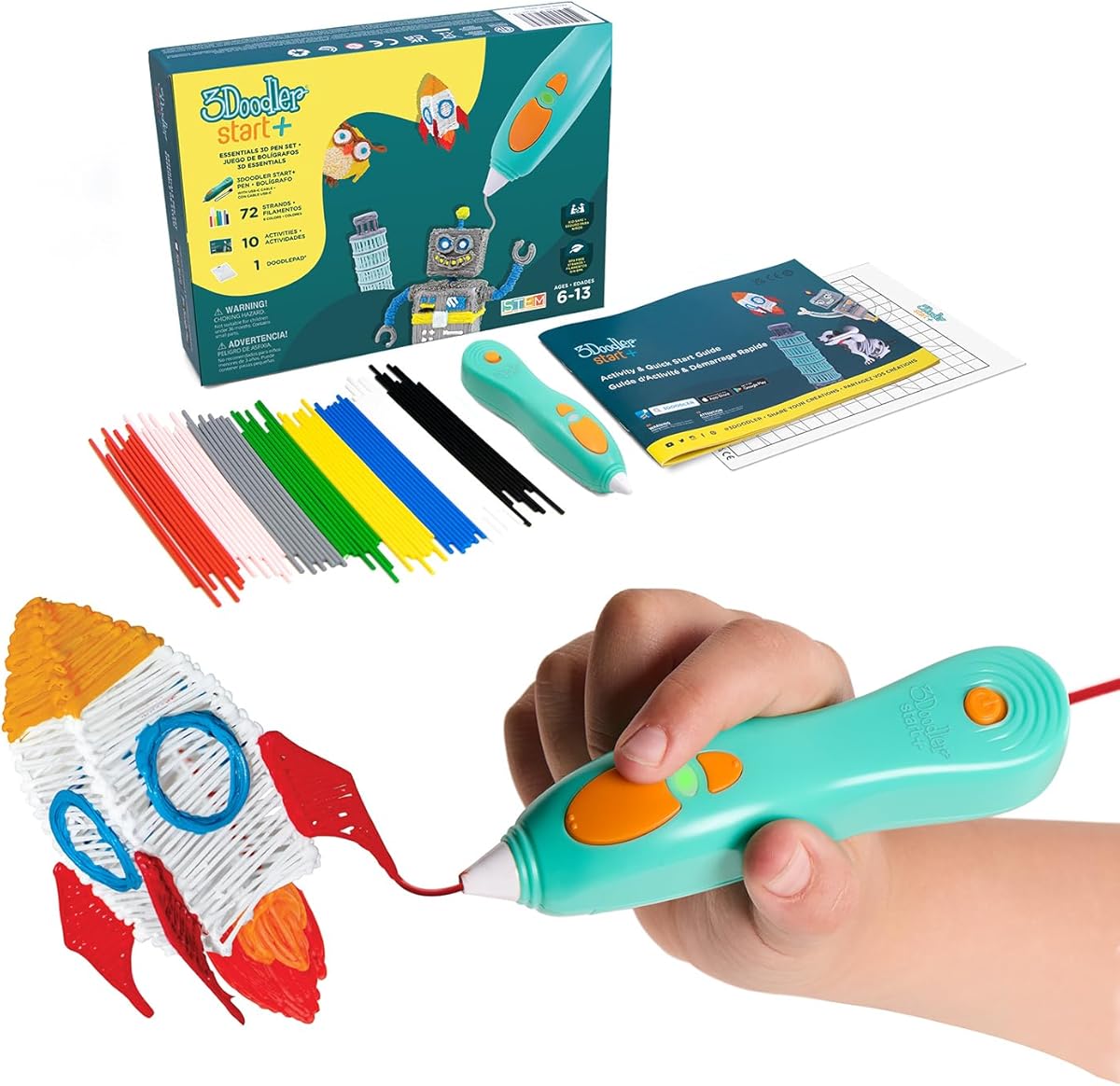
The 3Doodler Start+ Essentials 3D Pen Set is designed for kids aged 6 and up, prioritizing safety with no hot parts. It holds a strong 4.4 rating and comes with everything needed to start doodling immediately.
We may earn a commission when you buy through this link, at no additional cost to you.
This set includes a slimmer pen that charges 50% faster than previous models, along with 72 strands of mixed-color plastic and 10 new stencils. The addition of a safety stand-by mode makes it even safer for young hands to touch.
While it is priced higher than some competitors, the included accessories like the DoodlePad and USB-C cable offer excellent value. The only trade-off is that it uses proprietary filaments which may cost more over time.
Parents seeking the safest and most complete beginner experience should choose this pen. It bridges the gap between art and STEM learning without compromising on safety for children.
The pen is designed with no hot parts and a safety stand-by mode to prevent burns, making it safe for kids 6+ to handle freely.
It includes mixed-color plastics, stencils, a DoodlePad, and an activity guide so children can start creating immediately after unboxing.
We may earn a commission when you buy through this link, at no additional cost to you.
The SCRIB3D P1 3D Printing Pen with Display is an affordable yet high-grade option perfect for families. It holds a 4.4 rating and includes starter PLA filament and a stencil book to get started.
We may earn a commission when you buy through this link, at no additional cost to you.
This pen features a stepless speed function and temperature adjustments for PLA and ABS materials. The ceramic nozzle ensures high performance, while the anti-clogging features make it reliable for beginners.
The warm-up time of 2-3 minutes is slightly longer than some other models, but the auto-sleep function saves energy. It is designed to be risk-free with a 1-year guarantee and responsive customer service.
For those seeking a budget-friendly yet feature-rich pen, this is an excellent choice. It balances cost with enough advanced features to grow with a child's skills.
It supports both PLA and ABS filaments with adjustable temperature, allowing users to experiment with different materials as they advance.
The stepless speed slider and simple button layout make it easy to regulate flow for both intricate and fast projects.
We may earn a commission when you buy through this link, at no additional cost to you.
The MYNT3D Professional Printing 3D Pen with OLED Display allows users to watch their imagination come to life with precise control. It holds a 4.4 rating and features an OLED display for temperature monitoring.
We may earn a commission when you buy through this link, at no additional cost to you.
This pen offers temperature adjustments in 1-degree increments from 140 to 230 C, enabling optimal fine-tuning for different materials. The adjustable feed speed ensures optimal control of material during drawing.
The ergonomic slim pen design makes it comfortable for long sessions, but it may require a bit of practice to master the controls. It includes three colors of PLA filament and an A/C adapter to start immediately.
Advanced creators or those seeking the best precision control should choose this model. The OLED display and precise temperature adjustments justify the premium price for serious projects.
Temperature is adjustable in 1-degree increments allowing for exact control over material flow and curing for different effects.
The large OLED display lets you monitor material temperature in real time ensuring you achieve the perfect consistency every time.
We may earn a commission when you buy through this link, at no additional cost to you.
The MYNT3D Super 3D Pen is great for kids, artists, and engineers looking for reliability. It holds a 4.3 rating and features an ultrasonic sealed nozzle for market-leading durability.
We may earn a commission when you buy through this link, at no additional cost to you.
This pen turns ordinary drawings into 3D works of art with its stepless speed slider. The nozzle is nearly clog-proof and it is compatible with both ABS and PLA 1.75mm filaments.
While it does not have a display screen, its slim ergonomic touch pen ensures comfort during use. The inclusion of 3 colors of PLA filament and an A/C adapter makes it ready to go immediately.
Anyone prioritizing durability and ease of use without the need for digital displays should pick this pen. It is robust enough for daily use by various age groups.
The new ultrasonic sealed nozzle is nearly clog-proof ensuring long-lasting operation even with frequent use by active creators.
It supports both ABS and PLA 1.75mm filaments allowing users to switch between materials for different project needs.
We may earn a commission when you buy through this link, at no additional cost to you.
The SCRIB3D Advanced 3D Printing Pen features variable speed control and a large LCD screen for precise engineering. It holds a 4.3 rating and is designed for making accurate 3D models.
We may earn a commission when you buy through this link, at no additional cost to you.
This pen has an ergonomic design intended to fit your hand comfortably with a soft-touch surface. It includes 5 colors of PLA plastic and a stencil guide to ensure a smooth doodling experience.
The 8 different speed options allow for precise line thickness control, but the warm-up process is similar to other models. The 1-year guarantee ensures reliability and responsive customer service for any issues.
For users who need more control over speed and temperature for structured models, this advanced pen is ideal. It bridges the gap between beginner and professional tools.
The sleek ergonomic design with a soft touch surface is intended to fit your hand for the most comfortable drawing experience on the market.
It features 8 speed options and an LCD screen so you can monitor heat and adjust settings for accurate and creative models.
We may earn a commission when you buy through this link, at no additional cost to you.
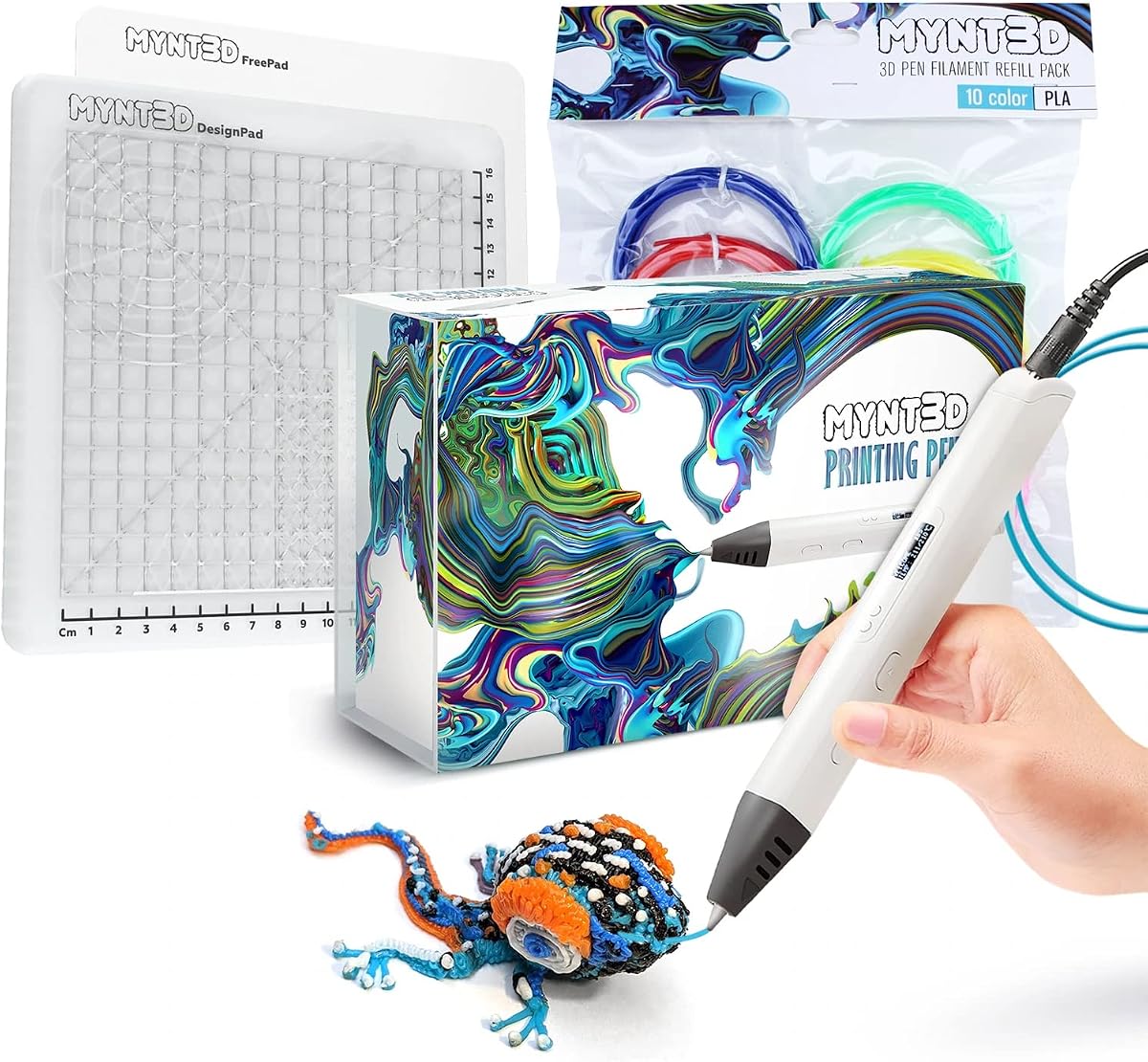
The MYNT3D Pro 3D Pen bundle includes everything needed to create like a pro with a DesignPad mat kit. It holds a 4.5 rating and offers vacuum sealed PLA in 10 vibrant colors.
We may earn a commission when you buy through this link, at no additional cost to you.
This set features stepless speed control, discrete temperature adjustability, and a replaceable sealed nozzle for long-lasting operation. The DesignPad and FreePad allow for perfect geometric shapes and tracing.
While it is a premium bundle, the included mats and 10 colors offer immense value for extensive creativity. The 1-year limited warranty and unlimited customer service ensure ongoing support.
Those looking for a complete professional package with accessories to maximize creativity should consider this bundle. It provides the tools for both tracing and freehand 3D art.
The bundle includes DesignPad and FreePad mats with channels and adhesive surfaces to help design perfect geometric shapes and trace patterns.
The 10 color PLA filaments are highest quality vacuum sealed to ensure long-lasting colors and smooth feeding without issues.
We may earn a commission when you buy through this link, at no additional cost to you.
The MYNT3D Super 3D Pen bundle combines the Super 3D Pen with a DesignPad mat kit and 10 color PLA filament. It holds a 4.4 rating and supports both ABS and PLA materials.
We may earn a commission when you buy through this link, at no additional cost to you.
This set features stepless speed control, temperature adjustability, and a replaceable sealed nozzle design. The DesignPad and FreePad allow users to trace favorite patterns and create geometric shapes easily.
While the Super pen lacks an OLED display, its clog-free operation and included mats make it great for varied projects. The 1-year limited warranty ensures reliable performance for users.
Anyone wanting a versatile bundle with multiple colors and a drawing mat for structured projects will appreciate this option. It offers a balance of professional features and value.
The bundle includes 10 different vacuum sealed PLA colors allowing users to create colorful 3D designs without buying extra supplies.
It supports both ABS and PLA materials with adjustable temperature for a wider range of creative and durable projects.
We may earn a commission when you buy through this link, at no additional cost to you.
The 3Doodler Flow 3D Printing Pen is designed for teens, adults, and creators who need advanced features. It holds a 4.1 rating and supports standard 1.75mm filaments like PLA and ABS.
We may earn a commission when you buy through this link, at no additional cost to you.
This pen features an integrated LCD for real-time temperature monitoring ensuring smooth 3D printing. It includes 8 different colors of plastic spools totaling 80 feet of filament and a comprehensive activity guide.
While it is compact and light-weight for on-the-go creativity, it is targeted more at teens and adults than young children. The user-friendly setup allows for instant creation without complex software.
Older kids and adults seeking a reliable pen with broad material compatibility and real-time monitoring should choose this model. It brings the value of engaging tactile activity to digital age users.
It is compatible with standard 1.75mm plastic filaments such as PLA, ABS, and wood offering a wide range of creative possibilities.
The integrated LCD provides real-time temperature monitoring so you can ensure smooth 3D printing and avoid clogs during use.
We may earn a commission when you buy through this link, at no additional cost to you.
The SCRIB3D P1 3D Printing Pen bundle includes a flexible silicone mat for tracing and practice. It is designed to help guide designs and support more consistent 3D pen work.
We may earn a commission when you buy through this link, at no additional cost to you.
This bundle comes with starter PLA filament, a stencil book, and a project guide to ensure a beginner-friendly setup. The durable mat is easy to wipe clean and built to handle repeated use.
The two-sided silicone surface features built-in shapes that help guide users through patterns. It makes a practical addition to a creative workspace for ongoing practice.
Those wanting a comprehensive package with a mat for tracing and practice sessions should consider this bundle. It provides the essentials for structured learning and creativity.
The mat features built-in shapes and patterns to help guide designs and support consistent 3D pen work for beginners.
It includes the P1 pen with display plus power adapter and project guide so you can begin creating right out of the box.
We may earn a commission when you buy through this link, at no additional cost to you.
The 3Doodler Start+ 3D Pen Set bundle offers over 1250 ft of additional plastic filament for extended creativity. It is completely child-safe with no hot parts and uses the safest plastic filaments.
We may earn a commission when you buy through this link, at no additional cost to you.
This set includes the pen, DoodlePad, 72 strands of mixed color filament, USB-C cable, activity guide, and 10 new stencils. It is compatible with the free 3Doodler app for stencils and instructions.
While the cost is high due to the extensive filament included, it ensures long-term fun without frequent refills. It encourages screen-free play and learning of STEM skills effectively.
Parents wanting a massive supply of filament and accessories to ensure long-term creativity should choose this bundle. It is the ultimate package for sustained creative learning and play.
This bundle includes over 1250 ft of additional plastic filament ensuring children can enjoy hours of 3D doodling without interruptions.
It is compatible with the free 3Doodler app which provides stencils templates and step-by-step instructions to aid learning.
We may earn a commission when you buy through this link, at no additional cost to you.
Choosing the right 3D printing pen requires evaluating safety, material compatibility, and ease of use to match your child's age and interests.
Safety is paramount for kids. Look for pens with no hot parts or cool-touch nozzles that prevent burns. Some pens have auto-sleep modes and safety stands to ensure safe handling by younger children.
Always check that the pen is rated for your child's age group and uses non-toxic materials.
Beginner-friendly pens should have simple controls such as buttons for feeding and retracting filament. Pens with displays or digital interfaces may be better for older kids who want more precise control.
Consider pens that require minimal setup to keep the focus on creativity rather than technical challenges.
Most pens use PLA or ABS filaments. PLA is safer and easier to use for kids, while ABS offers more durability but requires higher temperatures. Ensure the pen supports the type of filament you plan to buy.
Some pens accept standard 1.75mm filaments which are more affordable than proprietary ones.
Adjustable temperature control allows for more creative options and helps prevent clogs. However, fixed temperature pens are simpler for younger users and eliminate the risk of burns from high heat settings.
Pens with digital displays make it easier to monitor heat levels accurately.
Look for kits that include starter filament, stencils, and activity guides. These add-ons make the pen ready to use immediately and provide ideas for projects that inspire young creators.
Mats and stands help keep your workspace clean and organized.
Pens with durable nozzles and reliable motors ensure a smooth experience without frequent clogs. A solid warranty and responsive customer service provide peace of mind for parents investing in these tools.
Choose pens with proven track records for reliability if your child plans to use it daily.
Pens for younger kids should be safe to touch and simple to operate. Older kids might benefit from pens that offer more advanced features like OLED displays or multiple speed settings.
Always match the complexity of the pen to your child's developmental stage.
Higher-priced pens often include more accessories or better build quality. However, budget options can still provide excellent value if they include enough filament and support for a child to learn.
Evaluate what is included in the kit to ensure you are getting enough to start and continue projects.
To begin, plug in the pen and allow it to warm up until the light indicates it is ready. This typically takes 2-3 minutes depending on the model.
Insert a filament strand into the back of the pen and press the forward button to feed it until the plastic extrudes from the nozzle.
Always store the pen upright when not in use and clean the nozzle regularly to prevent clogs. Make sure to unplug the device before handling or cleaning.
Many pens are designed specifically for kids aged 6+ with no hot parts and cool-touch nozzles. Always check the safety ratings and choose pens with auto-sleep modes to prevent burns.
PLA filament is the safest and easiest to use for children. It melts at lower temperatures and is non-toxic compared to other materials like ABS.
Filament prices vary by brand and type. Standard PLA spools are usually affordable but some pens require proprietary filaments that may be more expensive.
Yes, many pens are versatile enough for fixing plastic items or creating decorations. They work well for small repairs around the home and creative DIY projects.
Warm-up times typically range from 2 to 5 minutes depending on the model. Some advanced pens with displays may have slightly faster or slower heat-up times.
No software is needed as these pens are analog. However, some brands offer companion apps with templates and instructions to help users create more complex designs.
Most pens are compatible with standard 1.75mm filament. Check the pen's specifications to confirm it supports generic filaments to save money on refills.
This is usually due to a clog or insufficient heat. Check the temperature settings and try cleaning the nozzle. If the problem persists, contact customer support for assistance.
Our top picks highlight the 3Doodler Start+ for safety, the SCRIB3D P1 for budget, and the MYNT3D Professional for precision. Each offers unique benefits depending on your child's age and interests.
Prioritize safety features and ease of use for younger children while opting for more control for teens and older kids. Always choose a model that includes enough accessories to start creating immediately.
Remember that prices can fluctuate so verify current listings before purchase. These pens provide a fantastic way to encourage creativity and STEM learning.