
BenQ MOBIUZ EX271U
4.2Editor score
4K resolution
165Hz refresh rate
HDR 400 support
Finding the right display can transform your gaming sessions from average to extraordinary. A Benq Monitor for Gaming offers specialized features like high refresh rates and motion clarity that give competitive players a distinct edge.
This guide evaluates ten leading models based on panel technology, response times, and connectivity options. We examine how each screen handles fast-paced action and whether it suits your specific gaming setup and preferences.
Each selection highlights unique strengths and potential trade-offs to help you decide. While prices may fluctuate over time, the performance characteristics and features discussed here remain consistent markers of quality.
4.2Editor score

4.3Editor score
4.3Editor score
As an Amazon Associate we earn from qualifying purchases.
The following comparison table provides a side-by-side view of all ten monitors to help you quickly identify key specifications and decide which model fits your needs best.


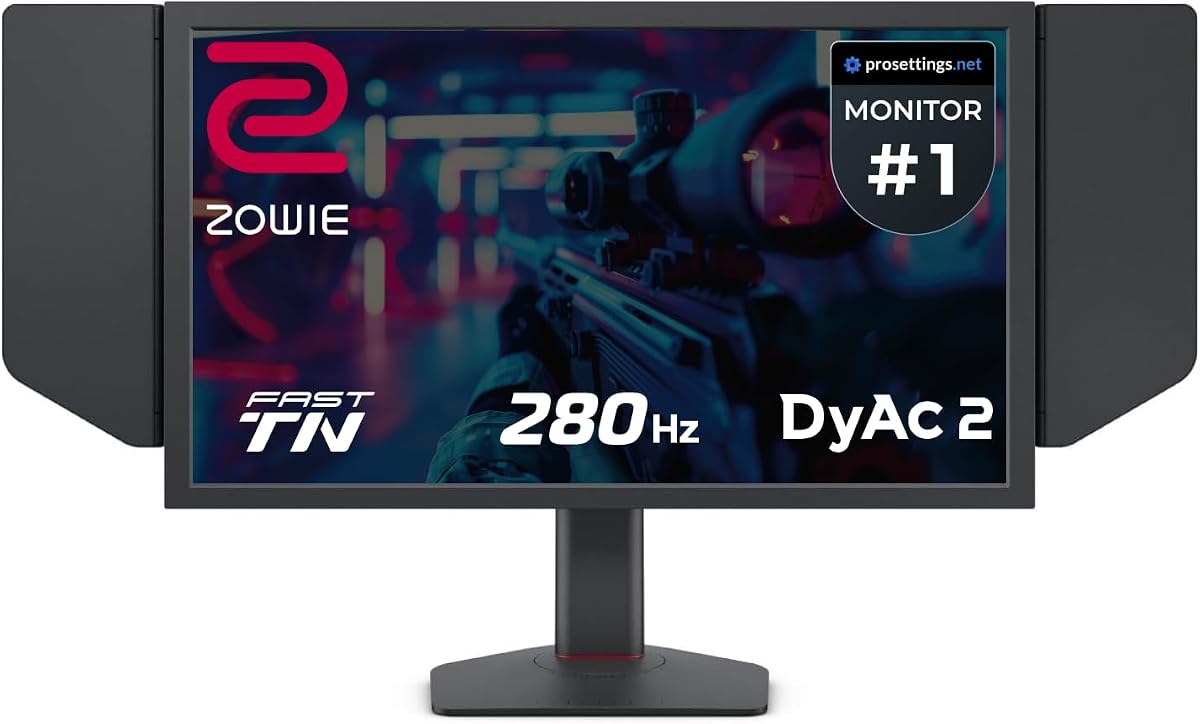
The BenQ Zowie XL2566X+ stands out as a premier choice for esports enthusiasts seeking peak visual performance. With a 4.3 rating from users, this monitor delivers exceptional motion clarity through its advanced DyAc 2 technology and Fast TN panel.
We may earn a commission when you buy through this link, at no additional cost to you.
Its design prioritizes sharp visuals and reduced overshoot, making moving images appear clearer and more defined. The panel enhances electrical conductivity to improve liquid crystal responsiveness, ensuring that enemies and targets are easily identifiable during fast-paced gameplay.
While the TN panel offers speed, it may have narrower viewing angles compared to IPS alternatives. Additionally, the native FHD resolution is standard for competitive gaming but might lack the pixel density of higher resolution screens for single-player titles.
This monitor is ideal for competitive players who prioritize frame rates and motion fluidity over cinematic detail. If your goal is to gain a competitive edge with sharper moving visuals, the XL2566X+ is a strong recommendation.
The dual backlight technology in DyAc 2 enhances blur reduction while offering a soft light output that facilitates better eye adaptation during long sessions.
Meticulous redesign improves color performance with vibrant hues and greater clarity in identifying enemies, addressing common TN panel limitations.
We may earn a commission when you buy through this link, at no additional cost to you.
The BenQ Zowie XL2546X+ is a powerful contender for those seeking high-speed performance without the absolute top-tier price tag. Rated 4.3 by users, this monitor excels in providing clear and sharper images compared to other panel types available in the market.
We may earn a commission when you buy through this link, at no additional cost to you.
Its Fast TN panel delivers sharper outlines of moving images, helping you focus on critical details without the distraction of unwanted afterimages. The design reduces overshoot effectively, enhancing liquid crystal responsiveness for smoother gameplay experiences.
The color performance has been enhanced with vibrant hues and improved clarity, though it remains a TN panel with narrower viewing angles than IPS. The 280Hz refresh rate is excellent for esports but falls short of the 400Hz capability in other models.
This monitor is best suited for gamers who need reliable speed and clarity for competitive titles. If you value focused vision and reduced motion blur at a accessible price point, the XL2546X+ delivers exceptional value.
The Fast TN panel provides clearer outlines of overall moving images, helping you focus and have less distractions from unwanted afterimage of motion in-game.
With dual backlight technology, DyAc 2 enhances performance in blur reduction while offering soft light output to facilitate eye adaptation over time.
We may earn a commission when you buy through this link, at no additional cost to you.
The BenQ MOBIUZ EX271U offers a premium experience for gamers who want high resolution alongside fast performance. With a 4.2 rating, this 27-inch monitor combines 4K visuals with 165Hz refresh rates and extensive connectivity options like HDMI 2.1 and USB-C.
We may earn a commission when you buy through this link, at no additional cost to you.
AI Detail Enhancement ensures a vibrant world tailored to your preferences, while the built-in eARC supports up to 7.1 channels for immersive audio. The KVM function allows seamless connectivity across platforms with DP 1.4 and HDMI 2.1 inputs.
While the refresh rate is high, it may not match the extreme speeds of dedicated esports monitors. The IPS panel might show slight motion blur in very fast games compared to TN panels, but it offers better color fidelity and viewing angles.
This monitor is perfect for single-player gamers who appreciate graphical fidelity and media features. If you want a single screen that handles gaming, work, and media with high resolution and sound support, the EX271U is an excellent choice.
Built-in eARC supports up to 7.1 channels to address console sound with first built-in eARC gaming monitors offering immersive audio experiences.
Plug-and-play across platforms with KVM and Color Shuttle presets boost the delicacy of your experience with seamless connectivity options.
We may earn a commission when you buy through this link, at no additional cost to you.
The BenQ Zowie XL2586X+ represents the pinnacle of speed in this lineup with an incredible 600Hz refresh rate. Users award it a 4.6 rating, praising its ability to provide the best motion clarity in the industry through Fast TN panel technology.
We may earn a commission when you buy through this link, at no additional cost to you.
Its design reduces overshoot effectively and introduces a vivid color film that improves color performance by 35%. This enhances target visibility and reduces color wash-out compared to standard TN panels, offering sharper and clearest visuals at native FHD resolution.
The 600Hz refresh rate is beyond what most PCs can currently drive, meaning you may need high-end hardware to fully utilize this speed. Additionally, TN panels generally have weaker color accuracy and viewing angles than IPS screens.
This monitor is strictly for competitive gamers who want the absolute fastest possible refresh rate. If you play at top levels and need every millisecond advantage with minimal motion blur, the XL2586X+ is a standout option.
New vivid color film improves color performance by 35%, enhancing target visibility and reducing color wash-out compared to standard TN panels.
DyAc 2 enhances performance in blur reduction while offering a soft light output that facilitates eye adaptation during long competitive sessions.
We may earn a commission when you buy through this link, at no additional cost to you.
The BenQ MA320U is a premium option designed specifically for MacBook users who want seamless integration and high-quality visuals. Rated 4.4 by users, it features a 32-inch 4K display calibrated for Apple devices with dedicated control integration.
We may earn a commission when you buy through this link, at no additional cost to you.
Its exclusive color tuning offers a vibrant P3 wide color gamut for MacBook Pro and Air models. Dual USB-C ports deliver 90W for your MacBook and 15W to charge your iPad or iPhone, acting as a versatile hub for connectivity.
This monitor is not focused on gaming features like high refresh rates or motion clarity. The 4K resolution may not scale perfectly for all fast-paced games on Windows systems without additional configuration for optimal performance.
This monitor is perfect for Mac users who also game casually and need productivity tools. If your priority is color accuracy and seamless macOS connectivity rather than competitive speed, the MA320U is an excellent investment.
Integrated MacBook Controls allow you to adjust brightness and volume directly from your MacBook keyboard for a streamlined workflow experience.
Versatile Connectivity with dual USB-C ports delivers 90W for your MacBook while supporting other devices through a single cable setup.
We may earn a commission when you buy through this link, at no additional cost to you.
The BenQ GW2790Q is a balanced choice for users who want an all-rounder display suitable for work and casual gaming. With a 4.6 rating, this 27-inch IPS monitor offers a 100Hz refresh rate and extensive eye-care features to reduce fatigue.
We may earn a commission when you buy through this link, at no additional cost to you.
Its Color Modes include Coding Mode and ePaper Mode, ensuring effortless readability during long reading sessions. The Input Hotkey allows seamless device switching between work and play with a single click, enhancing workflow efficiency.
The 100Hz refresh rate is decent for casual gaming but may not satisfy competitive shooters requiring higher speeds. IPS panels generally have slower response times than TN panels which can introduce slight ghosting in very fast scenes.
This monitor is perfect for mixed use where eye comfort and resolution matter more than extreme speed. If you spend long hours coding or working and play games casually, the GW2790Q offers excellent comfort and versatility.
Low Blue Light Plus filters out shorter higher energy blue-violet radiation harmful to the eyes while maintaining vivid color quality for viewing.
Brightness Intelligence Tech auto adjusts brightness based on content and ambient light conditions with B.I.Gen2 allowing customizable flexibility.
We may earn a commission when you buy through this link, at no additional cost to you.
The BenQ RD320U is a specialized monitor designed for professionals and gamers who value comfort and clarity during long work sessions. Rated 4.4 by users, it features a 32-inch 4K display with a Nano Matte Panel to minimize distractions and glare.
We may earn a commission when you buy through this link, at no additional cost to you.
Its advanced coding modes deliver clear fonts and better code differentiation with Dark and Light themes to reduce eye strain. The Night Hours Protection technology helps you maintain focus during dark room usage with enhanced eye protection.
This monitor is not focused on fast refresh rates needed for competitive gaming. The IPS panel may show slower response times compared to TN options and the high resolution requires powerful hardware for optimal gaming performance.
This monitor is perfect for developers or heavy text users who game casually. If your primary goal is eye comfort and clear text rendering with deep contrast, the RD320U offers an ergonomic and immersive experience.
BenQ's advanced coding modes deliver clear fonts and better code differentiation reducing eye strain for long programming or gaming sessions.
MoonHalo ensures optimal eye protection and focus with customizable color temperature brightness and light modes for ambient lighting.
We may earn a commission when you buy through this link, at no additional cost to you.
The BenQ GW2486TC is an office-focused display that balances utility and comfort for everyday tasks. Rated 4.4 by users, this 24-inch monitor features an edge-to-edge display and exclusive Eye-Care technology to reduce fatigue during extended use.
We may earn a commission when you buy through this link, at no additional cost to you.
It includes a Built-In Noise Cancellation Microphone to reduce background noise with one click. USB-C Connectivity allows you to synchronize images, videos, and data with 60W power delivery for mobile devices.
This monitor lacks high refresh rates and motion clarity needed for competitive gaming. The 1080p resolution is standard for productivity but may feel less sharp on a larger screen compared to 2K or 4K options.
This monitor is perfect for home offices that need some gaming capability. If you prioritize ergonomics and connectivity for daily work over extreme speed, the GW2486TC provides a reliable and comfortable experience.
24 Inch FHD IPS monitor features an edge-to-edge display that allows you to focus on the important stuff in work and casual play.
Brightness Intelligence optimizes display performance for work and play to protect your vision while providing a stunning image at the same time.
We may earn a commission when you buy through this link, at no additional cost to you.
The BenQ PD2706QN is designed for creatives who need precise color accuracy and consistent image quality. Rated 4.5 by users, this 27-inch IPS monitor offers factory calibration with average Delta E ≤ 2 for reliable color matching across displays.
We may earn a commission when you buy through this link, at no additional cost to you.
Its Nano Matte Panel diffuses ambient light to preserve color accuracy and reduce glare. The ICCsync feature automatically matches and syncs ICC profiles between your Mac and BenQ monitor when switching color modes for seamless workflow.
This monitor lacks high refresh rates and specialized gaming features found in other models. The 100Hz refresh rate is moderate and may not satisfy competitive gamers requiring faster response times for fast-paced action.
This monitor is perfect for designers who occasionally game and prioritize visual fidelity. If your goal is reliable color reproduction and a matte finish for eye comfort, the PD2706QN is a premium professional choice.
95% P3 and 100% sRGB with average Delta E ≤ 2 provides factory-calibrated color accuracy and intuitive color matching across displays.
Ergonomic Design allows tilt pivot swivel and height adjustments creating an ideal environment for creativity and productivity sessions.
We may earn a commission when you buy through this link, at no additional cost to you.
The Acer Nitro KG241Y is a cost-effective alternative that delivers solid gaming performance with high refresh rates. Rated 4.5 by users, this 23.8-inch monitor features AMD FreeSync Premium Technology and a 180Hz refresh rate for smooth visuals.
We may earn a commission when you buy through this link, at no additional cost to you.
Its 1ms Response time helps minimize motion blur during fast gameplay. The Zero-Frame Design ensures a wide viewing area, and VESA mounting compliance allows for flexible positioning with ergonomic tilt adjustments.
This monitor uses a VA panel which may have slower response times in dark transitions compared to TN panels. The 1080p resolution is standard but lacks the pixel density of higher resolution screens for larger setups.
This monitor is perfect for budget-conscious gamers who need high refresh rates. If you want smooth gameplay without breaking the bank and appreciate FreeSync Premium support, the KG241Y is a reliable entry-level option.
180Hz refresh rate with 1ms Response time ensures smoother user experience and minimized motion blur during intense gaming sessions.
Zero-Frame Design provides an edge-to-edge display with VESA mounting compliant options for flexible installation and viewing ergonomics.
We may earn a commission when you buy through this link, at no additional cost to you.
Choosing the right monitor involves balancing speed resolution and eye comfort features to match your gaming style and hardware capabilities.
Refresh rate measures how many times per second the screen updates the image. Higher rates like 400Hz or 600Hz provide smoother motion for competitive shooters while 100Hz to 165Hz suits casual or story-driven games.
Look for refresh rates that match your PC's output to avoid wasting potential performance in demanding titles.
Response time indicates how quickly a pixel changes from one color to another. Fast TN panels often offer 1ms response to reduce ghosting while IPS panels may vary slightly but provide better color fidelity.
Select a response time that keeps motion blur minimal without compromising image quality for your preferred genre.
TN panels offer the fastest speeds and best motion clarity but narrower viewing angles. IPS panels provide better colors and viewing angles but may have slower response times depending on the specific model quality.
Prioritize TN for esports and IPS for immersive single-player titles or mixed use cases.
Resolution determines the pixel count on the screen. FHD resolutions like 1920×1080 are standard for competitive gaming while 2K or 4K offers sharper visuals for immersive experiences at the cost of higher hardware demand.
Ensure your graphics card can handle the chosen resolution at your target frame rate for optimal performance.
Modern monitors feature HDMI and DisplayPort for video input with USB-C offering data and charging capabilities. Additional features like KVM allow switching between devices seamlessly without extra hardware.
Choose connectivity that matches your current setup and any future expansion plans for consoles or secondary PCs.
Features like low blue light filters and brightness intelligence help reduce strain during long sessions. Dual backlight technology like DyAc 2 can enhance clarity while reducing flicker effects.
Prioritize these features if you play for extended periods to maintain comfort and protect vision over time.
Stands with height tilt swivel and pivot adjustments allow you to position the screen ergonomically. Proper positioning reduces neck strain and improves posture during marathon gaming sessions.
Look for adjustable stands or VESA mount compatibility if you plan to use a custom monitor arm setup.
Gaming monitors vary widely in price depending on features like refresh rate and resolution. High-speed models are pricier but offer performance benefits for competitive players while budget options provide good value for casual gamers.
Set a realistic budget that balances must-have features with cost to get the best long-term value.
To ensure optimal performance always use high quality HDMI or DisplayPort cables that support the monitor's maximum refresh rate and resolution settings.
Avoid exposing the screen to direct sunlight or extreme temperatures as this can affect color accuracy and internal components over time.
Clean the display gently with a soft dry microfiber cloth to prevent scratches and avoid using harsh chemicals that might damage the coating.
DyAc stands for Dynamic Accuracy and reduces motion blur by adjusting the backlight to keep moving objects clear. This helps players track targets better in fast-paced shooters without sacrificing eye comfort.
Yes for competitive gamers who prioritize speed over color fidelity. TN panels still offer the fastest response times and best motion clarity making them ideal for esports titles like shooters and racing games.
4K provides sharper visuals but requires a powerful graphics card to maintain high frame rates. It is great for single-player games but may limit refresh rates if your hardware cannot sustain the pixel load.
Absolutely many gaming monitors have eye care features and adjustable stands suitable for productivity. However models designed for work may have better color accuracy for design tasks compared to fast gaming panels.
For competitive titles refresh rates of 240Hz or higher are often preferred to minimize input lag and motion blur. Most pros recommend at least 144Hz to see a clear advantage over lower rates.
Some BenQ gaming monitors support HDR like the MOBIUZ series offering DisplayHDR 400 or higher. Always check specifications as lower-end models may prioritize speed over HDR content support for general viewing.
The BenQ Zowie XL2566X+ and XL2586X+ lead the list for raw speed while the MOBIUZ EX271U offers excellent multimedia features for immersive play.
Consider your primary gaming style and hardware capabilities when choosing between high refresh rates and high resolution to get the most out of your system.
Check current availability and pricing as values change over time to ensure you secure the best deal for your specific needs today.