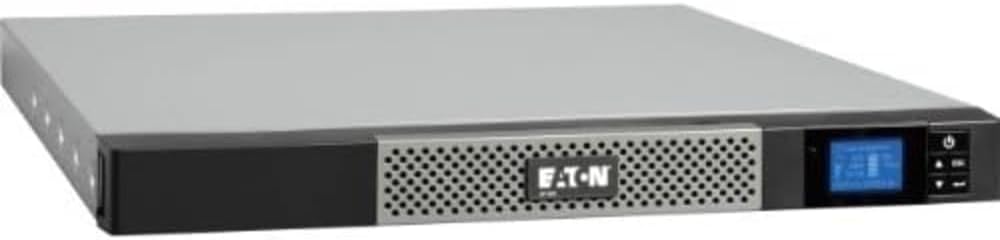
Eaton 5P 1550VA
3.6Editor score
1U rackmount design
True sine wave
AVR included
Compare the top 240V UPS systems for workstations to ensure reliable power protection for servers, workstations, and critical IT infrastructure equipment.
Finding the right power protection for your workstation is critical for maintaining uptime and preventing data loss during outages or voltage fluctuations.
We evaluated ten top models based on voltage compatibility, output waveform, runtime, and features to help you choose the best system for your needs.
Each selection highlights key strengths and trade-offs so you can make an informed decision for your specific setup and environment today.
3.6Editor score

5.0Editor score

4.0Editor score
This side-by-side comparison lists all ten models so you can quickly evaluate their core specifications and find the best fit for your workstation setup.


This model offers true online double conversion topology, making it an ideal choice for mission-critical workstations that demand absolute power continuity.
We may earn a commission when you buy through this link, at no additional cost to you.
Its pure sine wave output and zero transfer time ensure that sensitive equipment remains protected from even the slightest disturbances or interruptions.
The higher cost and specific voltage requirements are acceptable trade-offs for users needing the highest level of protection for valuable hardware.
If you need uninterrupted power for servers or workstations without any downtime, this system is a strong and reliable investment.
Online double conversion technology keeps your devices running on battery power continuously, isolating them from raw utility power completely.
The pure sine wave output ensures full compatibility with modern power supplies that use active power factor correction technology.
We may earn a commission when you buy through this link, at no additional cost to you.
This model provides true sine wave output at a very competitive price, making it a great budget-friendly option for smaller workstations.
We may earn a commission when you buy through this link, at no additional cost to you.
The compact 1U rackmount or wall-mount design allows it to fit into tight spaces where larger towers cannot be installed effectively.
While the capacity is lower than premium options, it covers essential needs for light workloads and provides solid voltage regulation.
For users needing reliable power backup without a high upfront cost, this system offers excellent value and performance.
The 1U form factor lets you mount the unit in standard server racks or on walls to save floor space.
You can adjust settings to work with 208V to 240V ranges, providing flexibility across different international power standards.
We may earn a commission when you buy through this link, at no additional cost to you.
This model is a powerhouse with 5000VA capacity, perfect for large workstations or server racks that draw significant power continuously.
We may earn a commission when you buy through this link, at no additional cost to you.
Its multiple outlet configurations including L6 and L14 connectors allow you to connect a wide variety of high-power equipment easily.
The cost and weight are high, but the reliability and advanced features justify the investment for professional and mission-critical environments.
If you need maximum capacity and professional-grade protection for your entire workstation setup, this is an excellent choice.
With 5000VA, you can support multiple high-end servers, workstations, and storage arrays without overloading the system.
Outlets like L6 and L14 support heavy-duty industrial plugs, which are common in data center environments.
We may earn a commission when you buy through this link, at no additional cost to you.
This rackmount model features a short depth chassis that fits well in tight racks where space is limited for server installations.
We may earn a commission when you buy through this link, at no additional cost to you.
A color LCD panel displays detailed power and battery data, making it easy to monitor status at a glance without software.
With eight high-capacity outlets and PFC sine wave output, it supports modern equipment efficiently while protecting them from power issues.
Ideal for rack-mounted workstations needing robust protection and easy monitoring without complex management systems or remote cards.
At 10.8 inches deep, this unit saves space in shallow or crowded racks while maintaining full functionality.
The color screen provides immediate alerts and detailed status information to keep you informed of power conditions.
We may earn a commission when you buy through this link, at no additional cost to you.
This unit supports selectable high voltage input from 220V to 240V, making it suitable for regions with higher voltage standards.
We may earn a commission when you buy through this link, at no additional cost to you.
A rotatable LCD panel lets you view status whether the unit is mounted horizontally or vertically in your setup.
Sine wave output ensures compatibility with active PFC power supplies, which are common in modern workstation systems.
For high voltage regions, this system offers flexible voltage input and solid protection for your sensitive workstation components.
Input selection for 220V to 240V allows this unit to work effectively in many international and industrial settings.
Rotating the LCD panel ensures readability regardless of whether the unit is installed as a tower or rack.
We may earn a commission when you buy through this link, at no additional cost to you.
This rackmount model provides strong PFC support and mixed outlet types, giving you flexibility for various workstation components in a single unit.
We may earn a commission when you buy through this link, at no additional cost to you.
Rotatable LCD and AVR help you monitor power and extend battery life without constant switching during minor voltage fluctuations.
The mix of outlet sizes is great for different device types, saving you from needing adapters or extension cords.
For a versatile and cost-effective rackmount solution, this system balances performance, features, and price quite well.
Combining 5-20R and 5-15R outlets accommodates both high-power and standard devices in your rack setup.
AVR corrects minor power issues using internal circuitry, preserving battery charge for actual outages.
We may earn a commission when you buy through this link, at no additional cost to you.
This model is a solid option for workstations that do not require pure sine wave output but still need reliable protection and monitoring.
We may earn a commission when you buy through this link, at no additional cost to you.
It provides eight high-capacity outlets and an LCD screen to track battery status and power conditions at a glance easily.
While it uses simulated sine wave, it still supports standard equipment and offers AVR to handle common brownouts effectively.
For standard workstation setups without active PFC power supplies, this unit delivers dependable protection at a good price.
All eight outlets are 5-20R, which can support heavier power loads than standard 15-amp sockets.
The LCD provides clear information on runtime and battery health, keeping you aware of your system status.
We may earn a commission when you buy through this link, at no additional cost to you.
This online UPS delivers robust protection for enterprise workstations using industrial connectors that are standard in high-end power setups.
We may earn a commission when you buy through this link, at no additional cost to you.
USB and RS232 ports allow you to monitor the system and integrate it with existing management software for better oversight.
The online topology ensures clean power by continuously conditioning input before delivering it to your connected devices and systems.
For professional environments needing industrial-grade connections and monitoring, this system is a solid and dependable choice.
L6-20P input and C13/C19 outlets support enterprise-standard hardware and reduce the risk of accidental unplugging.
Multiple ports like USB and RS232 enable easy connection to servers or management systems for remote monitoring.
We may earn a commission when you buy through this link, at no additional cost to you.
This compact tower unit is ideal for small workstation setups that need basic protection without consuming much desk or floor space.
We may earn a commission when you buy through this link, at no additional cost to you.
It includes TEL/DSL protection and USB ports, making it convenient for workstations that also use internet or phone lines.
The low capacity means it suits single systems rather than full workstation racks, which is fine for individual desktop use.
For small offices or individual workstations needing simple protection, this unit provides essential features at a very low cost.
Integrated TEL/DSL ports protect your modem or phone lines from surges alongside your main devices.
The small tower footprint allows it to sit under a desk or in tight corners without cluttering the workspace.
We may earn a commission when you buy through this link, at no additional cost to you.
This rackmount model offers true sine wave output and Active PFC support, making it suitable for modern workstation hardware that needs clean power.
We may earn a commission when you buy through this link, at no additional cost to you.
Its 1U design is perfect for crowded server racks, allowing you to add protection without needing extra vertical space.
AVR helps regulate voltage fluctuations without draining the battery, extending its life during minor power quality issues or brownouts.
For compact and clean power backup in racks, this unit delivers reliable performance and modern compatibility at a good price.
True sine wave ensures compatible and safe power for sensitive workstation components and Active PFC power supplies.
The 1U height allows installation in standard 19-inch racks, saving valuable space in crowded server closets.
We may earn a commission when you buy through this link, at no additional cost to you.
Choosing the right 240V UPS involves balancing capacity, output waveform, features, and your specific workstation needs.
Ensure the UPS supports 240V input or output as required by your region and equipment. Some models default to 120V and need transformers.
Verify the rated voltage range matches your power supply to avoid damage or inefficiency.
Pure sine wave UPSes are ideal for Active PFC supplies and sensitive gear, while simulated waveforms suit simpler electronics.
Match the waveform to your hardware requirements to prevent potential damage or reduced lifespan.
Calculate total wattage of your workstation to pick a VA rating that supports your load with headroom.
Higher VA means more capacity and longer runtime for critical shutdowns.
Online double conversion UPSes provide continuous conditioned power, whereas line-interactive models switch during failures.
Online is best for critical work, while line-interactive is fine for general office use.
Check the number and type of outlets to ensure they match your devices and plug types.
Multiple NEMA 5-20R or IEC C13/C19 outlets offer flexibility for workstations.
Look for USB, RS232, or Ethernet ports for software monitoring and automated shutdown features.
Monitoring tools help you track battery health and power events over time.
Decide between tower or rackmount based on your workspace layout and available physical space.
Rackmount units fit server racks, while towers are better for desktops.
Consider the warranty duration and support options to protect your investment over the long term.
Reputable brands often offer extended warranties and reliable customer service.
Install the UPS in a well-ventilated area with enough airflow to prevent overheating during use or operation.
Connect critical devices directly to battery backup outlets and non-critical ones to surge-only outlets to maximize runtime.
Run regular self-tests and replace the battery every three to five years to maintain reliable performance.
No, using a 240V UPS in a 120V region without proper transformers can cause damage. Always match the UPS voltage to your region's mains voltage.
Pure sine wave provides smooth AC power similar to utility mains, which is required for Active PFC supplies and sensitive electronics to operate safely.
Run a self-test monthly to ensure the system works properly. Check battery status regularly through the LCD or management software.
Runtime depends on load. Light loads may get 10 minutes or more, while full loads may drop to minutes. Refer to load charts.
Most modern workstation power supplies use Active PFC, so a UPS with true sine wave is recommended to ensure compatibility and safety.
Many models allow user-replaceable batteries, but some require professional service. Check the manual for your specific unit's replacement guidelines.
When the battery reaches end-of-life, the UPS may alarm and fail to provide backup. Replace batteries promptly to avoid risking data loss.
Use software like PowerPanel or APC PowerChute with USB or Ethernet connections to monitor status and automate shutdowns during outages.
These ten models cover a range of needs from budget towers to premium online units, so you can find a match for your environment.
Prioritize waveform type, capacity, and outlet configuration to ensure your workstation receives the protection it requires.
Always verify current availability and compatibility before purchasing to avoid any issues with voltage or physical setup.