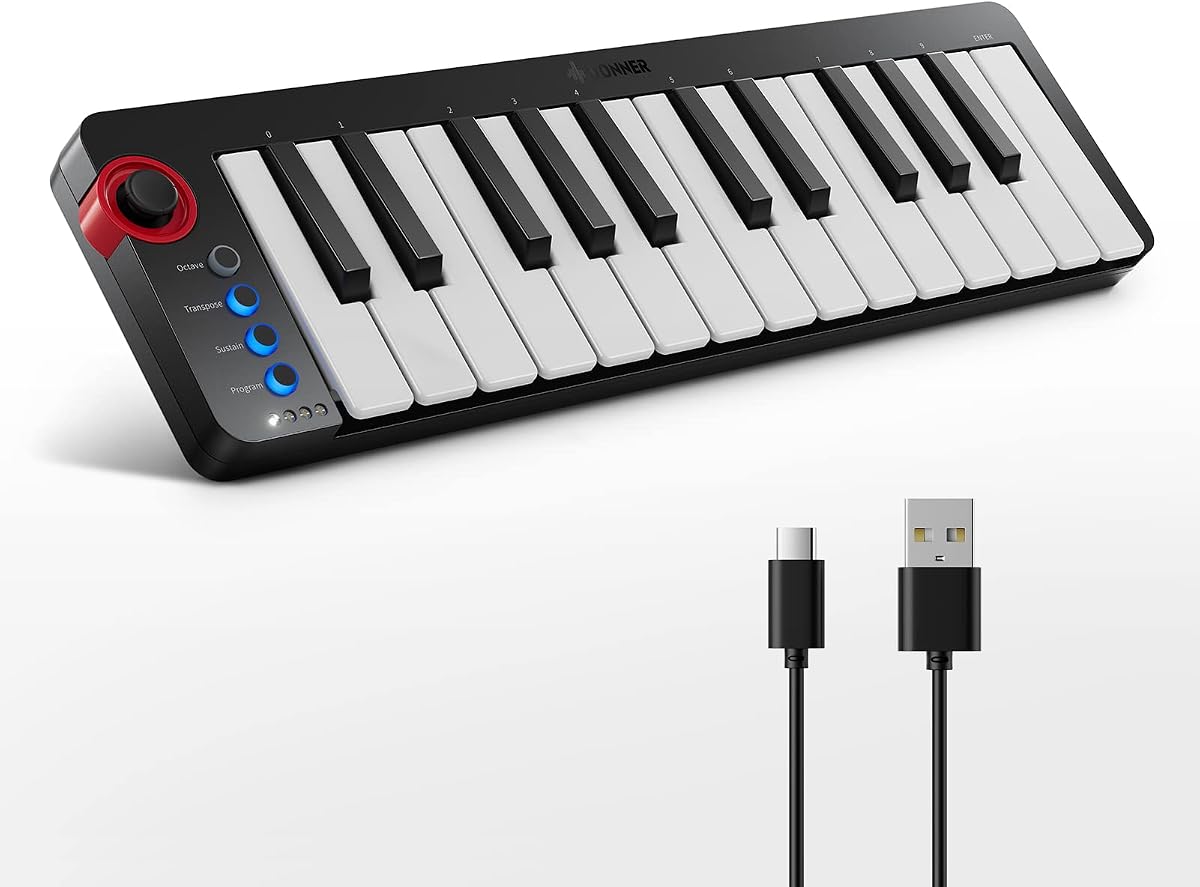
Donner Mini MIDI Keyboard N-25
4.1Editor score
40 teaching courses included
Light-up rocker buttons
Compatible with iOS and Mac
This guide compares the top 25 key MIDI controllers for 2026, evaluating key quality, DAW integration, portability, and features to help producers choose the
Finding the right 25 key MIDI controller can transform your music production workflow significantly. These compact devices offer essential control over virtual instruments and DAWs without taking up much desk space. Whether you are a beginner or a pro, selecting the right model depends on your specific creative needs and budget constraints.
We have analyzed ten leading models based on key response, feature sets, software bundles, and user feedback. Our comparison highlights how each controller integrates with popular software like Ableton Live and Logic Pro. We also consider portability, build quality, and the value of included accessories to provide a clear recommendation for every type of musician.
Each pick in this list showcases distinct strengths ranging from budget-friendly options to premium integrated solutions. You will find detailed breakdowns of specs, pros, cons, and real-world usage scenarios for every product. Please note that prices and availability can change frequently, so verify current details before making your final purchase decision today.
4.1Editor score

4.6Editor score

4.6Editor score
This side-by-side comparison highlights the core specifications and unique selling points of each controller to help you decide quickly based on your priority features.


The Akai Professional MPK Mini MK3 stands out as the top choice for many producers seeking a versatile 25 key controller. It balances compact size with robust features like backlit pads and a four-way thumbstick for modulation. Its rating reflects widespread satisfaction among users who value reliability and sound quality.
We may earn a commission when you buy through this link, at no additional cost to you.
Key strengths include its deep integration with DAWs and Native Instruments software via NKS. The included MPC Beats software and Splice trial add significant value, giving you everything needed to start making tracks immediately. The velocity-sensitive pads are responsive, allowing for dynamic drum programming and sample triggering with ease.
While it lacks a dedicated MIDI output, most modern workflows rely on USB connectivity, making this a minor trade-off. The knobs are plastic rather than metal, but they function smoothly for tweaking parameters during live performance or recording sessions without slipping easily under pressure.
This controller is ideal for bedroom producers and beatmakers who need a portable solution that doesn't compromise on features. If you want a reliable workhorse that grows with your skills, the MPK Mini MK3 is the definitive choice in this category for 2026.
Its balance of price and performance ensures it remains a bestseller despite newer competitors entering the market each year.
The four-way thumbstick provides intuitive pitch and modulation control without needing extra hands or complex mappings.
Bundled with MPC Beats and virtual instruments, it offers immediate production value right out of the box for new users.
We may earn a commission when you buy through this link, at no additional cost to you.
The Donner N-25 is designed specifically for beginners who want to start creating music without breaking the bank. Its light-up rocker buttons and visual feedback help users learn chords and melodies more effectively than traditional controllers. The low price point makes it accessible for students or casual hobbyists starting their musical journey today.
We may earn a commission when you buy through this link, at no additional cost to you.
One of its biggest advantages is the inclusion of 40 engaging keyboard courses aimed at novices. This educational value transforms the device from a simple input tool into a learning platform that guides you through essential concepts. Compatibility with various DAWs ensures you can practice using industry-standard software alongside your lessons.
The build quality is functional but basic, which is expected at this price. The keys are responsive enough for learning but may not withstand heavy daily use like higher-end models. Some users might find the limited customization options restrict advanced workflows or complex music production tasks.
This controller is perfect for students or anyone on a tight budget who wants a fun entry into music production. If you need a device to learn basics and play simple melodies, the N-25 offers excellent value for money compared to other options on the market.
Its focus on education and ease of use makes it a standout pick for those prioritizing learning over advanced production features.
Light-up buttons provide visual cues that simplify note entry and help beginners understand scales and chord progressions quickly.
Plug-and-play functionality via USB ensures you can start composing immediately without installing complex drivers or software on your computer.
We may earn a commission when you buy through this link, at no additional cost to you.
The Novation Launchkey Mini 25 MK4 is a premium controller that offers advanced features like FSR pads and Scale Mode for creative ease. It shines in its ability to integrate deeply with major DAWs, making workflow seamless for professionals who need precise control. The build quality feels solid and durable for daily studio or touring use.
We may earn a commission when you buy through this link, at no additional cost to you.
Key strengths include the Scale Mode which prevents wrong notes by locking the keyboard to a specific musical scale. This feature is incredibly useful for live performance and jamming where musical confidence is key. The included software suite, featuring Ableton Live Lite and various synth plugins, adds significant professional value to the purchase.
While it commands a higher price, the extra features justify the investment for serious producers who value workflow efficiency. Some users may find the number of buttons and controls initially overwhelming compared to simpler models, but the customization options allow for tailored setups once familiar.
If you are looking for a professional-grade controller that bridges the gap between studio and stage, this model delivers exceptional performance. Its combination of hardware quality and software support makes it a top tier choice for modern music production environments in 2026.
The attention to detail in pad responsiveness and key travel sets a high standard for compact MIDI controllers in its class today.
Scale Mode and Chord triggers allow you to create complex musical ideas without deep theory knowledge, speeding up your creative process.
FSR drum pads offer polyphonic aftertouch, enabling expressive drum patterns and dynamic control over synth parameters in real time.
We may earn a commission when you buy through this link, at no additional cost to you.
The Akai LPK25 focuses on simplicity and portability, offering a sleek solution for musicians who primarily need keyboard input. Its responsive keys feel great for their size, allowing dynamic control over melodies and bass lines without unnecessary clutter. The high rating reflects user appreciation for its straightforward and reliable design.
We may earn a commission when you buy through this link, at no additional cost to you.
A standout feature is the built-in arpeggiator, which adds creative flair without needing complex software settings. The eight programmable preset slots let you save mappings for different projects or instruments, streamlining your workflow during live sets. Sustain and octave buttons ensure you cover a wide musical range within the small footprint.
The lack of knobs and faders means you won't have direct control over mixing or modulation, but this keeps the price low and the size minimal. It is designed for those who prefer to handle automation via software mouse or mouse rather than physical controls on the unit.
For songwriters who need a lightweight companion for notebooks or small spaces, this controller is an excellent choice. It removes barriers to creativity by getting out of your way, letting you focus purely on composing melodies and harmonies quickly.
Its reliable build and universal compatibility make it a solid option for Mac or PC users wanting a no-nonsense MIDI interface.
USB power and compact dimensions allow you to slip this controller into a laptop bag for on-the-go writing sessions anywhere.
The built-in tool adds rhythmic interest to your tracks instantly, expanding your sound palette without external processing.
We may earn a commission when you buy through this link, at no additional cost to you.
The Arturia MiniLab 3 stands out with its unique design and comprehensive set of physical controls, including four faders for mixing. Its white aesthetic offers a refreshing alternative to typical black controllers, fitting well in modern studio setups. The keys are designed for a comfortable playing experience with good velocity sensitivity for expressive input.
We may earn a commission when you buy through this link, at no additional cost to you.
Included software like Analog Lab V adds immense value, giving access to hundreds of classic synth sounds. The combination of knobs, faders, and pads makes it a complete control surface for tweaking parameters beyond just playing notes. It bridges the gap between a simple keyboard and a full production console.
Some users might find the keys slightly smaller than others, but they offer a decent travel distance for comfort. The price is higher than basic models, reflecting the extra hardware features and premium software bundle. For those who want visual and tactile control, this model delivers a superior experience.
Ideal for producers who value both style and substance, this controller complements high-end studio gear perfectly. Its ability to control both instruments and mixes makes it versatile for various stages of music production.
The focus on workflow fluidity ensures you can adjust levels and parameters without reaching for a mouse during critical moments.
Faders and knobs provide direct access to mixing and synth parameters, enhancing your hands-on interaction with the software.
Access to high-quality sounds right out of the box allows you to start producing professional tracks immediately.
We may earn a commission when you buy through this link, at no additional cost to you.
The Rhymo 25 Key controller brings modern connectivity options like USB-C and Bluetooth MIDI to a budget-friendly package. This makes it highly versatile for connecting to tablets or phones without needing dongles. The joystick allows for expressive pitch bending and modulation, adding dynamics to your performances easily.
We may earn a commission when you buy through this link, at no additional cost to you.
Features like the loop function and arpeggiator help create rhythmic and melodic patterns on the fly. The sustain pedal input is a crucial addition for pianists who need that extra expressive layer. Its class-compliant design ensures it works seamlessly with major DAWs across Mac and PC platforms without extra drivers.
While the build is more basic compared to premium models, it offers impressive functionality for its size. Some users may find the button layout slightly cramped, but the essential controls are clearly labeled. It serves well for mobile producers who prioritize connectivity and portability over premium materials.
If you need a controller that integrates well with mobile music apps and desktop software, this is a strong contender. It provides a reliable foundation for learning and experimenting with sound without financial strain.
The inclusion of a sustain interface expands its utility beyond a simple toy-like device for serious practice.
Bluetooth MIDI and USB-C make connecting to phones and tablets effortless, ideal for street performers or travelers.
Loop and arpeggiator tools help beginners create complex structures instantly, enhancing creativity without technical hurdles.
We may earn a commission when you buy through this link, at no additional cost to you.
The M-VAVE 25 Key offers wireless connectivity and a built-in battery, freeing you from USB cables during composition. This is a game-changer for musicians working in cafes or on the go where outlets are scarce. The touch stripes on the sides provide additional pitch bend control without needing a separate wheel.
We may earn a commission when you buy through this link, at no additional cost to you.
Smart chord functions simplify music theory, helping you play harmonically complex sounds with single keys. The eight knobs allow you to manipulate effects and instrument parameters effectively. This controller is robust for its class, supporting multiple operating systems including Android and iOS for versatile setups.
While battery life can vary based on usage, having it built-in adds significant convenience over standard USB-only devices. Some users report a slight learning curve for pairing, but once connected, it remains stable for long sessions. It balances functionality with freedom of movement effectively.
Ideal for performers who want to move around the stage or studio, the wireless feature is a standout benefit. It brings a level of flexibility usually reserved for higher-end gear into an affordable package.
The combination of smart features and connectivity makes it a versatile tool for modern electronic musicians.
Bluetooth and battery power allow you to compose anywhere, transforming any space into a mobile music studio.
Integrated chord and scale functions help musicians focus on creativity rather than getting stuck on theory details.
We may earn a commission when you buy through this link, at no additional cost to you.
The Akai MPK Mini Play MK3 stands out because it can function independently without a computer. With a built-in speaker and internal sounds, it lets you play melodies and drums anywhere instantly. The OLED display provides clear feedback, making it easy to select sounds and adjust settings visually on the go.
We may earn a commission when you buy through this link, at no additional cost to you.
It includes a rich library of internal drum and instrument sounds for instant creativity without needing extra software. Battery power means you can take it anywhere, from park benches to hotel rooms, without needing an outlet. This standalone capability makes it perfect for inspiration on the spot or jamming with friends without setup time.
While the speaker is functional for monitoring, it is not a replacement for studio headphones or monitors for critical listening. The price reflects the added hardware, which is justified if you need a true standalone keyboard. For those who want a traditional keyboard feel with modern features, this fits well.
This model is ideal for songwriters who need a dedicated sketchpad that does not rely on a laptop for every session. It offers a unique hybrid experience that blends traditional keyboarding with modern digital capabilities seamlessly.
The ability to switch between standalone and controller modes offers unmatched versatility for different creative environments.
Internal sounds and speakers mean you can create anywhere without carrying a heavy laptop or external audio interface.
The OLED screen ensures you always know which sounds and settings are active, reducing confusion during live use.
We may earn a commission when you buy through this link, at no additional cost to you.
The Akai APC Key 25 MK2 is designed specifically to optimize the Ableton Live experience for electronic producers. Its grid of 40 RGB pads offers visual feedback for clip launching and triggers, essential for live performance and beat-making. Dedicated arrow buttons let you navigate tracks and scenes quickly without touching your computer mouse at all.
We may earn a commission when you buy through this link, at no additional cost to you.
This integration provides seamless control over clips, devices, and macros directly from the hardware surface. It is pre-mapped to work with Ableton Live out of the box, reducing the need for complex setup time. For users deeply invested in the Ableton ecosystem, this controller offers unmatched workflow efficiency.
While it excels with Ableton, its features are less useful with other DAWs, which might limit its versatility. The keys are short, which is standard for 25-key models, but the focus is clearly on the grid and control buttons. If you prioritize live performance and clip-based arrangement, this tool is powerful.
This controller is a top pick for DJs and electronic musicians who need tactile control over their live sets. The color-coded feedback helps you stay oriented during high-energy performances without looking at the screen constantly.
Its specialized design ensures that your hands stay on the controller, keeping the creative flow uninterrupted during sessions.
The RGB grid is optimized for launching clips and samples, making live set transitions smooth and visually clear.
Directional arrows allow for quick scrolling through projects, saving time and keeping focus on musical ideas.
We may earn a commission when you buy through this link, at no additional cost to you.
This alternative M-VAVE offering provides strong value with eight knobs and a dynamic keybed for responsive play. The inclusion of backlit pads adds a professional touch to an otherwise budget-friendly device. Users appreciate the balance of physical controls that allow for nuanced sound shaping without breaking the bank for new producers.
We may earn a commission when you buy through this link, at no additional cost to you.
The dynamic keybed supports expressive playing, making it suitable for both beginners and intermediates looking to refine their craft. Touch stripes offer extra control without adding bulk. It supports multiple DAWs well, making it versatile for home studios that use various software tools.
Bluetooth connectivity can occasionally introduce slight lag, but wired mode eliminates this issue for recording. The software bundle varies but often includes useful samples or synth plugins. For the price, you get a surprising amount of tactile control to enhance your production workflow.
If you need a budget-friendly option with physical knobs for mixing and tweaking, this model is a strong contender. It bridges the gap between basic controllers and professional gear without sacrificing essential usability.
It stands out as a great value pick for those who prioritize hardware knobs over software-only solutions.
Eight physical knobs allow for precise adjustments to parameters, giving you a hands-on experience often missing in entry-level gear.
A dynamic keybed responds to your playing force, allowing for expressive melodies and realistic instrument emulation.
We may earn a commission when you buy through this link, at no additional cost to you.
Selecting the right controller involves weighing several factors to ensure it fits your workflow and budget effectively.
25-key controllers generally use mini keys, but the depth and resistance vary. Look for velocity sensitivity to express dynamics and ensure the travel feels comfortable for your hand size. If you have larger hands, consider how the compact spacing affects your ability to reach wide intervals comfortably.
Prioritize models with responsive keys if you plan on playing melodies and bass lines frequently without fatigue.
Most controllers work with all major software, but some offer pre-mapped features for specific programs like Ableton or Logic. Check if the controller includes a dedicated mapping or app that automates parameter assignments. This saves time setting up knobs and faders to match your track controls manually.
Choose a model with deep integration for your primary DAW to streamline mixing and automation tasks effectively.
Knobs allow you to tweak synth parameters and effects in real time, adding life to your tracks without a mouse. Faders are useful for volume and panning automation during recording or live performance. Decide how many you need based on how hands-on your production style is compared to mouse work.
Select a controller with enough tactile controls to manage your main instrument parameters without excessive switching.
Drum pads are essential for beat makers who want to program rhythms by hand. Look for pads that are velocity sensitive and backlit for better visibility in low light environments. Some models also support note repeat or chord modes which help create complex rhythmic patterns quickly.
Ensure the pads are responsive and well-placed for intuitive finger drumming and sample triggering during sessions.
Modern controllers rely heavily on USB-C for power and data, making setup easier. Some offer Bluetooth MIDI for connecting to tablets or phones without cables, which is great for mobile workflows. Also check for sustain pedal inputs if you need expressive piano-style control.
Verify that the connection type matches your devices to avoid needing extra adapters or dongles constantly.
Many manufacturers include free DAWs or virtual instruments with purchase, adding significant value. These bundles often contain high-quality sounds that can save you money on paid plugins initially. Check if the software aligns with your needs and is fully functional without trial limitations.
Use the included software to jumpstart your production and learn workflows without additional initial costs.
If you travel to studios or gig frequently, weight and size are critical. Slim profiles fit easily into laptop bags, and lightweight builds reduce strain. Also consider if the controller requires external power adapters that add bulk or weight to your setup.
Choose a lightweight and self-powered option to maintain flexibility when moving between locations.
Durability matters for long-term use, especially with frequently used controls like knobs and buttons. Plastic bodies are common in this size but look for reinforced corners or robust internal structures. Reading user reviews about longevity helps ensure your investment lasts through regular use.
Opt for a model with a reputation for durability to avoid needing replacements due to wear and tear.
Start by connecting your controller to your computer using a quality USB or USB-C cable. Ensure the port provides sufficient power to avoid connectivity issues. Most modern units are class-compliant, meaning you do not need to install drivers on your system for it to work immediately.
Launch your preferred music software and verify that the input settings recognize your device. You may need to select the controller in the audio MIDI setup or preferences menu of your DAW. Configure key mapping to assign knobs and pads to track parameters you use most often for better control.
Clean the surface and keys gently with a dry cloth to prevent dust buildup. Avoid using liquids directly on the unit to prevent electrical damage. Store it in a cool dry place when not in use to maintain battery life and internal components over time.
Yes, 25 key controllers are excellent for beginners due to their compact size and affordability. They offer essential features like velocity sensitivity and basic controls to help you learn music production without overwhelming complexity. This makes them a low-risk entry point into the world of digital music creation.
Absolutely, almost all modern 25 key controllers are compatible with Ableton Live. Many models, like the APC Key 25, come pre-mapped specifically for Ableton to offer optimized control over clips and devices. Always check compatibility listings on the product page to ensure it fits your workflow.
Mini keys are smaller and narrower than standard keys, designed to save space on compact controllers. While they require a slight adjustment in finger placement, they allow you to reach multiple octaves easily. Some users may find them less comfortable for playing wide intervals compared to full-size keys.
No, you do not need an audio interface to use a MIDI controller since it sends digital data to your software. You can connect directly via USB to your computer to trigger virtual instruments. An audio interface becomes necessary only if you need to record analog instruments like microphones.
Velocity sensitivity allows the controller to detect how hard you press keys, varying volume and tone accordingly. This creates dynamic and expressive performances rather than robotic sounding notes. It is essential for playing realistic-sounding instruments and is a standard feature on good MIDI controllers.
Most require a computer or tablet to process sounds unless they have built-in synthesizers or speakers. Standalone models like the MPK Mini Play MK3 work independently. For traditional controllers, you need a host device running music software to generate sound output.
We have explored the top ten 25 key MIDI controllers available in October 2026, highlighting unique strengths for different user needs. Whether you prioritize portability, advanced features, or software bundles, there is a model in this list that fits your workflow. The Akai MPK Mini MK3 and Novation Launchkey Mini stand out as top-tier choices for most producers.
When making your choice, consider what features matter most to your creative process and daily habits. Prioritize DAW integration and tactile controls if you need hands-on mixing. Budget options like the Donner N-25 prove you can start producing without a large investment.
Remember that prices and availability can fluctuate frequently, so verify the current status before purchasing. We hope this guide helps you find the perfect tool to unlock your musical potential and streamline your production setup effectively.