
LG Smart Monitor Swing
4.1Editor score
Wheeled stand for mobility
Built-in webOS streaming platform
65W USB-C power delivery
Finding the right large interactive display can transform your workspace into a dynamic hub for creativity and efficiency. A high-quality 32 inch touchscreen monitor offers expansive real estate combined with intuitive touch controls that streamline workflows. Whether you are designing graphics or presenting data, the right model enhances your digital interaction significantly.
We have carefully selected and analyzed ten distinct models available in the current market to help you make an informed decision. Our comparison covers a wide range of features including resolution, refresh rates, connectivity ports, and stand adjustability. Each product was evaluated based on its ability to deliver smooth performance and reliable touch input across various operating systems.
Each pick below highlights specific strengths and ideal use cases to match your unique professional or personal needs. We have included detailed specifications and user feedback to ensure you understand the practical implications of each choice. Please note that product availability and pricing may fluctuate over time so always verify current details before purchasing.
4.1Editor score

5.0Editor score

4.2Editor score
As an Amazon Associate we earn from qualifying purchases.
The following table provides a side-by-side comparison of all ten selected models highlighting their key specifications and distinct advantages for potential buyers to consider.



This monitor stands out as the premier choice for users seeking high fidelity visuals and responsive touch controls. It boasts a perfect rating and delivers stunning 4K clarity with a refresh rate that supports smooth motion. The build quality and feature set make it ideal for demanding creative and gaming environments.
We may earn a commission when you buy through this link, at no additional cost to you.
The 10-point capacitive touchscreen ensures precise interaction while the 144Hz refresh rate eliminates motion blur effectively. Connectivity is versatile with HDMI 2.1 and Type-C supporting modern devices seamlessly. The stand offers full adjustability including pivot for portrait mode which enhances workflow flexibility.
While the touch function works perfectly with Windows devices macOS users may experience reduced multi-touch capabilities. The power adapter requirement adds a minor cable management consideration compared to bus-powered alternatives. These trade-offs are minor given the overall performance and visual quality provided.
Prospective buyers looking for a high-performance workstation display should consider this model highly. It balances premium features with reliable touch input making it suitable for professionals and enthusiasts alike. The combination of resolution and refresh rate ensures long-term satisfaction for intensive tasks.
The UHD resolution provides exceptional detail for design work and media consumption making every pixel count for precision tasks.
Multiple connection options including HDMI 2.1 and Type-C ensure compatibility with a wide range of devices without needing dongles.
We may earn a commission when you buy through this link, at no additional cost to you.
The LG Smart Monitor Swing redefines flexibility with its rolling base that allows easy movement across rooms. It features a robust smart OS that enables standalone use without a computer. The 4K IPS display ensures vibrant colors while the touchscreen adds intuitive control options for interactions.
We may earn a commission when you buy through this link, at no additional cost to you.
WebOS integration brings a range of apps directly to the screen reducing reliance on external hardware. The stand stability is impressive despite the wheels making it suitable for presentations in dynamic spaces. USB-C connectivity supports high power delivery which simplifies laptop setups significantly.
The price is higher than standard monitors reflecting the specialized mobility and smart features included. Some users may find the OS interface different from traditional desktop systems which requires an adaptation period. However the convenience of moving the display anywhere often justifies the investment for teams.
This model is perfect for offices or homes where the display needs to move frequently or be used independently. It caters to users who value convenience and smart functionality alongside high resolution visuals. The sleek design also complements modern interior aesthetics effectively.
Built-in webOS allows streaming and productivity tasks without needing a PC connection for ultimate flexibility in any room.
The wheeled base transforms a static monitor into a mobile presentation tool ideal for collaborative meetings or changing setups.
We may earn a commission when you buy through this link, at no additional cost to you.
The FYHXele monitor offers excellent value with its sharp QHD resolution and smooth refresh rate suitable for various tasks. It supports 10-point touch input which is rare at this price point making it accessible for interactive work. The IPS panel delivers consistent colors from different angles which benefits group viewing sessions.
We may earn a commission when you buy through this link, at no additional cost to you.
The connectivity options are practical including a USB-C port that simplifies cable management for laptops. The stand allows height and tilt adjustments helping users maintain a comfortable posture during long work sessions. Brightness levels are sufficient for typical indoor lighting conditions ensuring clear visibility without strain.
Touch functionality does not work with some gaming consoles which limits its utility for entertainment on those devices. The design is functional rather than stylish which might not suit all decor preferences. However the performance and feature set outweigh these minor aesthetic considerations for budget-conscious buyers.
This monitor is recommended for students or professionals needing an interactive display without a high price tag. It balances quality and cost effectively providing a reliable tool for presentations and design work. The versatility ensures it fits well in both home and office environments.
The 1440p resolution provides ample screen real estate for multitasking while maintaining crisp text and image clarity.
Multi-touch capability allows intuitive navigation and manipulation of on-screen content for efficient workflow management.
We may earn a commission when you buy through this link, at no additional cost to you.
Xyrio brings a practical monitor designed specifically for office environments with reliable touch functionality. The 2K resolution ensures text remains sharp while the refresh rate reduces eye strain during extended use. Integrated speakers remove the need for external peripherals making it a compact solution for desks.
We may earn a commission when you buy through this link, at no additional cost to you.
The compatibility with various operating systems like Linux and Android broadens its utility for technical users. It operates without complex driver installations ensuring quick deployment in corporate settings. The VESA mount capability allows flexible positioning on arms or walls when desk space is limited.
Brightness might not be ideal for very bright rooms but it is adequate for standard office lighting. The stand lacks advanced pivot features found on higher-end models which could limit viewing angle flexibility. These factors are secondary to the functional reliability it offers for daily tasks.
This product is suitable for businesses seeking a dependable touch display for training or internal presentations. It provides necessary features without unnecessary bells and whistles keeping costs down. The focus on compatibility and ease of use makes it a safe choice for IT managers.
Support for Windows Raspberry Pi and Linux ensures it can integrate into diverse technical environments effortlessly.
Built-in speakers and VESA mounting allow for a clutter-free workspace that maximizes available desk area efficiently.
We may earn a commission when you buy through this link, at no additional cost to you.
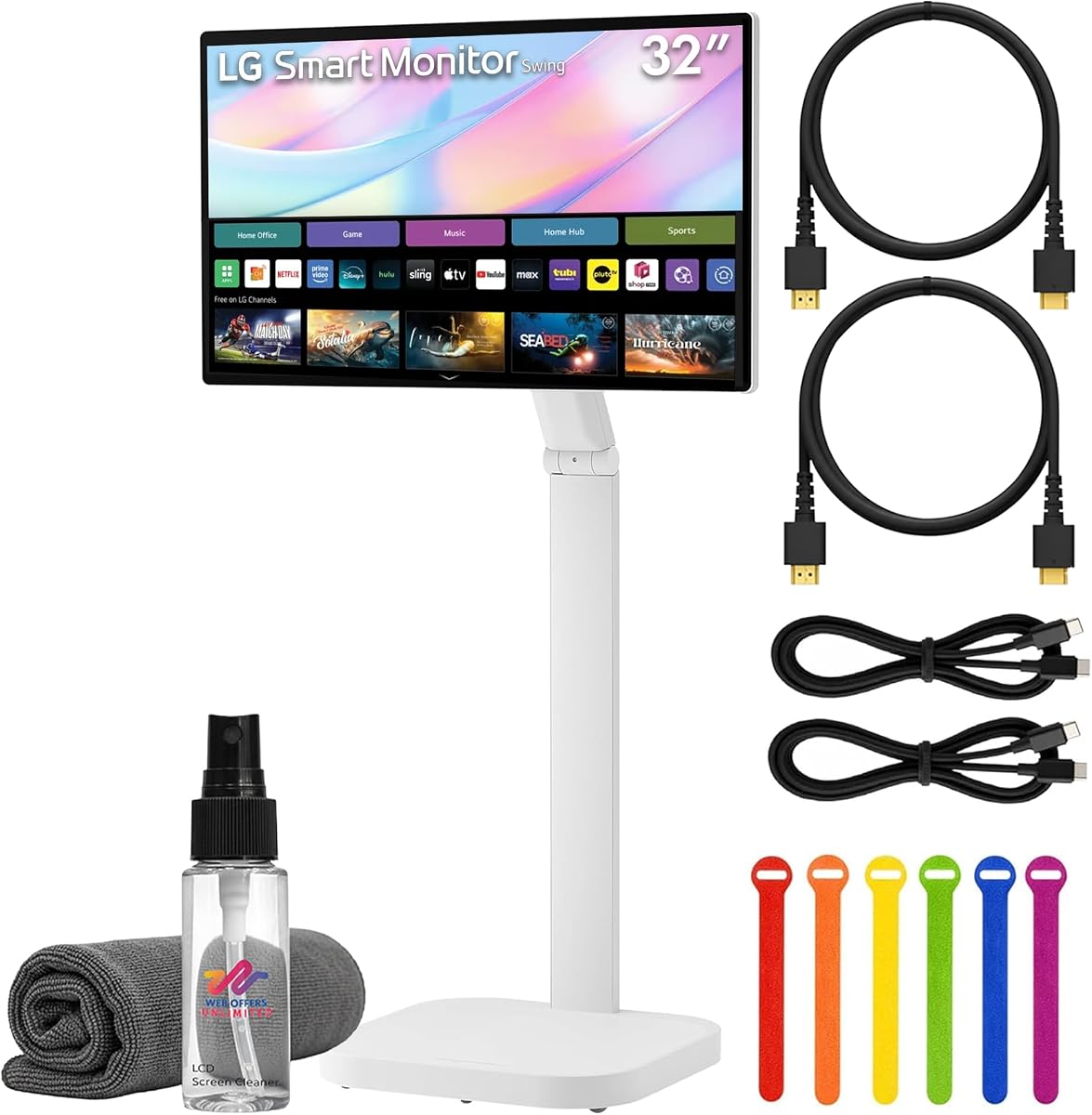
This bundle offers a comprehensive solution including the monitor and necessary accessories for immediate setup. The rolling stand allows easy relocation while the 4K display provides vibrant visuals for presentations. WebOS integration adds value by enabling entertainment without connecting a computer to the screen.
We may earn a commission when you buy through this link, at no additional cost to you.
Having cables and cleaning kits included saves time and reduces initial setup costs for users. The HDR support enhances media quality making it suitable for watching videos in high definition. The stand is stable and adjustable ensuring the screen can be positioned for optimal viewing angles.
The price includes the accessories which is beneficial but might be higher than buying the monitor alone. Some users may not need the smart features preferring a pure monitor setup instead. However the convenience of a ready-to-use package is often worth the extra investment for many.
Ideal for organizations needing a quick deployment solution for meeting rooms or training centers. It eliminates the guesswork of selecting compatible cables or stands ensuring a professional setup from day one. The mobility aspect further enhances its utility in dynamic collaborative spaces.
Included cables and ties ensure you can start using the monitor immediately without purchasing additional peripherals.
HDR10 support ensures rich contrast and color depth making it ideal for visual media and marketing presentations.
We may earn a commission when you buy through this link, at no additional cost to you.
Elo specializes in commercial hardware and this model is built to withstand constant use in public spaces. It is designed for 24/7 operation ensuring reliability for digital signage applications. The impact testing means it can handle rough conditions that might damage standard monitors easily.
We may earn a commission when you buy through this link, at no additional cost to you.
IoT support allows remote management which is crucial for large deployments across multiple locations. The mounting options are flexible making it easy to install in kiosks or interactive displays. It is a professional tool that prioritizes uptime and resilience over consumer entertainment features.
The price point is higher than consumer monitors reflecting the enterprise-grade build quality. It may offer features that home users do not require making it less cost-effective for personal use. However for businesses needing a robust touch interface it is a reliable choice.
This monitor is perfect for retail environments or public info kiosks where durability is paramount. It ensures that your display continues to function despite heavy traffic and potential physical contact. Investing in such a model reduces maintenance needs and improves long-term operational efficiency.
Impact tested design ensures the device survives accidental bumps and continuous operation in busy public areas.
IoT connectivity allows centralized control of multiple displays simplifying maintenance across different locations.
We may earn a commission when you buy through this link, at no additional cost to you.
While lacking touch features this model offers a solid standard display experience with proven reliability. The IPS panel ensures wide viewing angles which is beneficial for presentations in meetings. It serves well for users who prefer a traditional setup without interactive controls.
We may earn a commission when you buy through this link, at no additional cost to you.
Brightness levels are sufficient for most indoor environments ensuring visibility without glare issues. LG supports this model with standard support channels providing peace of mind for buyers. It fits well in setups where touch input is not a requirement for daily work.
The resolution is standard 1080p which is lower than modern touch options but adequate for basic tasks. It may not satisfy users looking for high detail or interactive capabilities on their screens. However for budget-conscious buyers it offers a dependable visual experience.
This monitor is ideal for workstations where touch is unnecessary but screen real estate is desired. It provides a straightforward and reliable solution for general computing and media consumption. The brand reputation ensures quality construction and consistent performance over time.
Wide viewing angles ensure consistent image quality from any seat making it great for group work.
LG provides established support and build standards ensuring a stable and long-lasting display unit.
We may earn a commission when you buy through this link, at no additional cost to you.
Samsung offers a commercial-grade touchscreen designed for professional environments and public interfaces. The display delivers a clean interface suitable for interactive kiosks or business presentations. Its robust build ensures it can handle frequent use in demanding settings effectively.
We may earn a commission when you buy through this link, at no additional cost to you.
The design is sleek with a black finish that blends well into office aesthetics. It focuses on core functionality without unnecessary extras keeping the user experience straightforward. This reliability makes it a preferred choice for businesses needing consistent performance.
The price reflects its commercial classification which might be steep for individual home buyers. It is optimized for specific use cases rather than general multimedia consumption at home. Understanding this positioning helps buyers evaluate its value for their specific needs.
Prospective buyers should consider this model for specialized business needs requiring durability. It offers a balance of touch capability and professional build quality that stands out. The focus on utility ensures it meets the demands of daily commercial operations.
Designed for business use to ensure reliability and longevity in high-traffic environments.
Integrated touch capabilities allow for seamless interaction in presentations and digital signage setups.
We may earn a commission when you buy through this link, at no additional cost to you.
This Samsung model provides a reliable LCD display for business applications where touch is not critical. The 75Hz refresh rate offers slightly smoother visuals than standard 60Hz panels for general use. It is built to handle continuous operation making it suitable for office displays.
We may earn a commission when you buy through this link, at no additional cost to you.
The black chassis gives it a professional look that matches office furniture well. It supports standard resolutions for typical productivity tasks without requiring high-end graphics processing. The focus on stability ensures that it remains functional over long periods of use.
Refresh rate is moderate which limits gaming but is sufficient for office work and presentations. It lacks some advanced features found in newer models but covers essential needs well. Buyers should verify specific feature availability as configurations may vary by region.
This display is a practical choice for workstations requiring a reliable screen without high costs. It balances performance and durability effectively for everyday business environments. The professional design ensures it fits seamlessly into any office layout.
Professional aesthetic and robust build ensure it fits well into corporate office environments.
75Hz capability provides a smoother visual experience for video playback and general navigation.
We may earn a commission when you buy through this link, at no additional cost to you.
This model integrates LG's ecosystem features allowing seamless device sharing from phones to the big screen. The rolling stand makes it easy to move between rooms for collaborative meetings. It offers a sharp 4K resolution ensuring text and images remain clear during work sessions.
We may earn a commission when you buy through this link, at no additional cost to you.
USB-C support with power delivery simplifies connecting laptops without needing extra power bricks. AirPlay 2 and screen sharing provide versatility for different device types making it future-ready. Eye care features help reduce strain during long workdays which benefits productivity.
User feedback indicates some variability which suggests checking reviews before purchase. The high cost might be a barrier for individual buyers looking for a secondary display. However for shared spaces it offers features that justify the investment.
This screen is best suited for environments requiring flexible connectivity and mobility. It serves well for team meetings where presentations need to be moved quickly. The smart features ensure it stays relevant as technology evolves.
AirPlay 2 and screen sharing make it easy to project content from smartphones to the large display.
Built-in eye care features help maintain comfort during extended viewing sessions reducing fatigue.
We may earn a commission when you buy through this link, at no additional cost to you.
Selecting the right touchscreen monitor requires understanding your specific needs regarding resolution connectivity and physical setup.
Resolution determines the clarity of text and images which is critical for design work or detailed data analysis. Higher resolutions like 4K provide sharper visuals compared to standard 1080p displays ensuring you see every detail. Look for IPS panels as they offer better color accuracy and viewing angles than other technologies.
Prioritize displays with high resolution and IPS panels for the best visual experience and color fidelity.
Touch sensitivity dictates how responsive the screen is to your input which affects workflow speed. Capacitive touch is standard for modern devices and offers smooth interaction similar to smartphones. Ensure the monitor supports enough touch points to handle gestures like pinch-to-zoom effectively.
Check that the touchscreen supports multiple touch points for natural gesture navigation and smooth interaction.
Connectivity ports determine what devices you can connect without needing adapters or hubs. HDMI and DisplayPort are standard but USB-C adds power delivery and video transmission in one cable. Verify that your devices match these ports to avoid connectivity issues during setup.
Ensure your monitor has USB-C or HDMI ports that match your devices to simplify setup and cable management.
A good stand allows height tilt and swivel adjustments to maintain ergonomic comfort. Some models include rolling bases for moving the screen between rooms which is useful for presentations. Consider whether you need fixed or mobile solutions based on your workspace layout.
Look for stands with height and tilt adjustments or rolling bases to ensure ergonomic comfort and flexibility.
Some monitors come with built-in operating systems allowing them to function independently. This can save space and reduce the need for a separate computer. Verify which apps are supported to ensure the features meet your streaming or productivity needs.
Check if the smart OS supports your favorite apps if you plan to use the monitor without a computer.
Durability matters if the monitor will be used in high-traffic or public environments. Look for features like anti-scratch coatings or impact ratings for rugged use. Standard home monitors may not survive heavy use as well as commercial-grade signage models.
Choose commercial-grade models with impact protection if the screen will be used in busy public settings.
Not all touch monitors work perfectly with every operating system. Windows usually works best while macOS may have limited touch functionality. Confirm compatibility with your specific OS to avoid driver issues or limited features after purchase.
Verify that the monitor supports your operating system fully before buying to ensure all features work as expected.
Prices vary significantly based on features like resolution smart OS and mobility options. Determine which features are essential for your workflow to avoid paying for extras you do not need. A slightly higher price might be worth it for better durability and warranty support.
Balance your budget against essential features to find a model that offers the best long-term value.
To get the most out of your touchscreen monitor ensure you connect all necessary cables including USB for touch activation. If using Type-C make sure it supports data and video transmission for seamless setup.
Keep the screen clean using a microfiber cloth and specialized screen cleaner to avoid scratches. Regular cleaning prevents oil buildup which can reduce touch sensitivity over time.
Adjust the stand to eye level and tilt to avoid neck strain during long sessions. Position the monitor where it is easily reachable to maximize the touch experience comfortably.
Most models support basic display but touch functionality may be limited due to system protocols. Always check manufacturer specifications for macOS compatibility before purchasing.
USB-C allows single cable video audio and power delivery simplifying connections. It reduces cable clutter and supports fast charging for compatible laptops.
Models with 144Hz refresh rates and low response times are excellent for gaming. Touch input adds a unique layer for interactive or strategic game types.
Most models feature VESA mounts allowing wall or arm mounting. Check the specific VESA pattern to ensure compatibility with your mount.
Yes standard warranties are included but duration varies by brand and model. Always review warranty terms to understand what is covered.
With proper care touch monitors can last many years similar to standard screens. Durability depends on usage frequency and physical handling habits.
Check if the USB touch cable is securely connected and drivers are updated. Restarting the device often resolves temporary touch detection problems.
Yes 4K provides sharper text and detail which is crucial for design and productivity. It makes better use of the large 32 inch screen real estate.
The 32 inch 4K Touch Monitor and LG Smart Monitor Swing stand out as top picks for different needs. The former offers high performance while the latter provides unmatched mobility and smart features.
Prioritize resolution and connectivity options to ensure the monitor fits your current and future tech setup. A reliable stand is also essential for maintaining comfort during daily use.
Always check the latest prices and availability as deals can change frequently. Investing in a quality touchscreen monitor enhances both productivity and interactive experiences.