
Nektar SE49
4.5Editor score
DAW integration for popular software
Compatible with Mac PC iOS
Includes DAW and sound content
This guide compares the top 49 key MIDI keyboards for music production, focusing on features, compatibility, and value for creators in 2026.
Finding the right 49 key MIDI keyboard can transform your music production workflow. These controllers offer a balanced layout for melodies and chords without taking up too much desk space.
We compared ten popular models based on key action, software integration, and build quality. Each option brings unique strengths for producers ranging from beginners to professionals.
Every pick highlights specific features and real-world usability. Prices and availability change frequently so check current listings before making your final decision today.
4.5Editor score

4.7Editor score

4.4Editor score
This side-by-side comparison highlights key specifications across all ten models to help you identify the best fit for your specific studio needs and workflow preferences.




The Novation Launchkey 49 MK4 stands out as a top contender for modern music producers seeking a versatile controller. With a strong rating and premium features, it offers a complete package for studio work and live performance alike.
We may earn a commission when you buy through this link, at no additional cost to you.
Its FSR drum pads support polyphonic aftertouch allowing for expressive drumming and sample triggering. The seamless DAW integration means you spend less time mapping controls and more time creating music. Scale Mode helps even beginners hit the right notes effortlessly.
While the price is higher than entry level options the included software and hardware quality justify the investment. The only minor drawback is the learning curve for advanced features which might overwhelm absolute beginners initially.
If you want a controller that grows with your skills and offers deep integration with major software this model is highly recommended. It balances professional features with user-friendly design perfectly for most home studios.
The FSR pads allow for nuanced velocity control and aftertouch making them ideal for complex beat programming.
Integration with major DAWs ensures that transport and mixing controls are mapped automatically for faster setup.
We may earn a commission when you buy through this link, at no additional cost to you.
The M-AUDIO Keystation 49 MK3 is an excellent choice for those who prioritize simplicity and ease of use. Its plug-and-play nature means you can start creating music immediately after connecting it to your computer without installing extra software.
We may earn a commission when you buy through this link, at no additional cost to you.
The 49 velocity-sensitive keys provide a natural feel that captures performance nuances well. The included software suite adds value by giving you access to popular production tools right out of the box. It is perfect for students or hobbyists.
However, it lacks dedicated transport controls and advanced pad features found on more expensive models. The build is functional but not premium which might be a concern for heavy use or travel over long periods.
For anyone looking to enter music production without a huge budget this controller delivers reliable performance. It strips away unnecessary complexity to focus on what matters most playing your virtual instruments.
The USB connection works instantly on Mac and PC making it ideal for quick recording sessions without setup delays.
Pitch and modulation wheels are ergonomically placed for easy access during performance without distracting from playing.
We may earn a commission when you buy through this link, at no additional cost to you.
The Nektar SE49 offers incredible value for money making it one of the best budget options available today. It provides all the essential features needed to start making music with your computer without breaking the bank.
We may earn a commission when you buy through this link, at no additional cost to you.
Its standout feature is the deep integration with popular DAWs which saves hours of manual setup. The comprehensive MIDI functionality ensures compatibility with almost any software application you might choose to use for production.
While the keys are not weighted the overall feel is pleasant enough for most users. The trade-off is a lack of advanced features like aftertouch or extensive knobs which limits complex mixing tasks.
If you are a beginner or need a secondary controller for a home studio this is a smart buy. It proves you do not need to spend a fortune to get reliable performance and usability.
Pre-configured profiles for major DAWs let you focus on creativity rather than technical setup or configuration issues.
The streamlined feature set keeps costs low while still delivering the core functionality needed for effective music production.
We may earn a commission when you buy through this link, at no additional cost to you.
The M-AUDIO Oxygen 49 MKV bridges the gap between entry-level and professional controllers effectively. It offers a robust set of features including faders and knobs that are essential for hands-on mixing and recording workflows.
We may earn a commission when you buy through this link, at no additional cost to you.
The inclusion of Native Kontrol Standard support is a significant advantage for users of Native Instruments software. Smart Chord and Scale modes help musicians write melodies quickly without needing deep theoretical knowledge of music theory.
The main downside is that the pads lack pressure sensitivity which might limit expressive drumming compared to other models. However the sheer volume of controls available makes up for this limitation in most production scenarios.
For producers who need tactile control over their plugins this model delivers excellent value. It is a versatile tool that supports growth from beginner projects to more professional level tracks.
Smart Chord and Scale modes simplify songwriting allowing users to create complex harmonies with simple input.
Nine faders and eight knobs provide hands-on adjustment of volumes and parameters without needing to use the mouse.
We may earn a commission when you buy through this link, at no additional cost to you.
The Arturia KeyLab Essential mk3 is designed to integrate deeply with the Arturia ecosystem providing a rich sound library through Analog Lab V. This inclusion alone makes it a strong contender for those looking to expand their sonic palette.
We may earn a commission when you buy through this link, at no additional cost to you.
The custom scripts for DAWs ensure that mapping is precise and tailored for specific workflows in Ableton or Logic. The LCD screen provides visual feedback on what parameters are currently active which reduces confusion during live mixing.
While the software is powerful it might require a robust computer to run smoothly. The keys themselves are decent but not weighted which is typical for this price range but worth noting for pianists.
If you want a keyboard that offers high quality sounds out of the box this is a great choice. The combination of hardware control and software breadth is hard to beat at this price point.
Analog Lab V offers thousands of presets covering vintage synths to orchestral sounds ensuring versatility for any genre.
The LCD screen displays real-time parameter changes making it easier to adjust settings without looking at the computer screen.
We may earn a commission when you buy through this link, at no additional cost to you.
This generic MIDI keyboard is a simple solution for those who need a basic input device without advanced controls. Its compact profile makes it ideal for small desks or temporary setups where portability is key.
We may earn a commission when you buy through this link, at no additional cost to you.
The ABS construction keeps it lightweight and practical for regular handling. It serves well for melody practice and composition preparation where you do not need extensive mixing controls or software integration.
However the lack of detailed features means it is not suitable for complex production tasks. The build quality is basic and it may not withstand heavy professional use over a long period of time.
For casual users or students who just need to play notes into a computer this fits the bill perfectly. It is a straightforward tool that does exactly what it says without extra complexity.
The compact size allows for easy arrangement on limited desktops making it suitable for small home offices.
Ideal for simple tasks like melody practice and composing basic ideas without the need for complex interfaces.
We may earn a commission when you buy through this link, at no additional cost to you.
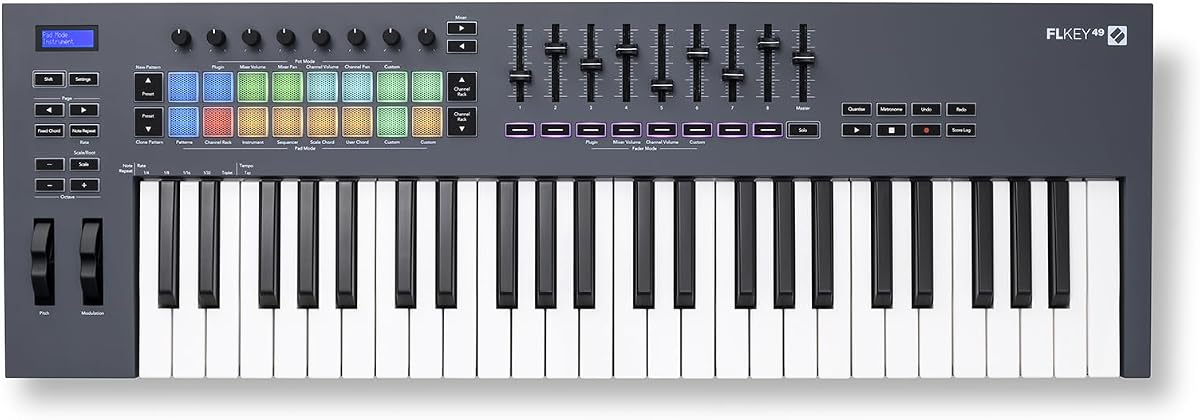
The Novation FLkey 49 is specifically engineered for users of FL Studio offering a seamless experience that minimizes manual setup. If you work primarily in FL Studio this controller acts as an extension of the software.
We may earn a commission when you buy through this link, at no additional cost to you.
The ability to access Mixer and Channel Rack controls directly gives you real-time feedback and control without mouse usage. The Sequencer Mode maps pads to the step sequencer allowing for rapid beat creation and pattern changes.
While it works with other DAWs the specific integrations are most useful in FL Studio. This specialization makes it a top choice for that ecosystem but slightly less flexible for general use.
For FL Studio producers this is a highly recommended tool that enhances workflow speed. The focus on keeping you in the flow without mouse dependency makes it a standout for beat makers.
Controls map directly to FL Studio parameters saving hours of manual setup and ensuring accurate automation recording.
Pad mapping to the step sequencer allows for fast drum programming and rhythm development directly from the hardware.
We may earn a commission when you buy through this link, at no additional cost to you.
The M-AUDIO Oxygen Pro 49 is a robust controller designed for serious producers who need advanced features like aftertouch and 5-pin MIDI output. It bridges the gap between entry-level gear and professional studio standards.
We may earn a commission when you buy through this link, at no additional cost to you.
The semi-weighted keys with aftertouch provide a playing experience closer to a real piano than cheaper options. The 16 RGB pads offer visual feedback and extensive control for beat making and sample triggering with precision.
While the feature set is extensive it comes at a higher price point. The physical size is also larger so ensure you have enough desk space before making the purchase decision for your studio setup.
If you need a controller that offers deep control and professional connectivity options this model is excellent. It supports a wide range of workflows and offers longevity for growing production skills.
The inclusion of 5-pin MIDI output ensures compatibility with older hardware synths and external gear without extra adapters.
Aftertouch support on the keys allows for added expression and modulation while holding notes down for dynamic effects.
We may earn a commission when you buy through this link, at no additional cost to you.
The midiplus AK490 is a straightforward MIDI controller that provides essential functions without unnecessary extras. It is a good option for those who just want to send notes to their software reliably.
We may earn a commission when you buy through this link, at no additional cost to you.
With a MIDI out Din jack it offers connectivity options that USB only controllers do not have. This allows you to connect to external hardware synths directly which can be useful for hybrid setups.
The keybed is functional but basic compared to premium models. It lacks modern software bundles which means you will need to provide your own instruments for production work effectively.
For simple MIDI input and hardware control this controller is sufficient. It is a practical choice for those working within a specific budget who need standard connectivity options.
The MIDI out port allows for direct connection to external hardware gear expanding possibilities beyond just computer software.
The layout focuses on core needs like wheels and velocity sensitivity ensuring it works as intended without complexity.
We may earn a commission when you buy through this link, at no additional cost to you.
The Arturia KeyLab mk3 represents the premium end of the market with robust build quality and high end features like pressure sensitive pads. It is designed for professionals who need reliability and precision in their daily workflow.
We may earn a commission when you buy through this link, at no additional cost to you.
The nine encoders allow for precise control over parameters giving you a tactile experience that software sliders cannot match. The aftertouch on keys ensures that every performance detail is captured accurately during recording sessions.
While it is expensive the quality justifies the investment for serious users. The USB-C connection ensures compatibility with modern laptops and peripherals without needing dongles which simplifies setup significantly.
If you want a controller that feels professional and offers extensive control this is a top tier choice. It is an investment in quality that pays off in performance over a long period.
Built with high quality materials this keyboard is designed to withstand the rigors of daily professional use and travel.
Multiple encoders and pressure sensitive pads offer deep control over sound parameters and mixing for detailed production.
We may earn a commission when you buy through this link, at no additional cost to you.
Choosing the right controller depends on your specific workflow needs software requirements and budget. These factors will help you narrow down the options to find the best fit.
The way keys feel affects your playing style significantly. Semi-weighted or synth-action keys are common in 49 key models and offer a fast response which is ideal for synth lines and rapid passages.
Look for velocity sensitivity as it allows dynamic control over volume based on how hard you press. This feature is essential for expressive performance regardless of your software setup.
Many modern controllers come with custom scripts for software like Ableton or Logic. This integration means transport controls and mixer parameters are mapped automatically saving you time setting up.
If you use a specific DAW prefer a model with deep integration for that software. It ensures that buttons and knobs function exactly as you expect without manual configuration.
Additional controls such as knobs faders and pads expand your creative possibilities. Pads are useful for drumming or triggering samples while faders help manage mix levels visually and quickly.
Consider how many controls you need before buying. More controls offer more flexibility but can also complicate the layout if you do not use them regularly.
Most units connect via USB which also provides power so you do not need an outlet. Some models also offer 5-pin MIDI out for connecting to external hardware gear without extra interfaces.
If you plan to connect to synthesizers or other gear check for physical MIDI ports. This feature is becoming rarer on basic models but remains vital for hardware studios.
A 49 key controller is compact enough to fit on most desks but still offers a good range of octaves. Check dimensions if you have a small workspace or plan to transport it often.
Lightweight materials are convenient for travel but might feel less durable. Balancing portability with build quality is key to finding a unit that lasts.
Many keyboards include software like DAWs or virtual instruments. These bundles can add significant value and allow you to start producing immediately after purchase without buying extra tools.
Evaluate the quality of included software since some are full versions while others are lite editions. This helps you determine the true value of the package beyond hardware specs.
Prices vary widely from entry level to premium models. Determine how much you are willing to spend and prioritize features that matter most for your workflow rather than extra ones.
You can often find great value in mid-range models that offer most professional features. Investing in the right tier ensures you do not outgrow the device too quickly.
Look for features like USB-C or firmware updates which keep the device compatible with future operating systems. This ensures longevity and protects your investment over several years.
A model with an active user base often has better community support and compatibility. This helps you troubleshoot issues and find resources if you need assistance later.
Connect your controller to your computer using the included USB cable. Most systems will recognize the device automatically without needing extra drivers. If drivers are required install them from the manufacturer website for best compatibility.
Launch your DAW and go to MIDI settings to ensure the controller is selected as an input device. You can test it by playing notes on the keys to see if the software responds correctly with sound.
Keep the keyboard clean by wiping it with a soft dry cloth regularly. Avoid exposing it to direct sunlight or moisture which can damage the electronics and reduce the lifespan of the materials.
No you do not need a separate audio interface to use a MIDI keyboard. The controller sends digital data to your computer which is processed by your software to generate sound through your computer speakers or headphones.
Velocity sensitivity measures how hard you press a key to control volume. Aftertouch measures pressure applied after the key is pressed allowing for modulation effects like vibrato while holding the note.
Yes a 49 key controller is fully capable for professional music production. It offers a balance between portability and range that is suitable for most studio environments and performance setups.
Most modern MIDI keyboards are designed to work seamlessly with both Mac and PC. Always check the manufacturer system requirements to ensure compatibility with your specific operating system version.
Most 49 key controllers use semi-weighted or synth action keys rather than fully weighted hammer actions. This design allows for faster playing and portability but lacks the heavier feel of a traditional piano.
Firmware updates are usually found on the manufacturer website. Download the tool for your specific model and connect the keyboard via USB to run the updater which improves performance and adds features.
We have explored ten top models ranging from budget friendly options to premium professional choices. Each offers unique features that cater to different needs whether you are focused on composition or mixing.
Prioritize features that align with your workflow such as DAW integration and control surface layout. Choosing a model that grows with your skills ensures you get long term value from your purchase.
Prices and availability change frequently so always check current listings before finalizing your decision. This ensures you get the best deal possible on the hardware that suits your studio needs.