
75% Retro Mechanical Keyboard Gasket with Knob
4.6Editor score
Gasket mount design
Pre-lubed switches
Full-key macro programmable
Discover the top 75 percent mechanical keyboards for gaming and work. Our guide compares features, build quality, and performance across ten leading models.
Finding the perfect 75 percent mechanical keyboard can transform your workspace. These compact layouts offer essential keys while saving desk space for better mouse movement and ergonomics.
We analyzed ten top models based on build quality, switch feel, connectivity options, and user ratings. Our goal is to help you find the ideal keyboard for your specific needs and budget.
Each pick highlights unique strengths like wireless connectivity, gasket mounting, or RGB customization. Prices and availability may change, so check current listings before making your final decision.
4.6Editor score

4.6Editor score

4.6Editor score
This side-by-side comparison highlights key specifications for each of the ten selected keyboards to help you make an informed decision.


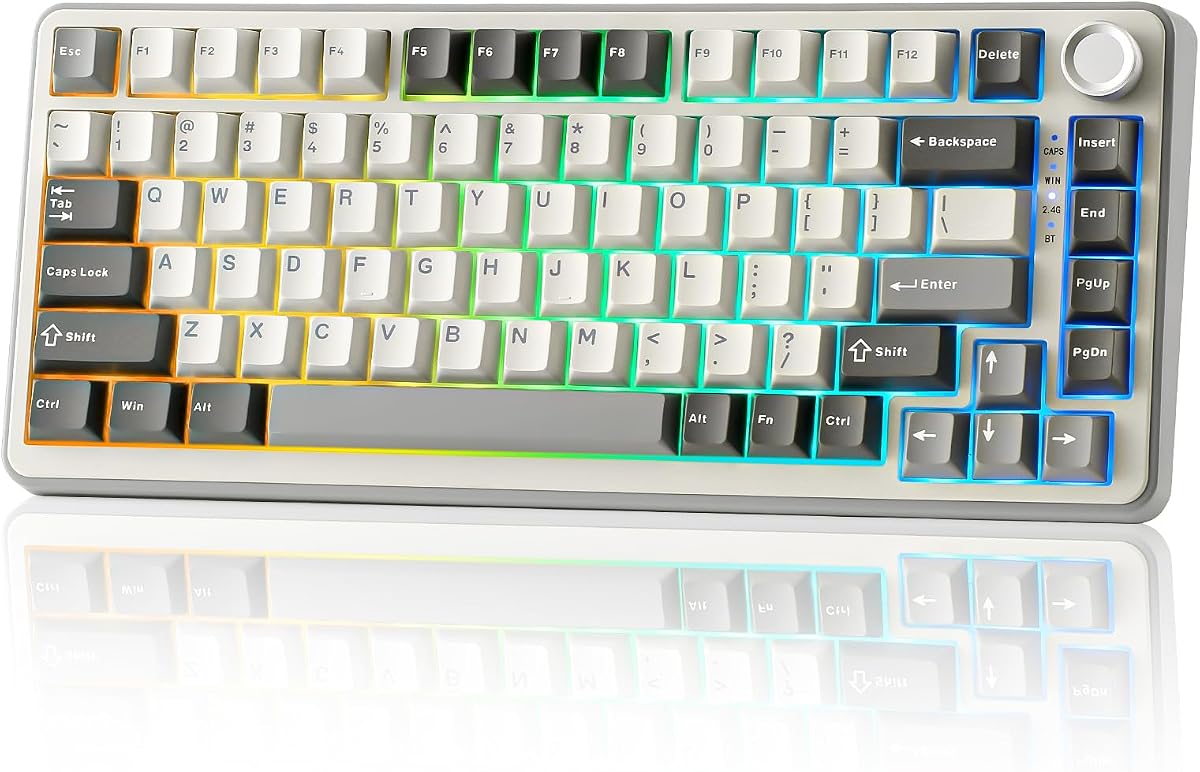


The AULA F75 Pro stands out as a top-tier option for those seeking a versatile 75 percent mechanical keyboard. With a 4.6 rating, it combines premium features like tri-mode connectivity and hot-swappable switches into a compact design.
We may earn a commission when you buy through this link, at no additional cost to you.
Its tri-mode connection allows seamless switching between Bluetooth, 2.4GHz wireless, and USB-C wired modes, supporting up to five devices. The pre-lubed Reaper switches provide a smooth typing experience, while the multi-function knob offers easy control over volume and media.
While the software is Windows-only, the keyboard delivers robust performance for both gaming and productivity. The advanced structure with single key slotting ensures stability and reduces noise, making it a solid choice for daily use.
Anyone looking for a high-performance wireless keyboard with customization options should consider the F75 Pro. It balances build quality, features, and usability effectively.
Connect to multiple devices and switch effortlessly using the dedicated side button or shortcut keys for enhanced workflow flexibility.
Five layers of filling silencer and extended silicone pads ensure a solid feel while minimizing cavity noise for a quiet typing experience.
We may earn a commission when you buy through this link, at no additional cost to you.
The RK ROYAL KLUDGE R75 is known for its smooth and creamy sound profile. With a 4.4 rating, it features a gasket mount design and pre-lubed switches for a satisfying typing experience.
We may earn a commission when you buy through this link, at no additional cost to you.
Its triple-mode connection supports up to three devices, and the 4000mAh battery ensures long usage times. The CNC metal volume knob adds a premium touch, allowing easy control of media and volume.
While the RGB customization is somewhat limited compared to others, the focus on sound quality and typing feel makes it ideal for enthusiasts who prioritize acoustic performance.
This keyboard is perfect for users seeking a balance of style and function without breaking the bank.
Five layers of sound-absorbing material and poron cotton reduce key noise and vibration for a refined acoustic experience.
We may earn a commission when you buy through this link, at no additional cost to you.
This 75% retro mechanical keyboard offers exceptional value with its gasket mount design and pre-lubed switches. Rated 4.6, it delivers a smooth typing experience at a budget-friendly price point.
We may earn a commission when you buy through this link, at no additional cost to you.
The five-layer padding ensures stability and comfort, while the hot-swappable PCB allows for easy switch customization without soldering. Its full-key macro programmability enhances productivity for work and gaming.
Although it lacks wireless connectivity, the wired design ensures stable performance. The RGB lighting adds a nice touch of style to any setup.
Ideal for budget-conscious users seeking premium features like gasket mounting and smooth switches.
The gasket mount and five-layer padding provide a cushioned feel that reduces finger fatigue during extended typing sessions.
We may earn a commission when you buy through this link, at no additional cost to you.
The MageGee 75% mechanical keyboard is a reliable choice for those needing a simple, wired solution. With a 4.1 rating, it features linear red switches and a compact TKL layout.
We may earn a commission when you buy through this link, at no additional cost to you.
Its plug-and-play functionality means no drivers are needed. The blue LED backlighting offers multiple modes, and the full anti-ghosting ensures accurate key registration during gaming.
While it lacks advanced features like hot-swap sockets, it provides solid performance for basic gaming and typing needs.
Best suited for users seeking a straightforward keyboard without extra frills.
Connect directly via USB and start typing immediately without the need for additional software or drivers.
We may earn a commission when you buy through this link, at no additional cost to you.
This gasket-mounted keyboard focuses on delivering a quiet and cushioned typing experience. Rated 4.6, it incorporates sound-absorbing pads and premium PBT keycaps for durability.
We may earn a commission when you buy through this link, at no additional cost to you.
The hot-swap feature allows easy switch replacement without soldering. RGB lighting can be customized via software, and the gasket mount enhances comfort during long sessions.
Despite being wired, the build quality and noise reduction make it a strong contender for office environments.
Recommended for those prioritizing sound dampening and build quality over wireless features.
Integrated sound-absorbing pads reduce typing noise, making it ideal for quiet offices or shared workspaces.
We may earn a commission when you buy through this link, at no additional cost to you.
The AULA S75 PRO stands out with its customizable LCD screen displaying battery status, GIFs, and more. Rated 4.6, it combines premium design with tri-mode wireless connectivity.
We may earn a commission when you buy through this link, at no additional cost to you.
Its advanced structure with extended silicone pads ensures a stable feel, and the hot-swap PCB supports easy switch customization. The south-facing LEDs illuminate RGB clearly through PBT keycaps.
While the software is Windows-only and the price is higher, the screen and build quality justify the investment for enthusiasts.
Best for users seeking a unique, feature-rich keyboard with visual customization options.
The LCD screen allows real-time updates on keyboard status and displays GIFs for a personalized experience.
We may earn a commission when you buy through this link, at no additional cost to you.
The Keychron K2 is designed for Mac users, featuring all necessary Mac function keys and a dedicated layout. Rated 4.4, it offers reliable wireless performance with a 4000mAh battery.
We may earn a commission when you buy through this link, at no additional cost to you.
Connect to up to three devices via Bluetooth and switch easily. The Super Red switches provide linear responsiveness with a 50-million keystroke lifespan.
While it lacks RGB, the elegant white LED backlighting and robust build make it a favorite among Mac enthusiasts.
Ideal for Mac users needing a high-quality wireless mechanical keyboard with full key compatibility.
Includes extra keycaps for Mac and Windows, ensuring seamless integration with Apple devices and shortcuts.
We may earn a commission when you buy through this link, at no additional cost to you.
The YUNZII B75 PRO offers a gasket mount design and tri-mode connectivity for a versatile setup. Rated 4.6, it delivers a creamy typing experience with pre-lubed switches.
We may earn a commission when you buy through this link, at no additional cost to you.
The hot-swap sockets support both 3 and 5-pin switches, allowing extensive customization. The multi-function knob makes media control easy, and the RGB effects are highly customizable.
Its 4000mAh battery ensures extended wireless use, making it great for mobile setups.
Best for users wanting a customizable, high-performance wireless keyboard with sound dampening.
Hot-swap sockets let you experiment with different switch types without soldering, tailoring the feel to your preference.
We may earn a commission when you buy through this link, at no additional cost to you.
The Newmen GM326 is a budget-friendly option with hot-swap capabilities. Rated 4.4, it features a compact design and a multi-function knob for volume control.
We may earn a commission when you buy through this link, at no additional cost to you.
Rainbow LED backlighting offers 20 modes for personalization. The hot-swap function allows switch customization, making it a great entry point for beginners.
While build quality is modest, the features offered at this price point are impressive.
Best for gamers or users on a budget seeking a basic hot-swap keyboard.
Hot-swap sockets allow you to upgrade switches later as you learn more about mechanical keyboard customization.
We may earn a commission when you buy through this link, at no additional cost to you.
The Womier SK80 features a vibrant color multimedia screen displaying GIFs and system info. Rated 4.7, it offers a gasket mount design for a soft typing feel.
We may earn a commission when you buy through this link, at no additional cost to you.
Music syncing mode allows RGB effects to match audio. The hot-swap PCB supports 3 and 5-pin switches for customization.
While primarily optimized for Windows, the visual display and build quality make it a standout choice.
Best for users wanting a unique, visually interactive mechanical keyboard.
The color screen displays custom GIFs and system stats, adding a unique visual element to your setup.
We may earn a commission when you buy through this link, at no additional cost to you.
Choosing the right 75 percent mechanical keyboard involves considering layout, switches, connectivity, and build quality. This guide outlines key factors to help you make the best decision.
The 75 percent layout balances compactness and functionality by retaining arrow keys and function rows while saving desk space. This makes it ideal for users who need essential keys but want more room for mouse movement.
Prioritize layouts that include dedicated arrow keys and a compact footprint to ensure both portability and usability.
Mechanical switches vary by feel and sound. Linear switches are smooth and quiet, tactile switches offer a bump, and clicky switches provide audible feedback. Choose based on whether you prefer gaming, typing, or quiet environments.
Select a switch type that aligns with your usage scenarios and noise tolerance.
Modern keyboards often offer tri-mode connectivity, including Bluetooth, 2.4GHz wireless, and USB-C wired. This versatility ensures you can connect to multiple devices and switch seamlessly between them.
Ensure the keyboard supports your preferred connection methods and device compatibility.
Gasket mount designs provide a softer feel and reduce noise by isolating the PCB from the case. Look for keyboards with solid materials, sound-dampening layers, and durable keycaps like PBT for longevity.
A gasket mount and quality materials enhance comfort and typing acoustics.
Hot-swappable sockets allow easy switch changes without soldering. RGB lighting, programmable macros, and multimedia knobs add personalization and functional control to your setup.
Prioritize hot-swap capability and customizable lighting if you value flexibility and aesthetics.
Wireless keyboards with large batteries, like 4000mAh, offer extended usage without frequent charging. This is crucial for productivity and gaming sessions where downtime is unacceptable.
Look for models with large battery capacities to minimize charging interruptions.
Keyboard software enables RGB customization, macros, and firmware updates. Ensure compatibility with your operating system, as some drivers are Windows-only.
Check software features and OS compatibility to avoid limitations in customization.
While premium models offer advanced features, budget options provide solid core functionality. Determine your budget and prioritize essential features to get the best value.
Balance price with the features most important to your workflow.
To maximize the lifespan of your keyboard, regularly clean dust and debris from keycaps using a soft brush or compressed air. Avoid eating or drinking directly over the device to prevent accidental spills.
Use the software to customize RGB effects and macros for personalized workflows. Adjust the brightness to reduce eye strain during long typing sessions.
Store the keyboard in a dry, cool environment and avoid exposing it to extreme temperatures. When traveling, use a protective case to prevent damage to the switches and structure.
A 75 percent layout is a compact design that retains the function row, arrow keys, and navigation cluster while removing the numpad. It offers a balance between space-saving and functionality, ideal for gamers and productivity users alike.
Yes, 75 percent keyboards are excellent for gaming. Their compact size provides more room for mouse movement while retaining essential keys like arrows and F-keys for game macros and navigation.
Most modern 75 percent keyboards feature hot-swap sockets that allow you to replace switches without soldering. Check the product specifications to ensure compatibility with 3-pin or 5-pin switches.
Gasket mounting involves placing rubber gaskets between the PCB and the case to isolate the switches. This design reduces noise and provides a softer, more cushioned typing experience.
Many models support up to three to five devices via Bluetooth or 2.4GHz wireless. You can switch between connected devices using shortcut keys or a side button.
Wireless 75 percent keyboards often feature 4000mAh batteries, providing up to 7 days of normal use with RGB lighting active. Turning off RGB can extend battery life significantly.
The AULA F75 Pro, 75% Retro Mechanical Keyboard, and AULA S75 PRO represent the best overall options for most users. They combine strong build quality, versatile connectivity, and essential features like hot-swap switches.
When selecting a keyboard, prioritize features that matter most to you, such as wireless connectivity, switch feel, or sound dampening. Ensure compatibility with your devices and preferred operating system.
Prices and availability are subject to change, so always verify the current listings before purchasing. Investing in the right keyboard can significantly improve your daily typing and gaming experience.