
Amazon Basics AC-Powered Computer Speakers
4.3Editor score
AC powered for consistent power
Front volume and headphone jack
Simple plug and play setup
This guide compares the top AC powered computer speakers for desktops and laptops, evaluating sound quality, power output, features, and value for every budget.
Finding the right audio solution for your workspace can transform your daily computing experience. AC powered computer speakers offer consistent power delivery and robust sound quality without relying on battery life or USB constraints. Whether you stream music, edit video, or game for hours, the right speakers enhance every note and impact every scene.
We evaluated ten top models based on power output, frequency response, connectivity options, and build quality. Our analysis focuses on how each system performs with typical desktop setups and whether the AC adapter ensures stable performance. We also consider design, ease of use, and value to help you choose confidently.
Each pick in this list highlights specific strengths tailored to different needs and preferences. You will see detailed breakdowns of features, pros, and cons to guide your decision. Note that availability and pricing may change over time, so check current listings before purchasing to ensure you get the best deal.
4.3Editor score

4.6Editor score

4.6Editor score
This comparison table provides a side-by-side view of all ten selected AC powered computer speakers. Each entry highlights key specifications and features to help you quickly identify which model meets your specific audio and connectivity needs.




The Amazon Basics AC-Powered Computer Speakers deliver reliable audio performance for users seeking a straightforward and affordable solution. With a rating of 4.3 stars, these speakers are praised for their ease of use and consistent power delivery through a direct AC outlet. They are ideal for basic desktop setups where simplicity and value are key priorities.
We may earn a commission when you buy through this link, at no additional cost to you.
These speakers feature a 10W total RMS power output that ensures clear sound even at moderate volumes. The frequency range of 68 Hz to 20 KHz covers most everyday audio needs from music to video calls. The single volume control knob on the front also handles power and standby functions, making operation intuitive.
While the build is mostly plastic, it keeps the cost low and the weight manageable. The design is compact enough for small desks, and the included headphone jack allows private listening without unplugging the speakers. However, there is no remote control or additional EQ settings to tweak the sound further.
This model is perfect for students, office workers, or anyone needing basic sound enhancement without breaking the bank. If you want reliable audio with minimal setup hassle, these speakers offer excellent value. They may lack advanced features, but they deliver consistently for everyday tasks.
The AC power plug ensures the speakers never run out of battery, providing stable performance for long sessions. The front control knob handles volume and power in one place for convenience.
A 3.5mm jack and included headphone port make these speakers compatible with most devices. You can switch between speakers and headphones quickly without needing extra cables.
We may earn a commission when you buy through this link, at no additional cost to you.
The Bose Companion 2 Series III Multimedia Speakers bring renowned audio engineering to your desktop. Boasting a 4.6-star rating, these speakers are celebrated for their clear sound at any volume. The brand's legacy of quality ensures a listening experience that stands out in a crowded market.
We may earn a commission when you buy through this link, at no additional cost to you.
These speakers support an auxiliary input that allows you to connect a second device like a phone or tablet effortlessly. This flexibility means you can switch sources without unplugging cables. The volume control and headphone jack are conveniently located on the front of the right speaker.
While the sound quality is excellent, the price reflects a premium positioning that may not suit all budgets. The design is elegant and fits well in professional or home environments. However, there are no advanced controls to customize the sound profile beyond the built-in tuning.
If you prioritize audio fidelity and brand trust, these speakers are a smart investment. They excel at music playback and video conferencing. While costlier than budget options, the performance and durability justify the price for discerning listeners.
The auxiliary input lets you connect a second audio source instantly. This feature enhances usability for those who switch between devices throughout the day.
Bose engineers tune these speakers for clarity across the frequency range. The result is balanced audio that avoids distortion even at higher volumes.
We may earn a commission when you buy through this link, at no additional cost to you.
The Bose Companion 2 Series II Multimedia Speaker System offers a timeless audio experience for desktop users. With a rating of 4.1 stars, it delivers clear sound tailored for music, movies, and gaming. The design remains elegant and fits seamlessly into various desk environments.
We may earn a commission when you buy through this link, at no additional cost to you.
Dual inputs allow you to connect both a computer and an additional audio source. This setup flexibility ensures you can switch between devices without hassle. The speakers are designed to provide a realistic experience that enhances entertainment and productivity.
While it is an older model compared to the Series III, it still holds up well in terms of sound performance. The build quality is solid, and the aesthetic is refined. However, it lacks some modern connectivity options found in newer releases.
This system is ideal for those who want reliable Bose quality without the latest feature set. It is a solid choice for home offices or study spaces. If you value classic design and consistent performance, these speakers deliver.
The dual inputs provide flexibility to connect multiple devices. This feature is useful for users who frequently switch between their PC and mobile devices.
These speakers are tuned for a realistic sound that works well across media types. You get balanced audio that is neither too bass-heavy nor too sharp.
We may earn a commission when you buy through this link, at no additional cost to you.
The Bose Companion 20 Multimedia Speaker System is designed to provide full, natural sound from just two speakers. Rated 4.6 stars, it uses TrueSpace technology to create a wide soundstage. This makes it a top choice for users who want immersive audio without a subwoofer.
We may earn a commission when you buy through this link, at no additional cost to you.
A convenient control pod is included, allowing you to adjust volume or mute sound and connect headphones easily. The active electronic equalization balances frequencies for natural tone and clarity. The speakers fill the room with sound that feels larger than their physical size.
While the price is higher than budget models, the audio performance justifies the investment. The design is sleek and complements modern computer setups. However, the lack of Bluetooth means you must rely on wired connections for audio input.
If you want premium audio quality with easy control, this system is an excellent choice. It excels at music, movies, and gaming. For those who value sound fidelity and design, these speakers are a top recommendation.
This proprietary technology creates a wide two-channel soundstage from two speakers. It enhances stereo separation and immersion for a more engaging listening experience.
The control pod adds convenience by placing essential functions at your fingertips. You can manage volume, mute, and headphone connections without reaching for the speaker itself.
We may earn a commission when you buy through this link, at no additional cost to you.
The Edifier R1280T Powered Bookshelf Speakers offer natural sound reproduction for desktop and studio use. With a 4.6-star rating, these speakers deliver high-quality audio thanks to a silk dome tweeter and full-range units. They are perfect for music lovers and creators.
We may earn a commission when you buy through this link, at no additional cost to you.
A remote control lets you adjust volume from your chair, and side panel knobs let you tune bass and treble. The classic wood finish adds a sophisticated look to any desk. Dual AUX inputs mean you can connect two sources at once without switching.
While they are larger than typical desktop speakers, the acoustic performance is worth the extra space. The wood finish minimizes resonance for cleaner sound. However, they do not support Bluetooth, so wired connections are required.
These speakers are ideal for audiophiles and home studios on a budget. They provide exceptional value for the sound quality. If you want detailed audio with physical controls, these bookshelf speakers are a top pick.
Physical knobs on the side allow you to adjust EQ settings to your preference. This feature gives you control over the sound signature without software.
Connect two devices simultaneously via AUX inputs to simplify switching. This is handy for users who connect both a PC and a phone or player.
We may earn a commission when you buy through this link, at no additional cost to you.
The Edifier R980T 4 Active Bookshelf Speakers deliver rich and immersive sound for desktop setups. Rated 4.6 stars, they feature 24W RMS power and flared bass reflex ports. The 100% wooden enclosures minimize resonance for cleaner audio.
We may earn a commission when you buy through this link, at no additional cost to you.
Cables including RCA and 3.5mm are included, making setup easy. The universal power supply works with 110V to 240V for global use. Dual AUX inputs let you connect two devices at once for flexibility.
The sound is well-balanced and fills the room effectively. The build is sturdy, and the design complements various decor styles. However, there are no physical EQ adjustments beyond what is built-in.
These speakers are excellent for multimedia use and casual listening. They provide strong performance at a competitive price. If you want reliable sound with included accessories, these bookshelf speakers are a smart choice.
The 24W RMS power output ensures robust sound across volumes. Bass reflex ports enhance low notes for a fuller listening experience.
The universal power supply allows use with different voltage standards. This is a convenience for international travelers or multi-region setups.
We may earn a commission when you buy through this link, at no additional cost to you.
The Cyber Acoustics CA-2014 2.0 Computer Speakers are a compact option for small desks. With a 4.2-star rating, they deliver clear stereo sound for videos and calls. The 4W output is modest but adequate for quiet environments.
We may earn a commission when you buy through this link, at no additional cost to you.
Front panel controls include power, volume, and a headphone jack. An LED indicator shows when they are on. The compact design fits in limited spaces without taking up room. An AC adapter ensures stable power.
The sound quality is basic but functional for everyday tasks. The build is light and durable. However, low power means they are not suitable for loud music or large rooms.
These speakers are ideal for workstations or dorm rooms where space is tight. They are an entry-level choice that gets the job done. If you need a simple solution with minimal cost, these speakers fit the bill.
The compact footprint fits neatly on crowded desks. This is a benefit for users with limited workspace who still want external speakers.
Power, volume, and headphone functions are all on the front. You can manage audio without digging into settings or cables.
We may earn a commission when you buy through this link, at no additional cost to you.
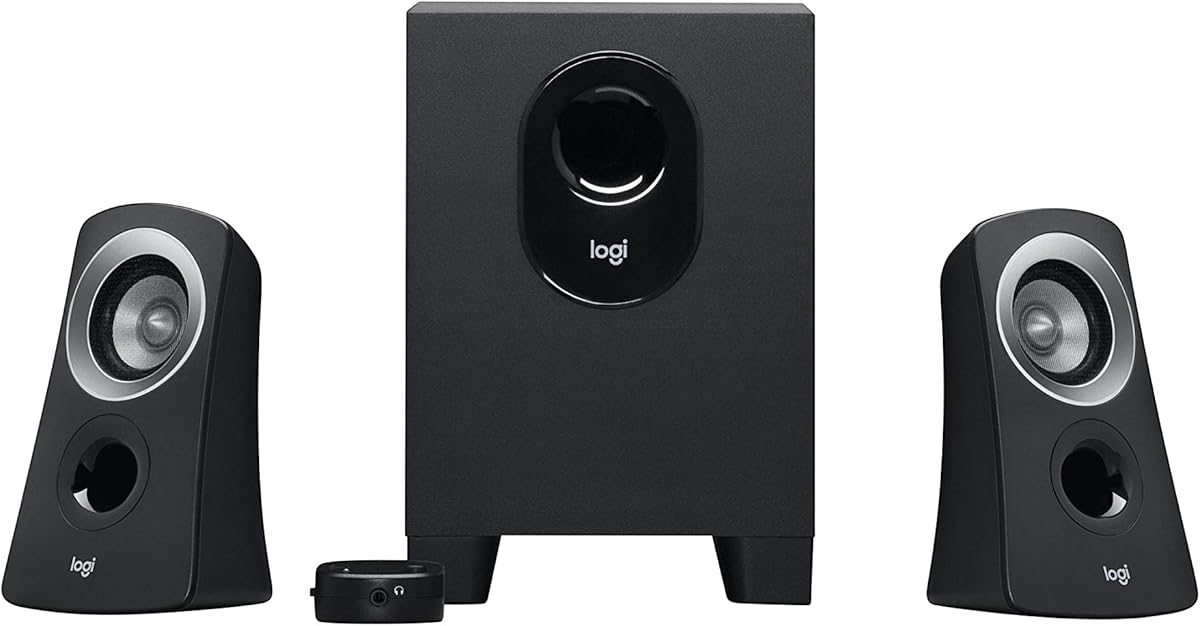
The Logitech Z313 2.1 Multimedia Speaker System brings a dedicated subwoofer to desktops. Rated 4.4 stars, it delivers 25 Watts RMS output for rich sound. The subwoofer adds depth that two-piece speakers lack.
We may earn a commission when you buy through this link, at no additional cost to you.
A convenient control pod lets you adjust volume and bass level easily. The compact subwoofer fits under or near your desk without taking too much room. This system is ideal for multimedia and casual gaming.
The bass is noticeable and impactful. The main speakers are clear. The design is straightforward and easy to set up. However, there are no advanced EQ settings to refine the sound further.
If you enjoy music or movies with strong low-end, this system is a great fit. It is affordable and performs well. For budget-conscious users who want a subwoofer, the Z313 is a reliable option.
The 2.1 design adds a dedicated driver for low frequencies. This creates a fuller sound experience compared to simple stereo pairs.
The control pod places essential functions within reach. You can adjust volume and mute without reaching for the speakers.
We may earn a commission when you buy through this link, at no additional cost to you.
The Nylavee Computer Speakers for Desktop PC combine audio with customizable RGB lighting. Rated 4.2 stars, they deliver 14W RMS power for clear sound. The four speaker units and passive radiators enhance clarity across frequencies.
We may earn a commission when you buy through this link, at no additional cost to you.
Bluetooth 5.0 and 3.5mm AUX support offer flexible connections. You can switch between wired and wireless easily. One-button EQ modes allow quick changes between relaxed and engaging sound profiles. The ambient lighting adds style to your setup.
The sound is balanced but not audiophile-grade. The design is compact and user-friendly with a volume knob and physical buttons. However, the lighting may not be ideal for professional work environments.
These speakers are perfect for gaming and casual entertainment. They add visual flair to your desk. If you want connectivity options and style alongside sound, these speakers offer great value.
Bluetooth 5.0 and AUX input support both wired and wireless needs. This is useful for switching between a PC and mobile devices easily.
The RGB modes let you change colors to match your mood or setup. You can also turn them off when focusing on work.
We may earn a commission when you buy through this link, at no additional cost to you.
The LITTOAK Bluetooth PC Speakers offer high power output at 2x15W. Rated 4.2 stars, they are designed for gaming and desktop use. The dedicated EQ presets for music, movies, and games tailor the sound instantly for different scenarios.
We may earn a commission when you buy through this link, at no additional cost to you.
Connectivity includes Bluetooth, 3.5mm AUX, and a USB port for additional features. The six RGB modes enhance immersion. The control panel is intuitive with all settings accessible on the front. Cables and adapters are included for setup.
The sound is loud and powerful for desktop use. The design is modern and fits gaming setups. However, the feature set may be overwhelming for users who prefer simple controls.
These speakers are ideal for gamers and multimedia enthusiasts. They offer versatility at a mid-range price. If you want power, lighting, and flexibility, these speakers provide a complete solution.
Three dedicated EQ modes let you optimize sound for music, movies, or gaming. This simplifies tuning without needing software or apps.
The RGB lighting adds atmosphere to your setup. It enhances the experience during gaming sessions without distracting too much.
We may earn a commission when you buy through this link, at no additional cost to you.
Choosing the right AC powered computer speakers involves considering power output, connectivity, and design. This guide breaks down the factors that impact audio performance and usability.
Power output is a key factor determining how loud and clear your speakers can get. Look for speakers with at least 10W total RMS output for adequate desktop volume. Higher wattage ensures better performance in larger rooms or for bass-heavy content.
Prioritize RMS ratings over peak power claims for realistic expectations. This ensures your speakers deliver consistent performance during long listening sessions.
Modern setups often require multiple connection types. Ensure the speakers support 3.5mm AUX for universal compatibility and consider Bluetooth for wireless flexibility. Some models also include USB ports or RCA inputs for added convenience.
Choose options that match your devices. Having multiple inputs saves time when switching between a PC and phone or tablet.
Desk space varies significantly across users. Measure your available area before purchasing to avoid clutter. Compact speakers suit small workstations while larger models may need dedicated stands or desk space.
Balance size with performance. Smaller speakers may lack bass but fit easily, while larger ones offer better sound but take up more room.
Materials affect durability and acoustics. Wood enclosures reduce resonance for better sound but add weight. Plastic is lightweight and affordable but may vibrate at high volumes.
Select a build that matches your priorities. Durable materials often last longer and produce cleaner audio over time.
Ease of use matters for daily interaction. Look for front volume knobs, headphone jacks, and control pods. Remote controls add convenience if you sit away from your desk.
Check for mute buttons and power indicators. These small features improve usability during frequent on-off cycles.
Frequency response determines the range of sounds your speakers can reproduce. A wider range like 68 Hz to 20 KHz covers most audio needs. Narrow ranges may miss deep bass or high treble details.
Check specs for balanced coverage. If you listen to music, prioritize models with clear mid and high ranges.
Your speakers contribute to your workspace look. Sleek designs blend well with modern monitors while colorful RGB adds personality. Consider whether a minimalist or feature-rich visual appeals to you.
Match the speaker style to your setup. Consistent aesthetics can make your desk feel more cohesive and professional.
Prices vary based on features and brand reputation. Budget models offer basic sound while premium ones deliver advanced tuning. Assess what features you truly need before spending more.
Compare specs within your budget. Sometimes a mid-range model offers the best balance of performance and cost.
To set up your AC powered computer speakers, connect them to a wall outlet using the included power adapter. Plug the audio cable into your PC or laptop using the 3.5mm jack. Ensure the volume knob is turned up on both the speakers and your device for optimal sound.
For regular care, keep the speakers dry and free from dust. Wipe the surface with a soft cloth to remove fingerprints. Avoid placing heavy objects on top of them to prevent damage. If the speakers have wood finishes, keep them away from direct sunlight to avoid discoloration.
When not in use, turn the speakers off using the power button or standby switch. This saves energy and protects the internal components. If you have a control pod, ensure all settings are in their default positions so they are ready for the next use.
Yes, AC powered speakers generally deliver more consistent power and higher volume than USB powered ones. The wall outlet provides stable electricity which supports stronger amplifiers. This makes them better for louder rooms or immersive listening.
Not necessarily. Many AC powered speakers include built-in woofers that handle bass well. If you prioritize heavy low-end effects for movies or games, a system with a dedicated subwoofer is a better fit. For general use, two-piece systems often suffice.
Yes, you can use AC speakers with a laptop. Most models include a 3.5mm jack that connects to laptop audio ports. Ensure your laptop has a working headphone or audio output for the speakers to function properly.
A control pod provides convenient access to volume, mute, and power functions. It saves you from reaching for the speakers or adjusting settings on your computer. This is especially useful for multi-monitor setups or long work sessions.
Yes, most AC powered computer speakers work with Mac computers. Since they rely on standard 3.5mm audio outputs, compatibility is typically seamless. Just plug in the cable and ensure your Mac volume is turned up.
Yes, many of these speakers are suitable for gaming. Models with higher power and subwoofers offer immersive effects. Look for those with EQ modes or Bluetooth if you want to sync audio with multiple devices during gameplay.
This guide explored ten top AC powered computer speakers that balance quality, features, and value. From budget options like Amazon Basics to premium choices from Bose and Edifier, there is a model for every setup. Consider your priorities in sound, design, and connectivity.
When choosing, prioritize power output and connectivity that match your devices. If you want immersive sound, look for higher RMS ratings and subwoofers. For simple use, models with direct 3.5mm input and front controls are practical.
Prices and availability change so check the current listings before purchasing. Review the detailed breakdowns to ensure the model fits your needs. With the right pair, you can significantly improve your desktop audio experience.