
Insta360 Flow 2 Pro
4.4Editor score
Advanced active zoom tracking
360 infinite pan rotation
Includes dedicated AI tracker module
Finding the right stabilization tool for your smartphone can transform your content creation experience. An AI Gimbal with Tripod offers the perfect blend of smooth motion and hands-free convenience for creators.
We analyzed ten leading models based on stabilization performance, intelligent tracking capabilities, and versatility. Our review highlights key features like battery life and build quality to assist your decision.
Each selection showcases unique strengths for different shooting scenarios. Prices and availability fluctuate frequently, so verify current details on the product pages before making your final purchase decision today.
4.4Editor score

4.3Editor score
4.4Editor score
As an Amazon Associate we earn from qualifying purchases.
This side-by-side comparison outlines the core specifications and unique attributes of each selected model to help you quickly identify the right fit for your needs.


The DJI Osmo Mobile 8 represents a top-tier choice for creators prioritizing professional results. Its robust 3-axis stabilization ensures smooth footage even during dynamic movement scenarios.
We may earn a commission when you buy through this link, at no additional cost to you.
Native tracking combined with audio reception and lighting features creates a versatile toolkit for vlogs. The built-in tripod adds significant convenience for solo recording situations.
While the app compatibility has seen some platform shifts, the hardware performance remains exceptional. Users should download the latest version directly from the official site.
This model is ideal for serious content creators who need reliable gear. The investment is justified by the seamless integration of advanced tracking and long battery life.
The ability to connect audio and add lighting directly through the module simplifies your workflow significantly.
Having a tripod built into the handle means you never need extra gear for hands-free shots.
We may earn a commission when you buy through this link, at no additional cost to you.
The AOCHUAN Smart V3 offers extensive features at an attractive price point. Its unique extension rod extends to over 70 inches for varied angles.
We may earn a commission when you buy through this link, at no additional cost to you.
Intelligent tracking and a detachable remote allow for flexible shooting without needing to hold the device constantly. This is great for group shots.
Build quality feels sturdy though the design is slightly bulkier than premium models. The gesture controls provide a nice user experience during live streams.
Buyers looking for a full-featured stabilizer without breaking the bank should consider this. It balances functionality and cost effectively for casual creators.
The rod allows you to capture high angles without standing on a chair or ladder.
Hand gestures for tracking and pausing make interaction intuitive and hands-free.
We may earn a commission when you buy through this link, at no additional cost to you.
The Insta360 Flow 2 Pro stands out with its Active Zoom Tracking feature. This allows for tracking subjects even when zoomed in up to 15 times.
We may earn a commission when you buy through this link, at no additional cost to you.
Apple DockKit integration ensures seamless connectivity with many iOS apps. The dedicated AI tracker module adds even more versatility to the setup.
While the price reflects these advanced capabilities, the results are professional grade. Users get excellent low light performance and creative shooting modes.
This is the top choice for those who need the best tracking tech available. It transforms smartphone filming into a truly cinematic experience easily.
Tracking while zoomed in is rare and essential for sports or stage performances.
Native app support means tracking works directly within your favorite social media apps.
We may earn a commission when you buy through this link, at no additional cost to you.
The grey variant of the Insta360 Flow 2 Pro matches the white version in functionality. It supports both Android and iPhone users for broader compatibility.
We may earn a commission when you buy through this link, at no additional cost to you.
Multi-person tracking allows for framing entire groups perfectly. This is incredibly useful for travel or family events where you want everyone in shot.
The active zoom and stabilization remain top notch. While expensive, it delivers professional results across all your devices.
If you prefer a neutral color and need Android support, this is ideal. It offers the same high performance as the white bundle.
This feature automatically frames multiple subjects so you do not miss anyone.
Unlike some models, this works seamlessly with Android devices for native tracking.
We may earn a commission when you buy through this link, at no additional cost to you.
This device combines a tripod and selfie stick with built-in tracking. It does not require any app to function for face tracking.
We may earn a commission when you buy through this link, at no additional cost to you.
The quad-foot design provides superior stability for low angle shots. A detachable ring light ensures you are well lit in any environment.
While it lacks the 3-axis mechanical stabilization of a full gimbal, it is lightweight and easy to carry. Ideal for quick social media updates.
It is perfect for travelers needing a simple setup. The gesture controls and light make it a versatile tool for content creators on the go.
Tracking works instantly without installing extra software on your phone.
Adjustable ring lights improve video quality significantly in dim lighting.
We may earn a commission when you buy through this link, at no additional cost to you.
The DJI Osmo Mobile 7P brings reliable stabilization and tracking to the table. It features dual-lens enhanced tracking for better focus accuracy.
We may earn a commission when you buy through this link, at no additional cost to you.
ShotGuides and One-Tap Edit simplify the workflow for beginners. The battery lasts for long sessions and can even charge your phone.
It offers a solid middle ground between price and performance. While some app compatibility concerns exist, the hardware is dependable.
This is a great choice for everyday creators who need consistency. It balances advanced features with ease of use perfectly for daily vlogs.
Built-in creative guides help you film cinematic shots with ease.
Using two lenses improves tracking accuracy and subject focus during movement.
We may earn a commission when you buy through this link, at no additional cost to you.
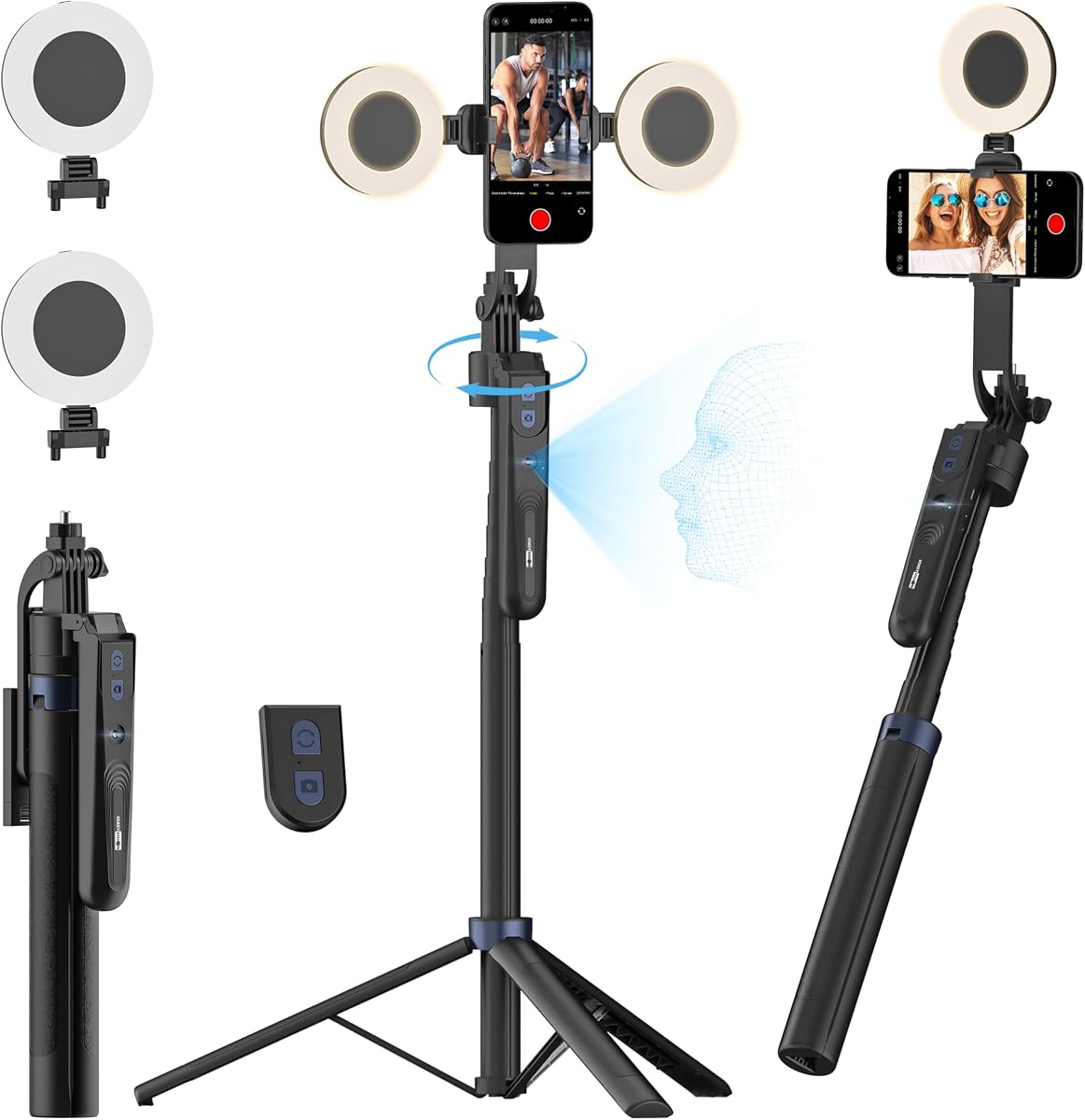
This tripod stands out with dual detachable ring lights and a remote. It offers a flexible solution for live streaming without complex setups.
We may earn a commission when you buy through this link, at no additional cost to you.
The aluminum alloy body is durable enough for travel. It reaches over 70 inches tall which is useful for various heights.
While it does not offer motorized stabilization, the AI face tracking ensures the subject stays in frame. This is ideal for stationary content creation.
Value seekers will find this unit highly practical. It covers basic needs for lighting and framing effectively without spending much money.
Having two lights allows for better shadow control and coverage.
The extendable legs provide flexibility for different shooting scenarios.
We may earn a commission when you buy through this link, at no additional cost to you.
This bundle adds a Mic Mini Transmitter to the Osmo Mobile 8 setup. It significantly enhances audio quality for interviews or live streaming.
We may earn a commission when you buy through this link, at no additional cost to you.
The gimbal itself provides robust stabilization and native tracking. Having audio and lighting all in one box streamlines your production workflow.
For creators who rely on sound, this is a comprehensive package. The extra cost is justified by the professional audio capability it provides.
Buyers prioritizing clear audio and video should choose this bundle. It covers all the essential bases for professional-looking content.
The included microphone ensures clear voice recording in noisy environments.
Having lighting audio and tracking together simplifies your gear checklist.
We may earn a commission when you buy through this link, at no additional cost to you.
The Flow 2 Plus excels at tracking pets and children reliably. The animal tracking feature ensures playful moments are captured without missing frames.
We may earn a commission when you buy through this link, at no additional cost to you.
It includes a teleprompter and remote control for enhanced functionality. Active zoom tracking allows for dynamic shots during sports or action.
The AI powered editing tools in the app help streamline post-production. This model is designed for creators who need specific tracking capabilities.
Families and pet owners will find this particularly useful. The extra features like teleprompter add significant value to your workflow.
Specialized algorithms help keep pets and kids in focus smoothly.
A built-in prompter helps you deliver lines accurately while recording.
We may earn a commission when you buy through this link, at no additional cost to you.
The Flow 2 offers a compact and foldable design for easy travel. It features active zoom tracking which is rare in this price range.
We may earn a commission when you buy through this link, at no additional cost to you.
It supports both Android and iPhone with multi-person tracking capabilities. The remote control and gesture features make it easy to handle alone.
While it lacks the extra AI tracker module of the Pro, it is still a powerful tool. The AI editing tools help finalize your videos quickly.
This is a balanced option for general creators. It offers high-end features like active zoom at a slightly lower entry point than the Pro.
The compact form factor allows you to carry it anywhere easily.
This feature allows you to zoom and track without losing your subject.
We may earn a commission when you buy through this link, at no additional cost to you.
Selecting the right AI Gimbal with Tripod requires balancing features, budget, and specific usage needs.
Look for a 3-axis gimbal that ensures smooth footage even during fast movements. Mechanical stabilization is superior to software stabilization alone for professional results.
Prioritize models with high torque motors to handle heavier phones effectively.
Advanced AI tracking should include face body and multi-person modes. Ensure the tracking works across your preferred apps like TikTok or YouTube.
Active zoom tracking is a premium feature worth considering for sports or stage filming.
An integrated tripod or selfie stick saves space and adds versatility. Check if the tripod is sturdy enough to hold the weight of your device.
A built-in extension rod offers more flexibility for low or high angle shots.
Long battery life is crucial for extended recording sessions. Aim for at least 10 hours of continuous use to avoid interruptions.
Features like pass-through charging allow you to record while the device is plugged in.
Verify that the gimbal works with your specific phone model and operating system. Some models have better support for iOS while others are optimized for Android.
Check if the companion app is available for your region to access all features.
If you travel often choose a foldable design that fits easily into a bag. Lightweight materials reduce fatigue during long handheld shoots.
Consider the folded dimensions to ensure it fits your backpack or suitcase.
Built-in lights or teleprompters add value to your setup. These accessories eliminate the need for extra gear during shoots.
Evaluate if these extras justify the cost compared to buying them separately.
Materials like aluminum alloy offer durability and resistance to wear. A sturdy build ensures the gimbal lasts through regular use.
Check reviews regarding hinge durability and motor longevity before purchasing.
Always balance your phone on the mount before turning on the motors to prevent unnecessary strain on the hinges and motors.
Regularly update the companion app to ensure you have access to the latest tracking algorithms and firmware improvements.
Store the gimbal in a protective case or pouch when not in use to prevent dust accumulation and accidental damage to the arms.
Most gimbals come with a dedicated app for setup and advanced features. However some models now support native tracking within popular social media apps without extra software.
It depends on the thickness of your case. Most clamps support standard cases but thick rugged cases might need to be removed for proper balance.
Standard tracking keeps the subject in frame while maintaining the current focal length. Active zoom changes the focal length to keep the subject large in the frame while moving.
Use adjustable legs or rubber feet if available. For extreme uneven surfaces you may need to place a small mat under the tripod for extra stability.
Yes many modern models like the Insta360 Flow series support both platforms equally. Always check specific compatibility lists before purchasing.
Absolutely many of the top models work seamlessly for video conferencing. The tracking keeps you centered even if you move around while talking.
Most gimbals take between two to four hours to fully charge. Look for fast charging support to reduce downtime when you need to shoot quickly.
Advanced models include fill lights to help in low light conditions. However extremely dark environments may still reduce tracking accuracy compared to well lit settings.
We have reviewed ten top models ranging from affordable tripods to professional gimbal systems with AI tracking. Each option offers unique strengths for specific shooting needs.
Prioritize stabilization and tracking accuracy if you film dynamic content. For static shots a simpler tripod with AI tracking might suffice.
Remember to check the latest pricing and availability on product pages before buying to ensure you get the best deal available today.