
Air Mouse Remote MX3 Pro
3.8Editor score
Plug and Play Setup
Mini Keyboard Back
5 Key IR Learning
This comprehensive guide compares the top 10 air mouse for Android TV Box models featuring motion sensors, voice control, and keyboard integration for seamless
Navigating your Android TV Box can be frustrating with a standard remote. An air mouse for Android TV Box transforms your experience by allowing gesture-based cursor control and integrated typing. These devices combine the ease of a remote with the precision of a mouse for smoother streaming.
We evaluated ten leading models based on connectivity, sensor accuracy, build quality, and compatibility. Our comparison focuses on 2.4G and Bluetooth options with gyroscopic motion detection and IR learning capabilities. Each product was assessed for real-world usability across various media center setups.
Each pick highlights key strengths, limitations, and ideal use cases for different users. We include detailed specs, pros, cons, and usage tips to help you decide. Prices and availability change frequently so always verify current listings before purchasing your next device.
3.8Editor score

4.5Editor score
4.3Editor score
The following table provides a side-by-side comparison of all ten reviewed products highlighting their primary connectivity types and key feature sets to help you quickly identify the model that fits your specific streaming setup and budget requirements.


The BOXPUT BPR2S Plus stands out as the top choice for users seeking a versatile control solution. With a high rating of 4.5 stars, it balances advanced features with ease of use. Its dual wireless capability ensures you can connect via Bluetooth or 2.4G RF depending on your device preferences.
We may earn a commission when you buy through this link, at no additional cost to you.
This remote shines due to its precise 6-axis gyroscope sensor which allows natural wrist movements to control the cursor. The IR learning chip supports full button learning enabling you to control your TV and box simultaneously. The USB receiver provides a stable connection up to 10 meters for flexible seating arrangements.
While highly capable users should note that voice commands work best within supported apps rather than system-wide. Additionally some specific TV brands may not be compatible so checking the device list is recommended. These limitations are minor compared to the robust feature set and reliable performance.
Ideal for smart home enthusiasts and casual streamers alike this remote simplifies navigation significantly. Its build quality and firmware support ensure long term usability. We highly recommend this model for anyone upgrading from a basic remote to a more intuitive control experience.
Switch between Bluetooth and 2.4G RF to ensure compatibility with your specific media player or TV setup.
Program blue TV buttons to control your display power and volume while keeping your streaming box separate.
We may earn a commission when you buy through this link, at no additional cost to you.
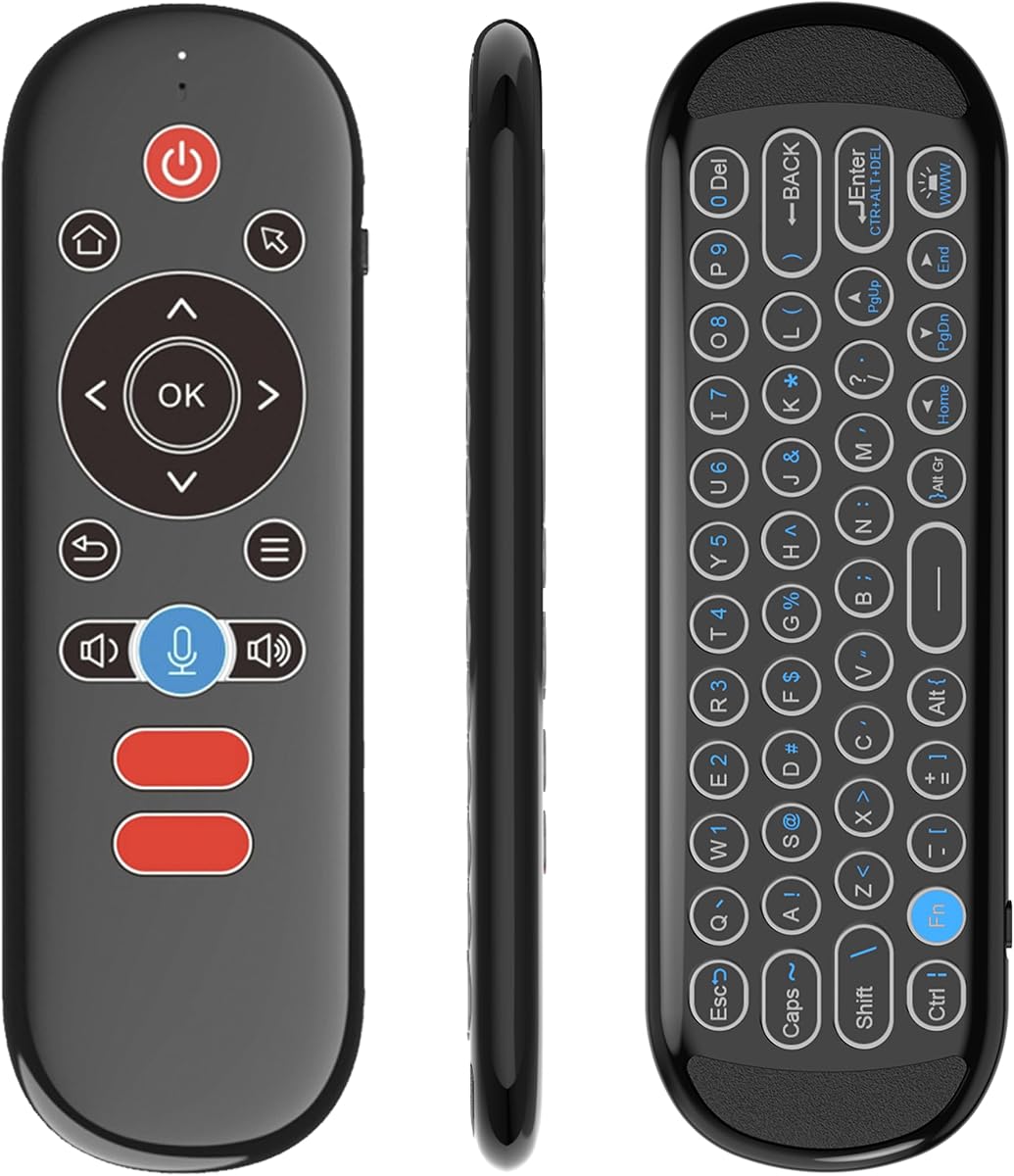
The MX3 Pro offers exceptional value for budget conscious buyers needing essential air mouse functionality. It combines a wireless keyboard and motion sensor in one affordable package. This makes it an ideal entry level device for users transitioning from physical remotes to gesture control.
We may earn a commission when you buy through this link, at no additional cost to you.
Its core strength lies in simplicity requiring no drivers or complex pairing processes. The 2.4G connection ensures stable communication with your Android box. The mini keyboard on the reverse side facilitates typing searches without needing a physical keyboard nearby.
However users may find the motion sensor less refined than premium models. The IR learning is limited to five keys which might not cover all TV functions. These trade-offs are acceptable given the low cost and solid performance for basic navigation tasks.
We recommend this remote for students or casual users who prioritize cost over advanced features. It performs reliably for media consumption and basic system navigation. Its versatility with multiple devices makes it a useful tool for various media centers.
Simply insert the USB dongle and start controlling your device immediately without software installation.
Access a full QWERTY layout quickly to search content or enter passwords without leaving your couch.
We may earn a commission when you buy through this link, at no additional cost to you.
This premium air mouse delivers a luxurious user experience with its vibrant backlighting and rechargeable design. It caters to users who demand aesthetic appeal alongside functionality. The dual mode connectivity ensures you stay connected via Bluetooth or 2.4G regardless of device constraints.
We may earn a commission when you buy through this link, at no additional cost to you.
The QWERTY keyboard features a 7-color backlit design allowing visibility in dark environments. Voice control integration streamlines search tasks and media playback commands. The rechargeable battery reduces long term waste and cost compared to disposable battery models.
Users should ensure they have an available USB port for the receiver if using 2.4G mode. While the price is higher the added features justify the investment for power users. The ergonomic design ensures comfortable extended use during long binge sessions.
We recommend this for tech enthusiasts who value design and sustainability. It excels in both gaming and media consumption scenarios. The combination of premium features and reliable performance makes it a top contender in the high end category.
Cycle through seven colors or turn off lights to customize your setup atmosphere.
Use the built-in battery to avoid frequent replacements and reduce electronic waste.
We may earn a commission when you buy through this link, at no additional cost to you.
The BPR1S Plus features an updated firmware designed to enhance compatibility and voice recognition. It supports full IR learning ensuring your TV buttons can be mapped effectively. The dual wireless modes allow flexible setup options for various smart TV environments.
We may earn a commission when you buy through this link, at no additional cost to you.
Voice input is a standout feature enabling hands-free searches for shows or apps. The gyroscope sensor provides accurate cursor tracking for smooth navigation. The USB receiver offers plug-and-play convenience without needing drivers or complex configuration steps.
Users must provide their own AAA batteries for operation which is a small maintenance task. It is explicitly not compatible with Fire Stick devices so verifying device support is essential. These minor constraints do not detract from its overall robust performance.
We suggest this remote for families who rely heavily on voice commands. Its versatility makes it suitable for mixed device households. The updated firmware ensures it remains relevant and functional as streaming platforms evolve.
Use the built-in microphone for seamless hands-free searches and app launches.
Take advantage of the latest software improvements for better device detection and stability.
We may earn a commission when you buy through this link, at no additional cost to you.
This remote distinguishes itself by supporting Windows Mac and Linux alongside Android devices. It is a versatile tool for users with diverse tech setups needing a single controller. The 2.4G connection remains stable and effective across all supported platforms.
We may earn a commission when you buy through this link, at no additional cost to you.
Its microphone allows for voice chat and input within compatible apps enhancing interactivity. The layout includes essential media and navigation keys without unnecessary clutter. The gyroscopic sensor delivers responsive cursor movement for gaming and browsing.
Voice functionality is restricted to specific built-in boxes so users may find it inconsistent. The compact design might feel small for those with larger hands. These factors are minor and do not hinder its primary function as a reliable input device.
Ideal for IT professionals or developers who need a portable controller. Its cross-platform flexibility makes it useful for testing and development. We recommend it for budget users who need a simple universal remote.
Connect to Windows Mac or Linux machines without changing hardware.
Carry this lightweight remote in a bag for on-the-go presentations.
We may earn a commission when you buy through this link, at no additional cost to you.
The iPazzPort Mini offers a colorful and compact solution for modern streaming setups. Its 7-color backlight adds visual appeal and functionality in low light. The rechargeable battery ensures long term use without needing constant replacements.
We may earn a commission when you buy through this link, at no additional cost to you.
It supports both Bluetooth and 2.4G modes providing versatility for different devices. The 6-axis gyroscope ensures precise cursor control for gaming and navigation. The Type-C charging port aligns with modern standards for convenient power management.
Users might find the setup slightly complex compared to plug-and-play USB models. Without a USB receiver included Bluetooth becomes the primary mode which may not suit all devices. These challenges are manageable for those seeking a stylish portable remote.
Recommended for users who prioritize design and portability. Its sleek look fits well in minimalist setups. We suggest this for tech-savvy users who want a reliable rechargeable remote.
Use a Type-C cable to recharge the device quickly and efficiently.
Change the backlight color to match your room lighting or personal preference.
We may earn a commission when you buy through this link, at no additional cost to you.
The Rii MX3 is designed with gaming in mind offering specific features for interactive play. Its 3-axis gyro and accelerometer allow for natural movement control. The 10-meter range ensures you can sit far back and still maintain control.
We may earn a commission when you buy through this link, at no additional cost to you.
It functions as both a keyboard and mouse facilitating text input during gaming. The IR learning allows control of media devices alongside your gaming console. This dual functionality makes it a versatile tool for entertainment systems.
Pairing requires a specific key combination which can be confusing for some users. The limited learning keys restrict TV control to essential functions only. Despite this it remains a robust choice for those wanting a gaming-friendly remote.
Ideal for gamers using Android boxes or mini PCs. Its durability ensures it withstands intense use. We recommend this for casual gamers who value responsive motion controls.
Access vertical and horizontal modes for better control in different game genres.
Enjoy up to 10 meters of wireless range for flexible seating positions.
We may earn a commission when you buy through this link, at no additional cost to you.
This remote focuses on the typing experience with its LED backlit keyboard design. It is ideal for users who frequently input text or passwords on their TV. The 38-key layout provides essential characters without unnecessary complexity.
We may earn a commission when you buy through this link, at no additional cost to you.
The dual-sided design separates media controls from typing for intuitive operation. The backlight ensures visibility in dark rooms reducing errors during entry. It connects via 2.4G RF ensuring stable and responsive performance.
Note that batteries are not included so immediate setup requires a trip to the store. The backlight is functional but not customizable. These minor issues are outweighed by its practical utility for typing heavy tasks.
Recommended for users who need frequent text entry. It simplifies searching and logging in. We suggest this for media centers where text input is frequent.
Type quickly and accurately with backlit keys that stay visible in dim environments.
Switch between media controls and typing modes effortlessly during use.
We may earn a commission when you buy through this link, at no additional cost to you.
The G20S PRO BT prioritizes simplicity and durability with its single-sided design. It removes unnecessary clutter to focus on core navigation tasks. The anti-shake algorithm ensures smooth cursor movement even with rapid hand movements.
We may earn a commission when you buy through this link, at no additional cost to you.
It supports Bluetooth and 2.4G modes providing flexible connectivity. Voice functionality allows for quick searches and commands. The buttons are designed to resist wear ensuring longevity during daily use.
Users should note that the rating is currently unavailable so rely on feature specs. It lacks advanced customization options found in other models. Despite this its straightforward design is appealing for those who prefer minimalism.
Ideal for users who value reliability and simplicity. Its design reduces accidental presses. We recommend this for elderly users or those new to air mice.
Gyroscopic algorithms filter out hand tremors for a steady cursor.
Enjoy a clean look with essential buttons and no unnecessary clutter.
We may earn a commission when you buy through this link, at no additional cost to you.
This remote is a straightforward budget option offering essential motion and typing features. It supports a wide range of devices including Xbox and Raspberry Pi. The 6-axis sensor provides decent navigation for standard media consumption.
We may earn a commission when you buy through this link, at no additional cost to you.
Its 30-day return policy gives buyers confidence to try it risk-free. The IR learning allows control of up to five key functions. The wireless connection is stable enough for casual use in a living room.
The motion detection is basic compared to high-end models but sufficient for TV navigation. The design is standard without unique aesthetic features. These limitations make it a solid choice for entry-level users.
We recommend this for students or secondary rooms. It provides reliable basic control without unnecessary costs. It is a practical choice for budget-conscious buyers.
Try the device with a 30-day return policy if not satisfied.
Use with a wide range of devices including media players and laptops.
We may earn a commission when you buy through this link, at no additional cost to you.
Selecting the right air mouse involves evaluating connectivity, sensor type, and compatibility features. This guide explains the critical factors to consider before making a purchase.
Air mice typically connect via 2.4G RF or Bluetooth. 2.4G requires a USB receiver but offers stable connections without pairing steps. Bluetooth connects directly to devices with built-in Bluetooth capabilities. Choose based on available ports and pairing convenience.
Prioritize 2.4G if your TV lacks Bluetooth or you want consistent performance. Bluetooth is preferred for cleaner setups without dongles.
A 6-axis gyroscope sensor allows for natural cursor control by tilting the remote. This is essential for accurate navigation across large screens. Cheaper models may use 3-axis sensors which offer less precision and can feel sluggish.
Look for remotes with 6-axis gyroscopes for smooth gaming and browsing experiences.
IR learning enables the air mouse to control your TV power and volume. This feature replaces the need for a separate remote. Ensure the remote supports learning all necessary buttons for your specific TV brand.
Check if the model supports full or partial IR learning to match your needs.
Many air mice include a mini keyboard for typing passwords or searches. This is useful for users who type frequently. Backlit keyboards help in dark environments but may add to the cost.
Select a model with or without a keyboard based on your typing frequency.
Voice control allows hands-free search and app launching. Support varies by device and app compatibility. Ensure the remote works with your Android TV system for best results.
Verify app support if voice commands are a priority for your setup.
Remotes use disposable batteries or rechargeable packs. Rechargeable models reduce waste and long-term costs. Disposable models are convenient but require frequent replacements.
Choose rechargeable for sustainability or disposable for immediate use without charging.
Not all remotes work with Fire Stick or Apple TV. Always check the compatible device list provided by the manufacturer. Universal compatibility is rare so specific support is crucial.
Confirm compatibility with your exact model before purchasing to avoid returns.
A durable build ensures longevity during daily use. Ergonomic designs reduce hand fatigue during long sessions. Lightweight models are easier to handle but may feel less premium.
Prioritize ergonomics if you plan to hold the remote for extended periods.
To start using your air mouse insert the USB receiver into your Android box or TV. If using Bluetooth access the Bluetooth settings on your device and pair the remote using the pairing button. Wait for the connection light to stabilize before navigating.
Calibrate the sensor if the cursor feels unresponsive. Wave the remote slowly to test motion tracking. Most remotes require a simple firmware update via USB to improve accuracy over time.
Clean the device regularly with a dry cloth to avoid dust accumulation. Store it in a safe place to prevent accidental drops. Avoid exposure to moisture to protect electronic components.
Most air mice work with standard Android TV boxes and sticks. However some proprietary models may have restrictions. Always verify compatibility with your specific device model before purchasing.
For 2.4G models simply plug the USB receiver into your TV. For Bluetooth models go to Bluetooth settings and press the pairing button on the remote until it connects.
Many universal remotes are not compatible with Fire Stick due to software restrictions. Check the manufacturer's supported list as few models support Amazon devices specifically.
Typically air mice have a range of 10 meters or more. This allows control from a couch or across a room. Obstacles like walls may reduce this range slightly.
Some models require disposable AAA batteries while others have rechargeable packs. Check product details to see which battery type is used and if it is included.
Yes many air mice support gaming modes with gyroscope control. They work well with simple casual games but may not match a dedicated controller for complex gameplay.
We reviewed ten top models offering various features from basic navigation to advanced voice control. The BOXPUT BPR2S Plus leads as the most versatile option for most users. Budget buyers may prefer the MX3 Pro for its simplicity and affordability.
When choosing prioritize connectivity type and compatibility with your specific TV. Consider whether you need voice control or a keyboard for your daily tasks. These factors will determine your satisfaction with the device over time.
Always verify current availability and specifications before finalizing your purchase. Prices and features may change as new models are released. This ensures you get the best value for your streaming setup.