
ASUS Prime MR120 ARGB Fan Black Triple Pack
4.6Editor score
Extra-thick 28mm frame
Quiet operation at 21dB
Dual-sided frame lighting
This guide compares the top ASUS case fans for cooling performance, noise levels, and RGB lighting to help you choose the best option for your PC build.
Selecting the right case fans is crucial for maintaining optimal system temperatures and ensuring long-term hardware reliability. ASUS offers a diverse range of cooling solutions designed to meet the needs of both casual users and demanding enthusiasts.
We evaluated ten top models based on airflow efficiency, static pressure, noise output, and aesthetic integration. Each product was analyzed for its unique features including PWM control, RGB synchronization, and build quality to provide a comprehensive ranking.
Every selection highlights specific strengths such as quiet operation or high-pressure cooling for radiators. Please note that pricing and availability fluctuate frequently, so verify current details before making your final purchase decision.
4.6Editor score

4.7Editor score

5.0Editor score
The following table provides a side-by-side technical comparison of all ten selected fans. Review key specifications like frame thickness, static pressure, and LED counts to identify the model that best fits your specific cooling requirements.


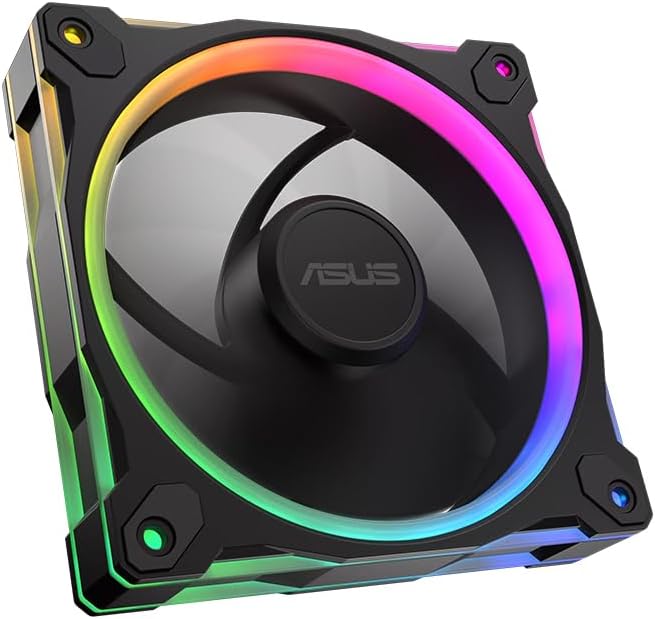
The ASUS Prime MR120 ARGB Fan Triple Pack delivers impressive cooling power at an accessible price point. With a 4.6 rating it stands out for users seeking reliable thermal management without excessive cost. Its extra-thick frame design maximizes airflow while maintaining structural rigidity during operation.
We may earn a commission when you buy through this link, at no additional cost to you.
This fan set features a 28mm frame that significantly enhances static pressure capabilities. The dual-sided lighting ensures the fan looks attractive from any viewing angle inside your chassis. PWM control allows precise speed adjustments up to 1600 RPM balancing cooling needs with noise levels.
While it lacks advanced curve features found in higher-end models the straightforward operation is a benefit for basic users. The triple pack format makes it ideal for outfitting entire intake or exhaust zones uniformly. Users may need to buy additional cables for full RGB control depending on motherboard headers.
Recommend this pack for budget-conscious builders needing reliable case ventilation or radiator support. The balance of price and performance makes it a top value choice in the current market. Ensure your case supports 120mm fans before purchasing to avoid fitment issues.
The 28mm frame thickness allows for larger blade surface areas which move more air per rotation compared to standard 25mm fans. This results in better heat dissipation across high-performance components like GPUs and CPUs.
Syncs with ASUS motherboards to create unified lighting effects throughout your system. This cohesive aesthetic elevates the look of custom builds without requiring complex third-party software setups.
We may earn a commission when you buy through this link, at no additional cost to you.
The ASUS ProArt PF120 is engineered for users requiring maximum airflow and static pressure for demanding thermal loads. With a 4.2 rating it emphasizes raw performance over aesthetic flair. The 3000 RPM capability pushes significant air volume through restrictive filters or dense radiator fins.
We may earn a commission when you buy through this link, at no additional cost to you.
Its construction uses LCP blades that resist warping at high speeds ensuring consistent performance over time. The brass bearing housing contributes to long-term durability and reduced mechanical friction. This design minimizes vibration even when running at full throttle during peak system usage.
The daisy-chain connector simplifies cabling by allowing multiple fans to connect in a series. This reduces cable clutter inside the case and streamlines motherboard header usage. However the noise levels can be intrusive if running continuously at maximum speed in a quiet room environment.
Choose this fan if you prioritize cooling efficiency above all else for workstations or gaming rigs. The high RPM range supports overclocking scenarios where component temperatures rise quickly. Pair with quality airflow management to mitigate the acoustic impact of high-speed rotation.
Operating up to 3000 RPM this fan generates airflow levels that exceed most standard case fans. This is particularly effective for pushing air through thick radiators or restricted intake vents.
Simplifies installation by linking fans together so they can share power and signal cables. This feature saves motherboard headers and reduces the visual clutter of individual wires running to each unit.
We may earn a commission when you buy through this link, at no additional cost to you.
The ASUS TUF Gaming TR120 ARGB Reverse Blade offers a unique reverse airflow design that eliminates visible cables on the front of your case. With a 4.4 rating it balances performance and visual appeal effectively. The reverse blade layout ensures that the frame and mounting hardware remain hidden from the intake side.
We may earn a commission when you buy through this link, at no additional cost to you.
Its 28mm frame delivers excellent static pressure at 2.75mm H2O which helps overcome resistance from dust filters or radiators. The 76.3 CFM airflow ensures rapid heat removal from inside the chassis. The flexible side pattern adds a customized look that distinguishes it from standard industrial fans.
Users appreciate the individually addressable RGB LEDs which allow for detailed lighting effects. The wide PWM range enables precise control to balance noise and cooling dynamically. While single pack pricing can add up for full case setups the unique design is worth the investment for clean builds.
This fan is ideal for builders who prioritize cable management and aesthetic presentation alongside thermal performance. It fits seamlessly into cases where the intake side is visible to viewers. Verify your case has clearance for the reverse mounting orientation before installation.
The reversed blade orientation means the frame faces outward eliminating cable clutter on the intake side. This creates a seamless and professional look especially for cases with tempered glass panels.
Delivering 76.3 CFM ensures that heat is quickly evacuated from the system. This high throughput is critical for maintaining stability during intense gaming or rendering workloads.
We may earn a commission when you buy through this link, at no additional cost to you.
The ASUS TUF Gaming TR120 ARGB Triple Pack provides three high-performance fans designed for comprehensive case cooling. With a 4.7 rating it excels in both thermal management and aesthetic integration. The triple pack configuration ensures consistency across all fan locations for a unified look.
We may earn a commission when you buy through this link, at no additional cost to you.
Each fan achieves a remarkable 3.3mm H2O static pressure which is ideal for high resistance cooling setups like radiators. The dual-layer LED matrix creates deep and vibrant color effects that enhance the gaming setup visual. The flexible side pattern allows for unique customization options within the chassis.
PWM control across the triple set allows synchronized speed adjustments based on system temperature. This ensures efficient cooling while keeping noise levels manageable during lighter tasks. The durability of the TUF series ensures these fans can withstand continuous heavy loads over long periods.
This pack is highly recommended for gamers building new systems who need to equip multiple fan positions. The combination of high pressure and lighting quality offers a premium feel. Ensure your motherboard supports enough PWM and ARGB headers to control all three units effectively.
The 3.3mm H2O rating allows these fans to push air through restrictive filters and dense radiators effectively. This makes them superior to standard intake fans for specialized cooling tasks.
Buying a set of three ensures matched color and performance across your case. This avoids mixing different models which can lead to mismatched noise or lighting tones.
We may earn a commission when you buy through this link, at no additional cost to you.
The ASUS TUF Gaming TF120 ARGB White Edition offers a clean and pristine look for white-themed PC builds. With a 4.7 rating it is praised for its quiet operation and reliable durability. The white finish matches perfectly with white cases and components without looking out of place.
We may earn a commission when you buy through this link, at no additional cost to you.
It features an advanced dynamic plain bearing that promises up to 250,000 hours of operation. This long life expectancy reduces the need for replacements and ensures consistent performance over years. The anti-vibration pads effectively dampen rattling sounds that often plague cheaper fan models.
The double layer LED array produces high color saturation which makes the lighting effects more visible and vibrant. This is a great choice for users who want subtle cooling performance with strong visual presence. The Aura Sync support allows you to match the lighting with other white branded peripherals.
Opt for this fan if you are building a white-themed PC and value silence over raw airflow. The durability features make it suitable for continuous operation in home office environments. Buy multiple units separately to create a complete white cooling system.
The bearing technology and vibration pads work together to minimize acoustic output. This makes the fan virtually silent during normal usage which is ideal for workstations.
Designed for 250,000 hours of operation this fan is built to last. The robust construction ensures that it will not fail prematurely even with daily use.
We may earn a commission when you buy through this link, at no additional cost to you.
The ASUS TUF Gaming TR120 ARGB Standard Blade White 3-in-1 combines high performance with a white finish in a convenient pack. With a 4.7 rating it is highly rated for cooling efficiency and lighting quality. The white blades and frames blend seamlessly into bright cases.
We may earn a commission when you buy through this link, at no additional cost to you.
These fans deliver 3.3mm H2O static pressure which ensures they can push air through restrictive elements like dust filters. The triple pack allows you to equip intake and exhaust points with matching units. The flexible side pattern on the frame adds a unique touch to the overall design.
The 16 individually addressable RGB LEDs provide deep color effects that synchronize well with other components. PWM control ensures that the fans can adjust speed dynamically based on system needs. This adaptability helps maintain a balance between cooling and noise levels.
Select this pack if you need a complete white cooling solution for a new high-end build. The high pressure ratings mean you can use these in intake positions without losing efficiency. Ensure your motherboard supports the required connections for the RGB lighting.
Buying a trio ensures all your visible fans match exactly in color and brightness. This consistency is hard to achieve by buying individual units from different batches.
The 3.3mm H2O pressure allows these fans to perform well even with dust filters installed. This reduces the need to clean filters frequently due to air starvation.
We may earn a commission when you buy through this link, at no additional cost to you.
The ASUS Prime MR120 ARGB Reverse Single Pack White Edition brings the reverse blade benefit to white builds. With a 4.8 rating it is one of the highest rated options in the lineup. The white finish provides a clean look that matches modern white system themes perfectly.
We may earn a commission when you buy through this link, at no additional cost to you.
This fan operates quietly with noise levels as low as 23 dBA making it suitable for quiet environments. The 58 CFM airflow is sufficient for standard case ventilation tasks. The dual-sided frame lighting ensures that the fan remains visually appealing even when viewed from the rear.
The reverse blade design is particularly useful for front intake positions where cables would normally be visible. This keeps the front of your case looking sleek and uninterrupted. PWM control allows you to adjust speed as needed based on thermal requirements.
Purchase this fan if you need to replace a single intake fan in a white case. The high rating indicates strong user satisfaction with its balance of performance and looks. Consider buying multiple packs if you plan to fill your case with these units.
The reverse blade design ensures that cables are hidden behind the fan frame. This creates a seamless look on the front panel without wires blocking airflow.
Rated at 23 dBA this fan is remarkably quiet during operation. This makes it ideal for home theaters or silent PCs where noise is a concern.
We may earn a commission when you buy through this link, at no additional cost to you.
The ASUS Prime MR120 ARGB Reverse Fan Black delivers the same benefits as the white model for black builds. With a 4.6 rating it is a reliable choice for those seeking a clean front intake. The black blades and frame blend in with dark cases to create a seamless look.
We may earn a commission when you buy through this link, at no additional cost to you.
It features a 28mm thick frame which provides robust structural support and efficient cooling. The 20 addressable RGB LEDs are arranged in a circular pattern for a unique visual effect. Double-sided lighting ensures the frame is illuminated from both sides for added visibility.
PWM control allows for smooth speed adjustments up to 1600 RPM ensuring optimal cooling. The quiet operation means it will not interfere with system noise levels during normal use. This fan is a great solution for upgrading a single intake in an existing black system.
Choose this fan if you need to upgrade a single intake position with a reverse blade unit. The strong rating suggests consistent quality across units. Ensure you have the necessary headers to connect the PWM and ARGB lines.
The reverse blade orientation hides cables and mounting hardware behind the fan. This keeps the front view of your case looking tidy and professional.
The circular LED arrangement creates a distinct light pattern that stands out. This unique design adds visual interest to your case without being too flashy.
We may earn a commission when you buy through this link, at no additional cost to you.
The ASUS ProArt PF120 Single Pack is a top-tier option engineered for professional workstations and high-end builds. With a perfect 5.0 rating it represents the pinnacle of ASUS cooling quality. Users praise its precision engineering and the robust materials used in its construction.
We may earn a commission when you buy through this link, at no additional cost to you.
It features LCP composite blades that provide exceptional resistance to warping at high speeds. The CNC milled brass bearing housing ensures strict tolerances and long-term reliability. This results in a fan that runs smoothly with minimal noise or vibration even under heavy loads.
The chain connector support simplifies the installation of multiple fans by allowing daisy-chaining. This reduces clutter and improves power distribution efficiency across your cooling setup. The high performance design ensures that airflow remains consistent even when the fan is mounted in tight spaces.
Buy this fan if you need the absolute best in cooling performance and build quality. The premium price is justified by the durability and engineering standards. It is an ideal choice for users who cannot compromise on thermal performance or noise levels.
Every component is engineered to tight tolerances ensuring perfect balance and minimal vibration. This attention to detail results in a fan that operates smoothly and efficiently.
Liquid Crystal Polymer blades are lightweight and durable allowing for high-speed rotation without bending. This ensures the fan maintains its aerodynamic efficiency over time.
We may earn a commission when you buy through this link, at no additional cost to you.
While not an ASUS product the CORSAIR RS120 ARGB Triple Pack is a worthy alternative for high value. With a 4.6 rating it stands out for its unique AirGuide technology and magnetic bearing. It offers robust cooling capabilities suitable for many enthusiast scenarios.
We may earn a commission when you buy through this link, at no additional cost to you.
The AirGuide technology uses anti-vortex vanes to direct airflow more effectively at components. This reduces turbulence and improves the cooling efficiency of the fans. The magnetic dome bearing reduces friction ensuring smooth operation and extended lifespan.
The triple pack format is convenient for outfitting entire zones in your case. The daisy-chain connection supports easy wiring similar to many ASUS fans. However for full RGB functionality you may need to use CORSAIR software which is an extra step.
Consider this pack if you are open to non-ASUS brands for a strong value proposition. It works well as a radiator fan or for general case cooling needs. Ensure you check motherboard compatibility for both PWM and ARGB control.
Anti-vortex vanes guide the air flow to focus on hot components. This targeted approach improves cooling efficiency compared to standard fans.
Buying three fans together is often more cost effective than single units. This provides a full set for your cooling needs in one purchase.
We may earn a commission when you buy through this link, at no additional cost to you.
Selecting the right fan involves considering several technical specifications that impact performance and compatibility. This section details the key factors you should evaluate before making a purchase.
Airflow is measured in CFM and determines how much air the fan can move in open space. Static pressure is measured in mm H2O and indicates how well the fan pushes air through resistance like filters or radiators. If you are mounting fans on a radiator or behind a dust filter prioritize static pressure. For general case ventilation standard airflow is sufficient.
Choose high static pressure fans for radiators and high airflow fans for open intake positions.
PWM control allows the fan speed to adjust automatically based on system temperature. This feature is crucial for balancing noise and cooling performance. Look for fans with wide PWM ranges to maximize flexibility. This ensures the fan can spin up during heavy loads and quiet down during idle.
Always verify your motherboard has PWM headers to utilize these features fully.
ASUS fans offer standard RGB and Addressable RGB. Addressable LEDs allow for individual control of each light which enables complex effects. Standard RGB lights up the whole fan at one color. Check your motherboard to see if it supports the specific lighting standard to avoid compatibility issues.
Prioritize Addressable RGB if you plan to use complex lighting patterns.
Standard fans are often 25mm thick while premium models are 28mm. The extra thickness adds structural integrity and often more blade area. This can lead to better performance but requires checking case clearance. Ensure your case mounts can accommodate the thicker frame.
Select 28mm fans for better performance if your case supports the extra width.
Bearing technology dictates the noise and longevity of the fan. Plain bearings are quieter but may have shorter lifespans. Sleeve bearings are common and reliable. Look for fans with advanced bearings if you want years of silent operation. Manufacturers often rate lifespan in hours to help compare durability.
Check the bearing specs to ensure the fan will last through your PC lifecycle.
Modern fans often use daisy-chain connectors to link multiple units together. This reduces the number of cables you need to run. Verify if the pack includes headers for RGB and PWM. A single chain connector saves headers and keeps cable management cleaner inside the chassis.
Prefer daisy-chain connectors for cleaner cable management in complex builds.
Buying in packs is usually more cost effective than buying single units. If you need to fill multiple slots a trio pack is more efficient. Ensure you have the necessary headers to control all units. Consider the aesthetic impact of matching colors across multiple fans.
Buy packs to save money and ensure consistent performance across your case.
Some fans are designed for specific directions like reverse blade models. These hide cables by changing the frame orientation. Make sure you select the right orientation for your case position. A reverse fan on the intake side looks cleaner but costs more. Check case guides for recommended mounting.
Choose reverse blades for the cleanest possible front panel view.
Install the fans securely using the included screws. Ensure all mounts are tight to prevent vibration rattling. Proper mounting is essential for quiet operation and longevity.
Connect the fans to your motherboard headers correctly. Ensure the cable aligns with the orientation shown on the case. Incorrect connections can prevent the fan from spinning.
Clean the fans periodically using compressed air. Dust buildup can restrict airflow and cause the motor to overheat. Regular maintenance ensures optimal performance.
Most ASUS fans use standard 4-pin PWM and 3-pin or 4-pin ARGB connectors which work with many motherboards. However full feature support like Aura Sync requires an ASUS motherboard or compatible software. Always check your board header compatibility before purchasing.
RGB lighting changes the color of the whole fan at once. ARGB allows each LED to change color individually. This creates advanced lighting effects. ARGB requires more control headers and software.
Reverse blade fans provide a cleaner look by hiding cables on the intake side. They offer the same performance as standard fans but cost slightly more. They are ideal for visible cases with glass panels.
While the fan will spin you cannot control RGB or fan curves with Corsair software without specific compatibility. You will need a motherboard controller or a hub that supports both standards.
The limit depends on your motherboard headers. Daisy-chain fans can connect to a single header. Ensure the power requirements do not exceed the header limit. Typically you can chain 3 to 5 fans safely.
Most packs include the necessary extension cables for power and lighting. Some may require separate hubs for full control. Check the product specifications to confirm what is included in the box.
The ASUS Prime and TUF lines offer exceptional performance for cooling and aesthetics. Each model balances airflow and noise to suit different needs.
Prioritize static pressure for radiators and RGB for visual appeal. Always check motherboard compatibility for full control features.
Prices fluctuate frequently so verify current deals before buying. This ensures you get the best value for your investment.
