
PROZOR 192KHz Digital to Analog Audio Converter DAC Digital Optical to RCA Analog L/R Converter
4.4Editor score
Supports 192kHz/24bit resolution
Aluminum alloy housing design
Optical and coaxial inputs
Discover the top audio converters for Mac in 2026. This guide compares ten models for quality, compatibility, and features to upgrade your audio setup.
Audio converters bridge the gap between digital sources and analog playback. Choosing the right one ensures clean sound and reliable connections for your Mac setup.
We evaluated ten top-rated models based on build quality, supported formats, and Mac compatibility. Each option serves different needs from budget capture to high-fidelity playback.
Every pick includes key specs and real-world performance insights. Prices fluctuate regularly, so verify current listings before purchasing to ensure the best value for your needs.
4.4Editor score

4.6Editor score

4.5Editor score
This side-by-side comparison highlights key specifications across all ten selected audio converters. Use it to quickly identify which model fits your specific Mac and audio needs.
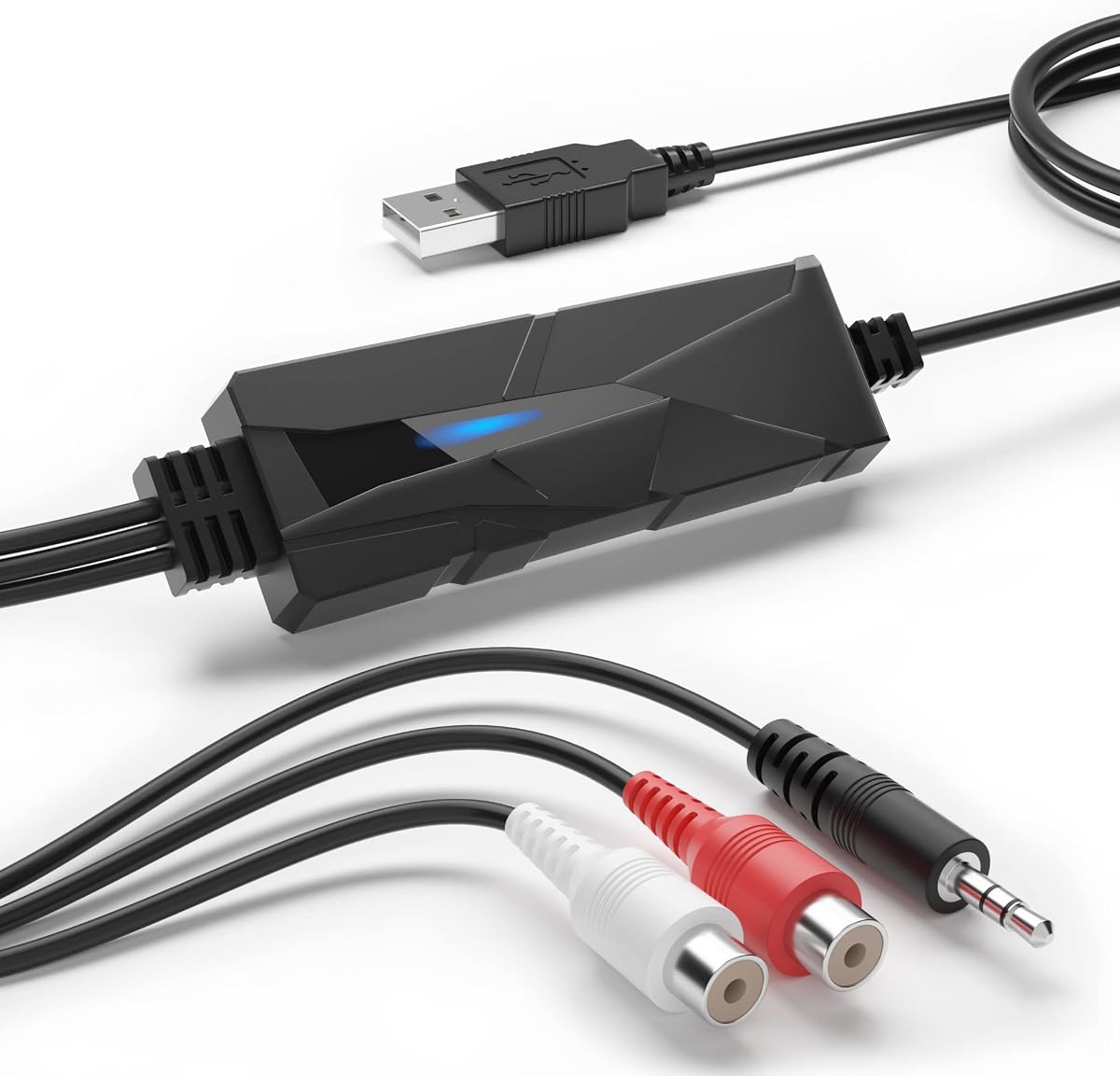


This capture card stands out for users looking to digitize old cassette tapes or vinyl records. It connects easily to your Mac via USB and works with included software for basic editing needs.
We may earn a commission when you buy through this link, at no additional cost to you.
It features a 3.5mm and R/L audio input system allowing you to record from various analog sources. The LED light indicates active recording which simplifies the workflow for beginners managing physical media archives.
The main limitation is the sample rate cap at 44.1kHz which restricts high-resolution output. Users should ensure their Mac OS is up to date as driver support varies across different versions.
Anyone needing to preserve vintage music formats will find this tool practical and straightforward. It remains one of the few dedicated solutions for converting analog cassettes directly into digital MP3 files.
Ideal for converting old cassette tapes and vinyl into MP3 or WAV formats easily.
Audacity is included or available for download to help edit your recorded audio.
We may earn a commission when you buy through this link, at no additional cost to you.
The K5 Pro is a versatile headphone amplifier that also acts as a DAC. It connects to your Mac via USB Type-C and offers optical and coaxial inputs for flexibility with external devices.
We may earn a commission when you buy through this link, at no additional cost to you.
Powered by the Texas Instruments NE5532 op-amp chip it delivers low noise and high dynamic range. This makes it suitable for gaming or listening to music on high-impedance headphones comfortably.
One downside is that volume and power share a single button which can be confusing. Additionally users must connect the audio source to the USB port specifically to enable proper functionality.
Gaming enthusiasts and casual audiophiles alike will appreciate the balance of features and performance. It serves as a capable sound card replacement for desktop setups on Mac systems.
Drives headphones ranging from 16 Ohm to 300 Ohm with clear power output.
Accepts USB Type-C optical and coaxial inputs to fit various audio setups.
We may earn a commission when you buy through this link, at no additional cost to you.
This converter delivers exceptional value by supporting 192kHz/24bit audio at a low cost. It connects to your Mac or TV via optical or coaxial cables to output analog RCA or 3.5mm signals.
We may earn a commission when you buy through this link, at no additional cost to you.
The aluminum housing helps reduce noise and dissipate heat effectively during operation. A detachable design allows for flexible cable management and future upgrades without replacing the whole unit.
Users should ensure their Mac or audio device is set to PCM output format for best results. Also the power adapter is sold separately so you need a compatible 5V 1A plug.
For budget-conscious shoppers seeking reliable digital to analog conversion this model is a top choice. It is especially useful for connecting older TVs or consoles to modern Mac audio systems.
Processes audio up to 192kHz sample rate for superior clarity and detail.
Aluminum alloy construction shields against interference and manages heat well.
We may earn a commission when you buy through this link, at no additional cost to you.
The U2PRO converts USB signals from your Mac into clean optical or coaxial outputs. This bridges the gap between modern computers and external DACs that lack direct USB inputs.
We may earn a commission when you buy through this link, at no additional cost to you.
Equipped with the XMOS XU316 chip it ensures stable transmission with minimal jitter. It supports PCM up to 32bit/768kHz and DSD512 making it ideal for high-resolution music streaming.
A UAC mode switch helps compatibility between different consoles and Mac systems seamlessly. However users should note that it does not include an internal power switch for easy control.
Audiophiles looking to upgrade their existing DAC setup will find this adapter useful. It is a compact solution to unlock lossless sound quality from USB sources on your Mac.
Transmits high-resolution PCM and DSD signals via optical or coaxial outputs.
Uses advanced clocking to deliver stable jitter-free digital signal transmission.
We may earn a commission when you buy through this link, at no additional cost to you.
The SU-1 is designed to handle MQA streams including those from physical CD players. It uses the AK4493S chip to restore high-resolution audio signals for an immersive listening experience.
We may earn a commission when you buy through this link, at no additional cost to you.
With USB input compatibility it connects directly to your Mac for easy control and playback. The device supports up to 32bit/768kHz PCM and DSD512 ensuring top-tier performance with modern files.
While it works well on macOS users on Windows may need to install specific drivers first. Also the power supply is not included so verify what adapter works best with your setup.
Listeners who use streaming services offering MQA files will appreciate this decoder. It is a solid upgrade for anyone wanting to unlock full fidelity from compressed sources.
Unlocks high-resolution audio from MQA enabled streams and digital sources easily.
Uses the AK4493S DAC for ultra-low distortion and clean audio output.
We may earn a commission when you buy through this link, at no additional cost to you.
This portable unit offers Type-C USB input for seamless connection to Mac laptops and tablets. It converts digital signals to optical or coaxial outputs suitable for external DACs or amplifiers.
We may earn a commission when you buy through this link, at no additional cost to you.
The device supports MQA decoding without requiring extra software on your system. You can use standard music players that support ASIO or WASAPI to get the best sound quality.
DOP64 playback capability ensures compatibility with devices like PS5 for gaming audio needs. The compact size makes it easy to carry in a bag for on-the-go setups.
Travelers or users with limited desk space will find this interface highly practical. It provides a lightweight bridge for high-resolution audio streaming from your Mac to external speakers.
Fits easily in backpacks or laptop bags for mobile audio setups.
Decodes MQA streams directly without needing third-party software applications.
We may earn a commission when you buy through this link, at no additional cost to you.
This adapter provides a straightforward solution for Mac users needing extra analog ports. It supports 24-bit 96kHz audio and works instantly via USB without installing extra drivers.
We may earn a commission when you buy through this link, at no additional cost to you.
You can connect various headsets using the included splitter for audio and microphone functions. The downloadable control panel offers audio enhancements to tailor sound profiles to your preference.
While it lacks complex settings it covers basic needs for calls or media playback efficiently. The design is small enough to leave plugged into your laptop port permanently.
Anyone needing a simple headphone extension or audio boost will appreciate its reliability. It remains a solid budget pick for improving audio output on Mac systems.
Works immediately upon connection to Mac without driver installation steps.
Accommodates single and split connectors for diverse headphone configurations.
We may earn a commission when you buy through this link, at no additional cost to you.
The Go Link Max connects directly to your Mac via USB-C for a clean audio path. It features dual ESS Sabre DAC chips that provide balanced output for premium headphone performance.
We may earn a commission when you buy through this link, at no additional cost to you.
With support for 32-bit/384kHz PCM and DSD256 it handles high-fidelity music files effortlessly. The Dynamic Range Enhancement technology improves clarity for tracks with wide dynamic swings.
Gold-plated connectors and silver-plated conductors ensure signal purity over time. The flexible cable reduces stress on ports though the fixed length might limit placement options.
Audiophiles needing a high-performance dongle will love its balanced capabilities. It is an excellent choice for Mac users seeking portable premium sound quality.
Provides a 4.4mm balanced connection for better channel separation and power.
Supports PCM up to 384kHz and DSD256 for studio-grade playback.
We may earn a commission when you buy through this link, at no additional cost to you.
The Q6 offers exceptional audio quality with its AK4493S DAC and XMOS processor. It connects to your Mac via USB-C and accepts optical or coaxial inputs for versatile integration.
We may earn a commission when you buy through this link, at no additional cost to you.
With RCA and Sub-Out outputs it pairs perfectly with home stereo systems or powered speakers. The design is compact yet built with high-quality aluminum for durability and aesthetics.
It does not drive headphones directly but works well as a pre-amp for amps. Users seeking clean signal conversion without complex features will find it reliable and effective.
This model earns top marks for its balance of performance and practicality on Mac setups. It is the best overall choice for integrating high-res audio into a home system.
Delivers crystal-clear audio with 32bit/768kHz PCM and DSD512 support.
Accepts USB-C optical and coaxial to fit various Mac and TV setups.
We may earn a commission when you buy through this link, at no additional cost to you.
This interface transforms any XLR microphone into a USB-C device for Mac streaming. It includes onboard DSP features like denoiser and popper stopper for zero-latency processing.
We may earn a commission when you buy through this link, at no additional cost to you.
Auto Level Mode adjusts gain in real time ensuring consistent output during recording or calls. The 48V phantom power supports condenser mics making it suitable for professional podcasting.
While it is pricier than simple converters it offers unmatched control via apps. It is designed for users needing high-quality voice capture rather than passive music playback.
Content creators and streamers seeking studio-quality audio will find this essential. It is the best premium option for integrating professional microphones into a Mac workflow.
Onboard DSP provides real-time denoising and leveling for clean voice audio.
Delivers 48V power to support professional condenser XLR microphones.
We may earn a commission when you buy through this link, at no additional cost to you.
Selecting the right audio converter depends on your specific input needs and desired output quality. Consider these key factors to ensure compatibility and performance.
Check whether your Mac and source device use USB Type-C optical coaxial or analog connectors. Matching these ports avoids the need for extra adapters.
Ensure the converter supports USB-C if your modern Mac lacks traditional ports.
Higher sample rates like 192kHz or 768kHz provide more detail in high-resolution tracks. Standard 44.1kHz may suffice for casual listening.
Look for DACs that support your music library's resolution to avoid downscaling.
Some converters handle MQA or DSD natively while others stick to PCM. Verify your streaming service or file type compatibility.
Choose models with MQA decoding if you use services offering master quality audio.
Consider whether you need RCA for speakers 3.5mm for headphones or balanced 4.4mm. Different setups require different physical connectors.
Select a unit with the specific outputs your amplifiers or speakers demand.
Most units draw power from the USB port but some need an external adapter. This affects portability and setup flexibility.
If you lack wall outlets USB power may be more convenient for daily use.
Aluminum housings shield against interference and dissipate heat better than plastic. Durability is crucial for long-term desktop use.
Choose metal cases for better signal integrity and longevity in active environments.
Advanced models offer app control for EQ gain or level adjustments. This adds flexibility for specific audio scenarios like streaming.
Look for software support if you need real-time audio processing features.
Some devices need drivers on macOS or Linux while others are plug and play. Check OS compatibility before buying to avoid installation hurdles.
Prefer driverless models for immediate setup and minimal system configuration.
Connect your converter to a free USB port on your Mac or to the digital audio source device. Ensure all cables are seated firmly to prevent signal loss or interruption during playback.
Install any required drivers or apps if the model supports custom settings or EQ adjustments. Restart your Mac if needed to recognize the device in system preferences.
Keep the device in a well-ventilated area to avoid overheating during extended sessions. Wipe the casing with a dry cloth to remove dust and maintain optimal performance.
Most work with macOS but verify driver support especially for newer systems. USB Type-C units are best suited for modern MacBooks.
Only models designed as interfaces with mic inputs allow recording. Others are for playback or analog-to-digital conversion.
Many draw power from the Mac USB port but some need a 5V adapter. Check the product specs to confirm power requirements.
For high-res listening 192kHz or 768kHz is ideal. Standard 44.1kHz is sufficient for most streaming and casual use.
Ensure the Mac is set to the converter in sound output preferences. Verify cable connections and check if device power indicators are active.
Yes optical DACs help connect TVs or consoles to stereo systems. Look for 5.1 decoding if surround sound is needed.
We highlighted ten models ranging from budget-friendly converters to premium interfaces for professional use. Each serves different needs whether you want to digitize old tapes or upgrade speaker output.
Prioritize the right inputs and outputs for your specific setup to avoid extra adapters. Look for high sample rates and aluminum build quality for reliable long-term performance.
Verify current prices and compatibility before purchasing since offers and stock change quickly. Investing in the right converter ensures your Mac audio setup delivers clear and accurate sound.