
GMK104 Barebones Keyboard Kit with Screen&Knob
4.6Editor score
Smart Display and Knob
Triple Mode Connectivity
Gasket Mounted Design
This expert guide compares the top ten barebones keyboards for 2026, helping you find the perfect DIY kit for customization, performance, and style.
Barebones keyboards offer enthusiasts the freedom to build a custom typing experience from the ground up. These kits provide the essential chassis, PCB, and stabilizers while leaving switches and keycaps for you to choose. Whether you seek premium materials or versatile connectivity, a quality barebones kit ensures a solid foundation for your next project.
We have evaluated ten distinct barebones kits based on build quality, customization options, and user feedback. Our analysis focuses on features like gasket mounting, hot-swap support, and software compatibility to help you make an informed decision. Each product selected represents a unique balance of functionality and design suitable for various workflows.
Each pick below highlights specific strengths such as wireless connectivity, display integration, or premium materials. You will find detailed breakdowns of specifications and real-world performance notes for every model listed. Please note that availability and pricing may fluctuate, so verify current details before making your final purchase decision.
4.6Editor score

4.5Editor score

4.4Editor score
The following table provides a side-by-side comparison of all ten selected barebones keyboards. Review the key specifications and features to quickly identify which model aligns best with your specific typing needs and budget constraints.


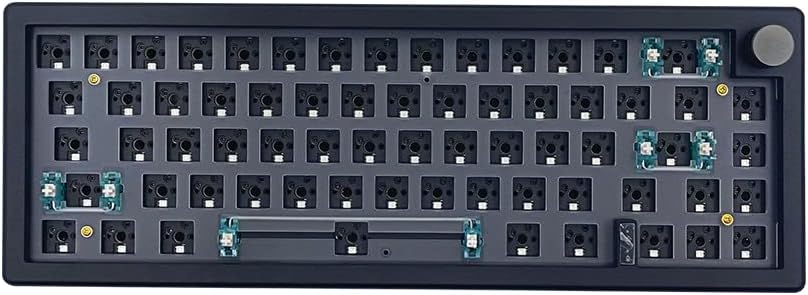


The BOYI GMK67 stands out as a top contender in the barebones category due to its robust customization capabilities. With a rating of 4.5 stars, users appreciate the deep level of control offered through VIA software. This kit allows you to tailor key mapping and macros to fit your specific workflow needs perfectly.
We may earn a commission when you buy through this link, at no additional cost to you.
Its triple mode connectivity ensures seamless switching between Bluetooth, 2.4GHz, and wired connections. The built-in 4000mAh battery supports extended use without frequent recharging. Additionally, the gasket mount design minimizes vibrations, providing a satisfying typing experience that reduces fatigue during long sessions.
While the kit is excellent for mechanical switches, it does not support optical or magnetic alternatives. Users seeking those specific technologies may need to look elsewhere. However, the inclusion of a multifunction knob and preinstalled foam makes this an attractive option for most builders looking for value.
If you want a versatile keyboard kit that balances performance with affordability, this model is a strong recommendation. It offers a solid foundation for DIY enthusiasts who want to define the look and sound of their setup without compromising on connectivity or build quality.
The VIA programmable custom function allows you to remap keys easily on the software interface, streamlining complex tasks.
Supporting Bluetooth 5.0 and 2.4GHz ensures stable connections for both gaming and office environments without latency issues.
We may earn a commission when you buy through this link, at no additional cost to you.
This GMK104 barebones kit offers exceptional value by combining a full-size layout with modern features like a smart display. Rated 4.6 stars, it appeals to users who need the numpad but still want wireless flexibility. The integration of a screen adds a unique touch for customization and status updates.
We may earn a commission when you buy through this link, at no additional cost to you.
The triple mode connectivity supports Bluetooth 5.0, 2.4GHz, and wired Type-C connections. A 4000mAh battery ensures long usage times between charges. The metal knob provides precise volume control, enhancing the premium feel despite the competitive pricing of the kit itself.
Although the full-size footprint requires more desk space, the included numpad is essential for data entry tasks. The display might need some initial setup to show custom images, but it adds significant flair. This balance of utility and style makes it a top budget choice.
Ideal for those needing a full keyboard without breaking the bank, this kit delivers a comprehensive solution. It supports your unique mechanical keyboard experience with features usually found on higher-end models, ensuring you do not have to compromise on performance or looks.
You can customize the screen in real-time with image updates, making it a dynamic addition to your workspace aesthetic.
Equipped with a numpad and arrow keys, it ensures no key conflicts for reliable performance in both work and gaming.
We may earn a commission when you buy through this link, at no additional cost to you.
The GMMK PRO is renowned for its premium build quality, featuring a solid aluminum body that feels substantial. Rated 4.4 stars, it represents the high end of DIY keyboards with its durable construction. The anodized finish offers scratch resistance and a satin-like texture that users consistently praise.
We may earn a commission when you buy through this link, at no additional cost to you.
Its 5-pin hotswap design allows easy installation of various mechanical switches without soldering. You can swap the aluminum plate for brass or polycarbonate to alter the sound profile significantly. The kit includes a braided cable, switch puller, and keycap puller to simplify the building process.
While it lacks wireless capabilities, the focus on build quality and modularity justifies the investment for enthusiasts. The heavier weight ensures the keyboard stays put during intense typing sessions. This makes it a favorite for users who prioritize tactile feedback and material integrity over portability.
If you seek a keyboard that feels like a piece of industrial equipment, this model delivers. It allows deep customization of feel and look, ensuring you can tailor every aspect of the board to your personal preference and ergonomic requirements.
The CNC machined aluminum body gives it substantial weight and unrivaled durability compared to plastic alternatives.
You can replace the top frame, rotary knob, and cable with colorful alternatives to redesign the keyboard completely.
We may earn a commission when you buy through this link, at no additional cost to you.
This M87 kit focuses on providing a quiet typing experience with excellent sound dampening features. Rated 4.2 stars, it appeals to users who prioritize silence over flashy features. The high-quality silencing pads absorb keystroke clatter without reducing responsiveness during typing.
We may earn a commission when you buy through this link, at no additional cost to you.
The hot-swappable terminals allow you to install MX switches directly without soldering. This flexibility supports a wide range of brands like Cherry and Gateron. The kit includes up to 18 factory-set light modes, giving you immediate visual customization without complex setup.
While it lacks advanced software capabilities, the simplicity makes it easy to use. The detachable USB-C cable adds portability for travel or different setups. This straightforward approach is ideal for beginners who want a reliable build without steep learning curves.
If you need a quiet workspace tool that still looks professional, this kit is a practical choice. It offers a solid foundation for a silent mechanical keyboard that fits well in shared environments like offices or libraries.
High-quality silencing pads absorb the clatter of keystrokes without sacrificing responsiveness for a whisper-quiet experience.
Supports both 3 pin or 5 pin switches, allowing you to choose from a wide variety of mechanical switch types.
We may earn a commission when you buy through this link, at no additional cost to you.
The white variant of the GMK104 kit achieves the highest rating in its family at 4.8 stars. Users love the clean aesthetic that complements modern desk setups. It retains all the functional benefits of the black version, including the smart display and full-size layout.
We may earn a commission when you buy through this link, at no additional cost to you.
The gasket mounted design provides a cushioned typing experience that reduces fatigue. With a 4000mAh battery, you get extended use across devices. The smart display allows real-time image updates, adding a premium touch to this visually appealing unit.
While the white finish might show dust more than darker colors, it offers a bright and stylish look. The full-size layout ensures you have all the keys needed for productivity. This version is perfect for those who prioritize both design and functionality.
If you want a high-performing kit that stands out visually, this white model is an excellent option. It combines premium features like the smart display with a bright color scheme that refreshes your workspace environment effectively.
The white finish offers a refreshing look that complements modern desk setups with a clean and minimalist style.
Equipped with a numpad and arrow keys, this ensures no key conflicts for reliable performance in both office and gaming.
We may earn a commission when you buy through this link, at no additional cost to you.
The white M87 kit provides a simple yet functional entry point into custom mechanical keyboards. While rated lower at 3.5 stars, it still offers essential features like hot-swappable switches and sound absorption foam. This makes it accessible for beginners testing the DIY waters.
We may earn a commission when you buy through this link, at no additional cost to you.
It supports customization through software to set up per-key lighting and effects. The sound absorption foam ensures a quiet typing experience which is often desired in shared spaces. The detachable USB-C cable enhances portability for those moving between setups.
The lower rating suggests potential quality control variations compared to other models. However, the design is elegantly simple and thoughtfully positioned for easy access. It remains a viable option for those prioritizing simplicity over advanced connectivity features.
If you want a quiet and portable keyboard kit without complex features, this is a good starting point. It allows you to customize lighting and feel without a steep price or learning curve for your first custom build.
Every key is thoughtfully positioned to provide effortless access, allowing you to navigate your digital realm with ease.
Build macros and set up per-key lighting and effects to create a personalized input experience for any task.
We may earn a commission when you buy through this link, at no additional cost to you.
The black variant of the GMK67 offers a sleek and professional look with a rating of 4.3 stars. It retains the strong performance of the white version, including a 4000mAh battery and triple mode connectivity. The dark finish often hides fingerprints and dust better than lighter colors.
We may earn a commission when you buy through this link, at no additional cost to you.
Gasket mounting ensures a comfortable typing experience that minimizes cavity sound. The VIA software support allows deep customization for workflows. It is designed to be built by you, giving you control over the final look and feel of the device.
It does not support optical switches, which may limit advanced users. However, for standard mechanical setups, it provides excellent value and stability. The compact 65% layout saves desk space while keeping essential keys accessible for most users.
If you prefer a dark, minimalist aesthetic that performs well, this kit is a solid choice. It combines robust build quality with versatile connectivity to support both office and gaming needs in a compact form factor.
The black finish provides a sleek look that hides dust better and suits dark desk setups effectively.
The 65% layout saves desk space while keeping essential keys accessible for most office and gaming tasks.
We may earn a commission when you buy through this link, at no additional cost to you.
This GMK87 kit features an interactive TFT-LCD screen that allows for real-time image updates and status displays. Rated 3.9 stars, it targets users who want visual customization alongside traditional typing features. The screen adds a unique element to the standard mechanical keyboard experience.
We may earn a commission when you buy through this link, at no additional cost to you.
The multifunctional display allows customization of images and time. The included metal knob controls volume precisely, and the 3000mAh battery supports wireless use. The ergonomic design includes a dual-stage kickstand for adjustable height and better comfort during use.
While the rating is moderate, the screen integration offers a novelty factor that many enthusiasts appreciate. The triple mode connectivity ensures you can switch between devices easily. This makes it a strong option for those wanting a tech-forward workspace setup.
If you want a keyboard that acts as a dynamic display and input device, this model fits well. It strikes a balance between functionality and style, allowing you to define how it looks and sounds to your exact needs.
You can update and customize the TFT-LCD screen in real time to display images or status updates.
A dual-stage foldable kickstand provides adjustable height for a comfortable typing position during long sessions.
We may earn a commission when you buy through this link, at no additional cost to you.
The GMK108 provides a comprehensive full-size layout with a 4.1 star rating. It offers triple connectivity options including Bluetooth and wired Type-C for flexible use. This kit is ideal for users who rely on the number pad for data entry but still want wireless convenience.
We may earn a commission when you buy through this link, at no additional cost to you.
Gasket mounting ensures a cushioned typing experience that reduces fatigue. The south-facing RGB backlighting allows for better compatibility with various keycaps. A 4000mAh battery supports extended use without needing frequent recharging during the day.
While it requires a larger desk space, the productivity benefits of the full-size layout are significant. It supports VIA programmability for macros and lighting effects. This makes it a versatile option for both office work and gaming scenarios.
If you need a full-size keyboard that does not compromise on modern features, this is a strong choice. It delivers reliable performance and comfort while maintaining the flexibility to customize your workflow with programmable keys.
Equipped with a numpad, arrow keys, and function keys, this ensures no key conflicts for reliable performance.
Supports wireless Bluetooth 5.0, 2.4GHz, and wired Type-C connection for extended use flexibility.
We may earn a commission when you buy through this link, at no additional cost to you.
The GMMK 3 is defined by its high modularity allowing you to swap parts to tailor the look and feel. Rated 3.2 stars, it focuses on deep customization options rather than out-of-box simplicity. The modular gasket system lets you adjust the typing feel to be firmer or more flexible.
We may earn a commission when you buy through this link, at no additional cost to you.
It includes sound-dampening foam layers to absorb resonance for a clean acoustic profile. The programmable knob lets you adjust volume or create custom actions. This level of control appeals to advanced users who want to experiment with every internal component.
The complexity may be a challenge for beginners. However, for enthusiasts, the ability to swap gaskets and foam provides a unique build experience. It represents the cutting edge of customizable keyboard designs.
If you want a kit that offers maximum control over sound and feel, this model is unmatched. It provides the tools to tailor your typing experience to your exact preference through a building block-inspired internal design.
The modular gasket system allows you to customize internal gaskets for a firmer or more flexible typing feel.
Nine points of modularity make it easy to swap parts and tailor the look and sound to your exact preference.
We may earn a commission when you buy through this link, at no additional cost to you.
Selecting the right barebones keyboard involves evaluating key factors such as layout, connectivity, and mounting style. Understanding these elements ensures you pick a kit that matches your specific workflow and aesthetic preferences.
Barebones keyboards come in various sizes ranging from compact 60% to full-size 104 keys. Smaller layouts save desk space and improve ergonomics by bringing the mouse closer. Full-size layouts include a number pad which is essential for accounting or data entry tasks.
Modern kits often support triple connectivity including Bluetooth wired USB-C and 2.4GHz wireless. This allows you to switch between devices easily without needing multiple keyboards. Ensure the battery capacity suits your daily usage hours to avoid constant recharging interruptions.
Gasket mounting uses rubber gaskets to dampen vibrations for a softer typing feel. Tray mounting offers a stiffer response which some users prefer for gaming. Consider your comfort needs when selecting between these structural options to reduce wrist fatigue.
Hot-swappable PCBs allow you to change switches without soldering giving you flexibility to experiment. Ensure the board supports your preferred switch pin configuration such as 3-pin or 5-pin. This feature is crucial for future upgrades or repairs without technical skills.
Software like VIA or proprietary apps lets you remap keys create macros and adjust lighting. Some kits include physical knobs for volume control which streamline media management. Check if the software is open-source or cloud-based for long-term support.
Higher-end kits may use aluminum frames instead of plastic for better durability and weight. The plate material also affects the sound profile with brass sounding brighter and polycarbonate softer. Invest in robust materials if you plan to keep the build for years.
Some modern barebones kits include small TFT screens for real-time customization and status updates. While not essential, these features add a unique interactive element to your workspace. Decide if this adds value or just noise to your specific setup needs.
Verify that the kit is compatible with your operating system like Windows or macOS. Check if it comes with essential tools like switch pullers or keycap pullers to simplify assembly. Accessory inclusion can save you time and extra costs after purchase.
Assemble your barebones keyboard carefully by placing switches into the hot-swap sockets before inserting keycaps. Ensure all components are seated firmly to avoid loose keys or uneven typing surfaces. Use the provided screwdriver to secure the case panels without over-tightening.
Install the recommended software immediately after assembly to configure your layout and macros. Test all keys and the knob functionality to ensure everything is working as expected. Update firmware to the latest version to access new features and bug fixes.
Clean your keyboard regularly by brushing debris from between keys and wiping the surface with a dry cloth. For the screen or display units, use a microfiber cloth to avoid scratches or smudges. Store your keyboard in a dry place to prevent moisture damage to the electronics.
Yes most barebones keyboards are designed to be compatible with both Windows and Mac systems. They typically include keycaps or software settings that allow easy switching between operating systems. Always verify the product description to ensure specific macOS support before purchasing.
No most modern barebones kits feature hot-swappable PCBs that eliminate the need for soldering. You can simply plug in compatible switches to customize the feel. However check the specifications to confirm it supports your switch type without requiring soldering.
Gasket mounting uses rubber gaskets to dampen vibrations for a softer feel. Tray mounting attaches the plate directly to the case for a stiffer response. Choose gasket for comfort and tray for stability depending on your typing preference.
No optical switches require specific PCB support as they use light signals instead of physical contacts. Most standard barebones keyboards only support mechanical 3-pin or 5-pin switches. Ensure your chosen kit explicitly states optical compatibility if you need them.
Battery life varies but many kits offer up to several weeks on a single charge depending on RGB usage. High-resolution displays or constant RGB lighting can reduce this duration significantly. Always check the mAh rating to estimate usage time accurately.
Yes most barebones keyboards offer extensive RGB customization via software or key combos. You can often set per-key colors and various lighting effects. Some kits even allow you to create custom animations for your display screen.
Most kits come with essential tools like a screwdriver switch puller and keycap puller. You might need a standard USB-C cable for connectivity testing. Having a soft mat for assembly can help protect the PCB from scratches.
Barebones keyboards offer superior customization for enthusiasts who want to control every aspect. Prebuilt ones are more convenient for those who do not want to assemble or customize. Choose based on how much control you want over the final product.
We have reviewed ten distinct barebones keyboards offering a range of layouts from 60% to full-size. The BOYI GMK67 and GMK104 series stand out for their balance of features and value. Each model provides unique strengths to suit different typing needs and desk environments.
Prioritize connectivity and switch compatibility when making your final decision. A kit with strong software support ensures your setup remains relevant and versatile over time. Choose the design that best aligns with your aesthetic goals and functional requirements.
Prices and availability fluctuate so verify current details before completing your purchase. Keep checking our guide for updates on new models and features as the market evolves. Select a kit that inspires you to build a truly personalized typing experience.