
Newsoul 4K Portable Monitor
4.2Editor score
1200Nits ultra high brightness
Aluminum alloy shell design
VESA mountable with cover
Finding a monitor that stays visible under direct sunlight is crucial for outdoor work. These displays use high brightness and anti-glare coatings to ensure clarity even in harsh lighting conditions for professionals on the go.
We evaluated ten models based on brightness levels, color accuracy, and build quality. Our comparison covers both portable travel screens and desktop units designed to handle intense ambient light without washing out the image.
Each selection highlights key specs and real-world performance metrics. Prices change frequently so check current listings before buying. This guide helps you choose the right Bright Sunlight PC Monitor for your specific workflow needs.
4.2Editor score
4.8Editor score

4.5Editor score
As an Amazon Associate we earn from qualifying purchases.
The following table presents a side-by-side comparison of all ten models ranked by their suitability for bright environments and overall performance metrics.




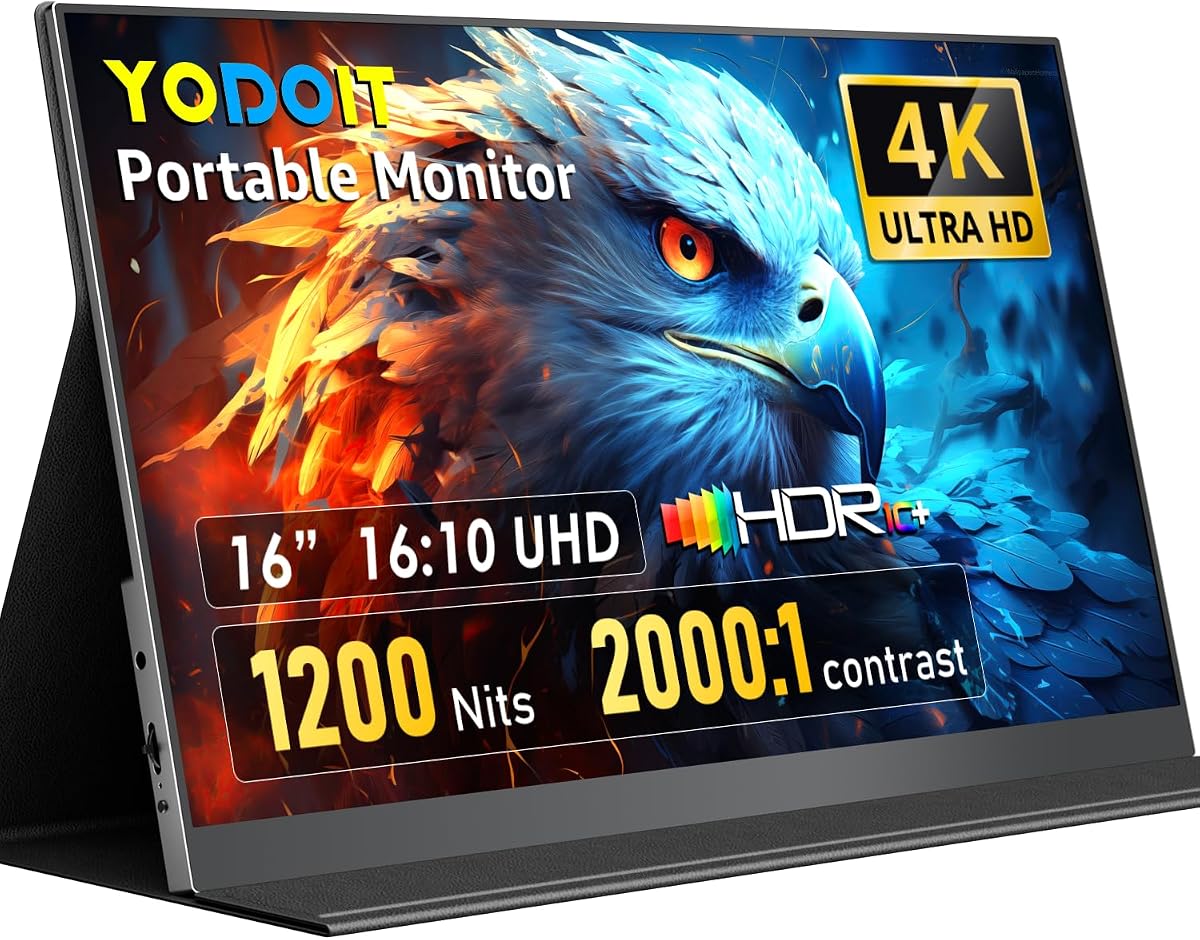
The Yodoit 4K Portable Monitor stands out as the top pick for professionals needing visibility in bright conditions. Its 1200nit brightness ensures clarity even under direct sun.
We may earn a commission when you buy through this link, at no additional cost to you.
This model delivers true 4K resolution with a 16:10 aspect ratio. The 145% sRGB coverage supports precise color work for photographers and designers.
While the brightness is unmatched, the monitor requires a USB power connection to maintain peak output. This limits true battery independence for mobile use.
Photographers and field inspectors will find this the most reliable option. It balances portability with professional grade visual performance effectively.
The matte coating eliminates reflections while high brightness counters ambient light.
Wide color gamut ensures edits match final output on other devices.
We may earn a commission when you buy through this link, at no additional cost to you.
This Dell monitor offers a compelling mix of speed and clarity. The 144Hz refresh rate makes it suitable for both work and casual gaming sessions.
We may earn a commission when you buy through this link, at no additional cost to you.
The IPS panel provides consistent colors across wide angles. While it lacks extreme brightness, the image quality remains sharp for indoor office use.
Brightness is limited compared to outdoor focused units. Users needing direct sunlight visibility will need to look elsewhere.
Ideal for general office productivity where speed matters. It fits well in budget constrained setups without sacrificing core display quality.
Fast response time reduces blur during scrolling or gaming.
Blue light reduction helps during long work sessions.
We may earn a commission when you buy through this link, at no additional cost to you.
The S2725QS delivers a crisp 4K experience on a 27 inch panel. It suits content creators who prioritize detail over raw brightness output.
We may earn a commission when you buy through this link, at no additional cost to you.
Colors are vibrant thanks to 99% sRGB coverage. The ComfortView Plus feature reduces blue light for extended viewing comfort.
It is not designed specifically for outdoor sun. Indoor environments are where this unit shines best for static visual tasks.
A strong contender for desktop editing setups. The resolution and color consistency make it a solid choice for media work.
High pixel count allows precise work on images and video.
Stable base supports the screen well on desks.
We may earn a commission when you buy through this link, at no additional cost to you.
This model brings extensive adjustability to the desk. Users can pivot and tilt the screen to find the perfect viewing angle.
We may earn a commission when you buy through this link, at no additional cost to you.
The integrated speakers provide basic audio convenience. While not replacing a full system, they save space on crowded desks.
Visibility in bright rooms is moderate. It performs well indoors but does not match the luminance of outdoor specific panels.
Great for ergonomics conscious users. The flexibility in positioning makes long work days more comfortable.
Multiple adjustment points help reduce neck strain.
Dual speakers allow for simple media playback without external gear.
We may earn a commission when you buy through this link, at no additional cost to you.
This LG unit offers a great balance of features and cost. The 120Hz refresh rate adds smoothness for both work and gaming.
We may earn a commission when you buy through this link, at no additional cost to you.
HDR10 support brings improved contrast to media consumption. The slim bezels keep the focus entirely on the content.
While bright enough for indoor use, it may struggle outdoors. It is best suited for controlled lighting environments.
Recommended for users on a budget who want speed. It delivers reliable performance without breaking the bank.
Higher refresh rate reduces motion blur during activity.
Minimalist look fits well in modern home offices.
We may earn a commission when you buy through this link, at no additional cost to you.
The SB273 G0bi provides a larger workspace for multitasking. Its 27 inch screen gives ample room for multiple windows.
We may earn a commission when you buy through this link, at no additional cost to you.
IPS technology ensures colors remain consistent from the side. The zero frame design maximizes the viewing area visually.
Brightness is standard and may not suffice outdoors. It is best used in shaded or indoor office settings.
A practical choice for general productivity needs. The size and speed offer good value for the price.
Larger screen real estate improves workflow efficiency.
Fast refresh rate keeps visuals smooth during transitions.
We may earn a commission when you buy through this link, at no additional cost to you.
This massive 32 inch panel offers a rich visual experience. The QHD resolution ensures sharp text and detailed images.
We may earn a commission when you buy through this link, at no additional cost to you.
USB-C connectivity simplifies cabling for laptops. It allows for both video and power delivery in one connection.
It is not designed for direct sun use. The screen works best in dimmer indoor rooms where details stand out.
Excellent for media consumption and home office work. The size and color quality make it a pleasure to use.
Single cable connection reduces desk clutter significantly.
Large display supports immersive content viewing.
We may earn a commission when you buy through this link, at no additional cost to you.
This Dell model combines sharp visuals with ergonomic flexibility. The QHD resolution provides a significant step up in detail.
We may earn a commission when you buy through this link, at no additional cost to you.
Integrated speakers deliver basic audio without extra gear. The adjustable stand allows for precise positioning to suit needs.
Brightness is typical for office units not outdoor ones. It is a reliable choice for indoor professional environments.
Ideal for users needing a premium desktop setup. The quality of construction matches the higher resolution display.
More pixels provide sharper text and finer image detail.
Multiple stand adjustments help reduce neck and eye strain.
We may earn a commission when you buy through this link, at no additional cost to you.
This compact monitor fits smaller desks without sacrificing speed. The 120Hz refresh rate ensures fluid motion for daily tasks.
We may earn a commission when you buy through this link, at no additional cost to you.
It supports full color ranges for standard work. The zero frame design keeps the focus on the content inside.
Not designed for direct sunlight use. It is intended for indoor home or office environments with ambient lighting.
A great option for entry level gaming or work. It balances speed and size effectively for budget users.
Smaller size leaves more room for keyboard and mice.
Fast refresh rate reduces motion blur in games.
We may earn a commission when you buy through this link, at no additional cost to you.
The Newsoul monitor competes with the top pick for brightness. It reaches 1200Nits which is rare for portable screens.
We may earn a commission when you buy through this link, at no additional cost to you.
The 4K resolution provides sharp detail for media. Aluminum construction adds durability for travel to field locations.
It requires power to maintain peak brightness output. The added weight may impact strict portability needs.
Best for users needing outdoor reliability on the go. It offers a robust alternative to standard laptop accessories.
High peak brightness ensures visibility in direct sunlight.
Metal chassis resists scratches and heat better than plastic.
We may earn a commission when you buy through this link, at no additional cost to you.
Selecting a monitor for bright environments requires attention to specific technical parameters. This section breaks down the key factors that determine visibility and usability.
Brightness is measured in nits and indicates how much light the panel emits. For direct sunlight, look for at least 1000 nits or a dedicated high brightness mode.
Higher nits ensure the screen remains visible without glare washing out the image.
Matte anti-glare coatings are essential for reducing reflections in outdoor settings. Glossy screens may look sharper indoors but reflect too much light outside.
Always choose a matte finish for any outdoor work scenario.
For creative work, sRGB coverage matters as much as brightness. Look for panels covering at least 100% sRGB to maintain color fidelity.
Accurate colors prevent errors in editing workflows.
USB-C allows single cable connections for power and video. HDMI remains essential for compatibility with consoles and older devices.
Ensure the monitor supports your primary device ports.
Full HD is adequate for text but 4K provides clarity for detailed media. Higher resolution helps text remain legible at a distance.
Balance resolution with screen size for optimal sharpness.
A higher refresh rate like 120Hz reduces motion blur. This improves the experience when scrolling documents or editing video timelines.
Gaming users benefit most from faster refresh rates.
Ergonomic stands allow tilt and height changes to reduce strain. Fixed stands limit viewing options in varying lighting angles.
Adjustability improves comfort during long sessions.
Metal casings dissipate heat better than plastic. Durability is key for travel models that will be moved frequently.
Look for solid materials if portability is a priority.
Always connect to a power source when using high brightness modes to maintain stable performance. Battery power may reduce output to save energy.
Clean the screen with a soft microfiber cloth to avoid scratching the matte coating. Avoid harsh chemicals that could damage the anti-glare layer.
Store the monitor in a protective case when not in use. This prevents scratches on the panel and ensures longevity during travel.
For direct sunlight, you should aim for at least 1000 nits. Standard monitors typically range between 250 and 400 nits which will be hard to see in daylight.
Most modern portable monitors support USB-C which works with MacBooks. Check the included cables to ensure power and data transfer are compatible.
A higher refresh rate reduces motion blur which helps with scrolling and video editing. It makes the visual experience feel smoother overall.
Use a dry or slightly damp microfiber cloth. Avoid spraying liquid directly on the screen or using abrasive cleaners.
Yes many models support 120Hz or higher which is great for gaming. Look for FreeSync or G-Sync compatibility if available.
sRGB covers the standard web color range while P3 is wider. For most tasks sRGB is sufficient but P3 offers more vivid colors.
The Yodoit 4K Portable Monitor leads the pack with its exceptional brightness and color accuracy. It is the most balanced option for outdoor professional work.
When choosing consider your primary use case whether it is travel or desk based. Prioritize brightness for outdoor use and resolution for static editing.
Always verify current prices and availability before purchase as these values fluctuate regularly. This guide provides a solid baseline for your decision.