
Nettbe 60 PCS Reusable Cable Ties
4.8Editor score
Reusable nylon adhesive material
60 pieces per pack
Adjustable cord straps
A cluttered desk can ruin your gaming setup and cause safety hazards. Proper cable management keeps wires organized and protects equipment from damage while improving airflow for better performance during intense sessions.
We evaluated ten top rated products based on durability ease of installation and capacity for various gaming setups. Our analysis focuses on real user feedback and technical specifications to ensure you get reliable organization tools.
Each pick highlights unique strengths like hidden trays or reusable ties to fit your specific needs. Prices fluctuate often so check current listings before purchasing to ensure you get the best value for your budget.
4.8Editor score

4.6Editor score
4.6Editor score
As an Amazon Associate we earn from qualifying purchases.
The following table provides a side-by-side comparison of all ten products featured in this guide. Use it to quickly identify key specs and ratings before diving into detailed reviews.




This kit offers an extensive range of organization tools with 192 pieces including sleeves ties and clips. It holds a strong rating for completeness making it ideal for full setups.
We may earn a commission when you buy through this link, at no additional cost to you.
The split wire loom makes loading cables effortless without removing connectors. Adhesive pads remain secure on clean surfaces ensuring long term stability for heavy cables.
Installation requires no drilling but dust can weaken the adhesive bond. The sheer volume of items might be too much for smaller setups needing minimal management.
Choose this if you need a full set for multiple rooms or complex gaming desks. It provides everything required for a professional looking cable management job.
With 192 pieces you get sleeves ties clips and holders all in one box.
Split sleeves allow you to slide cables in after they are already connected.
We may earn a commission when you buy through this link, at no additional cost to you.
This organizer kit provides 192 pieces including sleeves ties and holders for extensive cable management needs. Users report satisfaction with the variety and strength of the included components.
We may earn a commission when you buy through this link, at no additional cost to you.
The split design of the sleeves allows easy loading of existing cables without disconnecting them. Adhesive pads ensure the holders stay fixed to desks or walls securely.
Surface cleanliness is crucial for adhesive performance as dust can reduce grip. The large volume might be excessive for single desk setups requiring simple solutions.
Opt for this when tackling a complete room makeover or multiple workstations. It ensures you have enough supplies to organize all visible wiring effectively.
You receive 192 items ensuring you won't run out during large projects.
Open sleeves make installation faster since you do not need to cut wires.
We may earn a commission when you buy through this link, at no additional cost to you.
This sleeve is designed to protect wires from pets specifically cats that chew cables. It comes as a continuous ten foot tube that splits open for easy loading.
We may earn a commission when you buy through this link, at no additional cost to you.
The material withstands high temperatures and is UL recognized for safety in home environments. Installation requires no tools just slide wires in and close the split.
It lacks clips or ties so you must pair it with other holders for vertical routing. The price per foot is low making it efficient for long runs under desks.
Buy this if pet protection is your main concern for exposed cables near floors. It acts as a robust barrier against chewing damage effectively.
The tough outer layer prevents cats from accessing inner wires and biting them.
UL recognition ensures the material meets safety standards for home use.
We may earn a commission when you buy through this link, at no additional cost to you.
This set includes six J channel organizers that hide wires under desks for a clean look. They are made from flame retardant PVC ensuring safety in case of electrical issues.
We may earn a commission when you buy through this link, at no additional cost to you.
The outward facing opening allows quick access to cables without removing the channel. Adhesive backing provides strong hold on smooth surfaces leaving no residue when removed.
Powder coated walls or uneven wood can reduce adhesion so surface prep is key. You must wait 24 hours after installation before loading cables for best bond strength.
Choose this for office desks where hiding power strips and cables is essential. It offers a professional finish that blends seamlessly with furniture.
Channels mount below the desk surface to keep wires out of sight.
PVC construction prevents flames from spreading in event of electrical fires.
We may earn a commission when you buy through this link, at no additional cost to you.
These reusable cable ties offer an affordable way to bundle wires without waste. Sixty pieces allow bundling multiple groups of cables for organized storage.
We may earn a commission when you buy through this link, at no additional cost to you.
The hook loop design lets you adjust tightness quickly as cables change. They are made from premium nylon ensuring durability for daily handling.
They lack adhesive so you need separate clips to attach them to desks. The Velcro texture may degrade faster than plastic ties with heavy friction.
Pick this for users wanting cost effective bundling solutions without clutter. It is a simple tool that works well with other management products.
Hook loop fasteners allow you to reuse ties again and again easily.
At a low price point this pack offers excellent value per tie.
We may earn a commission when you buy through this link, at no additional cost to you.
This two pack provides under desk trays to hide power strips and excess cables. Users report improved desk appearance after hiding clutter behind them.
We may earn a commission when you buy through this link, at no additional cost to you.
Adhesive backing allows quick installation without drilling holes into your furniture. The trays are spacious enough for multiple cables and small transformers.
At 17 inches they may not fit large desks needing wider coverage. Ensure your surface is smooth for the adhesive to hold effectively.
Choose this if you need two trays for dual monitor setups or different rooms. It balances price and capacity well for standard desks.
Trays are sized to fit standard power strips keeping them off the floor.
Adhesive backing means you do not need tools to mount the trays.
We may earn a commission when you buy through this link, at no additional cost to you.
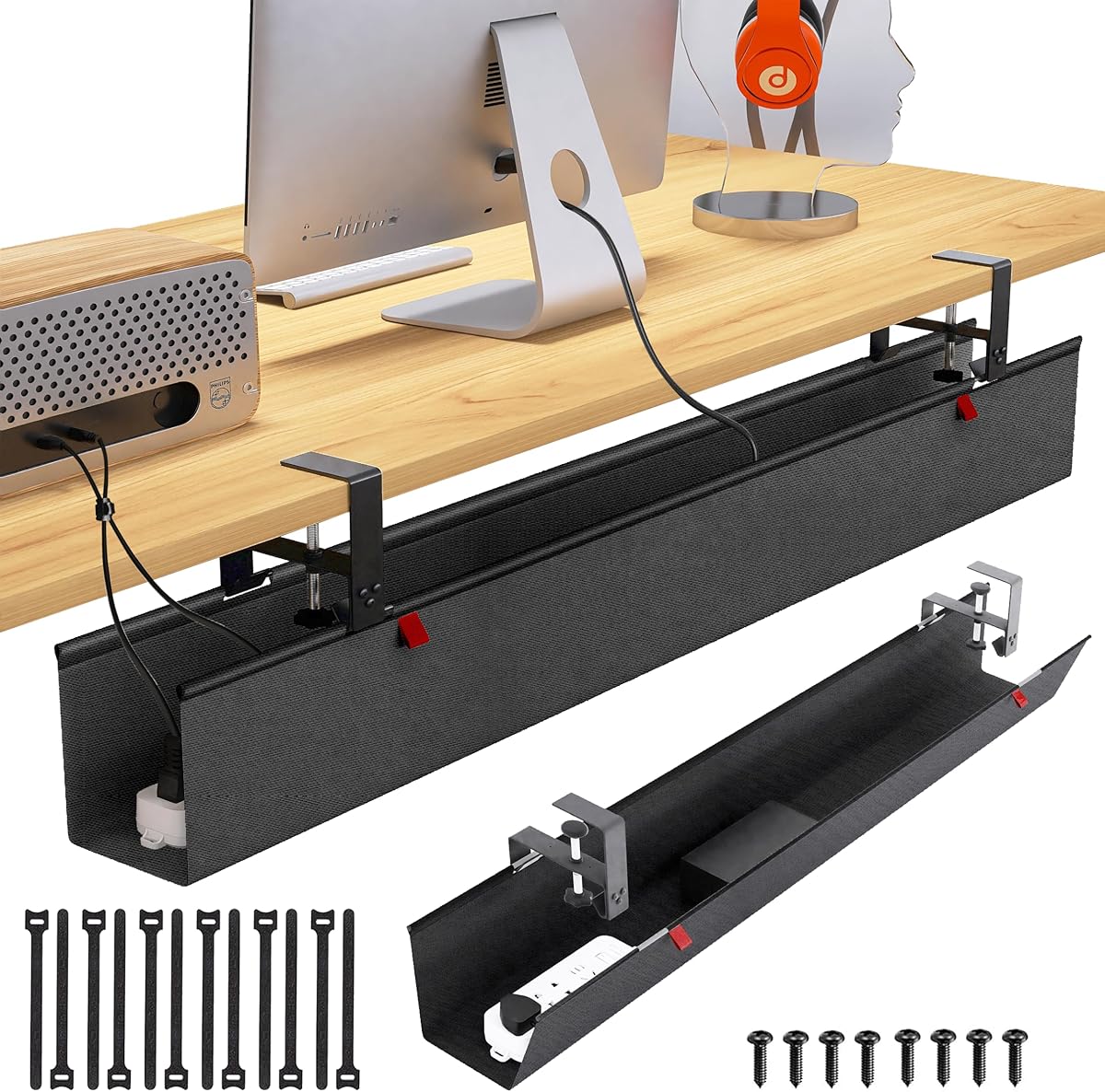
This tray offers a massive 36 inch capacity ideal for large gaming setups. It supports heavy gaming PC power bricks without bowing due to its sturdy build.
We may earn a commission when you buy through this link, at no additional cost to you.
You can install it using clamps or screws depending on your desk material. The fabric base is flame retardant and blocks dust accumulation inside.
You need at least 5.3 inches clearance under the desk edge for clamps. The price is higher but justified by the large volume and durability.
Select this for setups with many cables and large transformers under the desk. It provides ample space to hide everything neatly.
The long length accommodates all types of cables and power units.
Clamps or screws provide flexibility for different desk structures.
We may earn a commission when you buy through this link, at no additional cost to you.
This 25 inch tray uses a metal mesh structure for better ventilation of power supplies. It holds around 15 lbs without sagging which is ideal for gaming gear.
We may earn a commission when you buy through this link, at no additional cost to you.
Non-slip rubber pads protect the desk surface from scratches during mounting. The clamp system ensures firm attachment without drilling permanent holes.
Assembly requires connecting two parts which takes about three minutes. The mesh design helps prevent heat buildup but allows dust to enter slightly.
Buy this for standing desks needing wide support and heat management. It balances airflow and storage effectively for electronics.
Open mesh design allows heat to escape preventing power supply overheating.
Wide coverage fits standard desks ensuring all cables have room.
We may earn a commission when you buy through this link, at no additional cost to you.
These clips feature elastic loops that hold cables securely without tools. They are made in the UK using silicone for long lasting strength.
We may earn a commission when you buy through this link, at no additional cost to you.
You can mount them with adhesive screws or zip ties for flexibility. The design allows you to swap cables easily without removing the clip.
The ten count is lower than other options but the quality is high. Silicone may resist UV better than standard rubber over time.
Choose this for premium desk setups needing adjustable and durable clips. It offers high reliability for daily use.
Silicone provides better grip and UV resistance compared to rubber.
Use screws adhesive or zip ties to fit any mounting surface.
We may earn a commission when you buy through this link, at no additional cost to you.
This tray provides total blackout concealment hiding cables completely from view. The reinforced base supports heavy gear without sagging over time.
We may earn a commission when you buy through this link, at no additional cost to you.
High density Oxford fabric blocks dust while allowing heat to escape effectively. Side openings allow easy routing of thick cables without removing the tray.
It is the most expensive option but offers superior aesthetics for streamers. The fabric may show wear if exposed to friction frequently.
Select this for a premium battlestation needing complete visual cleanup. It ensures your RGB lights stand out without cable distractions.
Dense fabric blocks all views of wires ensuring a clean look.
Reinforced structure keeps heavy power bricks from bending the tray.
We may earn a commission when you buy through this link, at no additional cost to you.
Choosing the right cable management solution depends on your specific setup and goals. This guide outlines key factors to consider before making a purchase.
Consider how many cables and power strips you need to hide. Larger trays like 36 or 48 inches accommodate heavy setups better than smaller ones.
Ensure the dimensions fit under your desk without blocking drawers or legs.
Decide between no-drill adhesive and clamp or screw options. Adhesive is easier but requires smooth surfaces for strong bonds.
Clamps offer stability without adhesive but need space under the desk edge.
Look for flame retardant materials like PVC or high density fabric. This ensures safety in case of electrical issues or heat buildup.
Metal mesh offers ventilation while fabric provides better concealment of wires.
Choose designs with split sleeves or side openings for easy cable routing. You may need to add or remove cables later without tools.
Openings help maintain organization when adding new peripherals over time.
Consider how the product looks relative to your desk color. Black trays blend well with most gaming setups while metal looks industrial.
Total blackout fabric is ideal if you want no wires visible at all.
Compare the number of pieces or length against the price. Kits offer more variety while single trays focus on specific areas.
Durable items may cost more but last longer than cheaper alternatives.
Install trays on clean dry surfaces for adhesive to bond correctly. Use a hair dryer to warm adhesive before pressing for stronger hold.
Route cables into sleeves or trays starting from the source like power supply. Group similar cables together to prevent tangling and improve airflow.
Periodically inspect adhesive pads for wear and replace if they loosen. Clean dust from fabric trays to maintain fire safety and aesthetics.
Most trays come with removable adhesive that leaves no residue if removed correctly. To avoid damage heat the adhesive slightly before peeling it off slowly.
Weight limits vary by model but most hold 15 to 20 pounds. Check the specs for power bricks and transformers before loading heavy gear.
Yes split sleeves work well for HDMI and USB cables. Ensure the diameter fits the cable thickness to prevent bending or crimping.
Sleeves specifically designed for cat protection block chewing. Other trays hide cables under desks reducing access for pets to chew.
Many options require no tools using adhesive or clamp mounts. Some metal trays may need assembly screws to connect parts before mounting.
Use a soft cloth or vacuum to remove dust from trays. Fabric trays allow airflow so dust buildup may happen over time.
Yes designs with side openings allow easy routing changes. Reusable ties help re-bundle cables if you upgrade your setup.
Metal mesh trays allow more airflow to prevent overheating. Fabric trays block dust but may trap more heat if not ventilated.
The top picks offer solutions for every budget from affordable ties to premium trays. Each product serves a unique purpose in organizing your gaming cables effectively.
Prioritize capacity and ease of access when selecting a tray. A setup that is easy to maintain ensures long term organization without frustration.
Remember that prices can change so check current listings before buying. Investing in good management now saves time and keeps your gear safe.