
4K Vlogging Camera Pocket Digital Camera
4.4Editor score
4K video recording for sharp content
330-degree rotating lens for solo vlogging
Built-in WiFi for easy smartphone transfer
Discover the best camera for social media content creators in October 2026. We compare top models for video quality, portability, and features for TikTok and
Creating engaging content for social media platforms requires the right tools to capture high-quality visuals. Whether you are filming on TikTok, YouTube, or Instagram, having a reliable camera can make a significant difference in your output quality and audience engagement levels.
We have carefully evaluated ten distinct options ranging from compact pocket cameras to advanced creator kits. Each product was selected based on its ability to deliver sharp video, ease of use, and features tailored specifically for modern content creation workflows and social media needs.
This guide presents detailed reviews and comparisons to help you find the perfect fit for your style. Note that availability and pricing may fluctuate over time, so check the current listings before making your final decision to ensure you get the best deal available today.
4.4Editor score

4.5Editor score

4.3Editor score
This table provides a side-by-side comparison of the top ten cameras selected for social media creators. We highlight key specifications to help you quickly identify which model offers the features you need for your specific content creation workflow.




The DJI Osmo Pocket 3 Creator Combo stands out as the top choice for serious content creators who demand professional results. It combines a large 1-inch sensor with advanced stabilization to deliver cinema-quality footage in a compact form factor.
We may earn a commission when you buy through this link, at no additional cost to you.
Its ability to shoot 4K at 120fps allows for stunning slow-motion sequences that elevate your storytelling. The rotating 2-inch touchscreen makes framing vertical content for TikTok and Reels effortless without needing to rotate the entire device.
While the price is higher than budget options, the image quality and ease of use justify the investment for those committed to growing their channel. The included DJI Mic 2 transmitter ensures your audio matches your video quality.
If you want the best possible tool for social media content without carrying bulky gear, this model is the clear winner. It is perfect for vloggers, travelers, and influencers who value portability and performance equally.
The 1-inch CMOS sensor captures more light than smaller sensors, resulting in clearer images with less noise in low light environments.
The 3-axis mechanical stabilization keeps your footage smooth even while walking, running, or moving quickly during outdoor shoots.
We may earn a commission when you buy through this link, at no additional cost to you.
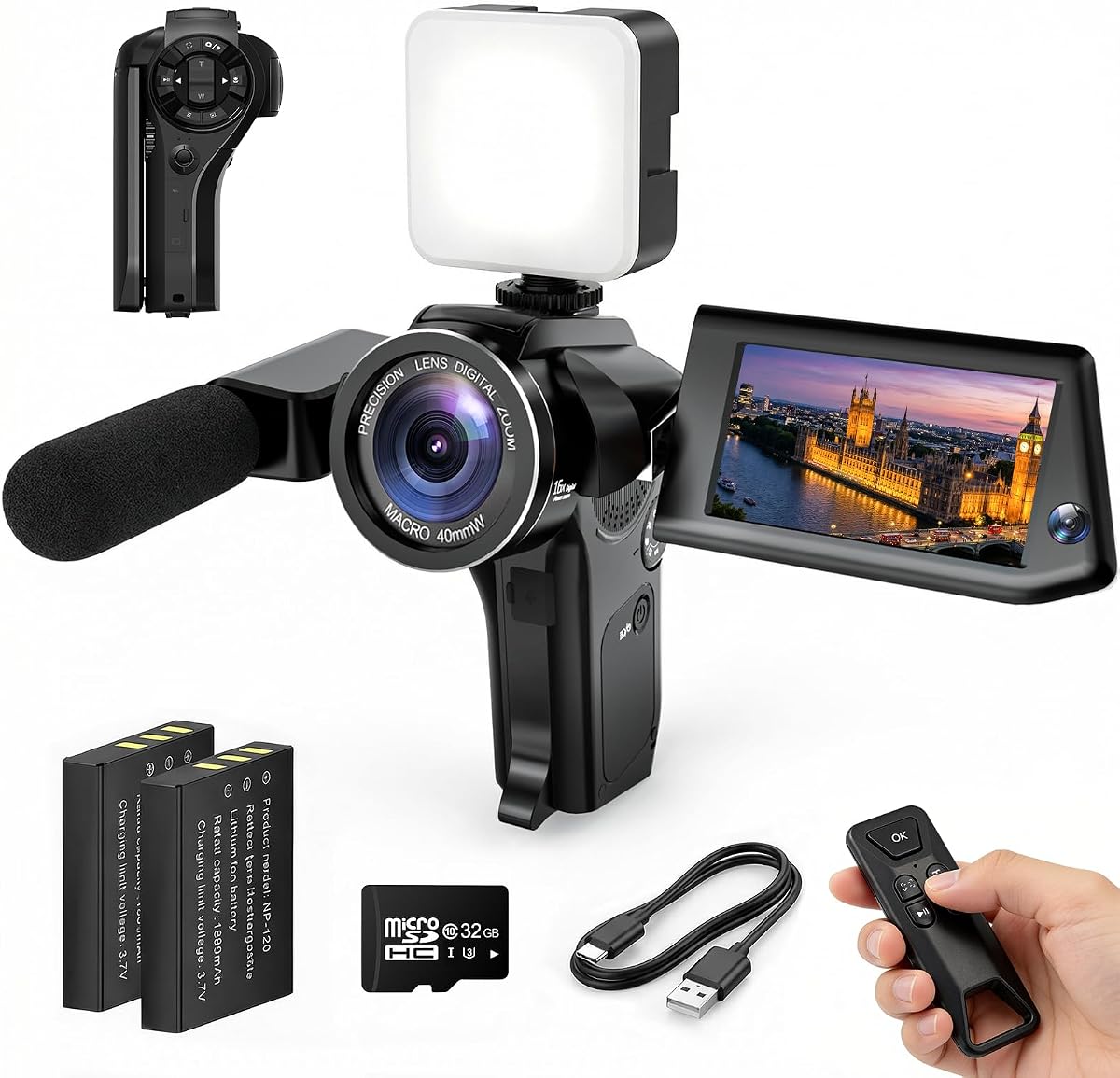
This 4K Vlogging Camera offers an incredible value for beginners looking to start creating content without breaking the bank. It provides essential features like 4K recording and a rotating lens that makes self-framing much easier than fixed cameras.
We may earn a commission when you buy through this link, at no additional cost to you.
The 330-degree rotating lens allows you to easily switch between recording yourself and the scene in front of you. Plus, built-in WiFi means you can transfer your videos to your phone quickly for editing and sharing on social platforms.
While it may not match the image quality of higher-end models, it is sufficient for most casual vlogs and social media posts. The inclusion of a tripod and memory card means you can start filming right out of the box.
For those just starting their journey into content creation, this camera provides the perfect balance of functionality and price. It removes the barrier to entry while still offering professional-level resolution options.
Simple controls and intuitive menus make it easy for first-time users to shoot high-quality videos without extensive technical knowledge.
Includes a mini tripod, 16GB card, and carrying bag so you have everything needed to start recording immediately.
We may earn a commission when you buy through this link, at no additional cost to you.
The FlyFrost 8K Video Camera pushes the boundaries of resolution with its 8K recording capability. This is ideal for creators who want future-proof footage that can be cropped heavily during editing without losing clarity for their social media content.
We may earn a commission when you buy through this link, at no additional cost to you.
Beyond resolution, it includes practical features like IR Night Vision for shooting in dimly lit environments. The included stabilizer and microphone help ensure your footage is steady and your audio is clear, which are both crucial for viewer retention.
One consideration is that 8K files are large and require a computer with strong processing power to edit smoothly. However, if your hardware can handle it, the detail and flexibility you get are unmatched in this price range.
If you want maximum resolution and extra accessories without spending on professional cinema gear, this camera is an excellent choice. It bridges the gap between standard vloggers and high-end production needs.
8K recording provides immense resolution allowing for significant cropping and reframing while maintaining high quality for social posts.
Includes lens hood, stabilizer, remote, and batteries so you have a ready-to-shoot package for various shooting conditions.
We may earn a commission when you buy through this link, at no additional cost to you.
This 8K Digital Camera blends photography and videography into a single compact device. The large 3.5-inch 180-degree flip screen makes it incredibly easy to frame yourself for vlogs without guessing your position or angles.
We may earn a commission when you buy through this link, at no additional cost to you.
It supports HDR imaging which helps balance bright skies and dark shadows in your shots. The 20X zoom allows you to capture distant details which can be useful for travel content or nature vlogs.
Since it comes with two batteries, you can switch them out during long shooting days without worrying about power. The WiFi transfer ensures you can get your content into your phone for fast publishing to social apps.
If you need a camera that does both still photos and videos well, this model offers a great balance. It is suitable for creators who want flexibility in their content types.
The flip screen allows you to see yourself clearly while recording, ensuring your framing is always correct for self-filmed content.
HDR support helps preserve details in both highlights and shadows for a more professional look in your final social media video.
We may earn a commission when you buy through this link, at no additional cost to you.
The Vlogging Camera Mini Camcorder is designed for simplicity and portability above all else. It is small enough to fit in any pocket and large enough to provide decent video quality for daily updates or quick social media posts.
We may earn a commission when you buy through this link, at no additional cost to you.
With a battery life of up to seven hours, you can record for extended periods without carrying a charger. The one-button recording feature means you can capture spontaneous moments without fumbling through menus or settings.
While it does not offer the resolution of higher-end models, its ease of use is its biggest selling point. It is perfect for casual recording where the goal is to capture memories rather than create cinematic masterpieces.
Choose this if you prioritize convenience and battery life over high-end image specs. It is an excellent secondary camera for quick clips or backup footage during travel.
No app downloads or complex setup are required. Just press record and start capturing your moments instantly.
Its small footprint means it adds almost no weight to your bag, making it ideal for hiking or walking tours.
We may earn a commission when you buy through this link, at no additional cost to you.
This variant of the 4K Vlogging Camera provides consistent performance for daily social media content. The wide-angle lens captures more of the environment which is great for travel vlogs or showcasing locations to your audience.
We may earn a commission when you buy through this link, at no additional cost to you.
Fast autofocus ensures that your subject stays sharp even when you are moving around. The WiFi connectivity allows for quick sharing to social platforms, which is essential for staying active on feeds.
The included travel bag helps protect the camera while you are on the move. This is a practical addition for anyone who takes their gear outdoors frequently or travels often.
It serves as a reliable workhorse for content creators who need consistent quality without complexity. It is a strong middle-ground option between budget and premium models.
A wide angle lens captures more of the scene, perfect for showing landscapes or cityscapes alongside yourself in the frame.
The travel carrying bag helps protect your camera from dust and bumps during transit to filming locations.
We may earn a commission when you buy through this link, at no additional cost to you.
This camera stands out with its Picture-in-Picture mode which lets you record your reaction simultaneously with the main video. This is incredibly useful for reaction videos, product reviews, or family updates where your expression matters.
We may earn a commission when you buy through this link, at no additional cost to you.
The flip screen ensures you can see yourself clearly while using this mode to ensure your face is framed correctly. This dual view adds a layer of personality to your content that standard cameras cannot easily provide.
Reviewers have expressed high satisfaction with the ease of use and the unique capabilities of this kit. The WiFi transfer makes it simple to get these dual-view videos onto your phone for editing.
If you want to make your content more engaging and personal, this camera offers a unique tool. It is excellent for creators who want to show their face along with what they are filming.
Capture the scene and your reaction in one shot, making your content feel more personal and engaging for viewers.
Viewers love seeing the creator's face alongside the content. This feature simplifies the process of creating that connection.
We may earn a commission when you buy through this link, at no additional cost to you.
This Vlogging Kit is perfect if you want to upgrade your existing smartphone camera with professional accessories. It includes a wireless microphone to ensure your voice is clear, and an RGB light to improve your lighting setup.
We may earn a commission when you buy through this link, at no additional cost to you.
The flexible tripod allows you to wrap the legs around objects or poles to get creative angles. This is a unique feature that adds versatility to your shots without needing a heavy stand.
The RGB light helps you balance lighting in dark environments or add color effects for creative storytelling. These tools combined make your phone footage look much more polished and professional.
If you already have a good phone but lack accessories, this kit is a smart investment. It transforms your mobile device into a powerful social media tool.
The wireless microphone picks up your voice clearly while filtering out background noise, making your content easier to understand.
RGB modes allow you to set the mood with different colors, adding a professional touch to your video background.
We may earn a commission when you buy through this link, at no additional cost to you.
This kit features an auto face tracking tripod that keeps your phone locked on your face as you move. This is incredibly helpful for solo creators who want to walk around while recording without missing focus.
We may earn a commission when you buy through this link, at no additional cost to you.
The included dual wireless microphones ensure your audio is crisp even if you move far from the camera. The lights provide illumination for darker indoor shots, making it a complete solution for indoor vlogging.
The tripod is quite tall which allows for overhead shots or placing the camera on higher surfaces. This versatility helps in creating dynamic content without needing expensive equipment.
If you want to automate the framing process, this kit is the best choice. It frees you up to focus on your content rather than adjusting the camera constantly.
The intelligent face tracking algorithm keeps you in focus as you move around, making it perfect for active vlogging.
Dual wireless mics allow for interviews or solo recording with excellent noise reduction and clear voice pickup.
We may earn a commission when you buy through this link, at no additional cost to you.
The Logitech Brio 101 is a dedicated webcam designed for streaming and content creation from your desk. It offers reliable 1080p video quality which is sufficient for most live streaming and video call content.
We may earn a commission when you buy through this link, at no additional cost to you.
Its Auto-Light Balance feature boosts brightness in low light to ensure you look your best without additional ring lights. The privacy cover gives you peace of mind when the camera is not in use.
It connects via USB A which is standard on most computers, making it easy to plug in and start recording. This is a robust solution for creators who focus on desk-based content or online teaching.
If your primary platform is streaming or video calls, this webcam is a reliable choice. It offers professional reliability in a compact form factor.
Auto-Light Balance adjusts the brightness automatically so you look clear even in dimly lit rooms.
Plug and play functionality means no drivers are needed. It works with most video platforms immediately.
We may earn a commission when you buy through this link, at no additional cost to you.
Choosing the right camera depends on your content style and budget. This guide breaks down the key factors to consider before you buy.
Resolution determines the sharpness of your footage. 4K is currently the standard for high quality social media content, while 8K offers future proofing for heavy cropping.
Look for cameras that offer at least 4K recording to ensure your videos look crisp on modern screens.
Stabilization keeps your footage smooth while you move. Optical or mechanical stabilization is preferable to digital stabilization which can reduce image quality.
If you walk while filming, choose a camera with a gimbal or built-in stabilization system.
A portable camera allows you to shoot anywhere. Pocket cameras are great for travel but may lack manual controls.
Consider how often you will carry the camera. If you hike or travel often, a lighter model is better.
Indoor or night shooting requires a camera with good low light capabilities. Larger sensors generally perform better in dim conditions.
Check reviews for performance in dark environments if you plan to film indoors frequently.
Good audio is crucial for retention. Some cameras include better microphones than others, but external mic inputs are also important.
Ensure the camera supports external microphones or has decent built-in audio options.
Flip screens or rotating lenses help you frame yourself for self recording. Fixed screens can make solo vlogging difficult.
If you record yourself often, a flip screen or rotating lens is highly recommended.
Wi-Fi and Bluetooth allow for quick transfers to your phone. This speeds up the editing and posting process significantly.
Prioritize models with wireless transfer if you edit on your smartphone.
Some kits come with tripods and memory cards. This can save you money upfront and ensure you have the essentials.
Check what is in the box to avoid buying extra items separately.
Always start by cleaning your lens with a soft cloth to remove dust or fingerprints. This ensures your footage remains clear and free from smudges.
Update your firmware regularly to ensure optimal performance and bug fixes. Most manufacturers release updates that improve features and stability.
Store your camera in a dry place to prevent moisture damage. If you film in humid conditions, consider using a protective case or dehumidifier.
For TikTok, you need a camera with good vertical video capabilities. Cameras with rotating screens or lenses allow you to easily shoot in portrait mode. A 4K camera is ideal for sharpness.
Not always. If your camera has built-in stabilization or you move slowly, a gimbal is optional. However, a gimbal helps if you run or walk quickly while filming.
Most modern cameras have Wi-Fi or Bluetooth. Install the manufacturer's app to connect and transfer files wirelessly. This is faster than using a cable.
8K is useful for cropping but is often too large for direct upload. It is great for editing flexibility but you may not need it for simple clips.
Look for at least 3 to 5 hours of recording time. If you film long events, consider carrying extra batteries or a power bank for charging.
Yes, smartphones are powerful tools. Adding accessories like tripods and microphones can bridge the gap with dedicated cameras for most creators.
We have reviewed ten top options ranging from budget picks to premium kits. Each offers unique features tailored to different content styles and needs.
Prioritize stability and audio quality as these impact viewer retention just as much as video resolution. Find a balance that fits your specific workflow.
Prices and availability may change over time so verify the current listings before making your purchase decision today.