
Canon MegaTank G3270
4.1Editor score
Wireless print copy and scan
High volume black and color pages
Affordable upfront investment cost
Cartridge free printers eliminate the need for expensive ink cartridges by using refillable tanks. These devices offer significant long-term savings and reduce waste for everyday printing needs.
We evaluated ten leading models based on ink capacity, print speed, connectivity options, and user reviews. Each selection provides reliable performance for home offices and small business environments.
Every pick highlights key features, pros, and cons to help you decide. Remember that prices fluctuate frequently, so check current listings before making your final purchase decision today.
4.1Editor score

4.3Editor score
4.2Editor score
As an Amazon Associate we earn from qualifying purchases.
The following table provides a side-by-side comparison of all ten selected cartridge free printers. Review each model's key specifications to find the best fit for your specific printing requirements.





The HP Smart Tank 5003 stands out as a top choice for users seeking a cartridge free printer. It offers up to three years of ink included with the purchase, providing exceptional value and convenience for home offices.
We may earn a commission when you buy through this link, at no additional cost to you.
Its standout feature is the mess-free refill system which allows users to replenish ink without squeezing or spilling. The printer also supports borderless prints and wireless printing for enhanced flexibility. AI capabilities add modern convenience to routine tasks.
While the initial cost might be higher than traditional printers, the long-term savings on ink are substantial. The physical footprint is larger than some compact models, so ensure you have adequate desk space before purchasing.
This model is ideal for households or small businesses needing reliable, high-volume printing without the hassle of frequent cartridge replacements. It delivers sharp text and rich colors consistently, making it a highly recommended option for 2026.
With up to three years of ink included, this printer significantly reduces ongoing costs and eliminates frequent store visits for supplies.
The easy-access refill system ensures you can top up ink quickly and cleanly without worrying about stains or spills on your workspace.
We may earn a commission when you buy through this link, at no additional cost to you.
The Epson EcoTank ET-2803 is a premium option designed for those who value sustainability and advanced features. It replaces tiny cartridges with high-capacity ink tanks, reducing waste and costs significantly over time.
We may earn a commission when you buy through this link, at no additional cost to you.
Key strengths include its voice-activated printing capability which streamlines tasks for busy users. The Micro Piezo Heat-Free technology ensures sharp text and vivid color photos on various paper types. Its high-resolution flatbed scanner enhances document management.
Users must use genuine Epson ink for optimal performance which may limit third-party options. The printer is larger than compact models so allocate sufficient space. However, the convenience and reliability make it worth the investment.
This model is perfect for eco-conscious users who need advanced connectivity and high-quality output. It is an excellent choice for home offices looking to upgrade their printing infrastructure with a modern, efficient device.
Hands-free voice-activated printing allows you to send documents to the printer using simple voice commands for ultimate convenience.
By eliminating disposable cartridges, this printer helps reduce plastic waste in landfills contributing to a more sustainable printing practice.
We may earn a commission when you buy through this link, at no additional cost to you.
The Epson EcoTank ET-2903 offers a blend of speed and capacity that appeals to demanding home users. It includes enough ink for up to three years of typical use, ensuring minimal interruptions for your workflow.
We may earn a commission when you buy through this link, at no additional cost to you.
Its 11 ppm print speed ensures quick document processing while the color display simplifies navigation and settings adjustments. The EcoFit bottles make refilling a straightforward process without mess or stress for any user.
The need to use specific EcoTank bottles may feel restrictive to some but guarantees quality. The higher initial cost is offset by long-term savings on ink purchases. Overall, it is a robust machine for busy environments.
This printer is recommended for families or students needing reliable color prints and high-volume output. It handles photos and documents with equal finesse, making it a versatile addition to any modern workspace.
With 11 pages per minute print speeds you can finish large jobs quickly without waiting around for output to complete.
The 1.44 inch color screen provides clear navigation through menus and settings for an intuitive user experience.
We may earn a commission when you buy through this link, at no additional cost to you.
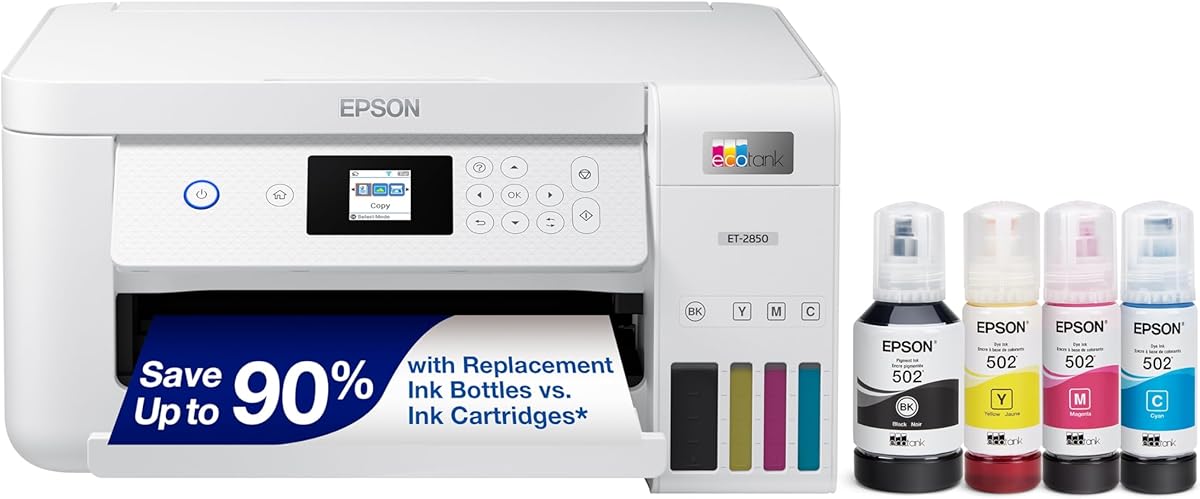
The Epson EcoTank ET-2850 emphasizes productivity with features like automatic two-sided printing and pigment black ink. It is designed for users who need professional-quality documents and high efficiency in their daily tasks.
We may earn a commission when you buy through this link, at no additional cost to you.
Key strengths include the auto duplex feature which saves paper and time. The pigment black ink ensures sharp text suitable for contracts and reports. Its large ink tanks mean fewer interruptions for refilling during busy workdays.
The larger physical size may require dedicated desk space. The price point is higher than basic models but justifies the advanced features. This model suits those prioritizing document quality and workflow efficiency.
Ideal for home offices processing frequent documents or reports. It balances cost savings with professional output quality making it a smart investment for small business owners or serious students.
Automatic two-sided printing reduces paper usage significantly helping you save money and environmental resources over time.
Pigment black ink produces crisp sharp text perfect for business documents contracts and formal reports.
We may earn a commission when you buy through this link, at no additional cost to you.
The Epson EcoTank ET-4800 is built for high-volume users who need a dependable machine for extensive printing tasks. Its high-capacity tanks ensure long periods between refills and consistent performance over time.
We may earn a commission when you buy through this link, at no additional cost to you.
It uses Micro Piezo Heat-Free technology which is reliable and durable. The all-in-one functionality covers scanning and copying efficiently. Wireless features allow for easy printing from smartphones or tablets anywhere in the home.
Some users report occasional connectivity issues or mixed experiences with setup. Ensuring stable Wi-Fi connectivity is essential. Despite minor drawbacks the ink savings remain a significant advantage for heavy users.
This printer is suitable for small businesses with heavy printing loads. It offers a solid balance of features and savings making it a practical choice for organizations needing robust output capabilities.
The Heat-Free technology ensures the printhead lasts longer reducing maintenance needs and keeping the printer running smoothly for years.
With wireless color printing capabilities this machine handles documents photos and graphics with consistent quality.
We may earn a commission when you buy through this link, at no additional cost to you.
The Canon MegaTank G3270 is an excellent budget-friendly option for users needing reliable cartridge-free printing. It offers a high page yield at a lower upfront cost than premium competitors.
We may earn a commission when you buy through this link, at no additional cost to you.
Its wireless printing capability and straightforward setup make it accessible for any user. The large ink tanks support extensive printing without frequent replacements. It handles both text and color photos well for everyday needs.
It lacks automatic duplex printing which may increase paper costs for high-volume users. The display is basic compared to modern touchscreen models. However the value proposition remains strong for cost-conscious buyers.
This model is ideal for home users or students on a budget. It delivers solid performance and savings making it a practical starting point for transitioning to a cartridge-free workflow.
With a lower upfront cost and high page yield this printer offers incredible value for those watching their spending.
The simple setup and wireless features ensure you can start printing immediately without technical hurdles or complex configurations.
We may earn a commission when you buy through this link, at no additional cost to you.
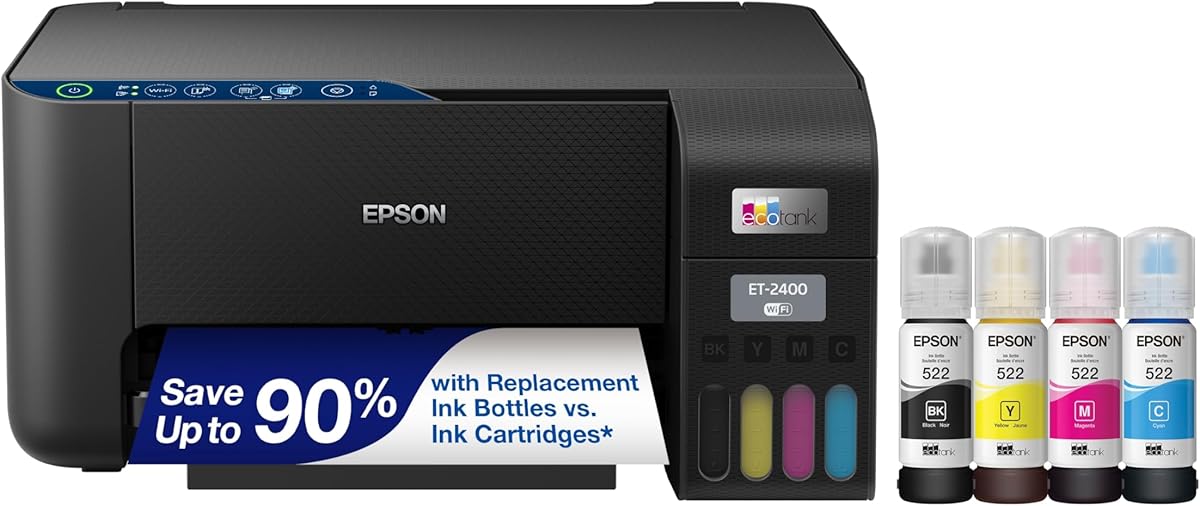
The Epson EcoTank ET-2400 is a compact solution for smaller spaces where footprint matters. It delivers wireless printing and high ink capacity despite its smaller physical size.
We may earn a commission when you buy through this link, at no additional cost to you.
It features EcoFit ink bottles for easy refilling and supports high-capacity tanks to reduce refill frequency. The Micro Piezo Heat-Free tech ensures good photo and text quality. It integrates well into small home offices.
It lacks some advanced features like automatic duplex or large touchscreens. Print speeds are slower than higher-end models. Still, its size and savings make it a smart choice for limited spaces.
This printer is best for users with limited desk space needing efficient printing. It balances functionality and compact design well, making it an attractive option for apartments or small workstations.
Its compact build fits easily on small desks or shelves without sacrificing essential printing and scanning capabilities.
Wireless connectivity allows printing from various devices ensuring convenience regardless of where you are located in your home.
We may earn a commission when you buy through this link, at no additional cost to you.
The Epson EcoTank ET-2800 is a reliable all-in-one printer designed for everyday home needs. It provides vivid prints and consistent performance for various document types and photos.
We may earn a commission when you buy through this link, at no additional cost to you.
With 10 ISO pages per minute it offers decent speed for home use. The wireless features and scanner copier functionality add convenience. It supports EcoFit bottles for easy maintenance and refilling.
The requirement for genuine ink ensures quality but limits third-party options. Speed is average compared to higher-end models. However its reliability and ease of use make it a strong contender.
This model suits home users needing consistent and reliable printing without complexity. It delivers solid value and performance making it a good choice for general household document handling.
Reliable daily performance ensures you can count on this printer for your important documents and photo prints without failure.
Combining printing scanning and copying in one device saves space and simplifies your daily workflow efficiency.
We may earn a commission when you buy through this link, at no additional cost to you.
The Epson EcoTank ET-2980 offers efficient printing with three years of ink included. It supports high page capacity which reduces the need for frequent ink purchases or refills.
We may earn a commission when you buy through this link, at no additional cost to you.
Mobile printing features allow convenience from smartphones or tablets. The simple refill process minimizes mess and effort for users. Its modern design fits well in contemporary home offices.
Limited duplex options may require manual flipping for double-sided printing. Price may be higher than some competitors with similar specs. Still it remains a strong value for long-term savings.
This printer is great for families needing reliable and efficient home printing. It handles high volumes well and supports modern connectivity making it a practical choice for busy households.
With enough ink to print thousands of pages this printer handles high volumes without frequent interruptions for refills.
Wireless and mobile printing features ensure you can print from anywhere in your home using your favorite devices.
We may earn a commission when you buy through this link, at no additional cost to you.
The Epson EcoTank ET-2988 offers fast printing at 15 ppm with auto duplex capabilities. It is a renewed model providing value without compromising on key speed and ink capacity features.
We may earn a commission when you buy through this link, at no additional cost to you.
Its 1.44 color screen simplifies navigation while the three years of ink ensures long uninterrupted use. Auto duplex saves paper and time. Performance is strong for its price point compared to new units.
Renewed units may have varied cosmetic conditions or support limitations. Verify warranty details before purchasing. However for cost conscious buyers the performance to cost ratio is attractive.
This model is ideal for users wanting speed and savings without paying premium prices. It suits home offices needing quick turnaround on documents with reliable ink capacity and efficiency.
With 15 pages per minute print speed this printer ensures quick turnaround for even large print jobs.
Automatic duplex printing saves paper and streamlines workflow by automatically handling two-sided documents effortlessly.
We may earn a commission when you buy through this link, at no additional cost to you.
Selecting the right cartridge free printer requires understanding key factors such as ink capacity, print speed, connectivity, and total cost of ownership. This section outlines essential considerations for your purchase.
Ink capacity refers to the volume of ink the printer can hold and how many pages one set of ink can produce. High capacity tanks reduce the frequency of refills and lower overall printing costs significantly. Look for models offering thousands of pages per ink set to maximize savings.
Prioritize printers with high page yields to reduce ongoing maintenance and expenses. Always check the estimated page count provided by the manufacturer.
Print speed determines how fast documents are produced, measured in pages per minute (PPM). Faster speeds are essential for busy environments or high-volume printing needs. Consider both black and white and color speeds when comparing models.
Choose a printer with PPM ratings that match your typical workload to avoid bottlenecks in your workflow. Faster speeds improve efficiency for large job volumes.
Connectivity options include Wi-Fi, Ethernet, USB, and mobile printing support. Modern users require wireless printing from smartphones and tablets for convenience. Features like AirPrint or Mopria services enhance compatibility with different devices.
Ensure the printer supports the connectivity types your devices use for seamless printing. Wireless capabilities are increasingly essential for flexible home and office setups.
The refill system affects how easy or difficult it is to add new ink. Mess-free designs with guided nozzles reduce spill risks and make maintenance simpler for users. Check if bottles are keyed to prevent incorrect color filling.
Opt for printers with intuitive refill systems to minimize cleanup and frustration. Easy refilling enhances the overall user experience significantly.
Print quality is measured in dots per inch (DPI) and affects the sharpness of text and vibrancy of colors. Higher DPI ratings produce better photos and detailed graphics. Consider the types of documents you print most frequently.
Evaluate resolution ratings to ensure output meets your expectations for text and images. Quality matters for both professional documents and personal photos.
Cost of ownership includes the initial purchase price and long-term expenses for ink and maintenance. Cartridge free printers typically have higher upfront costs but much lower per-page ink costs. Calculate total cost based on your expected usage.
Focus on long-term savings rather than just the sticker price. Lower ink costs lead to significant financial benefits over the printer's lifespan.
Physical size impacts how well the printer fits into your workspace. Some models are large due to high-capacity tanks while others are more compact. Measure your available desk or shelf space before purchasing.
Choose a design that balances capacity with space constraints in your office or home. Compact models suit smaller desks while larger units offer more features.
Reliability refers to the printer's ability to perform consistently without malfunctions. Warranty coverage provides support and parts for repairs. Check user reviews for real-world reliability ratings and manufacturer warranty terms.
Select a model with good reliability feedback and comprehensive warranty protection. This ensures peace of mind and support if issues arise.
To begin using your cartridge free printer, unpack it and connect it to your network following the manufacturer's instructions. Install the software on your computers or mobile devices to enable wireless printing capabilities.
When refilling ink, follow the step-by-step guide provided in the manual. Use the provided bottles and ensure they are inserted into the correct slots to prevent color mixing or spills during the process.
Regular maintenance includes cleaning the print heads periodically and keeping the printer covered when not in use. Check for firmware updates from the manufacturer to maintain optimal performance and security over time.
A cartridge free printer uses refillable ink tanks instead of disposable cartridges. This design reduces waste and lowers long-term printing costs by allowing users to refill ink bottles directly into the machine.
No, ink bottles are usually brand-specific and not interchangeable between manufacturers. Always use the ink recommended by the printer's manufacturer to ensure optimal performance and maintain warranty coverage.
Ink in cartridge free printers can last for months or years depending on usage. Many models include enough ink to last up to three years for average home users reducing the need for frequent refills.
Most cartridge free printers support wireless mobile printing via apps or standard protocols like AirPrint. You can send documents or photos directly from your phone or tablet to the printer.
Yes, many models offer high-resolution printing suitable for vibrant photo output. Look for printers with high DPI ratings and ink technologies designed specifically for color accuracy and detail.
While the upfront cost may be higher, cartridge free printers are generally cheaper over time due to lower per-page ink costs. Long-term savings are significant for users with moderate to high printing volumes.
If a printer is unused for long periods ink may dry out. Most modern models have maintenance cycles to prevent this but running occasional test prints can help keep the print heads clear and functional.
This guide highlighted the top ten cartridge free printers for 2026, covering various budgets and needs from budget models to premium options. Each offers unique benefits in terms of ink capacity, speed, and features.
Prioritize factors like ink yield, print quality, and connectivity based on your specific usage patterns. Consider long-term savings and ease of maintenance when selecting the model that best fits your home or office environment.
Always check current prices and promotions before buying since they fluctuate frequently. By choosing the right printer, you can enjoy efficient, cost-effective, and high-quality printing for years to come.