
Amzboy 15.6" Laptop
4.8Editor score
Quiet Fanless Design
Expandable Storage Up to 1TB
Windows 11 Pre-installed
Finding a cheap laptop for recording music requires balancing performance with affordability. You need sufficient RAM and a fast processor to handle audio tracks without latency issues during your creative sessions.
We evaluated ten budget-friendly models focusing on their ability to run digital audio workstations smoothly. Our analysis covers processing power, memory capacity, storage options, and essential connectivity ports for audio interfaces.
Each pick below highlights key strengths and trade-offs for music production on a budget. Please note that prices and availability change frequently, so verify current details before making your final purchase decision today.
4.8Editor score
4.3Editor score

4.4Editor score
As an Amazon Associate we earn from qualifying purchases.
This side-by-side comparison highlights the key specifications of all ten budget laptops to help you quickly identify which model offers the best value for your specific music production needs and workflow requirements.


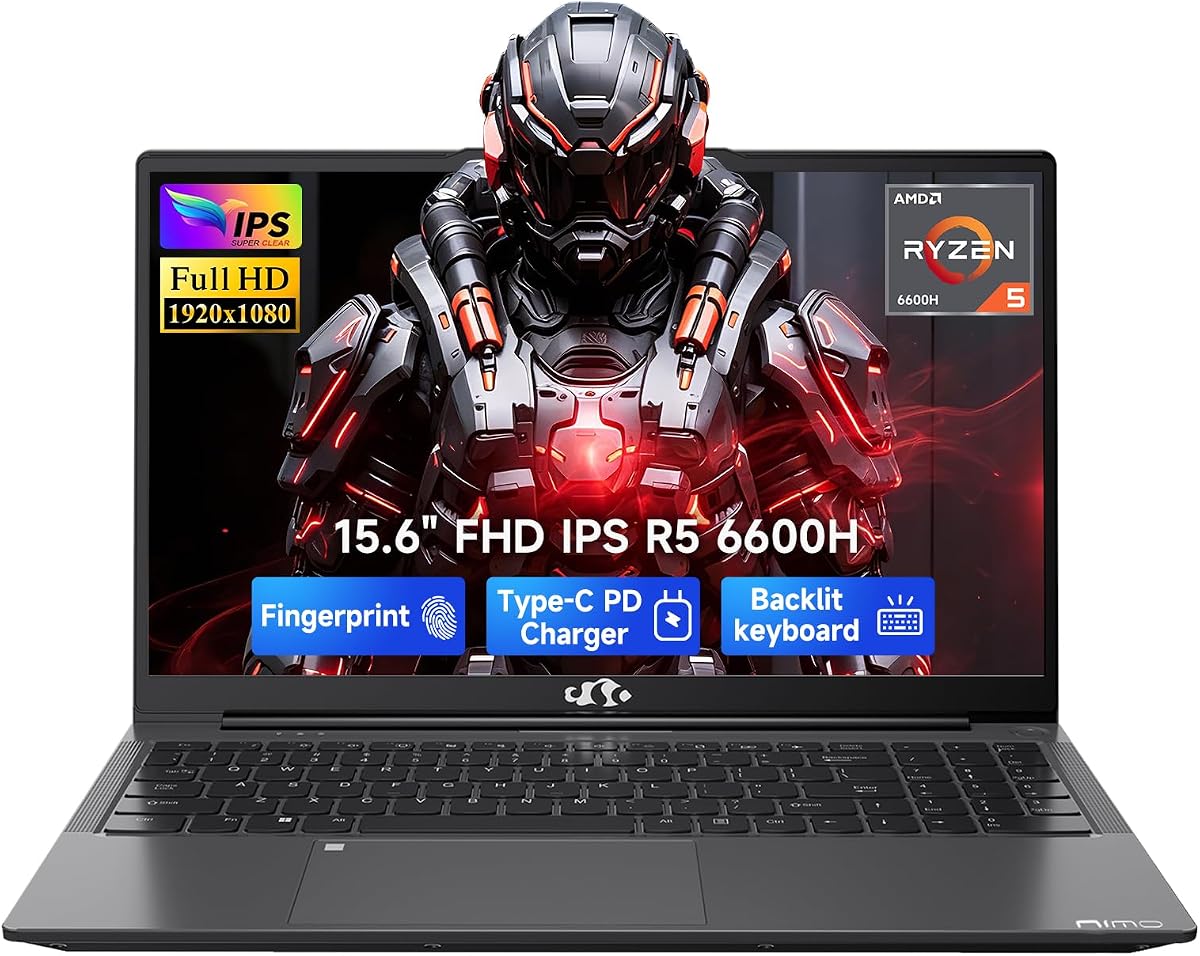
This NIMO laptop stands out as the top pick for affordable music recording due to its powerful AMD Ryzen 5 6600H processor and ample 16GB DDR5 memory. It handles multiple audio tracks and virtual instruments with remarkable stability compared to entry-level options.
We may earn a commission when you buy through this link, at no additional cost to you.
The 512GB PCIe SSD ensures quick load times for your digital audio workstation and large sample libraries. With dual SO-DIMM slots, you can upgrade RAM further to 64GB if your projects grow more complex over time.
While the integrated Radeon graphics are not designed for heavy video editing, they are sufficient for managing audio interfaces and screen sharing during online sessions. The backlit keyboard aids late-night recording sessions in low light environments.
This model is ideal for students and home producers needing reliable performance without breaking the bank. It balances cost and capability better than most competitors in this specific budget category for serious audio work.
The 6-core processor handles high track counts without stuttering, making it suitable for complex mixes.
You can expand RAM and storage easily, ensuring the laptop grows with your production needs.
We may earn a commission when you buy through this link, at no additional cost to you.
The Amzboy laptop offers an exceptionally quiet experience thanks to its fanless design, which is a huge plus for recording audio without background noise interference. It is perfect for beginners capturing vocals or simple instruments in a home setting.
We may earn a commission when you buy through this link, at no additional cost to you.
While the 4GB RAM limits complex multi-track mixing, it handles single track recording and basic editing well. The expandable storage via TF card allows you to add space for your recordings without needing an external drive immediately.
Its lightweight build makes it easy to transport between rooms or to small gigs. The Type-C PD fast charging ensures you stay powered up during mobile recording sessions without bulky power bricks taking up space.
Consider this if your primary goal is portability and silence rather than heavy processing power. It is a great secondary device for sketching ideas or capturing demos on the go with minimal noise.
The fanless design prevents internal noise from being picked up by sensitive microphones during takes.
Lightweight construction and fast charging make it ideal for recording outside the home studio setup.
We may earn a commission when you buy through this link, at no additional cost to you.
The HP Chromebook 14 is tailored for users who rely on cloud-based music creation tools and browser-based digital audio workstations. Its dual array digital microphones are excellent for direct audio capture without needing an external interface for voice calls.
We may earn a commission when you buy through this link, at no additional cost to you.
Running Chrome OS ensures a secure and streamlined experience with minimal background processes interfering with your audio. The long-lasting battery life means you can work on music ideas throughout the day without needing constant power access.
Storage is limited, but cloud integration allows you to save projects online and access them from other devices easily. This is effective for collaboration and keeping your work safe across multiple platforms and environments.
This laptop is best suited for learning music production concepts or creating simple tracks online. If you need full offline software compatibility, you may need to look at Windows options, but for online tools, it excels.
Built-in high-quality microphones allow for immediate recording of ideas without extra hardware connections.
Chrome OS integration enables smooth use of web-based DAWs for collaborative music making.
We may earn a commission when you buy through this link, at no additional cost to you.
This 15.6 laptop is a solid contender for budget music production because of its 12GB RAM which handles more tracks than typical entry-level models. The SSD provides quick startup times for your operating system and music software applications.
We may earn a commission when you buy through this link, at no additional cost to you.
The inclusion of an M.2 SSD slot allows you to upgrade storage easily if you need more space for large sample libraries or project files. This flexibility extends the usable life of the machine significantly for growing producers.
Connectivity options like USB-C and HDMI make it simple to connect external interfaces and monitors for a dual-screen workflow. The IPS display ensures accurate color representation when managing visual aspects of your software interface.
Buy this if you need a balance between performance and portability without spending a fortune. It is a practical choice for home studios that need reliable multitasking capabilities for recording and editing tasks.
Upgrading the SSD is straightforward, allowing you to scale storage as your media files grow.
The large IPS display offers ample workspace for viewing waveforms and plugin parameters comfortably.
We may earn a commission when you buy through this link, at no additional cost to you.
Designed for students and home users, this laptop provides the necessary RAM and SSD speed for basic audio recording tasks. The anti-glare screen reduces eye strain during long editing sessions which is essential for focus.
We may earn a commission when you buy through this link, at no additional cost to you.
Privacy features like the camera slider add peace of mind when working in shared spaces. The variety of ports ensures you can connect your audio interface without needing extra dongles or hubs for your setup.
The lightweight chassis makes it easy to carry between classes or rooms for practice. While not a powerhouse, the 12GB RAM allows for smooth operation with a limited number of tracks during recording.
This model is a smart choice for educational settings where portability and durability matter. It supports learning music production without requiring a large investment upfront while still offering key connectivity features.
The anti-glare screen prevents reflections in bright rooms helping you focus on waveforms and editing.
Full function USB-C and HDMI ports allow direct connection to external devices without adapters.
We may earn a commission when you buy through this link, at no additional cost to you.
This BLUEING model offers a vibrant display with 100% sRGB which helps in visual content creation alongside audio. The thin and portable design makes it convenient to take to live sessions or small venues for quick demos.
We may earn a commission when you buy through this link, at no additional cost to you.
Eight GB of RAM is a standard mid-range value that handles basic multitasking well. While it may struggle with very large orchestral libraries, it is sufficient for standard song recording and mixing on a budget.
Connectivity is robust with multiple USB ports and Bluetooth for wireless peripherals. The privacy slider provides an extra layer of security when you are working in public spaces or sharing your screen remotely.
Choose this if visual clarity and portability are your main priorities alongside audio work. It serves as a capable companion for music creators who need a reliable machine that fits in a backpack easily.
The high color gamut ensures screen elements and waveforms are displayed with sharp contrast.
Lightweight design allows you to bring your production setup to different locations without hassle.
We may earn a commission when you buy through this link, at no additional cost to you.
This BLUEING laptop stands out with 256GB SSD storage which provides more room for your sample libraries and projects. The 12GB RAM ensures that you can run your recording software alongside web browsers and communication apps smoothly.
We may earn a commission when you buy through this link, at no additional cost to you.
The ergonomic keyboard and spacious touchpad enhance your workflow comfort during long editing sessions. Privacy protection is built-in with a physical slider which is crucial for secure work environments.
Connectivity options include USB-C and HDMI which allow flexible setups with external displays or monitors. This makes it easy to set up a dual-screen environment for better management of your digital audio workstation.
Ideal for users needing more internal storage without upgrading to a high-cost model. It is a balanced machine for business students and hobbyists needing space for large files and daily computing tasks.
256GB SSD offers sufficient space for a moderate library of music files and software installation.
Large touchpad and keyboard design help reduce typing fatigue during extended editing work.
We may earn a commission when you buy through this link, at no additional cost to you.
This 15.6 inch laptop is designed with privacy and quiet operation in mind which is vital for recording sensitive content. The built-in webcam cover offers physical security for when you are not in video calls.
We may earn a commission when you buy through this link, at no additional cost to you.
The 12GB RAM and 256GB SSD combination provides a balanced environment for running audio software. The quiet performance ensures that internal fans do not disrupt the audio recording process in quiet studios.
Its lightweight and portable nature means you can move it around your home office or take it to a client site easily. The IPS display offers wide viewing angles which are helpful when sharing screens with collaborators.
Best suited for environments where silence and security are priorities. It delivers a reliable performance for standard music production tasks without unnecessary noise or security concerns.
Physical webcam cover ensures that your privacy is protected when you are offline or away from the device.
Quiet operation keeps the recording environment silent so no unwanted noise enters your tracks.
We may earn a commission when you buy through this link, at no additional cost to you.
This model offers a balanced set of specs with 8GB RAM and 256GB SSD which covers most daily music recording needs. The full-size keyboard is comfortable for typing song lyrics or coding automation scripts.
We may earn a commission when you buy through this link, at no additional cost to you.
The 100% sRGB display ensures accurate colors which can be helpful for visual editing alongside audio. You can expand storage up to 4TB NVMe or use TF cards for massive file storage requirements.
Connectivity includes USB-C and HDMI making it easy to connect to external monitors for a better workflow. The privacy slider adds a layer of security for users working in public spaces or shared offices.
Ideal for general users who need a mix of visual and audio capabilities. It is a dependable choice for those looking for a versatile laptop without overspending on unnecessary high-end features.
The high color gamut display ensures that visual elements of your software are sharp and true to life.
Full-size ergonomic keyboard provides better touch and feedback for long typing and editing sessions.
We may earn a commission when you buy through this link, at no additional cost to you.
This 15.6 inch laptop is incredibly light making it easy to carry to any location for quick recording sessions. The 6GB RAM is sufficient for light editing and simple mixing tasks without heavy effects chains.
We may earn a commission when you buy through this link, at no additional cost to you.
Storage can be expanded up to 512GB using a TF card which is useful for archiving recorded audio files. The pre-loaded Windows 11 ensures you are ready to install music software right out of the box.
The integrated Kensington lock slot allows you to secure the laptop in public spaces like libraries or cafés. This adds a layer of security for valuable production hardware in shared environments.
Choose this if you need a portable and secure machine for light audio work. It is a practical solution for beginners or those needing a spare device for simple editing and playback tasks.
At just 1.63kg this laptop is extremely easy to transport for music on the go.
The Kensington lock slot provides a physical security option to prevent theft in public spaces.
We may earn a commission when you buy through this link, at no additional cost to you.
Choosing the right budget laptop for music production involves evaluating several key components that directly impact your workflow and recording quality. Below are the most important factors to consider before purchasing.
RAM is critical for handling multiple audio tracks and virtual instruments simultaneously. A minimum of 8GB is recommended for basic recording while 16GB allows for more complex projects without stuttering or dropouts.
Look for laptops with upgradeable RAM slots so you can increase memory as your needs grow over time.
The CPU handles all audio processing tasks so a faster processor ensures smoother performance. Aim for modern multi-core processors like Intel i5 or AMD Ryzen 5 which can handle DSP effects better than entry-level chips.
Higher clock speeds help reduce latency when recording directly into your digital audio workstation software.
Solid State Drives offer much faster read and write speeds compared to traditional hard drives. This speed is essential for loading sample libraries quickly and saving large audio projects without delays.
Ensure the SSD capacity is at least 256GB to store your OS and software alongside your music files comfortably.
You need specific ports to connect audio interfaces microphones and external monitors efficiently. USB-A and USB-C ports are standard for connecting to most modern audio devices and peripherals used in production.
HDMI or DisplayPort connections allow you to use secondary screens which can improve your workflow significantly.
Long battery life allows you to work for extended periods without being tethered to a power outlet. This is particularly important for mobile recording sessions where you cannot access power sources easily.
Look for models offering at least 6 hours of continuous use to ensure you stay productive throughout the day.
A durable chassis ensures your equipment can withstand being moved frequently or used in various environments. Good build quality also helps in dissipating heat which is vital when running intensive audio processing software.
Check for materials that resist wear and tear especially if you plan to transport your laptop regularly.
A high-resolution screen makes it easier to see waveforms and detailed plugin settings accurately. IPS panels provide better viewing angles and color accuracy which is useful when working in different lighting conditions.
At least 1920×1080 resolution is recommended to comfortably manage multiple windows on your desktop.
Your choice of OS determines which software applications are available to you. Windows offers broad compatibility with most industry standard DAWs while macOS is preferred by many professionals for its stability.
Ensure the laptop comes with a genuine OS license to avoid security risks or installation issues later.
Keep your laptop on a hard flat surface to ensure proper ventilation during recording sessions which prevents overheating and maintains performance.
Use an external audio interface instead of relying on internal sound cards for better input quality and lower latency when recording vocals or instruments.
Regularly update your drivers and operating system to maintain compatibility with the latest music software and security patches.
Yes many budget laptops with sufficient RAM and SSD storage can handle professional recording tasks. You may need to manage your tracks carefully to avoid overloading the CPU.
For best quality an external interface is recommended. Internal cards often suffer from noise and latency issues that can affect your audio fidelity.
Eight GB is adequate for simple projects with a few tracks. However larger projects with many plugins may require 16GB to run smoothly.
Most interfaces connect via USB ports. Check that your laptop has available USB-A or USB-C ports before purchasing the interface.
Windows offers broad compatibility for budget laptops and works with most DAWs. macOS is also great but often costs more in premium machines.
Many models have upgradeable SSD slots. Check the specifications to see if you can add more internal storage or use TF card expansion.
We have highlighted ten affordable laptops suitable for music recording with the NIMO 15.6 AI Creator Laptop leading the pack for its powerful specs.
Prioritize RAM and storage type when choosing a model to ensure your machine can grow with your creative needs without immediate replacement.
Always verify current prices and availability before purchasing as deals change frequently on the market today.