
RDS – Licensed Nintendo Action Grip NES Classic Controller
4.5Editor score
Textured silicone grip material
Comfortable extended control design
Affordable accessory pricing tier
This guide compares the top 10 Classic Nes Controller Replacement options for 2026, reviewing features, compatibility, durability, and user ratings to help
Finding the right Classic Nes Controller Replacement can transform your retro gaming experience. Whether your original controller wears out or you need extra pads for friends, the right choice ensures smooth gameplay without input lag or connection issues.
We analyzed ten top-rated options based on build quality, cable length, compatibility, and user feedback. Our comparison covers wired and wireless variants, adapter solutions, and specialized grips to meet diverse gaming needs and budget constraints.
Each pick highlights unique strengths and trade-offs to help you decide quickly. Prices fluctuate often, so verify current listings before purchasing. Our goal is to provide clear, factual insights for your next classic controller purchase.
4.5Editor score

3.7Editor score

4.8Editor score
The following table provides a side-by-side comparison of all ten products considered in this guide. Each entry lists key specifications to help you quickly identify which controller matches your console or emulator setup.


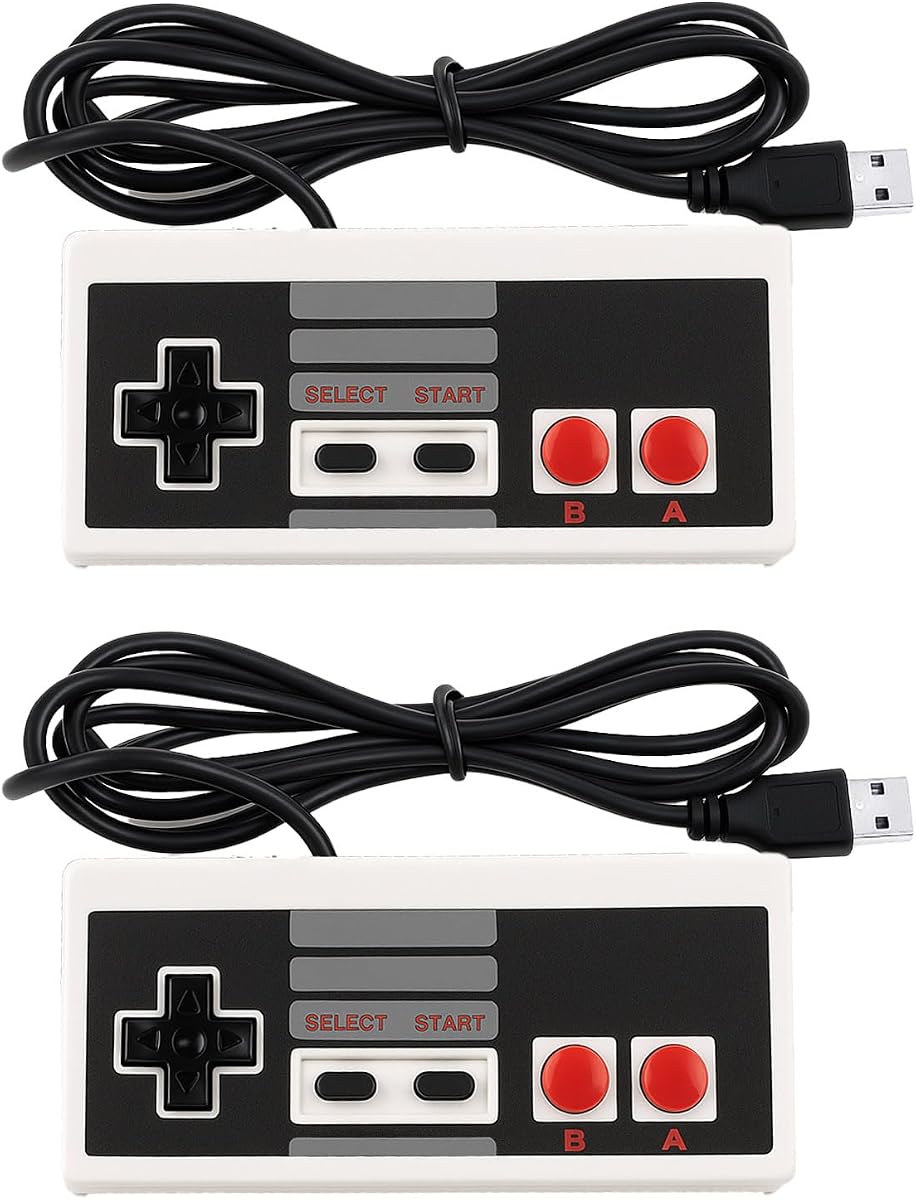


This NGHTMRE replacement pack offers extended reach for comfortable gameplay sessions. With a 10ft cable and sensitive buttons, it aims to replicate the authentic retro feel without the original length constraints. Users appreciate the dual-pack option for local multiplayer setups.
We may earn a commission when you buy through this link, at no additional cost to you.
The standout quality lies in the cable length and button sensitivity. Sitting back from the screen reduces eye strain while maintaining precise control during intense gameplay. The plug-and-play design ensures quick setup without additional configuration steps or driver downloads for immediate use.
While the long cable is beneficial, compatibility is restricted to the HDMI model NES Classic. Some users report slight variations in button feel compared to factory originals. These trade-offs are acceptable for most casual players seeking extra comfort and convenience.
Ideal for gamers needing longer reach or extra controllers for friends. This pack balances functionality and price effectively for retro enthusiasts. We recommend verifying your console model before purchasing to ensure full compatibility with this specific replacement set.
The 10ft cable allows players to sit further away from the TV, reducing eye strain during long gaming sessions while maintaining responsive control.
Including two controllers in one package provides excellent value for households that want to play split-screen or local co-op retro titles immediately.
We may earn a commission when you buy through this link, at no additional cost to you.
The ZAMPAM wireless controllers are designed for PC and Mac emulators rather than consoles. They offer freedom from cables using 2.4GHz technology with a rechargeable battery lasting up to 100 hours. Users can customize turbo functions for specific keys easily.
We may earn a commission when you buy through this link, at no additional cost to you.
Key strengths include multi-platform support and solid battery endurance. The wireless range extends up to 10 meters, allowing movement while playing emulated classics. Software configuration adds flexibility for personalized control schemes across different games.
However, these controllers do not work with NES Classic or Super Nintendo consoles. Configuration requires installing joystick mapper software for optimal results. This limits use cases to computer-based retro gaming setups primarily.
Best for PC and Mac users seeking wireless retro gaming without cables. If you play emulators regularly, these provide a modern solution with reliable connectivity and battery life for extended sessions without interruption or charging needs.
A single charge provides approximately 100 hours of play time, ensuring you can game for days without needing to recharge the built-in lithium ion battery.
Users can set rapid fire on specific keys to gain an edge in action games, with easy cancellation options via manual reference for precise control adjustments.
We may earn a commission when you buy through this link, at no additional cost to you.
The XYAB Classic USB Controller offers a simple plug-and-play solution for retro gaming on PCs and Macs. It features a classic layout with ergonomic comfort and a 6-foot cable. However, the product has received low ratings from users so far.
We may earn a commission when you buy through this link, at no additional cost to you.
Its main advantage is immediate functionality without installing drivers. The build includes durable materials and a standard USB connection that works across major operating systems. This makes it accessible for casual users wanting quick setup for emulators.
The low rating suggests potential quality control issues or inconsistencies in button responsiveness. Some users may find the feel less refined than other options. Consider other highly rated alternatives if reliability is a primary concern.
Suitable for budget-conscious PC gamers needing a basic replacement. If you can accept potential variability in quality, this provides a functional entry point for wired retro gameplay on modern computers without extra software steps.
No driver downloads are needed; simply plug into a USB port and start playing favorite retro games immediately on Windows or macOS systems.
Ergonomic design and responsive buttons make long sessions manageable, with a traditional layout familiar to fans of retro style gamepads.
We may earn a commission when you buy through this link, at no additional cost to you.
The happymaxplus controller delivers premium feel and solid ratings for retro game enthusiasts. Its 9-pin DB9 plug works with specific AV consoles like 620 HD series. Continuous fire buttons add functional depth for action-oriented classic titles.
We may earn a commission when you buy through this link, at no additional cost to you.
Strengths include durable construction and excellent user feedback. Sharing a 2-pack enhances multiplayer opportunities with family. The plug-and-play nature simplifies use once confirmed compatible with your console setup. This alternative is not first-party but performs well.
Verify compatibility with your specific console model before purchasing to avoid issues. Some users recommend testing before finalizing use due to third-party status. This ensures full functionality for your setup without return hassles later.
Ideal for owners of AV 620 HD series consoles seeking quality replacement controllers. If you want reliable retro gaming with enhanced features like fire buttons, this pack offers strong value and performance compared to other third-party options available.
Continuous fire capability gives players an edge in rapid-fire action games, adding functional depth beyond standard button inputs found on basic replacements.
A 2-controller pack enables immediate local gaming sessions with friends or family, making classic titles more social and interactive for everyone.
We may earn a commission when you buy through this link, at no additional cost to you.
The ZENANBiBi wired controller 2-pack supports multiple systems including Windows, Mac, Linux, and Raspberry Pi. It connects via USB 2.0 without needing drivers. The 5.6ft cable provides comfortable distance for emulator play with standard classic controller ergonomics.
We may earn a commission when you buy through this link, at no additional cost to you.
Its main advantage is broad emulator support across platforms. Multiplayer use is enabled out of the box with two units included. This makes it a practical choice for RetroPie users or PC gamers seeking simple retro input options.
This product is not compatible with NES Classic Mini or current Nintendo consoles. Cable length is shorter than some alternatives which may limit seating position flexibility. Ensure your emulator settings map keys correctly for best results.
Best for emulator fans and Raspberry Pi enthusiasts needing multiple controllers. If you play retro games on PC or Linux, these offer reliable connectivity and value. They provide a straightforward path to enjoying classic titles on modern systems.
Works with Windows, Mac, Linux, and Raspberry Pi systems, ensuring you can use this controller across different hardware setups for retro emulation.
Simply connect via USB to start playing immediately without installing additional software, making setup quick and hassle-free for most operating systems.
We may earn a commission when you buy through this link, at no additional cost to you.
The MAYFLASH adapter lets you use NES and SNES controllers on the NES Classic or Wii U. It features plug-and-play installation without drivers. Built-in turbo enhances gameplay with exchangeable D-pad and stick options for customized control.
We may earn a commission when you buy through this link, at no additional cost to you.
Its strength is enabling use of favorite legacy controllers on new systems. The turbo feature adds value for action games. This adapter expands retro flexibility by bridging older hardware with modern consoles effectively for dedicated fans.
This is an adapter not a replacement controller itself. You must already own compatible controllers to utilize this device fully. Ensure your existing hardware matches the adapter requirements before purchasing to confirm full functionality.
Ideal for collectors with existing NES or SNES controllers. If you want to repurpose original hardware on the NES Classic, this offers a convenient bridge. It preserves authentic feel while enabling new functionality and modern console compatibility.
Allows you to use original NES and SNES controllers on the NES Classic or Wii U, preserving authentic feel while adding modern convenience features.
Built-in turbo adds rapid fire functionality to compatible controllers, enhancing gameplay in action games without requiring external mod hardware.
We may earn a commission when you buy through this link, at no additional cost to you.
The eXtremeRate housing transforms Switch Joycons into retro style handhelds with soft touch comfort. It features an ergonomic d-pad and full button set. Installation requires moderate electronic skill with video guides available for step-by-step instructions.
We may earn a commission when you buy through this link, at no additional cost to you.
Strengths include personality added to standard controllers and improved grip. The anti-slip soft material suits long play sessions well. This option is for users seeking customization rather than direct console replacement or wireless convenience.
Installation complexity is the main trade-off with electronics not included. You need technical comfort to replace Joycon shells properly. Ensure you have necessary tools and patience before attempting this upgrade for your Switch setup.
Best for Switch owners wanting retro aesthetic with better d-pad performance. If you enjoy DIY customization and have the required skills, this housing provides a unique upgrade. It blends modern convenience with nostalgic design effectively.
Adds personality to standard controllers by changing colors and materials, allowing you to customize your Switch Joycons beyond factory options.
Soft touch materials provide anti-slip, sweat-free comfort for long sessions, improving overall control and user experience during extended play times.
We may earn a commission when you buy through this link, at no additional cost to you.
This bundle provides 1 controller 1 power supply and 2 extension cables for NES Classic setups. It solves basic power and reach issues in one purchase. Users appreciate the added length for flexible seating positions during play.
We may earn a commission when you buy through this link, at no additional cost to you.
The main strength is the inclusion of extensions and power supply together. This reduces need for separate purchases if you lack basic essentials. It supports comfortable distance gaming by extending reach beyond standard controller lengths easily.
Ratings indicate potential quality variability in cables or components. Check current seller details carefully before buying to ensure you receive expected items. This is a practical solution but may lack consistent build quality across different vendors.
Best for gamers needing extra cables and power supply together. If you want a quick setup with added length, this bundle offers convenience. Verify components and seller reputation to manage expectations for this bundle purchase.
Includes a dedicated power supply, reducing need for separate purchases when setting up your console or replacing lost or damaged components initially.
Two 6ft extension cables allow you to sit further from the TV, improving comfort and seating flexibility during extended gaming sessions.
We may earn a commission when you buy through this link, at no additional cost to you.
RDS offers a licensed Action Grip designed to enhance the classic controller. Made with textured silicone for comfort and precision, it is a top-rated accessory for Nintendo fans. It improves hold and control without requiring a full controller replacement.
We may earn a commission when you buy through this link, at no additional cost to you.
Strengths include official licensing and quality materials for comfort. The ergonomic grip reduces fatigue and improves accuracy during play. Affordable pricing makes it a strong budget choice for those needing better ergonomics over full replacements.
This accessory complements existing controllers rather than replacing them. Color options are limited to red in this listing. Ensure your goal aligns with grip enhancement rather than full pad replacement before buying for best satisfaction.
Best for users seeking licensed comfort upgrades at low cost. If you want better grip and precision without buying full controllers, this is ideal. Verify licensing and material quality for long-term satisfaction with your accessory upgrade.
The textured silicone material creates a comfortable grip that extends control, improving precision and reducing fatigue during extended retro gaming sessions.
Licensed by Nintendo, this accessory ensures compatibility and meets quality standards set by the manufacturer for authentic Nintendo peripheral performance.
We may earn a commission when you buy through this link, at no additional cost to you.
The KIWITATA pack offers 2 classic SNES style USB controllers for PC and Mac emulation. It features anti-sweat, anti-slip material with ergonomic design for comfort. This is a third-party USB controller tailored for retro emulation setups.
We may earn a commission when you buy through this link, at no additional cost to you.
Strengths include broad compatibility and comfortable grip. The 5ft cable offers flexibility while the anti-sweat coating suits long sessions. Users praise the shape for fitting hand contours, and it works well with most emulator software.
This is not compatible with original SNES consoles or Switch. Manual button mapping in emulators is required before playing. This adds a setup step but provides control over layout preferences for optimal gameplay experience.
Best for PC gamers seeking SNES style controllers for emulation. If you play retro games on computer, this pack offers value and comfort. Verify your emulator settings to map controls properly for best performance.
Frosted concave design reduces sweat and slip, ensuring hands stay comfortable and secure during intense or long gaming sessions.
Designed specifically for PC emulation, it works with popular emulators like VirtuaNES and OpenEmu for broad retro title support across systems.
We may earn a commission when you buy through this link, at no additional cost to you.
Choosing the right Classic Nes Controller Replacement depends on your console type, comfort needs, and desired features. Understanding key factors helps you avoid compatibility issues and find durable options for enjoyable gaming.
Verify your console or emulator system before purchasing. Many replacements work only with specific HDMI models or require USB adapters for PC setups. Check product listings for exact supported platforms.
Always confirm compatibility with your current setup to avoid returns and ensure seamless functionality without additional adapters or software.
Standard controllers often have short cables limiting movement. Look for options with extended cables or extension packs to sit comfortably away from the screen during sessions.
Extended cable length provides comfort and reduces eye strain for long gameplay.
Materials affect durability and feel. High-quality plastics and silicone grips reduce fatigue and wear over time. Check user feedback for long-term reliability insights.
Prioritize robust materials to ensure your controller withstands frequent and intense gaming use.
Responsive buttons are crucial for classic platformers and action titles. Some controllers report delay or mushiness. Look for models with sensitive button feedback to avoid gameplay frustration.
Sensitive button response ensures precise control during critical gameplay moments.
If you game with friends, buying 2-packs saves money and ensures consistent control. Many retailers sell controller sets instead of single units for this purpose.
Two packs enable immediate multiplayer gaming without needing separate purchases.
Extra functions like turbo buttons or wireless connectivity can enhance modern retro gaming. Decide if you want these conveniences over pure classic style simplicity.
Decide if you need turbo or wireless for enhanced experience.
Licensed products generally meet stricter quality standards. Unlicensed third-party options may vary in quality. Consider your priority on authentic performance versus budget.
Licensed options offer assurance of quality and safety standards.
Prices vary widely based on features and brand. Set a realistic budget balancing quality with cost. Higher price does not always guarantee better performance.
Balance your budget against required features to find the best value.
Connect your replacement controller to your console or USB port as directed. For adapters, ensure they are plugged into the console before powering it on for detection.
Avoid exposing cables to sharp objects or excessive bending to prevent internal wire damage. Store controllers in dry, clean areas away from direct sunlight.
Clean buttons and surfaces periodically with soft, dry cloths. Do not use liquid cleaners directly on electronics to maintain longevity and performance.
Generally no, the original console uses proprietary connectors. USB controllers typically require adapters or work only with the HDMI model or emulator setups. Always check compatibility details in the product description.
Input lag may stem from wireless interference or low-quality internal components. Wired controllers typically reduce lag. If using USB, ensure cables are undamaged and connected to functional ports.
Some adapters allow mixing styles on one console but standalone controllers are typically style-specific. Look for multi-platform USB options for emulator use with both classic layouts.
Replacement D-pads are available for certain models but installation requires disassembly and technical skill. Some manufacturers offer optional kits separately for advanced users.
Many USB controllers support PC emulators out of the box. Others require button mapping software. Verify emulator compatibility and mapping requirements before purchase for smooth setup.
Wireless models with rechargeable batteries usually include a micro USB or USB-C charging cable. Charge fully before first use and maintain regular charging cycles for optimal battery life.
Contact the seller immediately for replacement or refund per platform policies. Keep packaging until you confirm functionality to streamline returns and reduce shipping complications.
Yes, grips and thumb sticks exist to enhance comfort. They often attach to standard controllers and improve hold without replacing the entire unit.
We reviewed ten options ranging from budget grips to high-end packs. Top picks offer comfort, compatibility, and reliable performance for various retro setups.
Prioritize your console type and desired features like cable length or wireless capabilities. Choose licensed products when possible for consistent quality and durability.
Prices and availability change frequently. Check current listings and seller details before purchase to confirm you receive the expected configuration and support.