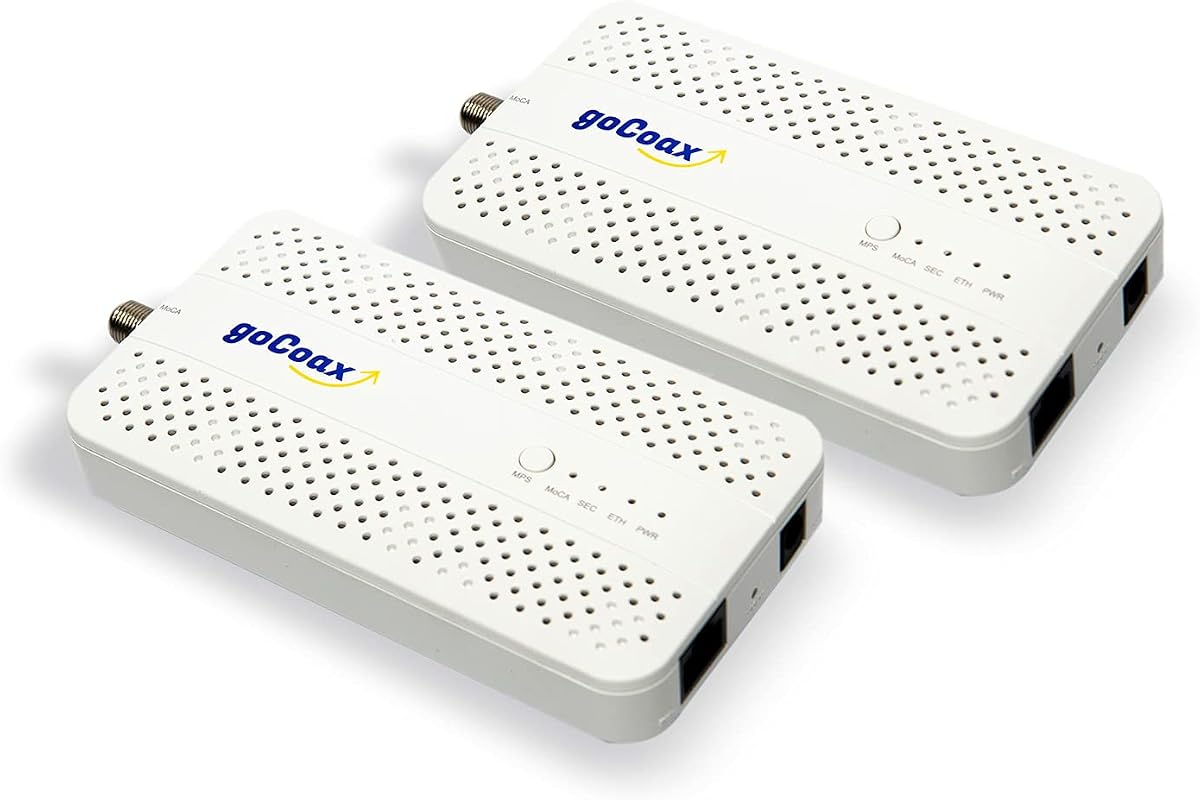
goCoax MoCA 2.5 Adapter (2-Pack)
4.6Editor score
Plug and play setup
Under 3ms latency
Compatible with major ISPs
This comprehensive guide compares the top ten coax to Ethernet adapters for reliable home networking, gaming, and streaming performance in October 2026.
Finding the right coax to Ethernet adapter can transform your home network by leveraging existing cabling for superior speed and stability. These devices bridge the gap between your coax outlets and modern Ethernet ports, delivering wired performance without new wiring.
We evaluated ten leading adapters based on speed capabilities, compatibility with major ISPs, ease of installation, and real-world performance for streaming and gaming. Each product was analyzed for its MoCA version, port speed, and included accessories to ensure you get the best value.
Every pick in this list highlights specific strengths like ultra-fast throughput or unique features such as PoE support. Remember that pricing fluctuates often, so check current offers before purchasing to secure the best deal for your home network setup today.
4.6Editor score

4.4Editor score

4.6Editor score
This side-by-side comparison outlines the key specifications and unique selling points of each adapter to help you identify the perfect match for your specific home networking needs and ISP environment.


The ScreenBeam ECB7250K02 is the top-rated solution for leveraging coax cables for high-speed internet. With a rating of 4.4 stars, it delivers speeds up to 2.5 Gbps, making it ideal for 4K streaming and competitive gaming without the lag of Wi-Fi.
We may earn a commission when you buy through this link, at no additional cost to you.
Its standout quality is the bonded MoCA 2.5 technology which ensures maximum throughput over existing home wiring. The kit includes everything needed for immediate deployment, including adapters, power supplies, and essential cables for quick connectivity.
While it offers superior performance, users with certain DOCSIS 3.1 modems might encounter frequency overlap issues requiring ISP intervention. Additionally, it is not compatible with satellite TV providers or specific coax networks like AT&T U-verse.
This adapter is perfect for users needing reliable high-speed connections in multiple rooms without drilling walls. Its comprehensive kit and proven performance make it the best choice for serious home network upgrades.
MoCA 2.5 offers double the speed of previous generations ensuring your network keeps up with modern broadband plans.
Getting all cables included saves time and money ensuring you can set up the network instantly.
We may earn a commission when you buy through this link, at no additional cost to you.
The goCoax MA2500D is the leading budget-friendly option that does not compromise on speed. With a 4.6 rating, it offers full 2.5 Gbps bandwidth and ultra-low latency under 3ms ensuring lag-free gaming and streaming.
We may earn a commission when you buy through this link, at no additional cost to you.
It is built exclusively around MoCA technology and is compatible with major cable and fiber providers. The 2-pack kit includes all necessary cables and adapters so you can get started right out of the box.
For optimal security and performance a MoCA PoE filter is recommended though it is not included in the box. Also ensure your home has existing coaxial wiring connected through a splitter for it to work properly.
This adapter is the smart choice for cost-conscious users who still demand top-tier network performance. It effectively extends your internet to any room with a coax outlet without expensive new wiring.
Under 3ms latency ensures competitive gaming experiences without the buffer or lag found in wireless connections.
Compatible with Comcast Spectrum Cox and Fios making it a universal solution for most cable internet homes.
We may earn a commission when you buy through this link, at no additional cost to you.
The Kiwee KB-M3-02 sets a premium standard with its unique dual 2.5GbE ports allowing multiple devices to connect at full speed. It is rated 4.6 and leverages MoCA 2.5 technology for ultra-fast interference-free wired networking.
We may earn a commission when you buy through this link, at no additional cost to you.
Its exclusive dual port design lets you connect multiple devices at full speed for seamless gaming streaming and work-from-home setups. The all-inclusive installation kit ensures you have everything needed for zero hassle setup.
While it is a premium product the design is future-proof for next-generation network demands. However ensure your home wiring is interconnected properly as it does not work with isolated coax runs.
This is the top pick for users needing maximum throughput for multiple devices in one location. Its high-grade components and reliability make it a trusted solution for demanding home networks.
Connecting two devices at full 2.5Gbps speed simultaneously is a game changer for homes with multiple users.
Built with high-grade components this adapter is engineered for years of reliable high-speed networking ahead.
We may earn a commission when you buy through this link, at no additional cost to you.
The TRENDnet TMO-313C2K boasts a remarkable 4.8 rating reflecting its high reliability and performance. It supports MoCA 2.5 technology with improved packet error rate technology for consistent voice and video bandwidth.
We may earn a commission when you buy through this link, at no additional cost to you.
This unit is compliant with NDAA and TAA standards making it suitable for government and enterprise customers who require specific networking solutions. The 2.5Gigabit port ensures ultra-fast speeds for critical working from home applications.
Its compact and lightweight housing design fits well in any installation including desktop or entertainment center. It supports up to 16 nodes each on one network providing ample scalability for growing homes.
Users seeking a certified reliable network solution with excellent error correction will appreciate this adapter. It is a robust choice for extending Ethernet networks over existing coax wiring efficiently.
NDAA and TAA compliance ensures it meets strict government demands for networking solutions in specific environments.
Support for up to 16 nodes allows you to expand your network across a large house easily.
We may earn a commission when you buy through this link, at no additional cost to you.
The Hitron HTEM5 is a dedicated network adapter designed to extend your existing network using coax cables without replacing routers. It delivers up to 2.5 Gbps speeds perfect for 4K streaming gaming and high-bandwidth devices.
We may earn a commission when you buy through this link, at no additional cost to you.
Free technical support is available to help verify home coax network configuration which often causes connectivity issues. The kit includes two adapters along with essential cables for easy setup in multiple rooms.
Important to note it is not compatible with AT&T Fiber due to signal interference. Verify your home coax outlets are interconnected and not isolated runs before purchasing to ensure functionality.
This is a straightforward choice for users wanting to convert coax to Ethernet efficiently. Its support and straightforward design make it a reliable option for most cable internet setups.
Free technical support helps verify your coax network configuration ensuring you get connectivity right away.
Check that your coax outlets are part of an interconnected network not separate isolated runs for it to work.
We may earn a commission when you buy through this link, at no additional cost to you.
The LNOVISION EoC Converter is a specialized tool designed to upgrade analog systems to IP surveillance using existing coaxial cables. It supports Power over Ethernet standards and includes a built-in heat sink for reliability.
We may earn a commission when you buy through this link, at no additional cost to you.
Ideal for CCTV systems in elevators or similar industrial settings it enables POE over coax transmission efficiently. The small design and light weight make it suitable for various installations requiring industrial-grade durability.
This converter acts as a point-to-point connection only so it does not support large network nodes like home MoCA kits. It is strictly for indoor use and requires specific setup with POE switches or injectors.
For surveillance and industrial applications this adapter provides a robust and simple solution. Its focus on reliability and specific use cases makes it a niche but powerful choice.
Built-in heat sink and industrial design ensure super reliability and hassle-free transmission in tough environments.
Supports PoE standards allowing devices to get power and data transmission from a single cable.
We may earn a commission when you buy through this link, at no additional cost to you.
The Nexuslink GCA-1200-KIT transforms unused or dark coax into a powerful gigabit network. It is designed for fiber or satellite internet homes where coax is not used for TV signal delivery.
We may earn a commission when you buy through this link, at no additional cost to you.
With speeds up to 1.2Gbps across 800 meters it ensures reliable connections for online gaming and streaming without rewiring. This makes it ideal for scenarios where other options cannot utilize shared coax infrastructure.
Note that this adapter will not work with Cable TV or Cable Internet Services. It is strictly for dark coax networks so ensure your wiring is unused by cable providers before purchasing.
This is a perfect choice for homes with unused wiring who need a secure wired link. It offers a straightforward way to extend network reach without installing new Ethernet cables.
Works well with unused coax networks not shared with cable TV or cable Internet services for maximum efficiency.
Capable of reaching up to 800 meters allowing network extension across large properties easily.
We may earn a commission when you buy through this link, at no additional cost to you.
The Kiwee KB-M3-03 kit provides 2.5 Gbps data speeds while powering PoE+ devices through the Ethernet port. This unique combination simplifies installations for Wi-Fi access points and IP cameras requiring power and data.
We may earn a commission when you buy through this link, at no additional cost to you.
Integrated PoE+ support allows you to power devices via a single Ethernet cable reducing the need for extra outlets. It supports true multi-gig speeds making it ideal for high-demand applications like video streaming and gaming.
This adapter is best for users with specific PoE devices needing power over the network link. The kit includes two adapters for creating a high-speed network without the hassle of separate power supplies.
A seamless network expansion tool for modern smart homes and offices. It handles power and data over coax wiring making it versatile for professional setups.
Integrated PoE+ supports devices like IP cameras and access points simplifying power and data cabling.
Ideal for powering modern Wi-Fi 6E/7 access points surveillance cameras without requiring additional outlets.
We may earn a commission when you buy through this link, at no additional cost to you.
The TRENDnet TMO-312C is a single unit adapter offering a reliable Gigabit LAN port for wired connectivity. It supports up to 16 nodes on one network and is compliant with NDAA and TAA standards.
We may earn a commission when you buy through this link, at no additional cost to you.
It is backed by 3 years of manufacturer protection and reliable tech support during business hours. This makes it a cost-effective choice for expanding networks without investing in larger kits.
Its compact design fits well on any desktop or entertainment center. It is backwards compatible with older MoCA standards ensuring flexibility with existing network setups.
A solid choice for users needing a single port solution with strong support backing. It delivers reliable throughput and peace of mind with its protection warranty.
Backed by 3 years of protection and English speaking tech support ensuring long-term reliability.
Lightweight housing design makes it well-suited for a variety of installations in any room.
We may earn a commission when you buy through this link, at no additional cost to you.
The ScreenBeam ECB6200S02 is an add-on adapter for existing MoCA 2.0 networks providing a cost-effective way to add Ethernet ports. It achieves 1Gbps speeds using bonded MoCA 2.0 technology for reliable connections.
We may earn a commission when you buy through this link, at no additional cost to you.
It is perfect for expanding a starter kit by allowing you to connect more devices without replacing existing units. It supports up to 16 nodes on one network and includes a power adapter and cables.
This unit is designed for users who already have a MoCA system but need more ports. Its carrier-grade quality ensures top performance even when adding on to a current setup.
An economical solution for network expansion when you already have compatible hardware. It simplifies adding connectivity in new rooms without significant new investment.
This package provides an add on to your MoCA 2.0 network setup to boost connectivity affordably.
Features a 1Gbps network card for top 4K/HD performance matching carrier-grade reliability standards.
We may earn a commission when you buy through this link, at no additional cost to you.
Selecting the right coax to Ethernet adapter involves understanding your home infrastructure and network requirements. This guide outlines the critical factors to consider for optimal performance.
MoCA version determines speed limits with 2.5 supporting up to 2.5Gbps while 2.0 tops at 1Gbps. For modern high-speed internet plans choose adapters with at least MoCA 2.5 to avoid bottlenecks.
Always verify the specific MoCA standard supported by your adapter to match your internet speed requirements.
Adapters come with 1Gbps or 2.5Gbps Ethernet ports. If your internet plan exceeds 1Gbps ensure your adapter has a 2.5Gbps port to utilize full bandwidth.
Check device requirements and ISP plans to select a port speed that supports your usage without limitations.
Not all adapters work with all internet providers. Some do not support satellite TV or AT&T Fiber networks. Verify that the adapter is compatible with your specific ISP and coax wiring setup.
Research provider compatibility before purchasing to ensure the device functions correctly in your home.
Some kits include power adapters and cables while others do not. Getting a complete kit saves time and money during setup. Look for all-inclusive kits with coax and Ethernet cables included.
Confirm what is included in the box to avoid additional costs for essential cables and power supplies.
Ensure your coax outlets are interconnected through a splitter. Isolated runs will not work with adapters. If you had satellite TV verify wiring is active for internet use.
Test your coax wiring before buying to confirm it is suitable for MoCA network connections.
PoE support allows powering devices like IP cameras over the Ethernet port. This is useful for security setups needing power without extra outlets. Ensure your use case requires PoE before buying.
Check if PoE features are needed for your devices to choose an adapter that supports it.
Prices vary based on features like port count and MoCA version. Budget options exist but may lack advanced features. Decide on necessary features to find the best balance of cost and performance.
Set a budget range to filter options that offer the best value for your specific needs.
Some adapters support up to 16 nodes allowing for large network expansion. Consider future needs when choosing a model. High node support ensures you can add more devices later.
Select an adapter that supports your current and future device count for long-term use.
Start by connecting the adapter to your coax wall outlet using the included cable. Plug the other end into your router or device via Ethernet for immediate connectivity.
Ensure both adapters in a pair are powered on for the network to establish. The LED indicators usually show status so check them if issues arise.
Keep adapters in well-ventilated areas to avoid overheating. Avoid physical impacts and ensure cables are secured to prevent accidental disconnections.
A coax to Ethernet adapter converts coax cables into Ethernet ports allowing wired internet connectivity over existing home wiring. It leverages MoCA technology to provide fast stable connections without new cables.
A PoE filter is often recommended to prevent signal leakage and optimize performance. Check your ISP requirements to see if a filter is necessary for your setup.
No, most adapters are not compatible with satellite TV wiring due to signal interference. Verify your wiring setup to ensure it supports MoCA technology.
Adapters with MoCA 2.5 support speeds up to 2.5Gbps over coax. Actual speeds depend on your home wiring quality and network conditions.
Most support major cable providers but some like AT&T Fiber are not supported. Check specific provider compatibility before purchasing to ensure functionality.
Yes many adapters support up to 16 nodes allowing you to add more connections. Buy additional units as needed to expand your network.
Most adapters are plug and play requiring no configuration. Simply connect and power them on to let the network auto-configure.
Isolated wiring will not work with adapters. You may need a professional to connect your coax outlets for network use.
The top picks in this guide offer various features to suit different home networking needs. From budget-friendly options to premium dual-port adapters there is a solution for every user.
Prioritize MoCA version and ISP compatibility to ensure seamless integration with your existing internet setup. Also consider whether you need extra ports or PoE support for specific devices.
Prices change frequently so verify current offers before purchasing to get the best value. Check the current market to secure the right adapter for your network upgrade.