
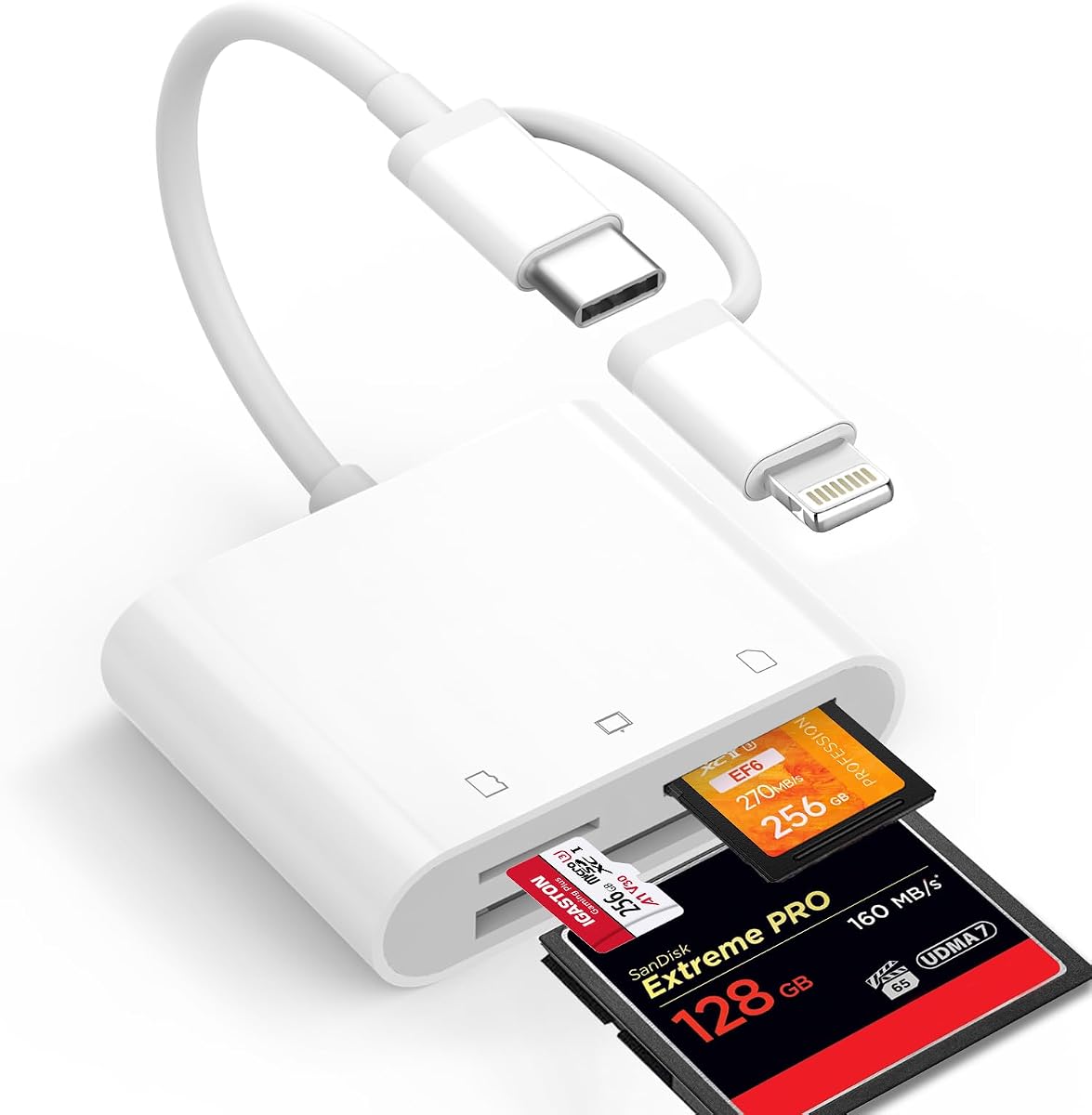
Memory Card Reader, BENFEI 4in1 USB 3.0 and USB-C
4.5Editor score
4 cards simultaneous read
USB-C and USB 3.0
High data speed access
Broad device compatibility
This guide compares the top ten Compact Flash Card Reader models for 2026, analyzing speed, compatibility, and build quality to help you choose the right
Finding a reliable Compact Flash Card Reader is essential for photographers and videographers who need quick access to their media files. These devices bridge the gap between camera memory and computers, allowing for efficient data transfers without removing internal storage.
We evaluated ten top-rated models based on transfer speeds, card slot variety, and connection options. Each product was assessed for compatibility with modern devices like MacBooks and iPhones as well as legacy camera systems that still use CF cards.
This list highlights the strengths and weaknesses of each reader to help you make an informed decision. While prices may vary over time, the performance characteristics and build quality remain consistent indicators of long-term value for your workflow.
4.5Editor score

4.7Editor score

4.4Editor score
The following comparison table provides a side-by-side overview of all ten selected Compact Flash Card Readers. It highlights key specifications and features to help you quickly identify the model that best fits your specific workflow and device ecosystem.



The Lexar Multi-Card 3-in-1 stands out as the top choice for users needing high-speed data transfers. With a rating of 4.7, this reader supports up to 312MB/s for SD and microSD cards, making it ideal for large media files.
We may earn a commission when you buy through this link, at no additional cost to you.
Its USB 3.1 interface ensures fast connectivity while maintaining backward compatibility with USB 2.0 ports. The ability to handle both SD and CompactFlash cards means professionals can use a single device for multiple camera systems.
While it does not support Memory Stick or XD cards, the speed and reliability compensate for this limitation. The included two-year warranty provides peace of mind for long-term usage in professional environments.
Photographers who prioritize speed and reliability should choose this model. It delivers consistent performance across various devices and card types, ensuring that your workflow remains efficient without frequent interruptions.
Transfer large video files and high-resolution photos in seconds with speeds up to 312MB/s.
Supports SD, microSD, and CompactFlash cards with backward compatibility for older USB ports.
We may earn a commission when you buy through this link, at no additional cost to you.
The BENFEI 4in1 reader offers exceptional value for users on a budget without sacrificing essential features. It allows simultaneous reading of four card types, including CF, SD, Micro SD, and Memory Stick.
We may earn a commission when you buy through this link, at no additional cost to you.
Equipped with both USB-C and USB 3.0 connectors, this adapter works seamlessly with modern laptops like the MacBook Pro and older systems. The 18-month warranty ensures support for potential issues during regular use.
While transfer speeds vary based on the card type and USB slot, it delivers fast access for most standard files. Users should note compatibility limits with older Memory Stick formats but will appreciate the wide device support.
This model is perfect for students or hobbyists who need a versatile tool. It combines affordability with robust connectivity options, making it easy to transfer files from various cameras and devices efficiently.
Read and write to four different card types at the same time to save valuable workflow time.
Plug into USB-C ports on modern laptops or USB 3.0 ports on older computers with one device.
We may earn a commission when you buy through this link, at no additional cost to you.
This reader targets professional videographers and photographers who use CFast cards in high-end cameras. It features a dedicated CFast 2.0 slot alongside support for CF, SD, TF, and XD cards, covering most workflow needs.
We may earn a commission when you buy through this link, at no additional cost to you.
Transfer speeds reach up to 5Gbps via USB 3.0 technology, significantly reducing wait times for large 4K or 8K video files. The aluminum body dissipates heat effectively during prolonged transfers, ensuring stability.
While the price is higher than basic models, the professional-grade features justify the cost. It connects via USB-C and USB-A cables, making it compatible with MacBooks, PCs, and tablets without additional adapters.
Content creators requiring reliability and speed should consider this premium option. It handles legacy formats like XD cards while supporting modern high-speed CFast, ensuring your equipment remains useful across generations.
Access high-speed CFast 2.0 cards alongside standard SD and CF formats in a single unit.
The aluminum alloy chassis manages heat better than plastic alternatives for stable long transfers.
We may earn a commission when you buy through this link, at no additional cost to you.
The UGREEN SD Card Reader is designed for efficiency, allowing simultaneous read and write operations on four different memory cards. It supports a wide range of formats including CF, SD, Micro SD, and Memory Stick.
We may earn a commission when you buy through this link, at no additional cost to you.
With USB 3.0 connectivity, it achieves transmission rates up to 5Gbps, which is ideal for moving large video files quickly. It also supports cards up to 2TB capacity, ensuring future-proofing for high-storage needs.
The compact dimensions make it easy to carry in a camera bag or laptop sleeve. While the cable is fixed, its length is sufficient for most desktop and laptop setups without causing clutter on the workspace.
Users looking for a versatile hub solution will appreciate this model. It eliminates the need to swap cards frequently, streamlining the process of backing up footage from multiple sources in one session.
Compatible with massive 2TB cards to handle growing storage requirements for modern cameras.
Access four different cards at the same time to manage files without interrupting your workflow.
We may earn a commission when you buy through this link, at no additional cost to you.
This 6-in-1 adapter offers extensive compatibility for users with diverse camera gear. It supports CFast, CF, SD, MicroSD, MS, and XD-Picture Cards, making it a comprehensive solution for archiving old and new footage.
We may earn a commission when you buy through this link, at no additional cost to you.
Transfer speeds reach up to 5Gbps via USB 3.0 technology, reducing wait times significantly compared to older USB 2.0 models. The dual connectors allow connection to both modern USB-C devices and traditional USB-A ports.
The aluminum alloy construction ensures heat dissipation during long transfers, protecting both the reader and connected cards. While it is larger than minimal readers, the versatility justifies the size for multi-camera workflows.
Photographers with a mix of legacy and modern equipment should find this highly useful. It avoids the need for multiple adapters by consolidating all necessary slots into a single robust device.
Access six different card types including legacy formats like XD-Picture Card and modern CFast.
Choose between USB-C or USB-A connectors on the same cable to match your laptop ports.
We may earn a commission when you buy through this link, at no additional cost to you.
This reader focuses on speed and convenience with hot swapping capabilities and simultaneous access to five card slots. It supports SD, Micro SD, MS, M2, and CF cards in a slim aluminum housing.
We may earn a commission when you buy through this link, at no additional cost to you.
USB 3.0 technology delivers speeds up to 5Gbps, ensuring quick access to data files. The intelligent protection features guard against over-current and short circuits to keep connected equipment safe.
The compact size makes it easy to store in a pocket or laptop bag. Users on Linux or Mac systems will appreciate the plug-and-play support without needing drivers or extra software installations.
For users who switch between cards often, the hot swapping feature is a major advantage. It saves time during data management sessions and keeps the workflow fluid without constant interruptions.
Built-in intelligent protection guards against power surges and short circuits during use.
The lightweight aluminum cover offers durability without adding bulk to your travel kit.
We may earn a commission when you buy through this link, at no additional cost to you.
Designed specifically for USB-C devices, this reader offers fast data transfers up to 5Gbps for iPhone 15, MacBooks, and Android phones. It supports SD, Micro SD, CF, and Memory Stick cards efficiently.
We may earn a commission when you buy through this link, at no additional cost to you.
Four cards can be read simultaneously, which is perfect for trail camera users or photographers managing multiple sources. The plug-and-play functionality ensures no drivers are needed for any modern operating system.
While it lacks a USB-A option, it is optimized for the latest hardware. The compact form factor ensures it does not interfere with other ports when plugged into a laptop or tablet.
Users with primarily USB-C setups will find this adapter indispensable. It simplifies file management by supporting multiple card formats in a lightweight device tailored for modern connectivity standards.
Works seamlessly with iPhone 15, MacBooks, and Android phones featuring USB-C ports.
Read multiple connected cards at the same time for quick downloading and browsing.
We may earn a commission when you buy through this link, at no additional cost to you.
The SmartQ C368 offers a user-friendly experience with an LED indicator that lights up when powered on. It supports SD, Micro SD, MS, and CF cards with plug-and-play compatibility for Windows and Mac.
We may earn a commission when you buy through this link, at no additional cost to you.
Transfer speeds reach up to 5GB per second via USB 3.0, allowing for quick access to stored data. The compact design makes it easy to use during travel without needing extra power sources.
Included accessories like the cable organizer help keep workspace tidy. While it uses plastic housing, the functionality meets the needs of casual photographers who prioritize ease of use over premium materials.
Anyone needing a simple and reliable reader will appreciate this model. It provides clear visual feedback and supports common card types effectively for everyday tasks.
The blue LED light clearly indicates when the device is powered on and ready to use.
A compact form factor and cable organizer make it easy to keep your setup tidy on the go.
We may earn a commission when you buy through this link, at no additional cost to you.
This adapter is tailored for iPhone and iPad users with its dual Lightning and USB-C connectors. It allows viewing photos directly from CF, SD, and MicroSD cards without needing a computer.
We may earn a commission when you buy through this link, at no additional cost to you.
Transfer speeds are stable thanks to Apple MiFi certification. It supports bi-directional transfer, enabling you to move photos from your phone to the card to free up storage space.
The fixed connector design prevents losing adapters but requires selecting the correct port for your device. It does not require apps or internet connections, ensuring privacy and ease of use for travelers.
Mobile photographers and creators will find this tool invaluable. It bridges the gap between camera cards and mobile devices for instant viewing and editing without relying on complex software.
View photos from camera cards on your iPhone or iPad instantly without needing a computer.
Move photos from your phone to the memory card to reclaim storage space for new shots.
We may earn a commission when you buy through this link, at no additional cost to you.
This reader features a built-in USB-C cord that avoids blocking adjacent ports on MacBooks and iPads. It supports CF, SD, and MicroSD cards for quick access to photos and videos.
We may earn a commission when you buy through this link, at no additional cost to you.
The 3-in-1 design allows compatibility with almost all popular camera memory cards. It works with iPhone 15, MacBooks, and other USB-C devices without requiring additional power or drivers.
Because the cord is fixed, it remains secure and less likely to be lost. However, users should ensure their device has a USB-C port before purchasing since it does not support Lightning connectors.
MacBook users looking for a hassle-free solution will appreciate this design. It offers reliable access to memory cards while maintaining a clean connection setup for portable devices.
The built-in cord layout prevents blocking other USB-C ports when connected to laptops.
Handles CF, SD, and MicroSD cards to view best shots from various cameras instantly.
We may earn a commission when you buy through this link, at no additional cost to you.
Selecting the right Compact Flash Card Reader requires considering several technical and practical factors to ensure compatibility and performance.
Modern laptops often lack standard USB-A ports, making USB-C compatibility essential for many users. Check your device ports to decide between USB 3.0, USB-C, or dual-connector options like Lightning and USB-C.
Dual-connector readers offer flexibility for mobile devices and older computers but may cost slightly more than single-port models.
Ensure the reader supports all the card formats you currently use such as CF, SD, MicroSD, Memory Stick, or XD cards. Some readers are limited to specific formats while others offer multi-slot capabilities.
Multi-slot readers allow simultaneous access to multiple cards, reducing the time spent swapping cards during data transfers.
USB 3.0 and 3.1 interfaces provide significantly faster data transfer rates compared to USB 2.0. Look for readers claiming speeds up to 5Gbps or more for handling large video files efficiently.
Actual speeds depend on your card type and slot speed, so high-performance cards paired with fast readers yield the best results.
Aluminum alloy housings dissipate heat better than plastic and generally offer greater durability. This is critical if you plan to transfer large files regularly or use the reader in varying environments.
A sturdy build also protects internal components from wear and tear over time, extending the lifespan of the device.
Hot swapping allows you to insert or remove cards while the device is connected to the computer. This feature is convenient for workflows requiring frequent card changes.
Ensure your operating system and reader support this feature to avoid potential data corruption or hardware issues.
A longer warranty period indicates the manufacturer's confidence in their product's reliability. Look for options with at least an 18-month to 2-year warranty for professional use.
Good customer service support can resolve issues quickly if the device stops functioning properly during critical workflows.
A compact size ensures the reader can be carried in a camera bag or pocket without adding bulk. Cabled readers often integrate well with port design but fixed cables may limit flexibility.
Consider whether you need a detachable cable or a fixed connector based on how you plan to use the device on the go.
Prices vary widely based on features like simultaneous card reading and premium build materials. Set a budget that aligns with your usage frequency and technical requirements.
Sometimes paying slightly more for better speed and compatibility saves time and frustration in the long run.
Start by connecting the reader to an available USB or USB-C port on your computer or mobile device. Wait for the operating system to recognize the device and assign it a drive letter.
Insert your memory card into the correct slot until it clicks into place. You can then browse, copy, or move files using your file manager or photo software.
After transferring data, always eject the reader safely before unplugging it to avoid data loss. Store the device in a dry place to prevent moisture damage to the internal components.
Most modern Compact Flash Card Readers support MacBooks via USB-C or USB 3.0 ports. Ensure the model you choose is compatible with macOS for plug-and-play functionality without installing drivers.
Yes, several models on this list allow simultaneous reading of multiple cards. This feature saves time when transferring footage from multiple cameras without swapping cards manually.
USB 3.0 is significantly faster than USB 2.0, offering transfer speeds up to 5Gbps. For large media files, a USB 3.0 or 3.1 reader is highly recommended.
No, most of these readers are plug-and-play and do not require driver installation. They work automatically with Windows, Mac OS, and Linux systems upon connection.
Yes, many readers support legacy formats like CompactFlash and XD cards commonly used in older DSLR cameras. Always check the specific slot compatibility before purchasing.
Ensure the card is fully inserted and the reader is properly connected to your computer. Try a different USB port or restart your system to resolve connection issues.
We have highlighted the top models including the Lexar Multi-Card for speed and the BENFEI for budget-friendly versatility. Each option offers unique advantages tailored to different needs and budgets.
Prioritize connection type and card compatibility to ensure the reader fits your current and future devices. Speed and build quality are also critical for handling large files reliably.
Prices may fluctuate so check current listings before purchasing. With the right Compact Flash Card Reader, you can streamline your data management and focus on creating more content.