
Laptop Cooling Pad with 3 Quiet Fans
4.3Editor score
3 ultra-silent cooling fans
5-level height adjustable stand
Built-in phone holder
Keeping your devices cool is essential for performance and longevity. A computer fan stand helps dissipate heat while improving your workspace ergonomics. Choosing the right model depends on your device size and cooling needs.
We compared ten top-rated stands based on build quality, airflow efficiency, and adjustability. Our analysis covers laptop coolers and desktop fan mounts. Each option offers unique benefits for work, gaming, or creative tasks.
Each pick highlights key features, pros, and cons to guide your decision. Prices and availability may change over time. We recommend verifying current details before purchasing to ensure you get the best value available today.
4.3Editor score
4.6Editor score

4.0Editor score
As an Amazon Associate we earn from qualifying purchases.
This comparison table provides a quick overview of all ten products reviewed in this guide. Each entry highlights key specifications to help you identify the best fit for your specific cooling and ergonomic requirements.


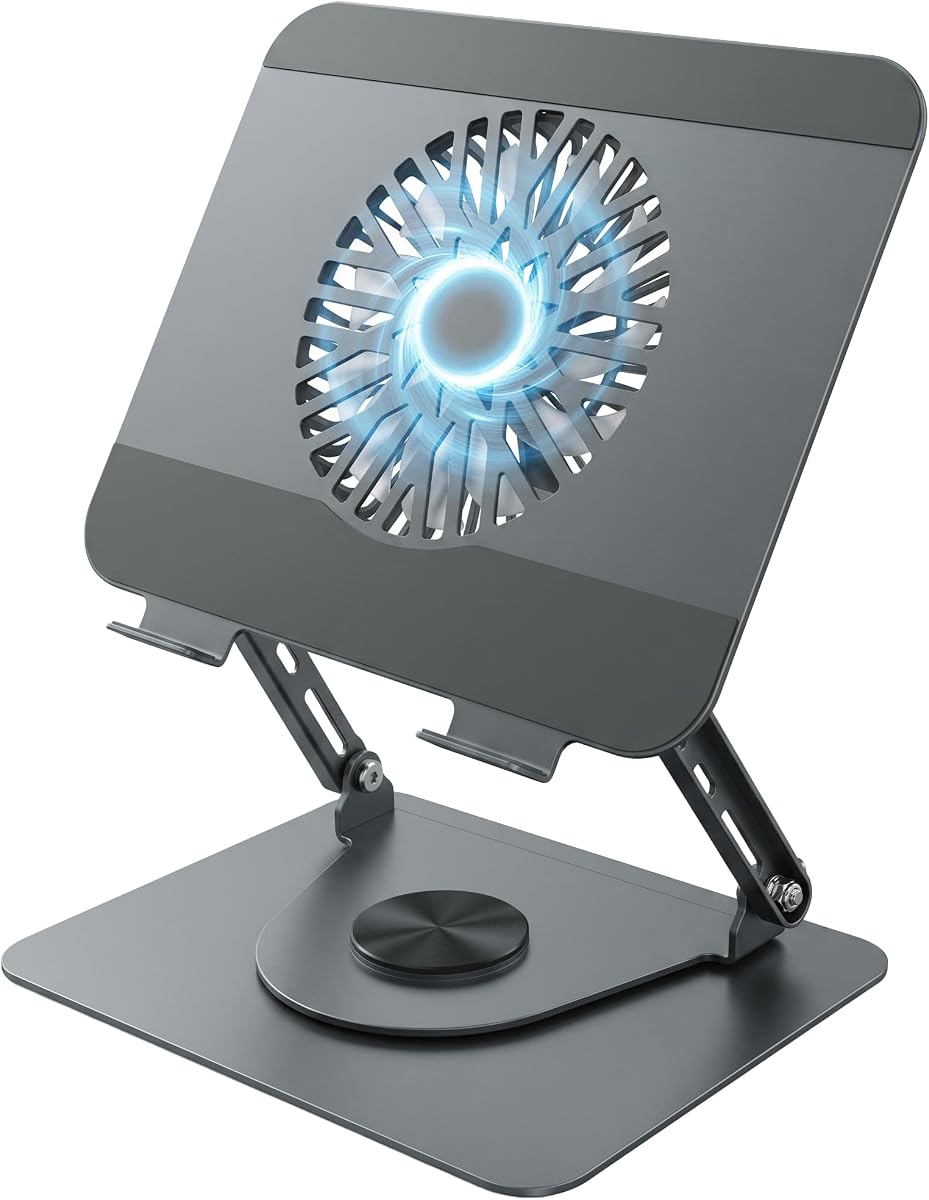
This laptop stand with cooling fan stands out as a top choice for users needing both ergonomics and thermal management. With a strong 4.6 rating it delivers smooth rotation and adjustable positioning. The integrated fan helps maintain optimal temperatures during long sessions.
We may earn a commission when you buy through this link, at no additional cost to you.
Key strengths include the 360 degree swivel base allowing easy screen sharing without moving the unit. Adjustable height settings help achieve eye-level positioning reducing neck strain. The non-slip silicone pads ensure your device stays secure even when typing vigorously.
While the integrated fan is effective it may introduce minimal noise which could be noticeable in quiet environments. Additionally it is designed specifically for laptops limiting versatility for other electronics. However these trade-offs are acceptable for most desk setups.
Ideal for professionals gamers and students who need a stable ergonomic platform with cooling benefits. We recommend this for anyone seeking a comprehensive solution for laptop desk management. It balances performance convenience and build quality effectively.
The swivel base allows effortless screen rotation for collaborative work without lifting the laptop.
Adjustable height settings help align the screen with your eyes to reduce posture strain.
We may earn a commission when you buy through this link, at no additional cost to you.
The laptop cooling pad with 3 quiet fans offers excellent value for families and budget-conscious users. Its 4.3 rating reflects reliable performance and user-friendly features. The triple fan setup ensures strong airflow while maintaining quiet operation for home environments.
We may earn a commission when you buy through this link, at no additional cost to you.
Strengths include five adjustable height levels adapting to various desk heights and postures. The bonus phone holder keeps devices accessible for calls or recipes. Two extra USB ports expand connectivity without needing separate hubs for peripherals.
The ABS body and stainless steel mesh are durable but may feel less premium than aluminum alternatives. It is also slightly heavier making it less portable for travel. These minor drawbacks are offset by its functional design and affordability.
This pad suits households with multiple users needing reliable cooling and ergonomic support. We recommend it for families students and casual users looking for a versatile desk accessory. It delivers core features at a competitive price point.
Designed to accommodate different family members needs with adjustable angles and phone support.
Dual USB ports allow connecting more peripherals without sacrificing laptop ports.
We may earn a commission when you buy through this link, at no additional cost to you.
This aluminum multi-purpose desk fan stand mount is designed for users seeking premium build quality and flexibility. With a 4.0 rating it excels in adjustability and aesthetic appeal. The CNC machined aluminum ensures durability and a refined look for professional setups.
We may earn a commission when you buy through this link, at no additional cost to you.
Strengths include support for fans ranging from 120mm to 180mm providing versatility for custom cooling needs. Three damped pivot hinges allow secure positioning at any angle. The matte finish resists corrosion and matches modern desk aesthetics perfectly.
The main trade-off is the higher price compared to standard metal options. Additionally fans are not included requiring separate purchase. These factors matter less for enthusiasts prioritizing quality and precise airflow control over budget constraints.
Ideal for audiophiles gamers and professionals managing complex desktop cooling setups. We recommend it for those who value engineering precision and durable construction. It transforms standard fans into sophisticated desktop cooling solutions.
CNC machined aluminum provides superior durability and a sleek refined appearance.
Accommodates larger fans up to 180mm for advanced cooling configurations.
We may earn a commission when you buy through this link, at no additional cost to you.
The Kootek laptop cooling pad delivers robust cooling performance with five built-in fans. Its 4.4 rating highlights reliability and user satisfaction. The combination of cooling and ergonomic support makes it a strong candidate for intensive work or gaming sessions.
We may earn a commission when you buy through this link, at no additional cost to you.
Key strengths include customizable fan control with switches for individual or group operation. The dual USB hub adds connectivity convenience. Six adjustable height settings ensure comfortable viewing angles for various user preferences and desk configurations.
The large footprint may limit space on smaller desks. The blue LED lighting while functional can be distracting in dark environments. However these issues are minor given the comprehensive feature set and effective cooling capabilities.
This pad is ideal for gamers and professionals running resource-heavy applications. We recommend it for those needing maximum airflow and ergonomic flexibility. It balances performance features and practical usability well.
Independent switches allow precise control over which fans operate based on cooling needs.
Built-in USB hub expands connectivity for peripherals without using laptop ports.
We may earn a commission when you buy through this link, at no additional cost to you.
The YICOSUN adjustable laptop cooling stand combines style and functionality with RGB lighting and portable design. Its 4.4 rating reflects user appreciation for its build quality and versatility. The aluminum alloy construction ensures durability while keeping weight manageable for travel.
We may earn a commission when you buy through this link, at no additional cost to you.
Strengths include foldability making it easy to carry to coworking spaces or events. Adjustable cooling speeds let you balance noise and performance. Anti-slip pads keep laptops secure even when moved frequently on smooth surfaces.
Fans are smaller compared to other models which may limit peak cooling output. Users with Type-C devices need an adapter for connectivity. These minor constraints do not diminish its value for mobile professionals and casual users.
Ideal for travelers students and anyone needing a compact stylish cooling solution. We recommend it for those who prioritize portability and aesthetics. It fits well in diverse environments from offices to cafes.
Foldable design allows easy storage and transport for users on the go.
Customizable RGB lighting adds a stylish touch to gaming or creative setups.
We may earn a commission when you buy through this link, at no additional cost to you.
The laptop stand for desk with active cooling fan supports a wide range of devices with strong stability. Its 4.5 rating emphasizes reliability and practical design. The open-frame structure and fan combination effectively prevent overheating during extended use sessions.
We may earn a commission when you buy through this link, at no additional cost to you.
Key strengths include an impressive load capacity accommodating heavier laptops or accessories securely. The included phone mount adds versatility for multitasking. Its lightweight and foldable profile makes it easy to store or transport as needed.
Fan noise may vary based on model and settings requiring adjustment in quiet settings. Color options are limited affecting aesthetic personalization. However these are minor trade-offs given its functional design and sturdy build.
This stand is ideal for users needing a robust yet portable solution. We recommend it for MacBook users and those managing heavier devices. It balances performance utility and portability effectively.
Design supports various laptop sizes including MacBooks and gaming machines securely.
Phone mount allows simultaneous use of laptop and mobile device for efficiency.
We may earn a commission when you buy through this link, at no additional cost to you.
The computer fan stand provides a sturdy mounting solution for standard PC fans on desks. Its 4.4 rating reflects satisfaction with its stability and adjustability. The heavy-duty metal build ensures it handles high-speed fans without wobbling during operation.
We may earn a commission when you buy through this link, at no additional cost to you.
Strengths include 360 rotation allowing precise airflow direction targeting specific hotspots. The weighted base adds stability even during high-RPM usage. Tool-free assembly makes setup quick and accessible for users without technical tools.
Fans are sold separately requiring additional purchase for full functionality. Metal edges are precise and may require gloves during handling to avoid minor nicks. These minor points are easily managed with basic care.
Ideal for DIY enthusiasts router users and those managing electronics cooling. We recommend it for anyone needing a reliable standalone fan mount. It delivers robust performance and flexible positioning.
360 rotation lets you direct cooling exactly where needed on your desk.
Weighted base prevents tipping even with high-speed fans in use.
We may earn a commission when you buy through this link, at no additional cost to you.
This multi-purpose desk fan stand mount offers a compact lightweight option for desktop cooling. Its 4.3 rating indicates reliable functionality for standard setups. The full-aluminum construction provides a sleek look while resisting rust over time.
We may earn a commission when you buy through this link, at no additional cost to you.
Strengths include a compact design fitting well on smaller desks. Smooth 360 rotation ensures flexible airflow control without manual readjustment. Tool-free installation allows immediate use right out of the box.
Compatibility is limited to 120mm fans which restricts options for larger models. Aluminum construction while lightweight is less rigid than steel alternatives. These constraints suit general users prioritizing desk space and simplicity.
Ideal for users with standard fan setups seeking minimal footprint solutions. We recommend it for compact desks and basic cooling needs. It offers a clean and efficient mounting approach.
Small design fits well on limited desk space without cluttering the area.
Full aluminum build resists corrosion and maintains appearance over years.
We may earn a commission when you buy through this link, at no additional cost to you.
This multi-purpose desk fan stand mount balances versatility and value for general users. Its 4.3 rating reflects consistent performance across common desktop scenarios. The metal construction ensures durability while supporting both 120mm and 140mm fans.
We may earn a commission when you buy through this link, at no additional cost to you.
Strengths include compatibility with slightly larger fans providing better airflow options. The 360 rotation offers directional flexibility to target heat sources. Tool-free setup enables quick installation without additional hardware or tools.
Design aesthetics are functional rather than stylish which may limit appeal. Fans must be sourced separately adding to total cost. These trade-offs are acceptable for users prioritizing utility and affordability over looks.
Ideal for home offices and standard PC users needing a versatile stand. We recommend it for those wanting reliable performance at a reasonable price. It delivers solid functionality with minimal hassle.
Accommodates both 120mm and 140mm fans for flexible cooling setups.
Tool-free installation allows immediate use without requiring screwdrivers or tools.
We may earn a commission when you buy through this link, at no additional cost to you.
The YAODHAOD multi-purpose desk fan stand mount has achieved a perfect 5.0 rating for reliability. Users praise its sturdy build and flexible positioning. The solid metal bracket ensures stability while supporting standard cooling fans securely for diverse devices.
We may earn a commission when you buy through this link, at no additional cost to you.
Strengths include full 360 vertical rotation allowing precise airflow targeting. The bracket design works for laptops routers and other electronics. Quick assembly with thumbscrews makes it easy to adjust or relocate as needed.
Like others fans are sold separately increasing total project cost. Color options are basic limiting aesthetic customization. These minor points are outweighed by its exceptional build quality and performance.
Ideal for tech enthusiasts needing a reliable versatile cooling stand. We recommend it for anyone prioritizing stability and adjustability. It provides excellent value and performance across setups.
Earned a 5.0 rating for consistent reliability and user satisfaction across reviews.
Versatile mount supports laptops routers modems and various electronics effectively.
We may earn a commission when you buy through this link, at no additional cost to you.
Choosing the right computer fan stand involves evaluating several factors to ensure optimal performance. This guide outlines key considerations to help you find the perfect match for your devices and workspace.
Check if the stand supports your fan size whether it is a 120mm or 140mm PC fan. Some models fit a single size while others accommodate multiple dimensions for flexibility.
Match the fan dimensions to the stand specifications before purchasing to ensure proper fit and safety.
Look for stands with adjustable height and angle settings to achieve ergonomic comfort. This helps reduce neck strain during long work or gaming sessions.
Prioritize models with multiple adjustment levels or smooth rotation to customize airflow direction easily.
Materials like aluminum alloy or heavy-duty metal provide durability and stability. Sturdy construction prevents wobbling especially with high-speed fans.
Choose a material that balances weight and strength for your specific desk environment.
If you need to move your setup frequently choose foldable or lightweight designs. This is ideal for travelers or users with shared workspaces.
Consider the weight and folded dimensions to ensure it fits your carrying needs.
Many stands include USB hubs phone holders or RGB lighting for added convenience. Evaluate which features align with your daily usage patterns.
Focus on features that enhance productivity rather than adding unnecessary complexity.
Efficient cooling requires proper airflow and fan placement. Ensure the stand design promotes adequate ventilation around your devices.
Select stands with open-frame designs or active fans for better heat dissipation.
Tool-free assembly with thumb screws simplifies setup and adjustment. This feature saves time and effort for all users.
Verify that the stand can be assembled quickly without requiring additional hardware or tools.
Prices vary widely depending on materials and features. Determine your spending limit to find a cost-effective solution that meets needs.
Balance price with essential features to avoid overspending on unnecessary extras.
Start by assembling the stand according to manufacturer instructions ensuring all parts are secure. If tool-free options are available use the provided thumbscrews for easy setup without extra hardware.
Place the stand on a stable flat surface to prevent tipping during use. Ensure the fan is properly seated and rotated to direct airflow effectively toward your devices.
Clean the stand regularly with a dry cloth to remove dust and debris. Avoid using water or harsh chemicals that could damage materials like aluminum or electronic components.
Most stands accommodate laptops between 12 and 17 inches but check specific compatibility lists. Some models offer universal fit while others target narrower ranges like 10 to 16 inches.
PC fan stands typically do not include fans and you must purchase them separately. Always verify the product description to confirm what is included in the package.
Look for stands with rubber or silicone pads that provide grip and stability. This ensures your device stays secure even during vigorous typing or movement.
Many models support up to 5kg or more but verify the load capacity before buying. Heavier laptops may need stands with robust metal frames for safety.
Yes desk fan mounts designed for PC fans often support routers modems and other electronics. Ensure the device fits securely within the fan brackets for stability.
Choose stands with ultra-silent fans and adjust speed settings if available. Proper placement away from noise-sensitive areas also helps maintain a quiet workspace.
Tool-free designs with thumb screws are generally secure for regular use. Check that all locking mechanisms are tightened properly to maintain stability.
Some laptop stands work with larger tablets but verify size and weight limits. Using additional padding or cases may improve stability for smaller devices.
The top picks offer a range of solutions from budget-friendly laptop coolers to premium desktop mounts. Each option balances cooling performance ergonomics and build quality for different needs.
Prioritize adjustability material durability and compatibility when selecting a stand. These factors ensure long-term satisfaction and effective thermal management for your devices.
Prices and availability may change so verify current details before purchasing. Always check recent user feedback to confirm performance matches your expectations.