
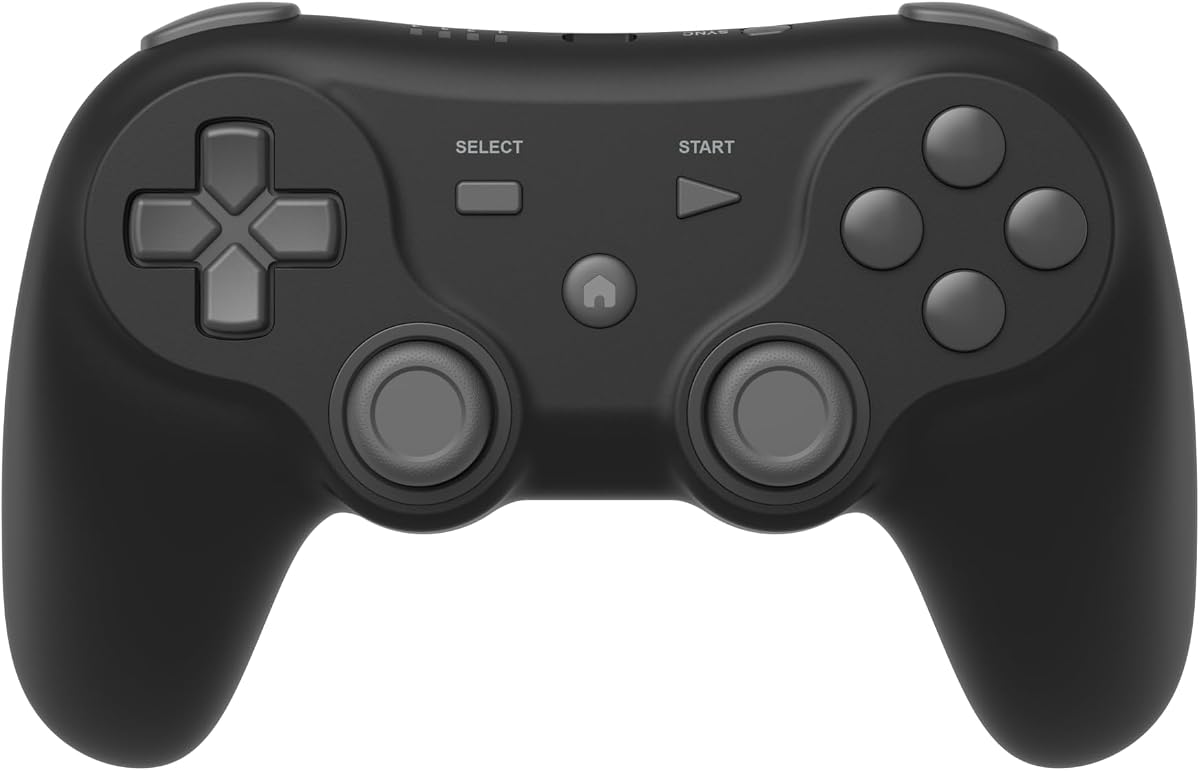
Logitech G F310 Wired Gamepad Controller Console – Blue/Black
4.4Editor score
Six-foot Cord Length
Xbox 360 Layout
Plug-and-Play USB
This guide compares the top 10 controllers for retro console gaming, analyzing features like wireless connectivity, button layout, and compatibility to help
Finding the right controller for retro console gaming can transform your nostalgic experience into something truly immersive. Whether you are revisiting classic titles on modern hardware or preserving old setups, the right input device matters.
We evaluated ten top-rated controllers based on build quality, connectivity options, and compatibility across platforms. Our analysis focuses on how well each device handles vintage gameplay while offering modern conveniences like wireless freedom or long cables.
Each pick below highlights specific strengths and ideal use cases to guide your decision. Note that product availability and pricing can fluctuate, so always check the latest details before making your final purchase for your setup.
4.4Editor score

4.6Editor score
3.8Editor score
The following table provides a side-by-side comparison of all ten controllers reviewed in this guide. It highlights key specifications and compatibility details to help you quickly identify the best match for your retro gaming needs.


The 8Bitdo SN30 Pro stands out as a premier choice for enthusiasts seeking high fidelity in their retro experiences. With a robust rating and widespread acclaim, it balances classic aesthetics with modern functionality effectively.
We may earn a commission when you buy through this link, at no additional cost to you.
Its upgraded Hall Effect Joysticks provide exceptional precision and longevity, eliminating drift issues common in older units. The full button set including clickable joysticks and motion controls enhances versatility across platforms like Switch and PC.
While the price point is higher than basic options, the rechargeable battery and wireless freedom justify the investment. The compact size ensures portability without sacrificing comfort during extended gaming sessions.
We recommend this model for users wanting a reliable, feature-rich controller that bridges the gap between old and new gaming eras seamlessly.
Hall Effect sensors use magnets to detect stick position, ensuring smoother inputs and longer lifespan.
Connect via Bluetooth or USB-C cable for flexibility across Android, iOS, and desktop systems.
We may earn a commission when you buy through this link, at no additional cost to you.
The Logitech G F310 offers an excellent entry point for retro gaming on PC without breaking the bank. Its familiar layout makes it easy to adapt to immediately for those accustomed to Xbox controllers.
We may earn a commission when you buy through this link, at no additional cost to you.
Designed with broad game support, it works seamlessly with both classic titles and newer releases. The Profiler software allows customization for games lacking native gamepad support, expanding its utility significantly.
The six-foot cord provides ample room to relax away from the monitor while maintaining a stable connection. However, the lack of wireless connectivity may be a drawback for some users prioritizing mobility.
Ideal for casual gamers or those on a tight budget, this controller delivers consistent performance and reliability for retro emulation and standard gameplay.
The extended cable allows you to sit comfortably on a couch while playing PC games.
Use Profiler software to map keyboard commands to buttons for unsupported titles.
We may earn a commission when you buy through this link, at no additional cost to you.
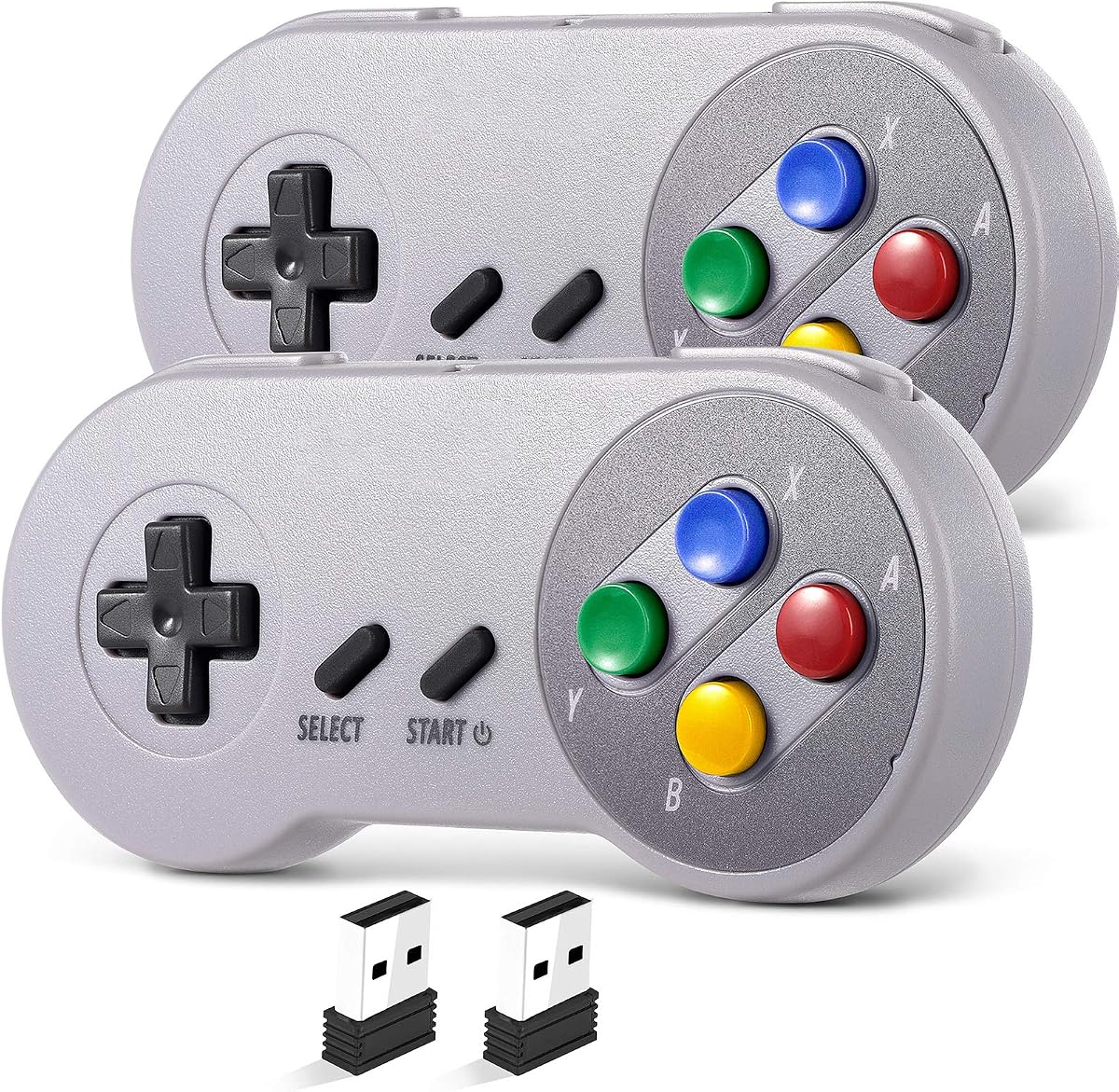
This pack provides two wireless SNES-style controllers perfect for local multiplayer on PC and Mac. The multi-color keys add a playful aesthetic that fits well with retro-themed setups and emulators.
We may earn a commission when you buy through this link, at no additional cost to you.
Using 2.4GHz wireless technology, it offers a stable ten-meter range with minimal latency. The plug-and-play USB receiver ensures easy setup without needing complex drivers or software installation steps.
While it lacks Switch compatibility, it is robust for Windows and macOS users focused on emulation. The rechargeable battery supports ten hours of play, keeping you in the game longer.
Best for households needing multiple inputs for classic games, this set delivers value and convenience for retro enthusiasts on PC platforms.
Includes two controllers for instant two-player action on compatible PC or Mac systems.
No drivers needed; just plug in the USB receiver and start playing immediately.
We may earn a commission when you buy through this link, at no additional cost to you.
Designed specifically for AV 620 and HD consoles, this controller ensures a perfect fit for users of these systems. Its 9-pin DB9 plug connects directly without adapters, simplifying the experience significantly.
We may earn a commission when you buy through this link, at no additional cost to you.
The 4-button layout includes continuous fire functionality which is a staple for many classic arcade shooters. This feature provides a tactical edge in games requiring rapid inputs without repetitive pressing.
With a 2-pack, families can enjoy local multiplayer sessions effortlessly. The rating reflects satisfaction with its build quality and responsiveness relative to other budget options available.
Ideal for owners of specific retro consoles, it offers a reliable and budget-friendly way to expand your controller setup.
Connect directly via 9-pin port on AV 620 and HD consoles without extra hardware.
Toggle continuous fire for rapid shooting in arcade classics without manual tapping.
We may earn a commission when you buy through this link, at no additional cost to you.
The Retro-Bit Legacy 16 captures the nostalgic feel of 16-bit controllers with a modern USB interface. Its ergonomic design mimics classic shapes while adding useful buttons like Home and Screenshot for better utility.
We may earn a commission when you buy through this link, at no additional cost to you.
With a generous 10-foot cable, it offers flexibility for various setups whether playing on PC or Switch. This length reduces tension on the hands and allows comfortable positioning on larger furniture.
While it lacks wireless options, the sturdy construction and responsive buttons ensure a solid experience for retro titles. It balances authenticity with practical features needed for modern emulation environments.
This is an excellent pick for purists who value the original feel but need compatibility with current USB-enabled devices.
Includes Home and Screenshot buttons to streamline navigation on Switch and PC.
The 10ft cable provides ample space to play comfortably from a couch or bed.
We may earn a commission when you buy through this link, at no additional cost to you.
Designed for fans of the Nintendo 64 era, this controller mimics the classic trident shape with modern wireless tech. It works seamlessly with Analogue 3D and Switch, ensuring compatibility with emulation consoles.
We may earn a commission when you buy through this link, at no additional cost to you.
The dual input modes allow users to switch between D-input and S-input for different system needs. Vibration support adds immersion during gameplay, while turbo functions help automate repetitive actions in games.
Although the shape may take a moment to get used to, it offers a unique tactile experience. The build quality remains robust, matching the high standards expected from 8Bitdo products.
Perfect for collectors or players seeking an authentic N64 feel on modern systems like Switch or PC.
Recreates the iconic three-pronged design for authentic N64 gaming experience.
Fully supported by Nintendo Switch for wireless play in handheld or docked mode.
We may earn a commission when you buy through this link, at no additional cost to you.
The Defender Pro offers high-end features like pressure-sensitive buttons and Hall Effect sticks, catering to enthusiasts. It uniquely supports older Sony consoles alongside modern systems, bridging a gap many controllers ignore.
We may earn a commission when you buy through this link, at no additional cost to you.
Its dual wireless modes provide flexibility, allowing you to switch between Bluetooth and 2.4GHz for better stability. Trigger stops let you customize analog sensitivity, which is crucial for fighting games requiring precision.
While the price is higher, the feature set justifies it for users seeking a comprehensive solution. Some users note mixed feedback on specific console compatibilities, so checking setup details is wise.
Ideal for serious gamers who play across multiple generations and demand precision engineering in their controllers.
Buttons detect varying pressure levels for nuanced control in compatible games.
Supports PS1, PS2, and PS3 along with modern Switch and PC platforms.
We may earn a commission when you buy through this link, at no additional cost to you.
The Tegenaria Lite combines a retro aesthetic with high-performance specs like a 1000Hz polling rate for instant response. This makes it suitable for both nostalgic titles and competitive modern retro-inspired games.
We may earn a commission when you buy through this link, at no additional cost to you.
Hall Effect sticks ensure precision and longevity, while dual rumble motors deliver immersive feedback. Mappable back buttons give you extra inputs for complex commands without taking your thumbs off the main controls.
Although it is wired, the low latency ensures a fluid experience without the interference common in wireless signals. The ergonomic design supports comfortable play during marathon gaming sessions.
A top choice for performance-minded retro gamers who need reliability and speed without compromise.
1000Hz polling registers inputs rapidly for minimal delay during intense gameplay.
Magnetic Hall Effect sticks offer durable, drift-free analog control.
We may earn a commission when you buy through this link, at no additional cost to you.
Offering two controllers at a budget-friendly price, this set is ideal for shared local gaming experiences. The wireless 2.4GHz connection provides freedom from cables while maintaining stable performance on PC systems.
We may earn a commission when you buy through this link, at no additional cost to you.
With a battery life of 100 hours per charge, you can play for weeks without recharging. The turbo function helps automate rapid inputs, which is useful for specific game mechanics.
Note that it may require software configuration for optimal use on some platforms. Users should verify compatibility with their specific emulation setup before purchasing.
Best for families or roommates looking for affordable wireless options for PC and Linux retro gaming.
100 hours of battery life per charge means fewer interruptions during play.
2.4GHz wireless connection eliminates clutter from cables on your desk.
We may earn a commission when you buy through this link, at no additional cost to you.
The Hyperkin Trooper 2 brings back the classic Atari feel with a modern USB interface. Its ergonomic design ensures comfortable handling during long sessions, while the joystick operates quietly for a pleasant experience.
We may earn a commission when you buy through this link, at no additional cost to you.
With a 10-foot cable, you have ample room to sit back comfortably. The six mappable buttons provide flexibility for various console emulations and desktop navigation tasks.
It is durable enough for regular use, balancing nostalgia with reliability. The price point is reasonable for a controller designed specifically for emulation on desktop systems.
A solid choice for those who want a straightforward, retro-styled controller for PC-based emulation projects.
Chamfered corners and soft rubber provide comfort during extended play.
Silent joystick movement prevents distractions during relaxed gaming sessions.
We may earn a commission when you buy through this link, at no additional cost to you.
Selecting the right controller depends on your specific setup and preferences. Understanding key factors ensures you get a device that fits your needs.
Ensure the controller supports your target platform such as PC, Switch, or specific retro consoles. Check for USB, Bluetooth, or 9-pin connections based on your hardware.
Always verify compatibility with your emulator or console before buying to avoid connection issues.
Decide between wired and wireless options. Wired offers stability and zero lag, while wireless provides freedom of movement and cleaner setups.
Choose wireless if you prefer sitting on a couch, or wired if you need precise input for competitive retro games.
Different eras have different layouts. Consider whether you need an SNES, N64, or Xbox-style layout depending on the games you play most.
Select a layout that matches the original experience for authenticity and ease of muscle memory adaptation.
Look for durable materials and reliable components like high-quality sticks and buttons. Hall Effect joysticks prevent drift over time.
Invest in models with proven durability to ensure long-term value and consistent performance.
For wireless controllers, check battery capacity and charging methods. Rechargeable batteries are more eco-friendly than replaceable AA types.
Prioritize controllers with long battery life to reduce interruptions during marathon retro sessions.
Budget controllers offer basic functionality while premium options provide extra features like haptics or programmable buttons. Determine how much you need advanced features.
Balance your budget against the features you truly need for your specific gaming setup.
Comfort is crucial for long gaming sessions. Choose a controller that fits your hand size and has a comfortable grip.
Test ergonomics if possible or read reviews to ensure you won't experience discomfort during extended play.
Features like turbo buttons or motion controls can enhance gameplay for specific titles. Consider which extras add value to your experience.
Prioritize features like turbo for action games or motion for immersive titles that require them.
Start by connecting the controller to your device using the appropriate method, such as plugging in the USB cable or pairing via Bluetooth. Ensure your system is set to recognize external controllers before launching your game.
If your controller requires software mapping, install the provided tool on your PC or console to assign keys correctly. This step ensures every button performs its intended action within your emulator.
To maintain longevity, keep the controller clean by wiping it with a dry cloth and store it in a cool, dry place. Avoid exposing it to liquids or extreme temperatures to prevent internal damage.
Yes, most modern wireless controllers connect seamlessly via Bluetooth or a USB receiver. They work with popular emulators like RetroArch and PCSX2. Just ensure you configure the inputs in the emulator settings for full functionality.
Wired controllers offer stable connections without battery concerns, making them ideal for precision gameplay. Wireless controllers provide convenience and mobility, allowing you to sit farther from the screen without cables cluttering your space.
Absolutely, Xbox controllers are widely supported by PC emulators and consoles like Switch. Many retro games map perfectly to the Xbox layout, though some classic titles may require software remapping for accuracy.
Drift usually stems from worn-out internal potentiometers. If your controller has Hall Effect sticks, it should be resistant. Otherwise, recalibrating via software or replacing the sticks if repairable can resolve the issue.
Yes, many manufacturers offer clones designed for NES or SNES styles that plug directly into modern USB ports. These replicate the original button layouts to provide an authentic feel for retro enthusiasts.
Focus on durability, compatibility, and response time. A budget controller should have responsive buttons and a sturdy build without unnecessary features. Check user reviews for longevity before purchasing.
Some modern retro-inspired controllers include motion controls to enhance gameplay. Features like gyro aiming are common in premium models, adding versatility for games that support this input method.
Use a soft, dry cloth to wipe the exterior and avoid getting moisture inside. For sticky buttons, gently use a cotton swab with a tiny amount of alcohol, but never spray liquid directly onto the device.
We reviewed ten excellent options ranging from budget-friendly wired pads to premium wireless solutions. Each model brings unique strengths tailored to different platforms and gaming styles.
Prioritize compatibility with your specific console or emulator and ensure the button layout feels right for your hands. The right choice can transform your retro gaming sessions into enjoyable experiences.
Remember to check current prices and availability before buying as stock and deals change regularly. Investing in a quality controller will enhance your nostalgia journey significantly.