
Switch Cooling Fan with Bottom Cooling
4.5Editor score
Vertical stand with bottom cooling
Compatible with Switch OLED and Steam Deck
LED display with adjustable speed
This guide compares the top cooling fan Nintendo Switch dock accessories to help you prevent overheating and extend console lifespan during long gaming
Keeping your console cool is essential for stable performance. A good cooling fan for the Nintendo Switch dock helps prevent overheating and extends the system lifespan during long gaming sessions.
We evaluated ten top-rated dock accessories based on fan speed, noise level, build quality, and compatibility with original and OLED models to find the best options for your setup.
Each pick shows key specs and real user feedback to help you choose quickly. Prices and availability change often so check the linked page for current offers before buying.
4.5Editor score

4.6Editor score

4.4Editor score
The table below compares all ten products side by side with key specs and links. Use it to find the right fit for your dock model and cooling needs.



This cooling unit ranks top for its precise temperature and speed monitoring. Users rate it highly for keeping docks stable during long sessions and for the clear LED display that shows airflow efficiency.
We may earn a commission when you buy through this link, at no additional cost to you.
The fan offers adjustable speeds from 510 to 6000 RPM. Below 2400 RPM it runs nearly silent. The display shows exhaust temperature in Celsius and current RPM so you can balance cooling and noise.
It requires a Micro USB cable and includes a fixed pad for stability. The sponges on the pad prevent scratches. Noise increases at top speed but the cooling gain is noticeable during intense games.
Buy this if you want full control and visibility. It fits the original dock well and gives you the tools to prevent throttling or sudden pauses caused by heat.
The LED display shows the current exhaust temperature so you can verify cooling performance before overheating occurs.
The included fixed pad with sponge sides holds the fan steady and protects your console from scratches during use.
We may earn a commission when you buy through this link, at no additional cost to you.
This cooler uses three high speed fans to push air through the dock. It aims to lower console temperature fast and reduce system malfunctions. Users note it works well for normal gaming sessions.
We may earn a commission when you buy through this link, at no additional cost to you.
You can choose between Turbo, Normal, and Off modes. Normal keeps noise low for light play. Turbo boosts airflow for intensive games. The unit connects to the dock USB port for power.
Installation is straightforward with no extra tools. The design is compact to save space on your stand. Some users report fit differences depending on dock revisions.
Choose this if you want multiple fans at a modest price. It suits players who prefer a simple plug and play solution without extra displays or controls.
Built in three fans deliver strong ventilation to lower console temperature quickly and effectively during extended gaming.
Insert the product on the back of the original dock and connect to the dock USB port for power without tools.
We may earn a commission when you buy through this link, at no additional cost to you.
This dual fan stand is designed for the Switch 2 charging dock. It auto starts at full speed when connected and offers three cooling levels. It combines cooling with storage and expansion.
We may earn a commission when you buy through this link, at no additional cost to you.
You get six game card slots for quick access. The stand adds two USB A ports and one USB C port for controllers and accessories. The RGB lights add style and can be turned off.
The unit promotes heat dissipation to extend console lifespan. It balances performance and design for a clean setup. It works seamlessly with the newer dock hardware.
Buy this if you own a Switch 2 and want integrated cooling. It is a complete upgrade that adds storage and ports along with reliable heat management.
Six game card slots and three USB ports let you organize games and accessories without adding extra gear.
When connected to the Switch 2 charging dock the fan automatically operates at full speed to start cooling with your game.
We may earn a commission when you buy through this link, at no additional cost to you.
This cooler is built for the 2021 OLED dock HEG-007. It uses super turbo fans that blow inward to circulate air directly on the OLED base. The blue light matches the dock aesthetic.
We may earn a commission when you buy through this link, at no additional cost to you.
There are 14 game card slots on top so you can organize favorites. The fan includes a Type C cable and fits the official base design closely. It stays cool even during long charging sessions.
Installation is quick and the control button is on the unit. The blue light turns on and off with the fan. It provides solid cooling and looks cohesive with the OLED setup.
Choose this if you want an OLED specific accessory with style and storage. It delivers reliable airflow and a unified look for your dock station.
The design follows the official Switch OLED base so it installs easily and fits perfectly without gaps or wobble.
Fourteen slots on the fan top store your most used cards so you can swap titles quickly while staying cool.
We may earn a commission when you buy through this link, at no additional cost to you.
This white fan works with the Switch OLED model base. It uses a high speed fan to accelerate air circulation inside the base. The blue LED light syncs with power on and off.
We may earn a commission when you buy through this link, at no additional cost to you.
Power comes from the original adapter TYPE C header connected to the fan TYPE C port. The switch turns the fan and lighting effect on or off. It is simple and compact.
The design focuses on direct airflow for heat dissipation. Users report it helps keep the base cool during extended use. It adds little bulk to your setup.
Pick this if you want a clean white accessory for OLED. It offers straightforward cooling with minimal setup and matches the dock appearance.
The fan uses the original adapter TYPE C header to draw power directly from the Switch OLED model base.
Press the switch to turn on or off the fan and the blue LED lighting effect follows the same state.
We may earn a commission when you buy through this link, at no additional cost to you.
This compact fan uses a 3000 R/min turbo fan to cool the dock quickly. It fits neatly beside your OLED dock and adds a blue LED accent. The white color matches the OLED look.
We may earn a commission when you buy through this link, at no additional cost to you.
It plugs into the USB port of the OLED docking station for power. The design keeps your gaming setup tidy. It runs quietly at steady speed and helps avoid overheating during long play.
There is no speed control or display so it runs at one preset speed. This simplifies use but limits fine tuning. The unit is lightweight and easy to position.
Select this if you want a no fuss turbo fan for OLED. It delivers fast cooling with minimal bulk and a clean visual match.
The 3000 R/min fan cools the console fast and ensures optimal performance during intense gaming sessions.
Its compact shape keeps your setup tidy and saves space on your TV stand or entertainment cabinet.
We may earn a commission when you buy through this link, at no additional cost to you.
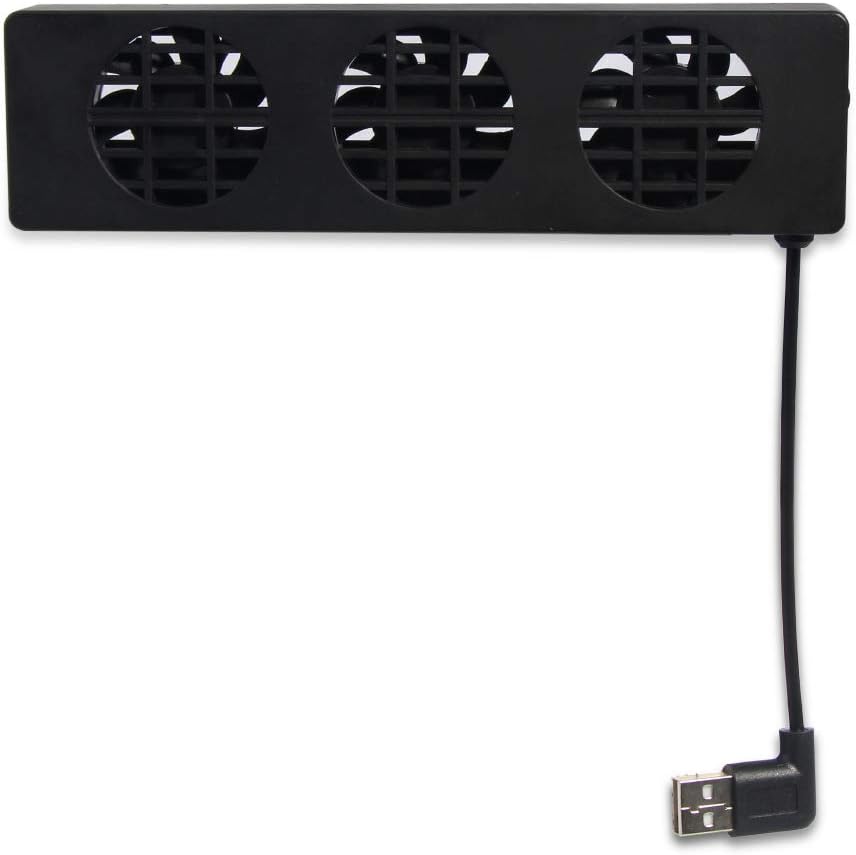
This unit includes three cooling fans inside a bracket that sits near your console. It aims to dissipate heat efficiently during gaming. The side switch toggles Turbo, Normal, or Off modes.
We may earn a commission when you buy through this link, at no additional cost to you.
Its small size makes it easy to set up and store. The material is sturdy and resists daily wear. It plugs via USB to power the fans without extra adapters.
The design is generic so fit can vary by dock or console. Still the fan count and speed options give you flexibility. It suits players who value raw airflow.
Choose this if you want multiple fans and mode control. It offers strong ventilation in a compact form that adapts to different setups.
Three fans inside the bracket effectively dissipate heat and keep the console cool while you play games.
Use the side switch to select Turbo for heavy loads or Normal for quieter operation depending on your needs.
We may earn a commission when you buy through this link, at no additional cost to you.
This dock accessory increases airflow to the console and speeds up heat exchange. It has three built in fans for stronger ventilation. A switch lets you pick Turbo for heavy games or Normal for quieter play.
We may earn a commission when you buy through this link, at no additional cost to you.
It draws power from a USB port on the dock so no extra supply is needed. The unit is easy to insert onto the back of the dock and stores conveniently in its small shape.
Reviews note that fit can vary across dock models. Cooling is effective for the price but the build is basic. It reduces console temperature quickly during sessions.
Buy this if you need an inexpensive three fan cooler. It delivers solid ventilation and simple controls without extra features or displays.
By increasing airflow to the console the unit speeds up heat exchange so the system cools more easily during play.
The fan is driven via the USB port on the dock so you do not need an extra power source.
We may earn a commission when you buy through this link, at no additional cost to you.
This stand lowers operating temperature to avoid game pauses or lag. An LED display shows real time fan RPM and exhaust temperature. It works with Switch original dock and other consoles like Steam Deck.
We may earn a commission when you buy through this link, at no additional cost to you.
Speed adjusts from 510 to 6000 RPM. It runs nearly silent below 2400 RPM so it balances cooling and low noise. The package includes a Micro USB cable, fixed stabilizer pad, and joystick caps.
The sponge pad prevents scratches and stabilizes the fan. USB power connects easily to your setup. It offers strong performance at a very low price.
Choose this if you want value and visible metrics. It gives you control and feedback without spending much and fits multiple dock styles.
The LED display shows real time fan speed RPM and exhaust temperature so you can verify cooling during games.
The fixed stabilizer pad includes sponge that is anti slip and prevents your console from being scratched during use.
We may earn a commission when you buy through this link, at no additional cost to you.
This unit is listed as a cooling fan for the Switch OLED model dock. It comes in a black finish that blends with most setups. It is designed for the OLED dock and ships as an imported accessory.
We may earn a commission when you buy through this link, at no additional cost to you.
The design focuses on direct cooling for the OLED base. Since details are limited it relies on standard dock USB power. It provides a compact form to keep airflow steady.
Few public reviews exist for this item. Still the OLED focus suggests it aligns with the newer base geometry. It suits users seeking a simple black add on.
Pick this if you prefer an OLED targeted black cooler. It offers a focused design for the OLED dock and delivers steady performance.
The accessory is described for the Switch OLED model dock so it aligns with that base design.
The black color finish keeps your gaming setup tidy and remains cool during long play.
We may earn a commission when you buy through this link, at no additional cost to you.
Choosing the right fan depends on your dock model, cooling needs, and budget. Review these factors to pick a unit that fits your setup.
Ensure the fan is designed for your dock version. Some units are made for the original dock, others for the 2021 OLED dock, and newer accessories target the Switch 2 dock. Using a mismatched unit can cause fit issues or poor airflow.
Check the product listing for model matches like HEG-007 for OLED or explicit Switch 2 support before buying.
Units with multiple fans often provide stronger ventilation. Single fan designs save space but may struggle during intense sessions. Consider whether you prefer raw airflow or a compact footprint for your entertainment center.
Three fan units are best for long marathons while one or two fans suit casual play.
Look for fans with adjustable speed or at least two modes. A low or normal mode reduces noise during light use. A turbo mode increases cooling for heavy games so you can balance comfort and performance.
Choose a unit with a switch or button so you can adapt cooling to your session length.
Most dock fans draw power from a USB port. Some use Micro USB cables while others support Type C. Match the cable type to your available dock USB port to avoid needing extra adapters or hubs.
Prefer Type C if your dock has it since it is more common and durable in modern setups.
Some units include an LED display for temperature and RPM. This gives you visibility into cooling performance so you can verify the fan is working as expected. Others rely on indicators or silent operation without metrics.
Pick a display unit if you want to track exhaust temperature while gaming.
ABS plastic housings are common and lightweight. Ensure the fan includes protective pads or sponge if it contacts your console directly. A sturdy build reduces vibration and prevents scratches on your dock surface.
Look for anti slip features or included stabilizer pads to keep the unit steady during operation.
Noise increases at higher fan speeds. Units that stay nearly silent below 2400 RPM work well in living rooms or open spaces. If noise is critical, prioritize fans that advertise quiet operation at normal settings.
Test reviews for fan spinning sound and decide your tolerance before buying.
Manufacturers offer different support terms. Some provide lifetime warranties and fast response times. Others give standard returns. Check seller ratings and warranty text to ensure help is available if issues occur.
Prioritize units with clear warranty promises if you plan to use the fan daily.
Start by matching the fan to your dock model. Align the unit with the back or side ports so airflow paths clear. Insert cables into the dock USB port and secure the fan with included pads.
Select the right mode for your session. Use normal speed for short play to keep noise low. Switch to turbo for long gaming to prevent heat buildup and system throttling.
Keep the fan vents clear of dust. Wipe the exterior monthly and avoid placing the dock near carpet or direct sunlight. Replace cables if they fray and check stability regularly.
A fan is helpful if you play long sessions or run intensive games that push the system. It lowers dock and console temperatures to reduce thermal throttling and avoid unexpected pauses. For short play it may not be essential but it extends hardware life.
Choose a unit labeled for the 2021 OLED dock HEG-007. Models like GLDRAM or Dobe offer precise fits and Type C power. These maintain airflow paths and avoid blocking ventilation vents on the OLED base.
Check for airflow by hand near the vents and listen for fan spin. If the unit has an LED display verify the RPM and temperature readings increase during use. Ensure the dock stays cool to the touch after hours of play.
Yes many fans list compatibility with the original dock. Confirm the USB port type and physical fit before buying. Units like TNP or OSTENT are designed to insert onto the back of the original dock.
An LED display helps you monitor exhaust temperature and fan speed. This is useful if you game for long hours or want to verify cooling performance. Without a display you must rely on temperature changes and noise to judge operation.
Noise varies by speed and fan count. Most units stay nearly silent below 2400 RPM. Turbo modes increase airflow and sound. Read reviews for spinning sound details and test the normal mode before committing.
Most fans draw power from the dock USB port so no adapter is needed. Ensure the dock USB port is accessible and supports the required cable type. Use the included cable to avoid connection issues.
Align the fan with the back or side of your dock and insert gently. Connect the power cable to the USB port. Use included pads or sponges to stabilize the unit and protect the console from scratches.
The top picks cover a range of needs from precise displays to OLED specific fits and budget friendly multi fan units. The Editor's Choice offers strong monitoring and control while the budget pick adds value with a display and stand.
Prioritize dock compatibility and power type before considering extra features. A correct fit ensures stable cooling and prevents vent blockage. Match fan count to your session length to balance noise and performance.
Prices and stock change often. Verify the current listing for your dock model and check warranty terms before buying to ensure you get the right solution for your setup.