
Thermalright Assassin X120 Refined SE
4.7Editor score
AGHP heat pipe technology
Single tower lightweight design
Low noise PWM fan
Explore our expert comparison of the top CPU Air Cooler Fan Heatsink models available in October 2026, evaluating performance noise and compatibility.
Choosing the right CPU Air Cooler Fan Heatsink is essential for maintaining optimal processor temperatures and ensuring system stability. High-quality coolers prevent thermal throttling and extend hardware lifespan while keeping noise levels low.
We compared ten leading models based on thermal performance build quality noise output and installation ease. Our analysis includes detailed specifications real-world expectations and compatibility across modern Intel and AMD platforms.
Each pick highlights unique strengths from budget-friendly options to premium dual tower designs. Note that availability and specific pricing may vary by region and retailer at the time of purchase.
4.7Editor score

4.8Editor score
4.7Editor score
This side-by-side comparison outlines key specifications for each model to help you identify the right balance of performance compatibility and features for your specific build requirements.


The Thermalright Assassin X120 Refined SE is a top budget choice delivering reliable cooling for mainstream processors. With a 4.7 rating it stands out for its AGHP heat pipe technology and compact single tower design.
We may earn a commission when you buy through this link, at no additional cost to you.
Its TL-C12C PWM fan ensures efficient airflow while maintaining low noise levels under load. The aluminum heatsink cover protects the fins while keeping weight manageable for standard tower cases.
Though it lacks premium features like RGB or dual fans it handles thermal loads effectively for most users. The mounting hardware supports both Intel and AMD platforms including AM5 and LGA1700.
This model is ideal for builders seeking solid performance without overspending. It balances cost and capability making it a practical upgrade for entry-level gaming or office workstations.
AGHP orientation gravity technology ensures consistent thermal performance regardless of orientation in your case.
The TL-C12C PWM fan delivers 66 CFM airflow with noise levels staying under 25 decibels.
We may earn a commission when you buy through this link, at no additional cost to you.
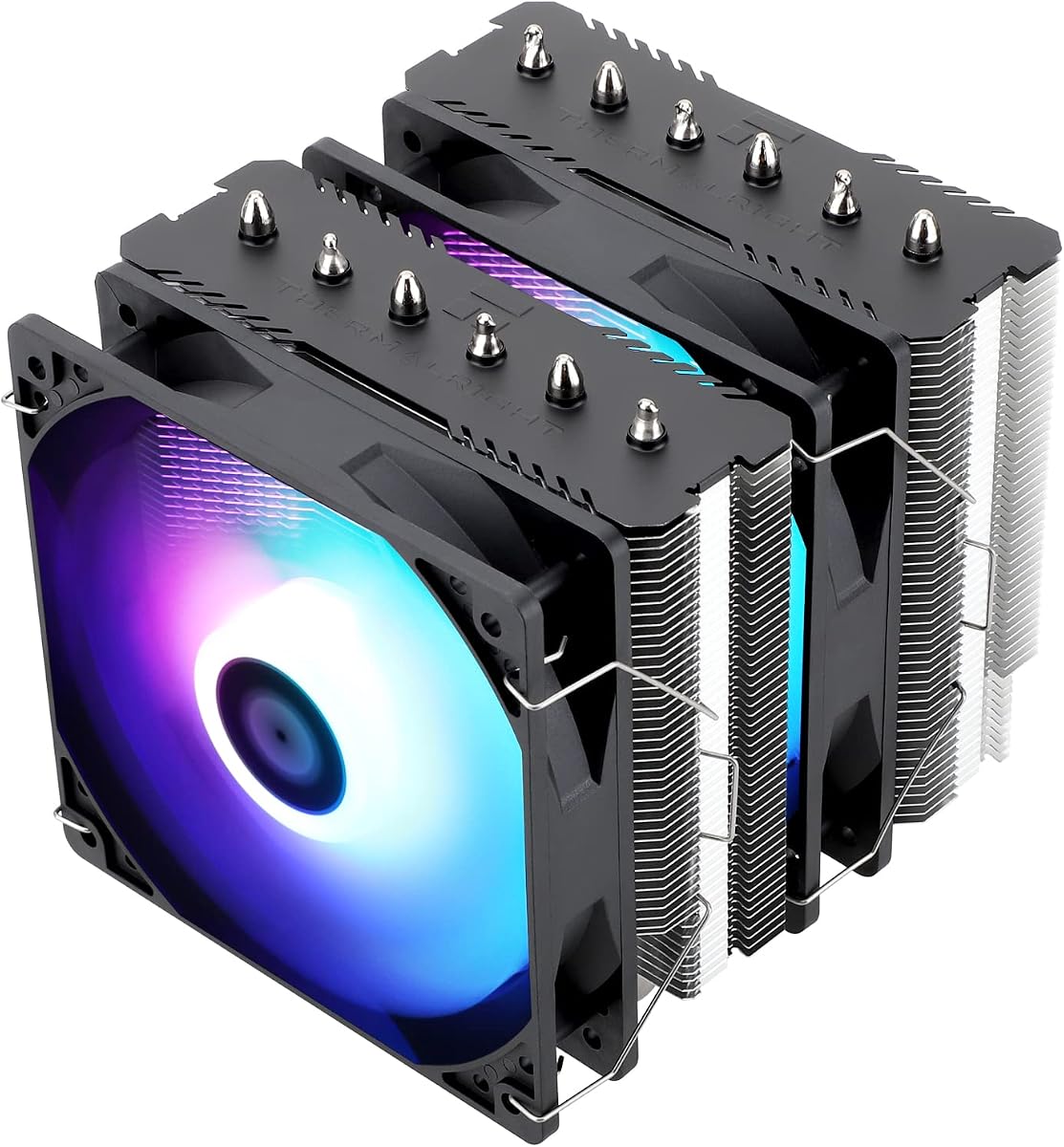
The Peerless Assassin 120 SE ARGB offers premium cooling with dual fans and six heat pipes. Its dual tower design maximizes surface area for better heat dissipation compared to single tower alternatives.
We may earn a commission when you buy through this link, at no additional cost to you.
Users appreciate the ARGB lighting which syncs with motherboard headers for a customized look. The TL-C12C-S fans provide ample airflow while staying whisper quiet during idle conditions.
While it adds a few millimeters of height it remains compatible with most RAM modules due to cutouts. The mounting system supports both Intel and AMD including latest generations.
This cooler is a smart pick for gamers wanting high performance and style without water cooling. It delivers near top-tier thermal results at a fraction of the cost.
The twin tower structure increases contact area allowing efficient heat transfer from the base to fins.
Connect the 5V ARGB header to control lighting effects via your motherboard software.
We may earn a commission when you buy through this link, at no additional cost to you.
The Noctua NH-D15 chromax.Black is a legendary dual tower cooler known for silent efficiency. It earns a 4.8 rating thanks to award-winning NF-A15 fans and proven thermal performance.
We may earn a commission when you buy through this link, at no additional cost to you.
Its all-black design matches modern systems while the six heat pipes and large fins dissipate heat effortlessly. The included NT-H1 thermal paste ensures optimal contact right out of the box.
While it requires ample case clearance it remains a top choice for overclockers and silence seekers. The SecuFirm2 mounting system simplifies installation across both Intel and AMD platforms.
Investing in this model guarantees years of reliable cooling. It is the gold standard for those prioritizing quiet operation without compromising on maximum thermal capacity.
These 140mm fans use PWM control to balance speed and noise under varying workloads.
Supports latest sockets including LGA1700 and AM5 with offset mounting options.
We may earn a commission when you buy through this link, at no additional cost to you.
The NH-U12A chromax.Black delivers dual fan performance in a compact 120mm single tower. It is perfect for builds needing strong cooling without excessive height or RAM obstruction.
We may earn a commission when you buy through this link, at no additional cost to you.
Its NF-A12x25 fans are engineered for low noise while maintaining high static pressure. The all-black aesthetic blends seamlessly into dark themed builds without standing out.
The cooler includes high-quality thermal paste and a robust mounting system for easy setup. It supports latest Intel and AMD sockets ensuring future-proof compatibility.
Choose this if you need excellent cooling in a smaller footprint. It combines Noctua reliability with efficient thermal management for mid-range to high-end systems.
The two fans increase airflow significantly compared to single fan towers of the same width.
At 158mm height it fits most tower cases without compromising internal airflow.
We may earn a commission when you buy through this link, at no additional cost to you.
This cooler features a unique digital top cover displaying CPU and GPU temps in real time. The TL-P12-S PWM fan delivers strong airflow while the ARGB lighting adds a modern touch.
We may earn a commission when you buy through this link, at no additional cost to you.
The digital screen runs via TRCC software enabling easy monitoring without extra software suites. Its single tower design keeps case compatibility high while delivering solid thermal results.
Users like the ability to check temps at a glance during heavy loads. The mounting supports latest Intel and AMD sockets with included backplates for secure fit.
Ideal for builders wanting visual flair with practical monitoring. It offers a distinctive look that stands out in open frame or glass front cases.
The LCD panel displays CPU usage and temperature without needing external sensors.
Connect the 5V header to synchronize fan lighting with your motherboard RGB ecosystem.
We may earn a commission when you buy through this link, at no additional cost to you.
The classic NH-D15 remains a benchmark for dual tower air cooling performance. With two NF-A15 fans and six heat pipes it handles even the highest TDP processors with ease.
We may earn a commission when you buy through this link, at no additional cost to you.
Its brown and beige design suits traditional builds while delivering top-tier thermal efficiency. The SecuFirm2 mounting system ensures secure installation across Intel and AMD platforms.
Many users report it performs as well as liquid coolers without the complexity. The included NT-H1 paste and Low-Noise Adaptors give flexibility in tuning fan speeds.
This is the go-to choice for those seeking the best air cooling available. It proves that air can rival water in performance when built to high standards.
The large surface area and dual fans maximize heat dissipation for overclocked CPUs.
Fans spin slowly under idle and ramp up only when needed to maintain quietness.
We may earn a commission when you buy through this link, at no additional cost to you.
The NH-D15S chromax.Black shifts to an asymmetrical single fan design for better compatibility. It keeps most PCIe slots open while delivering nearly the same cooling as the dual fan version.
We may earn a commission when you buy through this link, at no additional cost to you.
The NF-A15 fan ensures quiet performance with PWM control for automatic speed adjustments. The all-black aesthetics suit dark cases while the offset design aids airflow.
This cooler is ideal when space for PCIe cards matters. It avoids the typical clearance issues of full dual tower models without sacrificing much thermal power.
Opt for this if you need high performance without blocking other components. It is a refined solution for complex builds requiring precise fit.
The offset heatsink leaves room for top PCIe slots avoiding obstruction.
With 65mm clearance it accommodates tall memory modules comfortably.
We may earn a commission when you buy through this link, at no additional cost to you.
The NH-D9L brings dual tower efficiency to small form factor builds. Its 110mm height fits tight cases while still offering superior cooling to standard single tower alternatives.
We may earn a commission when you buy through this link, at no additional cost to you.
The NF-A9 92mm fan is optimized for low noise and PWM control. It ensures quiet operation even when pushing small CPUs harder.
This model avoids blocking PCIe or RAM slots thanks to compact dimensions. It is perfect for mini-ITX or HTPC builds needing quiet high performance cooling.
Use this when case space is limited but heat dissipation matters. It balances size and performance better than many compact coolers available.
The dual tower design maximizes surface area within a small vertical footprint.
At just 110mm height it fits into even the smallest tower cases.
We may earn a commission when you buy through this link, at no additional cost to you.
The NH-U12S is a slim tower model delivering quiet performance for standard builds. It avoids overhanging RAM or PCIe slots making it highly compatible with most motherboards.
We may earn a commission when you buy through this link, at no additional cost to you.
Its NF-F12 focused flow fan ensures efficient cooling with low noise. The classic design and brown accents fit well in any color scheme.
Users trust Noctua reliability and this model is no exception. It handles thermal loads effectively while keeping noise minimal during daily tasks.
Choose this for a reliable silent cooler without bulk. It works well for general purpose builds where quiet and compatibility matter most.
The NF-F12 uses a high static pressure design to push air through dense fins.
Slim design ensures no obstruction to memory or expansion slots.
We may earn a commission when you buy through this link, at no additional cost to you.
This Peerless Assassin model pairs dual fans with six heat pipes for solid cooling performance. The offset asymmetric layout helps with GPU and motherboard clearance.
We may earn a commission when you buy through this link, at no additional cost to you.
AGHP technology handles orientation issues ensuring heat moves efficiently regardless of case angle. The nickel plated pipes enhance durability and corrosion resistance.
Fans deliver ample airflow while staying within reasonable noise limits. The mounting includes SS2 system for secure contact on the CPU surface.
Ideal for builders wanting dual fan power without extra cost. It competes well with pricier models while maintaining reliable thermal management.
Two fans increase cooling capacity compared to single fan towers of similar size.
The nickel layer on heat pipes prevents oxidation and extends lifespan.
We may earn a commission when you buy through this link, at no additional cost to you.
Selecting the right cooler involves matching thermal output to your processor while ensuring physical fit and noise preferences.
Look at the total number of heat pipes and fin surface area. More pipes and larger towers generally mean better heat dissipation for high TDP CPUs.
Prioritize models with strong TDP ratings matching your processor requirements to avoid overheating.
Check cooler height against case clearance to prevent fit issues. Tall coolers may block fans or interfere with side panels.
Ensure the model fits your case dimensions before buying to avoid returns.
Some coolers overhang RAM slots or block PCIe cards depending on tower design. Asymmetrical models offer better clearance for expansion cards.
Verify clearance requirements against your motherboard layout for smooth installation.
Noise is measured in decibels. Look for models with PWM fans and low noise adaptors for quieter operation under load.
Prioritize low dB ratings if you need a silent workspace or media PC.
Quality mounting systems like SecuFirm2 simplify installation across socket types. Included backplates ensure secure fit without extra tools.
Choose coolers with clear instructions and comprehensive mounting kits for hassle-free setup.
High-quality heatsinks use durable materials like aluminum and copper. Brands offering long warranties signal confidence in build reliability.
Seek models with extended warranties to protect your investment.
Some users want RGB lighting to match system themes. Others prefer simple unobtrusive designs.
Decide if lighting adds value to your build or if plain black is better.
Premium coolers cost more but offer better performance. Budget models can still perform well for mid-range CPUs.
Balance performance needs with budget to find the best value.
Install the cooler after applying thermal paste evenly across the CPU surface. Align the mounting brackets carefully before tightening screws to ensure proper contact.
Connect the PWM fan to the CPU_FAN header so speeds adjust automatically. Use motherboard software to set custom fan curves for optimal balance.
Periodically dust the fins with compressed air to maintain airflow. Avoid moving fans while cleaning to prevent bearing damage and ensure quiet operation.
Check your case manual for maximum CPU cooler height. Compare it to the cooler dimensions listed. If it fits, check RAM clearance as well.
AGHP stands for anti-gravity heat pipe technology. It ensures efficient heat transfer regardless of orientation inside the case.
Most modern coolers come with pre-applied or included thermal paste. If not, you will need to apply a pea-sized amount during installation.
Dual towers provide better cooling due to more surface area. Single towers save space and may suit smaller cases better.
Quality models stay below 30 decibels under load. Lower is quieter but may mean less airflow.
Most models include mounting for both. Confirm socket support before purchase to be safe.
Different sockets need specific plates for secure contact. Use the one matching your CPU socket.
Clean every six months or when dust buildup affects airflow. Use compressed air to remove dust from fins.
We highlighted top picks ranging from budget single towers to premium dual fan models. Each offers distinct advantages depending on your needs.
Prioritize thermal performance and clearance to avoid fit issues. Match the cooler to your CPU and case for best results.
Prices and availability change often. Check current listings before finalizing your purchase for the best deal.