
AULA S99 Gaming Keyboard
4.2Editor score
Multi-device connectivity modes
Dual-mode rotary knob control
Full key macro programmable
This guide compares the top creamy keyboards for 2026, evaluating sound profiles, connectivity, and build quality to help you find the perfect typing experience
Creamy keyboards offer a unique typing experience characterized by smooth, quiet keystrokes that feel satisfying to type on. These mechanical boards use specialized switches and dampening materials to reduce noise while maintaining a responsive tactile feel for users.
We analyzed ten top-rated models based on user feedback, build quality, connectivity options, and sound profiles. Each product was selected for its ability to deliver that sought-after creamy thock sound without compromising on performance or durability for daily tasks.
Every pick below highlights specific strengths like hot-swap capability or wireless modes to match your workflow. Prices and availability change frequently so please check the linked store pages for current details before making your final purchase decision today.
4.2Editor score

4.8Editor score

4.8Editor score
The following table provides a side-by-side comparison of all ten models reviewed in this guide so you can quickly identify which board meets your specific layout and feature requirements.





The AULA S99 delivers an accessible entry point into creamy keyboards with its wireless membrane design that offers smooth typing without loud clacks. It holds a solid 4.2 rating from users who appreciate the value it brings to daily tasks and casual gaming.
We may earn a commission when you buy through this link, at no additional cost to you.
Its standout quality lies in the multi-device connectivity and dual-mode rotary knob that lets you switch between Bluetooth and wireless effortlessly while controlling volume. The 96% layout keeps a numeric keypad without taking too much space and ergonomic stands ensure comfort.
Trade-offs include the lack of mechanical switches which means no tactile bump and no hot-swappable parts for future customization. These are acceptable given the low price point and the fact that it still provides a creamy feel and efficient workspace setup.
You should buy this if you need a wireless board for office or light gaming without breaking the bank. It is ideal for users who want simplicity and reliable connectivity over advanced mechanical customization or tactile feedback options.
Bluetooth 5.0 2.4GHz wireless and USB-C modes let you connect to multiple devices and switch easily using shortcuts.
The dual-mode knob allows easy adjustment of volume audio and lighting effects without needing to use function keys.
We may earn a commission when you buy through this link, at no additional cost to you.
The AULA F75 brings mechanical precision to creamy keyboards with hot-swappable linear switches that offer smooth and responsive typing. It earns a 4.6 rating from gamers and typists who value customization and a compact layout that saves desk space.
We may earn a commission when you buy through this link, at no additional cost to you.
Key strengths include the pre-lubricated stabilizers and linear switches that reduce noise while maintaining a solid feel. The tri-mode connection supports up to five devices and the large 4000mAh battery ensures long usage between charges.
The 75% layout removes the numpad which may be a downside for data entry but frees up mouse movement. You need the official driver for macros which adds a step but enhances workflow once configured for gaming or work tasks.
Buy this if you want a premium mechanical feel at a reasonable price with wireless freedom. It suits enthusiasts who enjoy modding their boards and need a reliable companion for both work and gaming sessions.
Hot-swappable base allows 3-pin or 5-pin switch replacement without soldering for easy upgrades and testing.
16.8 million colors with music rhythm effects and a knob that controls brightness media or volume depending on mode.
We may earn a commission when you buy through this link, at no additional cost to you.
The HUO JI E-Yooso delivers a creamy gasket sound profile at a budget price with its 99-key layout and hot-swap capability. It scores a 4.6 rating among users who appreciate the noise reduction and quality build materials included out of the box.
We may earn a commission when you buy through this link, at no additional cost to you.
Its standout feature is the gasket structure with five layers of sound-absorbing foams that reduce hollow noise significantly. The PBT keycaps resist shine and wear while the full anti-ghosting ensures accurate input during fast-paced typing or gaming.
Being wired limits portability but guarantees zero latency and consistent power delivery. The USB-C cable is pluggable which aids organization and the layout keeps essential keys without unnecessary bulk for a focused typing setup.
Choose this if you prioritize sound quality and customization options on a budget without needing wireless. It is perfect for stationary setups where a quiet creamy thock is preferred over loud mechanical clicks.
Five layers of thicker foams and silicone dampeners reduce noise by 40 percent and eliminate hollow cavity sounds.
Double-shot injection PBT keycaps ensure character never fade and resist oils for long-term texture retention.
We may earn a commission when you buy through this link, at no additional cost to you.
The YUNZII B98 PRO stands out as a premium creamy keyboard with open-source QMK VIA firmware that offers deep customization for power users. Its 4.8 rating reflects high satisfaction with its wireless reliability sound profile and thoughtful design features.
We may earn a commission when you buy through this link, at no additional cost to you.
Key strengths include the tri-mode connectivity that supports five devices and the massive 8000mAh battery that lasts weeks. The gasket mount with five layers and pre-lubed switches deliver a smooth solid typing feel that reduces fatigue during long sessions.
The dual knob options add playful utility and the 96% layout keeps a numpad which balances compactness with functionality. While the firmware is powerful it may require a learning curve for casual users who want plug-and-play simplicity.
Buy this if you want a top-tier mechanical experience with unmatched battery life and customization. It is ideal for professionals and gamers who need reliability and a premium sound profile for everyday use.
QMK VIA firmware allows remapping keys macros and RGB layers without needing official software downloads.
8000mAh battery provides weeks of use on a single charge for uninterrupted productivity or gaming.
We may earn a commission when you buy through this link, at no additional cost to you.
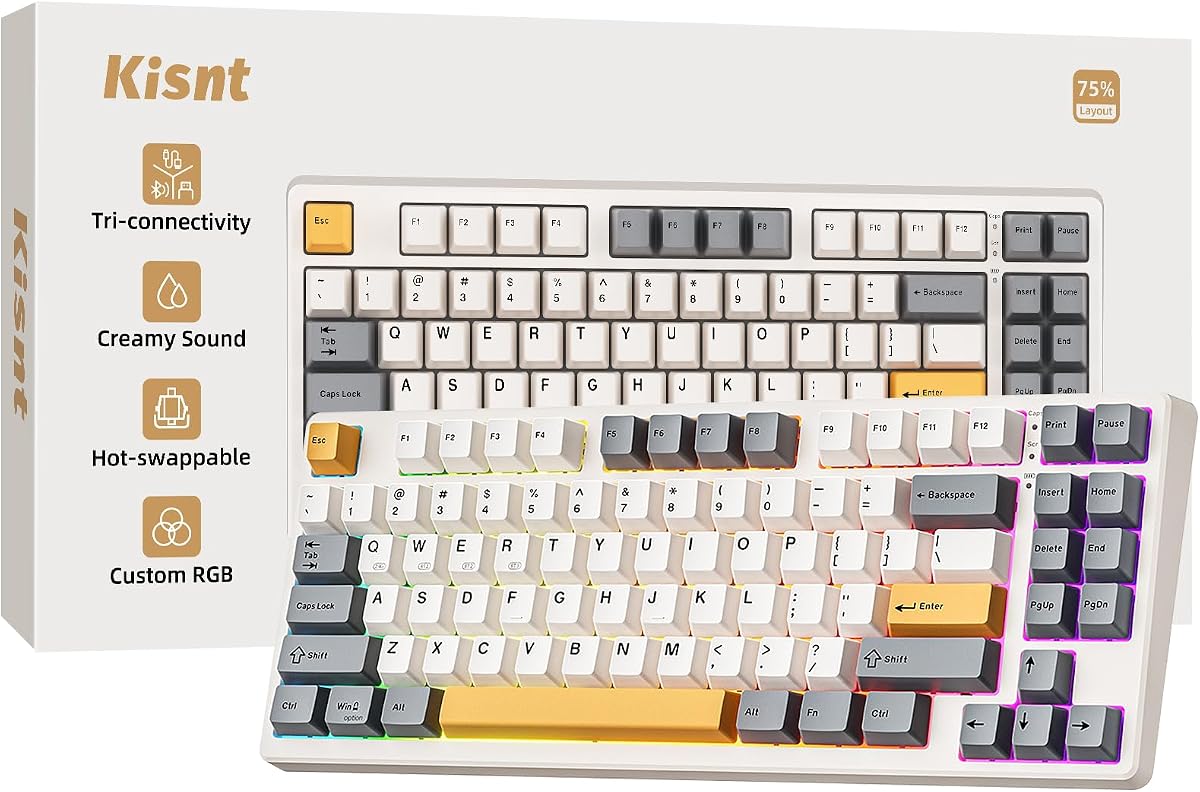
The Kisnt KN85 focuses on a creamy thocky sound profile and compact layout that saves desk space for mice. With a 4.6 rating it appeals to typists and minimalists who value quiet operation and robust support from the manufacturer.
We may earn a commission when you buy through this link, at no additional cost to you.
Its gasket mount absorbs vibrations to produce a marbly thock feel that is soft and cushioned. The tri-mode connectivity offers low latency and the 4000mAh battery ensures stability even when power runs low during charging.
Trade-offs include the lack of a numpad which impacts numeric data entry but the 2-year warranty provides peace of mind. The driver is Windows-only and wired which may limit cross-platform customization options for some users.
Choose this if you prioritize sound and compact ergonomics over numpad functionality. It is best for writers or coders who want a quiet reliable wireless board with excellent after-sales support.
Gasket mount reduces hollow echoes and vibrations to create a smooth marbly thock sound ideal for offices.
24/7 specialist support and 2-year warranty ensure users are treated well and issues are resolved quickly.
We may earn a commission when you buy through this link, at no additional cost to you.
The Redragon K745 PRO offers a full-size 108-key layout with creamy gasket sound dampening for a premium typing experience. Its 4.6 rating comes from gamers who appreciate the zero-lag wireless and dedicated hotkeys for quick access to utilities.
We may earn a commission when you buy through this link, at no additional cost to you.
Standout qualities include the see-through PBT keycaps that let RGB shine cleanly and the gasket mount that reduces hollow noise. The tri-mode connectivity ensures smooth transitions between devices without needing to re-pair or re-connect manually.
The larger footprint may not suit small desks but ensures all essential keys are present. Software customization adds depth but requires installation which might be a minor friction point for users seeking immediate plug-and-play functionality.
Buy this if you need a full-size wireless board with premium sound and lighting. It suits gamers and power users who want dedicated hotkeys and a durable build for daily intensive tasks.
Tri-mode connectivity lets you jump between USB-C Bluetooth and 2.4GHz without re-pairing or sacrificing speed.
Translucent PBT keycaps resist greasy shine and maintain texture while allowing vibrant RGB to shine through cleanly.
We may earn a commission when you buy through this link, at no additional cost to you.
The SOLAKAKA A99 Pro distinguishes itself with an LCD display showing date time battery and system info directly on the board. Its 4.5 rating reflects appreciation for these visual aids and the creamy gasket sound that users enjoy.
We may earn a commission when you buy through this link, at no additional cost to you.
Key strengths include the multifunctional metal knob and intuitive controls for volume and lighting which reduce key combinations. The hot-swappable design and gasket structure deliver a stable smooth feel that resists hollow echoes during typing.
Trade-offs include the need for web driver software to unlock full functionality which adds a setup step. The LCD screen may be distracting for some but provides useful status info without needing to check device settings.
Choose this if you value visual feedback and unique controls alongside a creamy typing experience. It fits users who want a smart keyboard with clear status indicators and robust wireless performance.
LCD shows date time battery level and connection mode to enable effortless operation without extra apps.
Multifunction metal knob allows effortless adjustment of time lighting and volume through rotation or presses.
We may earn a commission when you buy through this link, at no additional cost to you.
The AULA Pink Gaming Keyboard offers a stylish aesthetic with creamy typing for those seeking a unique desk look on a budget. It holds a 4.2 rating and appeals to users who prioritize design and basic wireless functionality over mechanical feel.
We may earn a commission when you buy through this link, at no additional cost to you.
Standout features include the dual-mode rotary knob for easy control and the 99-key layout that keeps essentials like numpad. RGB lighting and Bluetooth 5.0 connectivity add versatility while the ergonomic stand improves posture during use.
Trade-offs include membrane switches which lack the distinct feedback of mechanical switches and no hot-swap option. These are acceptable given the low price and stylish appeal making it a great secondary keyboard for casual or creative use.
Buy this if you want a pink-themed wireless keyboard with good value and easy setup. It suits casual users or gamers who appreciate aesthetics and basic customization without needing high-end mechanical switches.
16.8 million RGB colors with preset effects adjustable via knob or Fn combinations for a personalized atmosphere.
The dual-mode rotary knob easily adjusts volume audio and lighting effects with just a twist or click.
We may earn a commission when you buy through this link, at no additional cost to you.
The AULA F75 White Blue delivers a compact mechanical solution with hot-swap capability and creamy reaper switches. Its 4.6 rating comes from gamers and typists who appreciate the smooth sound and wireless flexibility it provides.
We may earn a commission when you buy through this link, at no additional cost to you.
Key strengths include the advanced structure with PCB slotting that stabilizes the feel and reduces noise. The tri-mode connection ensures easy switching between devices and the RGB effects add a vibrant touch to gaming sessions.
The 75% layout saves space but removes the numpad which might be a dealbreaker for data entry. Using the driver for macros adds a step but allows deep customization once set up for a personalized workflow.
Buy this if you want a compact mechanical board with reliable wireless and sound quality. It fits users who want to save desk space without sacrificing performance or customization options.
Advanced structure and PCB slotting optimize resilience and stability for a softer and more elastic typing feel.
16.8 million colors with music rhythm effects to add atmosphere to games and allow single color selection.
We may earn a commission when you buy through this link, at no additional cost to you.
The Redragon K768 PRO offers a single-knob simplicity that manages media and lighting while delivering a creamy gasket sound. It earns a 4.8 rating from users who value the massive 8000mAh battery and fade-resistant PBT keycaps.
We may earn a commission when you buy through this link, at no additional cost to you.
Key strengths include the tri-mode connectivity and the single control knob that reduces key combinations needed. The gasket mount gives a soft silky bounce and the PBT caps ensure color and texture last for years without glossing.
Trade-offs include the higher price point compared to other models and the need for software to maximize customization. These are acceptable for those who prioritize battery life and a clean interface for daily use.
Choose this if you want long battery life and premium sound with minimal controls. It suits professionals or gamers who need reliable wireless performance and durable materials for long-term use.
A single control knob adjusts backlight brightness and media playback so you manage settings without extra combos.
Massive 8000mAh battery backs tri-mode connectivity for far longer runtime than typical gaming keyboards.
We may earn a commission when you buy through this link, at no additional cost to you.
Choosing a creamy keyboard involves balancing sound, connectivity, and layout to match your specific workflow needs.
Creamy keyboards often use linear switches that are pre-lubed to reduce friction and create a smooth thock sound. Look for hot-swap boards if you want to test different switches without soldering to find your perfect tactile or linear feel.
Prioritize linear switches with lubrication if you want the quietest typing experience without sacrificing mechanical responsiveness.
Tri-mode connectivity allows you to switch between Bluetooth 5.0, 2.4GHz wireless, and USB-C wired modes easily. This is crucial if you use multiple devices like PCs tablets and phones throughout your day without manual re-pairing.
Choose tri-mode boards to ensure seamless transitions between your primary computer and mobile devices for flexible workflows.
Layouts range from compact 75% designs to 96% or 100% full size with numeric keypads. Consider if you need a numpad for data entry or if you want to save desk space for mouse movement.
Select a 96% or 100% layout if you need frequent number input but still want a slightly smaller footprint than full-size boards.
Gasket mounts and layers of foam or silicone dampeners reduce hollow sounds and vibrations for a premium creamy sound. This construction makes the typing experience more consistent and comfortable during long sessions compared to rigid plastic cases.
Look for boards with gasket mounts and multiple damping layers to ensure a solid sound-free typing experience.
Wireless models vary from 4000mAh to 8000mAh batteries which impact how often you must charge the board. Larger batteries are ideal if you use your keyboard away from power sources frequently for work or travel.
Choose boards with at least 4000mAh capacity to ensure days of use without needing to recharge often.
Many boards require drivers for macro programming and RGB lighting which may add setup time before use. Open-source firmware like QMK VIA offers deeper customization without needing official software but may require a learning curve.
Decide if you need deep customization via open-source software or prefer plug-and-play simplicity with basic drivers.
PBT keycaps resist oil and gloss better than ABS and ensure long-term texture retention for a better grip. Metal knobs add durability and premium feel while plastic knobs are lighter and easier to mass-produce.
Prioritize PBT keycaps and metal components if you want a keyboard that maintains its quality and look over time.
Prices range from budget-friendly membrane options to premium mechanical boards with advanced features like LCD screens. A longer warranty period and good support services give you peace of mind against defects or hardware failures.
Balance your budget against warranty terms to ensure you are protected for at least two years of usage.
When setting up a wireless keyboard ensure you charge the battery fully before first use and pair it via Bluetooth or the 2.4GHz dongle. Follow the manufacturer instructions to switch modes using the knob or key combinations to avoid connection issues.
Clean your keyboard regularly with a can of compressed air to remove dust and debris from under the keycaps without damaging the switches. This maintains the smooth feel of creamy switches and prevents sticky keys over time.
For mechanical keyboards hot-swap models allow you to replace switches when they wear out using a puller tool. This extends the lifespan of the board significantly and lets you upgrade sound or feel without buying a new device.
A creamy sound profile is achieved through linear switches that are pre-lubed and gasket-mounted designs that dampen vibrations. This combination reduces hollow echoes and harsh clacks resulting in a smooth quiet thock that feels satisfying under the fingers.
Hot-swap boards allow you to change switches without soldering which gives flexibility to test different feels and sounds. They are worth the extra cost if you plan to customize your typing experience or upgrade your keyboard over time.
Yes creamy keyboards with mechanical switches provide fast response times and anti-ghosting which are crucial for gaming. The quieter operation also helps maintain focus without disturbing others during intense gaming sessions at night.
Wireless models typically last from days to weeks on a single charge depending on usage and backlight settings. Larger batteries like 8000mAh can last several weeks even with RGB lighting enabled at moderate brightness levels.
Most modern keyboards support multiple operating systems and include specific key combinations to switch between Windows Mac and Android. Check product compatibility notes to ensure all special keys work correctly on your specific device platform.
Gasket mount allows the PCB to float on gaskets reducing hard contact for a softer and more flexible typing feel. Plate mount is more rigid and direct offering a stiffer feel but less sound dampening and vibration absorption.
The YUNZII B98 PRO and Redragon K768 PRO offer top-tier performance with large batteries and wireless reliability for daily use. Budget-friendly options like the AULA S99 provide solid functionality without breaking the bank for casual typists.
Prioritize gasket mounting and hot-swap support if you want to customize your sound profile over time. These features ensure your keyboard adapts to your preferences and lasts longer with proper maintenance.
Always check current prices and availability before purchasing as deals change frequently. Select the model that best balances your layout needs with sound and connectivity requirements for the best experience.