
Dell Tower Desktop
4.4Editor score
Intel Core Ultra 7 processor
32GB RAM for multitasking
Multiple 4K display support
This guide compares the top desktop computers for home use in October 2026 focusing on performance, storage, and value for families and professionals.
Choosing the right desktop computer for your home can be a daunting task given the vast array of options available on the market today. You need a machine that balances performance with ease of use while fitting seamlessly into your living space without taking up too much room.
We have carefully evaluated a wide range of models based on processor speed, memory capacity, storage options, and overall build quality to help you make an informed decision. Our analysis covers both budget-friendly picks and high-performance towers designed to handle demanding tasks with grace and efficiency.
Each pick in this list highlights specific strengths such as AI capabilities, multi-monitor support, or energy efficiency to match different household needs. Please note that prices and availability can change rapidly so always check the current listings before finalizing your purchase decision today.
4.4Editor score

4.5Editor score

4.4Editor score
The following table provides a side-by-side comparison of all ten selected models highlighting their key specifications and unique features for quick reference.




The Dell Slim Desktop stands out as our top pick for home use in 2026 due to its balanced performance and modern AI features. With a rating of 4.5 stars users appreciate its ability to handle daily tasks efficiently while maintaining a sleek profile that fits any desk.
We may earn a commission when you buy through this link, at no additional cost to you.
This model features the latest Intel Core Ultra 5 processor which brings built-in AI tools to boost productivity for creative and office work alike. The ability to connect up to four FHD monitors makes it ideal for multitasking professionals or parents managing multiple family devices simultaneously.
While the 512GB SSD is fast it may fill up quickly with large media libraries so external storage might be needed for some users. The lack of a dedicated GPU limits gaming potential but it is perfectly suited for casual entertainment and standard home computing needs.
We recommend this desktop for households seeking a reliable compact machine that blends style with function without breaking the bank. Its onsite service warranty adds peace of mind ensuring that help is available right at your doorstep if technical issues arise.
Built-in AI accelerates workflows and creative tasks making everyday computing more efficient and enjoyable for all users.
Crafted from recycled materials the sleek chassis reflects a commitment to sustainability without compromising on aesthetics.
We may earn a commission when you buy through this link, at no additional cost to you.
For users demanding maximum performance the Dell Tower Desktop delivers with its powerful Intel Core Ultra 7 processor and massive 32GB of RAM. It earns a solid 4.4 rating from users who rely on it for intensive multitasking and professional home office setups.
We may earn a commission when you buy through this link, at no additional cost to you.
This tower supports two 4K displays which is exceptional for designers or traders needing expansive visual real estate. The tool-less side panel allows easy access for future upgrades ensuring the machine remains relevant as technology evolves over the years.
The premium price tag reflects the high-end specs but budget-conscious buyers might find better value elsewhere for basic tasks. Its larger size requires dedicated desk space which could be a constraint in smaller home offices or shared living areas.
Invest in this desktop if you need robust computing power for content creation or complex simulations at home. The included onsite service further justifies the cost by providing professional support without you needing to ship the device away.
With 32GB RAM you can run dozens of applications simultaneously without any slowdowns or system lag.
Dual 4K display support ensures crisp detailed visuals for professional work and immersive entertainment experiences.
We may earn a commission when you buy through this link, at no additional cost to you.
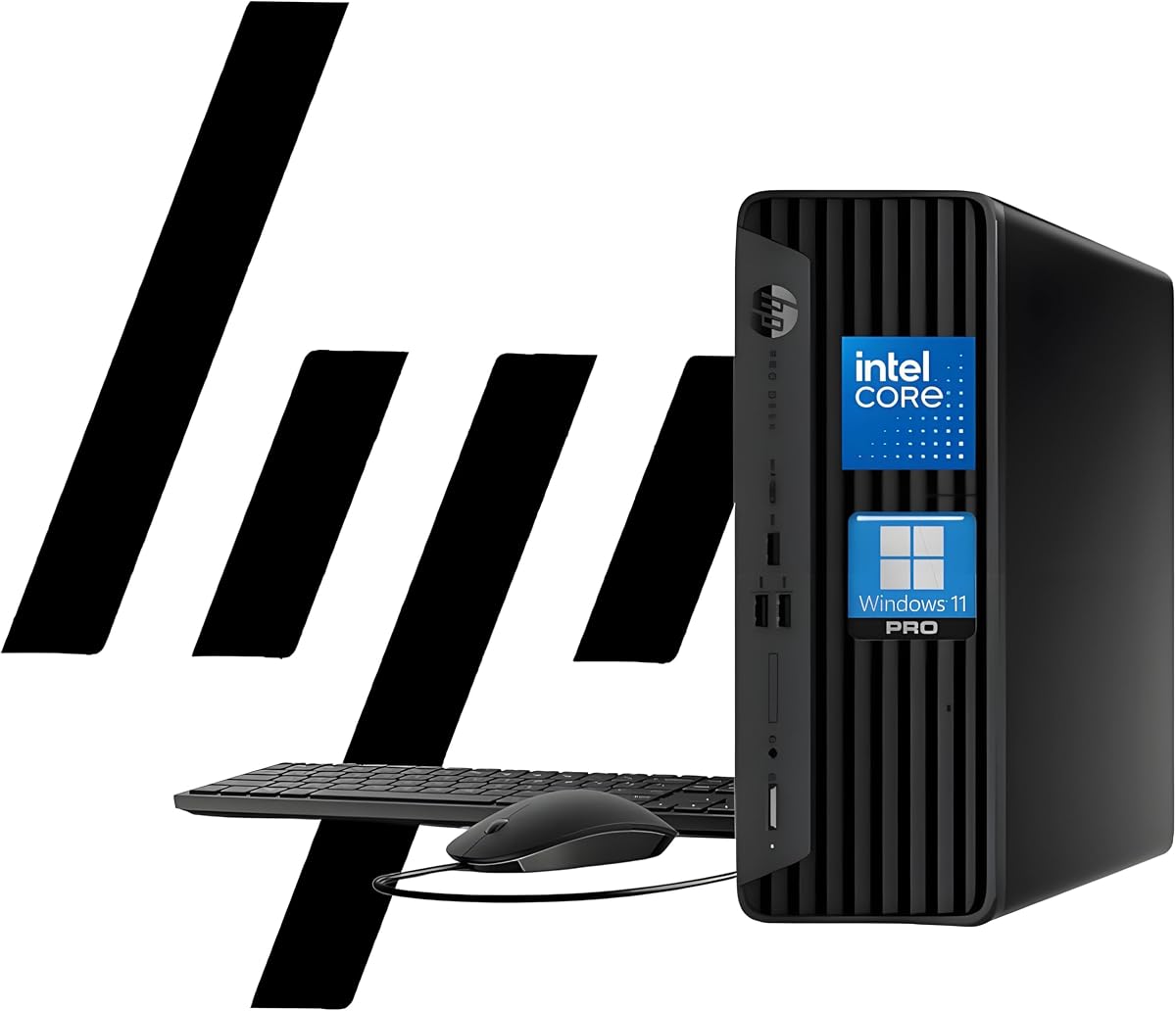
The HP 2026 Desktop Tower offers exceptional value for students and families needing a reliable machine without overspending. With a 4.4 rating it is praised for its ready-to-use setup that includes essential peripherals like a keyboard and mouse right out of the box.
We may earn a commission when you buy through this link, at no additional cost to you.
Equipped with a 1TB PCIe SSD you get ample storage for assignments and media plus lightning-fast boot times that keep you moving quickly. The 16GB RAM ensures smooth performance for online learning and light multitasking without frustrating delays during class.
The graphics card is basic so it is not suitable for heavy gaming but perfectly fine for video streaming and light casual play. Since it uses an older generation processor it may lack some of the latest AI features found in newer ultra models available today.
Choose this tower if you want a complete package that gets you started immediately with zero setup hassles. It is an excellent choice for households needing a dependable computer for education and general home use on a strict budget.
Everything you need including keyboard and mouse is included so you can start working instantly after unboxing.
The 1TB SSD provides plenty of room for documents projects and media files without needing external drives.
We may earn a commission when you buy through this link, at no additional cost to you.
This HP Desktop Computer Tower PC is designed to handle the diverse needs of a whole household with ease and reliability. Users rate it 4.5 stars praising its ability to manage homework online learning and entertainment without any noticeable slowdowns during peak hours.
We may earn a commission when you buy through this link, at no additional cost to you.
The compact microtower design is perfect for smaller spaces where footprint matters while the quiet operation ensures it won't disturb family members. Windows 11 Pro adds enterprise-grade security and parental controls which are vital for protecting kids online while browsing the web.
The 256GB SSD is fast but may require additional storage for large media libraries so external drives might be necessary soon. Integrated graphics limit gaming capabilities making it more suitable for educational tasks and general productivity rather than serious gaming.
This system is ideal for families who need a single robust machine that everyone can share comfortably. Its complete setup with included peripherals makes it easy to set up in any room without needing extra accessories or technical knowledge.
Windows 11 Pro brings enhanced security and management tools that help keep the system safe and organized.
The small design fits easily on desks or entertainment centers saving valuable floor space in your home.
We may earn a commission when you buy through this link, at no additional cost to you.
The Dell Optiplex 3060 offers an affordable entry into powerful computing with its high RAM and large SSD at a fraction of new costs. With a 4.0 rating it appeals to budget shoppers who need serious performance for multitasking and media streaming on a tight budget.
We may earn a commission when you buy through this link, at no additional cost to you.
This renewed model comes with 32GB RAM and a 1TB SSD which is impressive for the price point allowing smooth handling of heavy workloads. The refurbished status means it has been tested for quality providing reliable performance without the premium price of a brand-new device.
The processor is older than the latest models which might limit its efficiency for heavy AI tasks or modern gaming applications. Buyers should verify warranty terms carefully when purchasing renewed items to ensure they have support if hardware issues arise later.
Select this desktop if you want maximum specs for the money and are comfortable with refurbished goods. It serves as an excellent workstation for home offices needing robust memory and storage without investing in the newest high-end hardware.
Significant savings on hardware allows access to enterprise-grade memory and storage typically found in pricier systems.
Renewed units are inspected for quality ensuring you get dependable performance without the new price tag.
We may earn a commission when you buy through this link, at no additional cost to you.
The HP ProDesk 400 G9 SFF is engineered for small spaces without sacrificing essential computing power for daily tasks and work. Users give it a 4.4 rating for its reliability and compact form factor that fits comfortably on any desk without cluttering the workspace.
We may earn a commission when you buy through this link, at no additional cost to you.
Despite its small size it supports dual 4K displays which is rare in this form factor making it great for multitasking professionals. The enterprise-grade security features protect sensitive data while the high RAM ensures smooth operation even with multiple browser tabs open.
The Celeron processor limits heavy processing tasks but is adequate for web browsing document editing and light office work. Its compact design might limit future upgrade options so you may be stuck with the initial hardware configuration after purchase.
This model is perfect for home offices where desk space is limited but professional features are needed. It offers a clean solution for users who need dual monitor support and strong security without needing a large tower under their desk.
The small form factor maximizes desk space while maintaining essential connectivity and security features for work.
Dual 4K support allows for expanded workspace making it easy to manage spreadsheets and documents side by side.
We may earn a commission when you buy through this link, at no additional cost to you.
The Dell 2026 Edition Tower is built to handle demanding workloads with its fast DDR5 RAM and modern processor architecture. It maintains a 4.4 rating thanks to its stable performance and reliable dual 4K display support that caters to visual professionals.
We may earn a commission when you buy through this link, at no additional cost to you.
This tower supports two 4K monitors easily which helps financial traders and analysts view vast data and charts with perfect clarity. The DDR5 memory provides quicker data access than older generations ensuring that multitasking remains smooth even during heavy usage times.
The processor is a base model which might struggle with very high-end tasks but suffices for office automation and daily work. Lack of dedicated graphics means it relies on integrated GPU limiting its use for 3D rendering or high frame rate gaming.
Choose this tower if you need a modern workstation for data analysis or professional multitasking at home. Its optimized thermal design ensures longevity while the dual display support offers a productive visual environment for complex daily tasks.
DDR5 RAM provides faster speeds and efficiency keeping your system responsive as software demands grow over time.
Dual 4K display support delivers the crisp clarity needed for detailed financial or creative work at home.
We may earn a commission when you buy through this link, at no additional cost to you.
The HP 2026 Desktop Computer is tailored for small business owners and students needing reliable performance and professional software access. It earns a 4.5 rating for its robust build and included access to Office 365 which helps with immediate productivity upon setup.
We may earn a commission when you buy through this link, at no additional cost to you.
Its 12th Gen Intel processor ensures smooth operation for CRM and inventory management tasks which are critical for business owners. The extensive port selection allows easy connection to printers and external drives which are common peripherals in any small office environment.
The 512GB SSD is a standard size that may fill up with large business files so cloud storage or external drives are recommended. Integrated graphics work well for daily apps but are not meant for intensive video editing or high-end gaming activities.
This desktop is an excellent choice for entrepreneurs needing a secure reliable machine to run daily operations. The included software and business design make it a smart investment for home offices focused on productivity and collaboration.
Designed for business use it offers stable performance and connectivity to support daily professional operations efficiently.
Lifetime access to Office 365 on the web ensures you can create and edit documents without additional subscriptions.
We may earn a commission when you buy through this link, at no additional cost to you.
The Lenovo IdeaCentre Tower earns the highest rating in our list thanks to its balanced specs and reliable performance for daily computing. It appeals to users who want modern features like WiFi 6E and DDR5 RAM without paying premium prices for flagship models.
We may earn a commission when you buy through this link, at no additional cost to you.
With a 10-core processor this desktop handles multitasking with ease making it suitable for families sharing the machine for work and play. The included Office 365 on the web provides essential productivity tools that keep students and professionals organized without extra cost.
The storage is decent but might need expansion for large media archives over time which is a common trade-off for mid-range PCs. Integrated graphics limit high-end gaming but work well for streaming and general entertainment needs in a shared home environment.
Opt for this model if you want a highly rated machine that blends modern connectivity with practical performance. It is a versatile choice for households needing a dependable computer that handles modern software and network demands efficiently.
The 10-core Ultra processor delivers responsive speed for all your daily tasks and light workloads with ease.
WiFi 6E ensures stable high-speed wireless connections for video calls and streaming throughout the house.
We may earn a commission when you buy through this link, at no additional cost to you.
The Dell Pro Tower Desktop PC holds the highest user rating in our list reflecting exceptional reliability and professional-grade features. It is an ideal choice for small businesses or home offices that prioritize security and stable performance above all else.
We may earn a commission when you buy through this link, at no additional cost to you.
Pre-installed with Windows 11 Pro this machine offers enhanced security and remote desktop capabilities that are vital for professional environments. Its physical security features like the Kensington lock slot provide extra protection for valuable hardware in shared or public spaces.
The base processor limits heavy processing tasks but suffices for most administrative and office workloads without issues. Standard storage means you may need external drives for extensive archives which is a manageable trade-off for the build quality and support offered.
Select this desktop if security and reliability are your main concerns for a home business setup. Its compact design fits any workspace while delivering the tools needed for professional productivity without unnecessary complexity or bloatware.
Windows 11 Pro and physical security slots protect your data and hardware from unauthorized access and theft.
Remote desktop features allow you to manage your system from anywhere ensuring continuous productivity.
We may earn a commission when you buy through this link, at no additional cost to you.
Selecting the right desktop requires balancing your specific needs with the available hardware to ensure you get the best value.
The processor is the brain of your computer and determines how fast it can run applications and handle multitasking. For home use look for modern Core i5 or Ultra processors that provide enough speed for daily tasks without overspending on enterprise-grade chips.
Choose a processor that matches your usage intensity to avoid paying for power you do not need while ensuring smooth performance.
Memory or RAM allows your computer to hold data for active applications and is critical for running multiple programs simultaneously. Aim for at least 16GB for smooth multitasking as 8GB may struggle with modern web browsers and background updates.
More RAM ensures your system remains responsive over time so prioritize 16GB or higher if you plan to use the machine for years.
Solid State Drives are now essential for fast boot times and quick file access compared to older mechanical drives. A 512GB SSD is usually sufficient for most users but consider 1TB if you store large amounts of photos or videos locally.
Prioritize SSD storage over HDD for performance and consider external drives for bulk data if the internal drive fills up.
Many home users benefit from multiple monitors to improve productivity by viewing different applications side by side. Check the available video ports to ensure the desktop supports the number and resolution of monitors you plan to use.
Select a model with multiple HDMI or DisplayPort outputs if you want to expand your workspace without buying extra adapters.
Modern homes rely on wireless internet so built-in WiFi 6 or WiFi 6E ensures stable and fast connections. Look for multiple USB ports including Type-C to easily connect peripherals like printers and external drives without needing a hub.
Verify the port selection matches your accessories to avoid inconvenience when plugging in devices around your home office.
Windows 11 Pro offers enhanced security and management tools suitable for home businesses that need data protection. For general family use Home editions are often sufficient and include the same features needed for entertainment and education.
Choose Pro if you need advanced security features or remote access capabilities for managing work files from different locations.
The physical size of the desktop should match your available desk space with compact towers saving room in smaller areas. High-quality materials and efficient thermal designs ensure the machine runs quietly and stays cool during long usage sessions.
Prioritize a size and design that fits your room aesthetic while offering enough power and upgrade potential for the future.
A solid warranty and onsite service options provide peace of mind when dealing with hardware issues at home. Check if the manufacturer offers direct support and how long the coverage lasts before you finalize your purchase decision.
Investing in a model with reliable support ensures you get help quickly without the hassle of shipping the device away for repairs.
Proper placement of your desktop computer is crucial for longevity and optimal performance so ensure it sits in a well-ventilated area. Avoid placing the unit inside closed cabinets or against walls where airflow is restricted to prevent overheating during heavy tasks.
Regular software updates keep your system secure and efficient so enable automatic updates for your operating system and installed applications. This practice patches security vulnerabilities and introduces new features that improve your overall computing experience without manual effort.
Physical maintenance like dusting the case and cleaning the keyboard extends the lifespan of your machine and keeps it running smoothly. Use compressed air to remove dust from vents periodically and wipe surfaces with a soft cloth to maintain a clean and professional workspace.
Desktop computers often offer better performance and value than laptops due to larger components and easier upgradability. They provide more connectivity options and better ergonomics for permanent workstations making them ideal for long hours of work.
Many modern desktops allow RAM and storage upgrades but some compact models have soldered components. Check the specific model's service manual before buying to confirm which parts are replaceable if you need more power later.
Most listed towers are sold as the computer unit only without monitors or peripherals included. Always check the product description to see if a keyboard and mouse are bundled before you assume they are part of the package.
Windows 11 Pro adds features like BitLocker encryption and remote desktop which are useful for business users. For general family use Home offers the same interface and apps without the extra cost of professional features.
Basic desktops handle light gaming well but heavy gaming requires models with dedicated graphics cards. Most business towers rely on integrated graphics which are great for media but not for demanding AAA titles.
Most modern desktops have built-in Wi-Fi so you can connect through the network settings like a laptop. If your model lacks Wi-Fi you can use a USB adapter or connect via Ethernet for a stable wired connection.
We have explored ten exceptional options ranging from compact budget models to powerful towers designed for professional workloads. Each pick balances performance and price to help you find the perfect fit for your specific home needs and preferences.
Prioritize a processor and memory capacity that match your daily tasks to avoid paying for features you will not use. Security features and warranty options are also critical factors when investing in a machine for long-term home use.
Always verify current availability and specs before purchasing as inventory changes quickly in the current market. This guide serves as a foundation for your decision but checking the latest product details will ensure you get the best deal available today.