HP ProDesk 600 G4 Mini Desktop Computer
4.2Editor score
Compact mini design saves space
Includes 24 inch monitor
Pre installed Windows 11 Pro
Finding the right desktop computer for kids requires balancing performance, durability, and ease of use. Young learners need machines that can handle schoolwork, creative projects, and entertainment without lagging or breaking down easily.
We compared ten real products based on processor speed, memory capacity, storage options, and display quality. Each entry includes detailed specifications and honest assessments to help you choose the best fit for your household needs and budget.
Every pick highlights specific strengths and potential trade-offs so you know exactly what you get. Prices and availability change frequently so always verify current details before purchasing to ensure you get the best value for your investment today.
4.2Editor score

4.3Editor score

4.2Editor score
As an Amazon Associate we earn from qualifying purchases.
This side by side comparison lists all ten products with their key specifications so you can quickly identify which system matches your requirements for speed storage and display quality.


The Dell Optiplex 9020 stands out as a reliable budget-friendly option for families seeking a dependable desktop computer for kids. It features a capable Intel Quad-Core i5 processor and comes with a 20-inch monitor plus RGB productivity accessories to create a complete workspace ready for school and light creative tasks.
We may earn a commission when you buy through this link, at no additional cost to you.
Its 8GB of RAM allows for smooth multitasking across common educational applications and web browsers. The included Windows 11 Pro installation ensures modern security features and compatibility with the latest software. The setup includes everything needed to start working immediately including WiFi connectivity and stereo sound for multimedia learning.
The trade-off lies in the older DDR3 memory and mechanical hard drive which may feel slower compared to modern SSD systems. This makes it ideal for word processing and research rather than heavy gaming or video editing. The refurbished nature means it offers excellent value with a 90-day warranty backing its quality.
Families on a tight budget should consider this bundle as it provides a full functional computer without hidden costs. It is perfect for younger students who need a machine for homework reading and basic internet use without demanding high-end performance or cutting-edge graphics capabilities.
This package includes the monitor keyboard and mouse so you do not need to buy separate accessories to get started.
Windows 11 Pro comes pre-installed ensuring you have the latest security updates and features right out of the box.
We may earn a commission when you buy through this link, at no additional cost to you.
The HP 21.5-inch FHD All-in-One delivers a sleek integrated design that eliminates cable clutter on a child's desk. It features an Intel N100 quad-core processor and a high-resolution display that ensures text and images appear sharp during lessons and videos. The unit comes with essential accessories and a unique docking hub for expanded connectivity options.
We may earn a commission when you buy through this link, at no additional cost to you.
Its 8GB of RAM handles everyday tasks efficiently while the included docking station allows for extra USB connections. The anti-glare screen reduces eye strain during long study sessions making it comfortable for extended use. Windows 11 Home provides a familiar interface that kids can navigate easily for homework and creative projects.
The storage configuration relies on an internal drive plus an SD card which adds flexibility but requires management. While not as powerful as higher-end desktops it is sufficient for browsing word processing and streaming. The compact footprint makes it ideal for shared family spaces where desk real estate is limited.
Parents looking for a tidy and modern setup will appreciate this all-in-one solution. It balances functionality with space-saving design offering a clean look while providing enough power for typical student needs without overwhelming complexity or high cost.
The all-in-one design integrates the computer and monitor into one unit reducing cables and saving valuable desk space.
An included 8-in-1 docking hub provides extra ports for peripherals like printers or external drives without clutter.
We may earn a commission when you buy through this link, at no additional cost to you.
The HP Elite Desktop Computer PC offers robust performance with 16GB of RAM making it suitable for heavier multitasking scenarios. It includes a 22-inch full HD LED monitor and RGB accessories that add a touch of personality to the setup. The system runs on Windows 11 Pro and provides ample storage for school projects and media files.
We may earn a commission when you buy through this link, at no additional cost to you.
With its Intel Core i5 processor this desktop handles multiple browser tabs and applications simultaneously without slowing down. The large 1TB HDD ensures there is plenty of room to store documents videos and music locally. The certified refurbished status means it has been tested to work like new with a reliable warranty.
The main limitation is the mechanical hard drive which operates slower than modern solid state drives. This can affect boot times and file loading speeds compared to SSD-based systems. However for users who prioritize memory capacity over raw storage speed this machine remains a solid choice for daily work.
This desktop is ideal for students who need to run multiple programs at once such as research tools and creative software. The included monitor and accessories make it a complete package ready to use right out of the box without additional purchases.
Sixteen gigabytes of RAM allows you to run many applications at once without slowing down your workflow.
This package includes the monitor keyboard and mouse so you have everything needed to start using it immediately.
We may earn a commission when you buy through this link, at no additional cost to you.
The Dell OptiPlex Computer Desktop PC provides extensive storage space with a massive 2TB hard drive perfect for families with large media libraries. It features 16GB of RAM for smooth multitasking and includes a 22-inch LED monitor along with RGB accessories. This setup ensures a complete workspace experience ready for school and entertainment tasks.
We may earn a commission when you buy through this link, at no additional cost to you.
Its Intel Core i5 processor delivers reliable performance for daily computing needs. The included Windows 11 Pro installation offers professional features and security enhancements suitable for both home and educational use. WiFi capability allows for easy connection to online resources without needing extra hardware.
The system uses a traditional hard drive which means file access is slower than on solid state drives. Additionally the processor is an older generation which may limit performance in demanding applications. Despite these limitations it remains a strong value for users prioritizing storage capacity over speed.
This desktop is excellent for families who need to store large amounts of data without paying for external drives. It serves as a central hub for homework and streaming making it a practical choice for households needing robust storage within a budget friendly price range.
Two terabytes of hard drive space allow you to store thousands of files videos and photos without running out.
Everything from the monitor to the RGB keyboard is included making it simple to set up and start using quickly.
We may earn a commission when you buy through this link, at no additional cost to you.
The HP Windows 11 Desktop Computer combines modern speed with a compact design ideal for small home offices. It features an 8th Gen Intel i5 processor and a 500GB SSD for fast boot times and application launches. The system includes 16GB of RAM and comes with essential peripherals to ensure a seamless user experience.
We may earn a commission when you buy through this link, at no additional cost to you.
Its solid state drive provides significantly faster performance than traditional hard drives enhancing overall responsiveness. The inclusion of Wi-Fi 6 ensures reliable high-speed internet connectivity for video calls and online learning. The small form factor saves space while the RGB keyboard adds a fun aesthetic touch for young users.
The refurbished nature means it is sold as Grade A but buyers should expect minor cosmetic wear. The monitor brand might vary which adds slight uncertainty to the visual experience. However these factors are balanced by the strong internal hardware and modern connectivity options offered in this bundle.
This system is perfect for students who need speed and reliability for daily tasks without compromising on space efficiency. It offers a balanced mix of performance and value making it a smart choice for families seeking a fast desktop for school work.
The solid state drive ensures your computer boots quickly and opens applications much faster than older hard drives.
Built-in Wi-Fi 6 support allows you to connect to the latest high-speed wireless networks for better internet speed.
We may earn a commission when you buy through this link, at no additional cost to you.
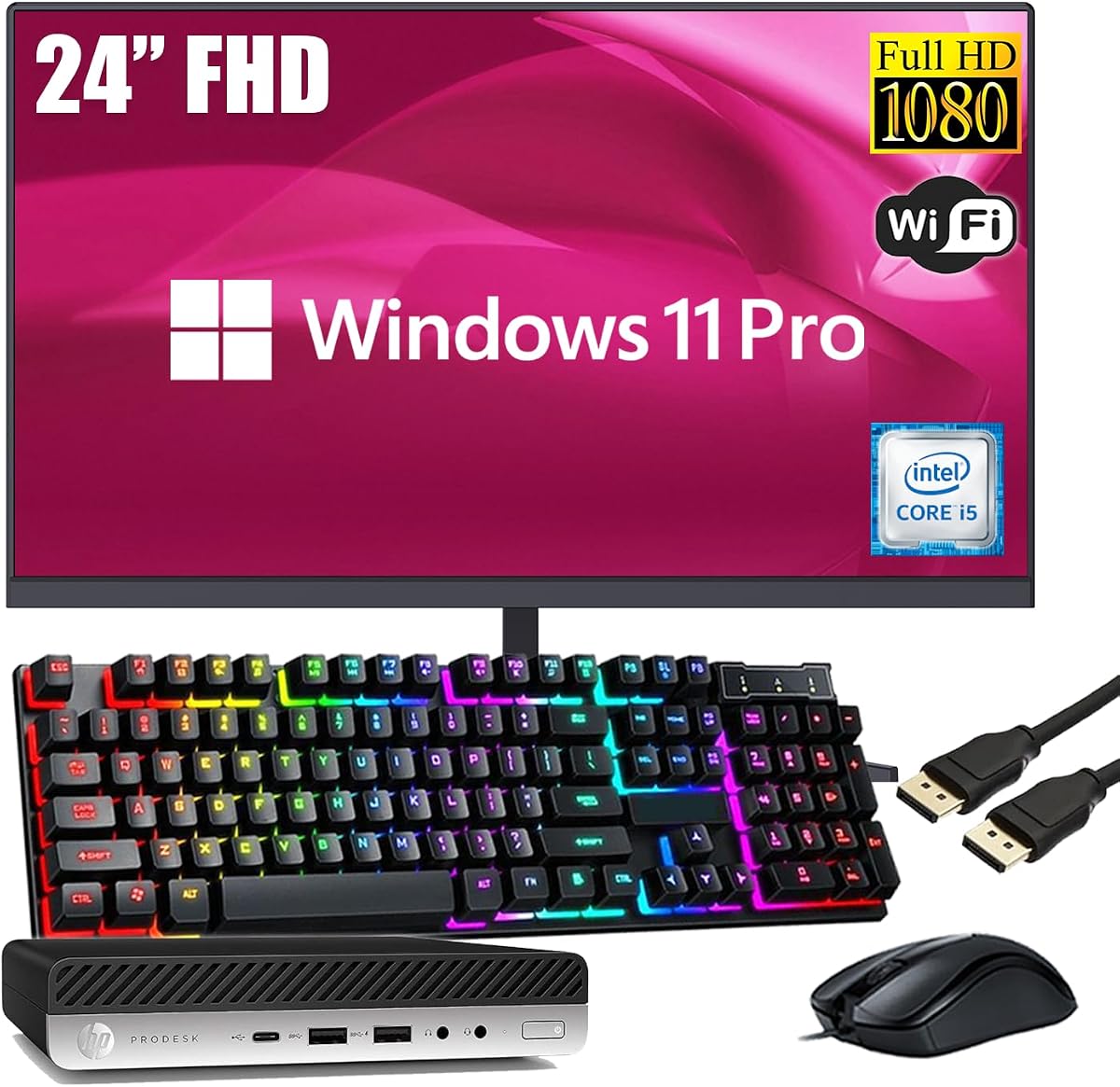
The HP ProDesk 600 G4 Mini Desktop Computer offers a perfect blend of compact design and essential performance for students. Its small form factor makes it easy to fit on crowded desks while still delivering reliable speed for everyday tasks. The bundle includes a 24-inch monitor keyboard and mouse making it a ready-to-use solution.
We may earn a commission when you buy through this link, at no additional cost to you.
Powered by an 8th Gen i5 processor and SSD storage this system boots quickly and handles multitasking efficiently. The inclusion of USB-C allows for modern peripheral connections while Windows 11 Pro provides robust security. Its refurbished nature ensures you get a reliable system at an affordable price point.
The 8GB RAM is adequate for most schoolwork but may struggle with very heavy gaming. Storage is also limited to 256GB which might fill up if storing large video files. Despite these constraints it remains a strong choice for basic productivity and web-based learning.
Parents seeking a tidy and efficient workspace will love this mini setup. It provides a complete computer experience without taking up much room making it ideal for bedrooms or shared study areas in your home.
The mini desktop footprint is tiny leaving more room on your desk for notebooks and other study materials.
This package includes the monitor and accessories so you can start using it immediately without extra purchases.
We may earn a commission when you buy through this link, at no additional cost to you.
The Lenovo 24-inch FHD All-in-One Desktop Computer delivers a professional feel with wireless peripherals that reduce cable clutter. It features 16GB of RAM and a PCIe SSD for reliable performance during daily tasks. The anti-glare display ensures comfortable viewing during long study sessions making it suitable for home and office environments.
We may earn a commission when you buy through this link, at no additional cost to you.
With Wi-Fi 6 and Bluetooth 5.2 connectivity this system stays connected to networks and devices effortlessly. The Windows 11 Pro operating system provides advanced security and management features. The Intel Processor N100 handles standard workloads efficiently without overheating or lagging under normal use.
The local storage is limited to 256GB which may require cloud solutions for larger file collections. There is no dedicated graphics card so gaming performance is restricted to lighter titles. However for productivity and learning these limitations are minimal compared to the benefits of speed and efficiency.
Families who value a clean desk aesthetic will appreciate the wireless setup and sleek design. It is an excellent choice for students who need a reliable and modern machine that looks professional and functions smoothly for online classes and research.
The included wireless keyboard and mouse eliminate cable mess allowing for a cleaner and more organized desk setup.
Sixteen gigabytes of RAM ensure you can run many applications at once without experiencing slowdowns or lag.
We may earn a commission when you buy through this link, at no additional cost to you.
The Lenovo 23.8-inch i3-N305 All-in-One Desktop stands out as a top choice for modern home computing. It features an efficient eight-core processor and a generous 512GB SSD for fast performance. The borderless display provides immersive visuals that make learning and media consumption more engaging and enjoyable for users.
We may earn a commission when you buy through this link, at no additional cost to you.
Its 16GB of RAM handles multitasking with ease while the included webcam simplifies video calls for school. The design saves space by integrating the computer and monitor into one sleek unit. Windows 11 Pro ensures robust security and access to the latest professional tools for productivity.
The integrated graphics limit gaming performance but suffice for casual play and educational software. The webcam is functional but not high definition which is typical for this class of device. These trade-offs are acceptable given the overall speed and design quality offered in this package.
Students and families seeking a reliable and fast all-in-one will find this model ideal. It balances performance and aesthetics effectively making it a standout option for those needing a dependable computer for daily use without excessive clutter.
The borderless display maximizes screen real estate for sharper visuals and a more engaging viewing experience.
The eight core processor ensures smooth performance even when running multiple applications or browser tabs at once.
We may earn a commission when you buy through this link, at no additional cost to you.
The Dell Desktop Computer Package Compatible with Dell Optiplex 7010 is a practical choice for basic computing needs. It features a capable Intel Quad-Core i5 processor and includes a 19-inch monitor plus essential peripherals. This setup ensures you have everything required for homework research and browsing right out of the box.
We may earn a commission when you buy through this link, at no additional cost to you.
Its 8GB of RAM provides sufficient memory for standard tasks and the 500GB HDD offers decent storage for files. The inclusion of a DVD drive allows for physical media playback which is rare in modern systems. Windows 11 Pro ensures security and compatibility with the latest applications.
The monitor size is smaller than average which may limit productivity for larger tasks. The hardware is also older than newer models meaning it may not handle intensive applications well. These limitations make it best suited for lighter workloads and educational purposes.
Families looking for a budget friendly option will appreciate the complete package design. It is an excellent starter computer for younger students who do not need high-end power but require reliability and simplicity for daily schoolwork and browsing.
This package includes the monitor keyboard and mouse so you do not need to buy separate accessories to get started.
The included DVD drive lets you watch physical movies or install software from discs which is often useful.
We may earn a commission when you buy through this link, at no additional cost to you.
The Lenovo IdeaCentre All-in-One Desktop Computer offers a sleek and modern solution for home computing. It features a 512GB SSD for quick access to files and apps. The design is slim and space-saving making it ideal for shared spaces where minimal clutter is desired. It includes a wireless keyboard and mouse for convenience.
We may earn a commission when you buy through this link, at no additional cost to you.
The Intel N100 processor provides enough power for everyday tasks like web browsing and document editing. The IPS display ensures vibrant colors and wide viewing angles which are great for media consumption. Wi-Fi 6 support ensures you stay connected to fast networks easily.
The 8GB RAM is suitable for general use but may struggle with heavy multitasking. Storage is ample for most users but not for massive media collections. The webcam is standard which is fine for video calls but not for professional streaming or high resolution recording.
Families wanting a tidy and modern workspace will love this design. It is a strong option for students who need a reliable machine for online classes and basic productivity without taking up too much desk space.
The slim all-in-one design integrates the computer and monitor into one unit reducing clutter on your desk.
A USB-C port provides fast data transfer and charging options for compatible modern devices and accessories.
We may earn a commission when you buy through this link, at no additional cost to you.
Choosing the right desktop computer involves evaluating performance storage and usability to ensure it meets your child's educational and entertainment needs effectively.
The processor is the brain of the computer and determines how fast it runs applications. For kids a mid range processor like an Intel Core i5 or newer N-series is often sufficient for schoolwork and light gaming without breaking the bank.
Look for at least four cores to ensure smooth multitasking across multiple browser tabs and educational apps simultaneously.
RAM or memory affects how many programs can run at once without slowing down. Eight gigabytes is the minimum standard for modern use but sixteen gigabytes offers more headroom for future-proofing.
If your child plans to run multiple apps like browsers editors and video players simultaneously aim for the higher capacity to avoid lag.
Storage type influences boot times and file access speeds. Solid State Drives are much faster than traditional Hard Disk Drives making them ideal for quick starts and responsive performance.
Prioritize models with SSDs for better user experience even if the total capacity is slightly smaller than HDD options.
A clear screen reduces eye strain during long study sessions. Look for Full HD resolution with anti-glare coatings to protect vision during prolonged use of the computer.
Consider the size of the screen so it fits comfortably on your desk without being too small for reading text effectively.
Windows 11 offers the latest security features and compatibility with modern software. Ensure the computer runs a genuine version of Windows to receive updates and stay protected online.
Check if the OS is Home or Pro depending on whether you need advanced management features for school networks.
Modern connectivity like Wi-Fi 6 and Bluetooth ensures seamless connection to printers headsets and networks. Ports like USB-C allow for easy integration with newer devices and accessories.
Verify there are enough USB ports for all the peripherals you plan to connect without needing extra hubs.
All-in-One units save space by combining the monitor and computer into one while desktops offer easier upgrades. Choose based on your desk space and need for future hardware expansion.
Consider compact mini PCs for smaller desks or all-in-ones to reduce cable clutter on your workspace.
Refurbished units often come with limited warranties so check the terms carefully before purchasing. A good warranty provides peace of mind if technical issues arise shortly after setup.
Select sellers with high performance bars to ensure the refurbishment process meets quality standards.
Place the computer on a stable surface away from direct sunlight and heat sources to maintain optimal performance and longevity over time.
Keep liquids and food away from the keyboard and mouse to prevent accidental spills that can damage internal components permanently.
Regularly update the software and antivirus programs to protect against security threats and ensure smooth operation of all installed apps.
Yes refurbished desktop computers are a great choice for kids as they offer reliable performance at a lower cost. Most come with warranties that ensure they work like new and are tested for functionality. This makes them an economical option for families without sacrificing quality or usability.
Not all bundles include a monitor so check the product details carefully. Some all-in-one computers have the screen built-in whereas standard desktops may require you to buy a monitor separately. Review the package contents before purchasing to avoid additional costs.
Eight gigabytes of RAM is generally sufficient for standard schoolwork web browsing and basic productivity tasks. If your child plans to use resource-heavy software or game simultaneously consider sixteen gigabytes for smoother performance and future-proofing against software updates.
Windows 11 Home is suitable for most personal use cases offering essential features and security. Pro adds management tools useful for school networks or advanced security needs. For typical home use Home is often enough unless specific business features are required for your setup.
Yes most of these systems can handle standard educational games and web-based learning tools effectively. While not designed for heavy gaming they are perfectly capable of running light interactive software and browser apps needed for online classes.
Ensure the operating system is updated and install reputable antivirus software to protect against threats. Use parental controls built into Windows to manage screen time and restrict access to inappropriate websites for added safety.
We have reviewed ten top desktop computers ranging from budget bundles to modern all-in-ones that offer reliability and performance for schoolwork and play.
Prioritize processors and memory that match your child's current needs while considering storage speed and display quality for a comfortable experience.
Always check current prices and warranty terms before purchasing to ensure you get the best value and protection for your investment.