
STGAubron Gaming PC Computer
4.0Editor score
Intel Core i7 Up To 3.9GHz
Radeon RX 580 8G GPU
16GB RAM 1TB SSD
This guide compares the top Desktop Gaming PC for Gta 6 models to help you find the right performance, budget, and features for seamless gameplay in 2026.
Finding the right Desktop Gaming PC for Gta 6 requires balancing power, budget, and future-proofing. The upcoming title demands strong GPUs and CPUs for smooth 1080p or 1440p gaming without lag.
We evaluated ten prebuilt systems based on their processors, graphics cards, RAM, and storage. Each model offers unique strengths for gaming, streaming, and multitasking in today's demanding landscape.
Each pick highlights key specs, real-world performance potential, and value. Prices and availability change often, so check current listings before deciding on your next high-performance desktop tower.
4.0Editor score

4.5Editor score

3.5Editor score
The following table provides a quick side-by-side view of the ten top contenders. Compare processors, GPUs, RAM, storage, and key features to find your match.



The KOTIN Gaming PC Desktop delivers solid performance for modern AAA titles and competitive play. Its AMD Ryzen 7 8700F CPU and RTX 5060 Ti 8GB GPU are well matched for 1080p and 1440p gaming.
We may earn a commission when you buy through this link, at no additional cost to you.
This system supports DLSS 4 and ray tracing for smoother visuals. The 16GB DDR5 RAM handles multitasking and streaming effectively while the 1TB PCIe Gen4 SSD ensures quick boot and load times.
Some users note the case design might limit airflow under extreme loads. Also the 1TB drive is full once multiple large games installed though expansion slots are accessible.
Buy this if you want balanced power for high frame rates. It suits gamers needing reliable specs without custom building.
Six ARGB fans and a dual pipe CPU cooler keep temps stable during long sessions.
Extra DDR5 DIMM slots and M.2 SSD bays allow easy future memory storage upgrades.
We may earn a commission when you buy through this link, at no additional cost to you.
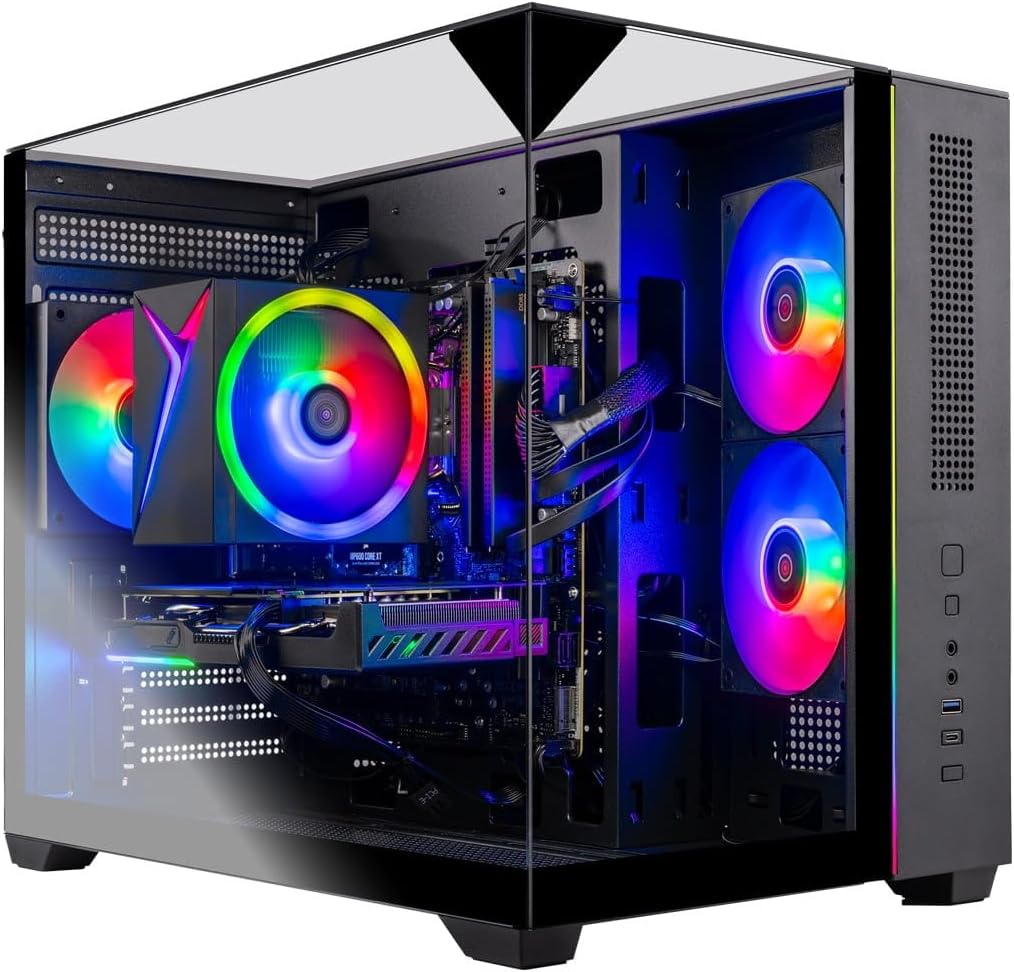
The STGAubron Gaming PC Computer offers an accessible price point for gamers seeking 1080p play. It handles titles like Fortnite Valorant and GTA V at reasonable frame rates with stable hardware.
We may earn a commission when you buy through this link, at no additional cost to you.
Featuring an Intel Core i7 up to 3.9GHz and 16GB RAM this desktop supports smooth streaming and business tasks too. Six RGB fans and included keyboard mouse set up nicely.
The RX 580 is older than modern cards so ultra settings may lag. Still for its cost it provides a reliable base to start upgrading later without major rebuilds.
Ideal for beginners or budget focused buyers who need a plug and play setup. It balances cost and capability well for casual to moderate gaming loads.
WiFi 6 and Bluetooth 5.0 enable easy wireless connection to headsets and controllers.
1TB SSD storage provides fast system response and quick access to installed applications.
We may earn a commission when you buy through this link, at no additional cost to you.
The msi Codex R2 Gaming Desktop targets enthusiasts wanting strong VR and 4K gaming. The RTX 5070 12GB paired with 32GB DDR5 RAM ensures smooth gameplay and heavy multitasking.
We may earn a commission when you buy through this link, at no additional cost to you.
With Intel Core i5-14400F and DLSS 4 support this system delivers high frame rates without stutter. Air cooling and a dedicated RGB CPU cooler keep temps stable for marathon sessions.
Fans can be audible during peak loads which some may find distracting. Also the price is higher than average but reflects top end GPU and build quality.
Buy if you need raw power for VR or ultra settings. The MSI Center software simplifies performance control for beginners and pros alike.
The RTX 5070 provides ample headroom for demanding VR titles without frame drops.
Standard components allow simple future GPU or storage swaps without vendor restrictions.
We may earn a commission when you buy through this link, at no additional cost to you.
The YAWYORE Gaming PC uses a strong Ryzen 7 5700X and RTX 5060 for reliable 1080p and 1440p gaming. It handles multitasking well with 32GB of DDR4 memory.
We may earn a commission when you buy through this link, at no additional cost to you.
A MSI B550M-A PRO motherboard ensures stability and upgrade options. The 1TB M.2 NVMe reduces load times and the 650W power supply offers steady power during peak use.
This build favors stability over top end specs so high refresh rates might need adjustments. Shipping includes shock foam so unpack carefully before powering on.
Choose this for a balanced platform for streaming and gaming. It fits users prioritizing CPU and RAM over the latest GPU features.
32GB RAM allows multiple apps and browsers to run while gaming without slowdown.
MSI board and 80plus bronze PSU ensure consistent performance under load.
We may earn a commission when you buy through this link, at no additional cost to you.
The Skytech Gaming PC Desktop offers 32GB DDR5 RAM which is great for streaming while gaming. Its Ryzen 7 7700 and RTX 5060 Ti handle AAA titles smoothly at 1080p.
We may earn a commission when you buy through this link, at no additional cost to you.
A high-performance air cooler and ARGB fans manage thermals. The Crystal case with tempered glass showcases internal lighting. Free keyboard and mouse add value out of box.
Note that it lacks integrated WiFi requiring Ethernet or a USB adapter. Some users mention fan noise can be noticeable during peak loads.
Pick this if you stream or multitask heavily. The extra memory and fast storage make it a robust choice for content creators.
32GB RAM enables seamless game streaming with background apps running smoothly.
Tempered glass panels show off RGB lighting for a modern setup look.
We may earn a commission when you buy through this link, at no additional cost to you.
The CyberPowerPC Gaming PC pairs an Intel Core i5-14400F with RTX 5060 8GB for balanced gaming. It runs modern titles with good efficiency and stability.
We may earn a commission when you buy through this link, at no additional cost to you.
Featuring 16GB DDR5 RAM and a 1TB PCIe 4.0 NVMe SSD this system boots quickly and handles multitasking well. WiFi 6 and Bluetooth 5.3 support wireless setups.
Storage is limited to one drive but expansion is possible. Some users wish for more internal drive bays for media storage.
Choose this for efficient daily performance and solid gaming. It suits users wanting fast storage and reliable peripherals.
Wi-Fi 6 and Bluetooth 5.3 ensure stable and low latency connections.
PCIe 4.0 NVMe SSD reduces load times and improves general system responsiveness.
We may earn a commission when you buy through this link, at no additional cost to you.
This STGAubron desktop offers 32GB RAM and an RTX 3070 for capable gaming and streaming. It delivers 60+ FPS in many titles with smooth performance at 1080p.
We may earn a commission when you buy through this link, at no additional cost to you.
The RTX 3070 supports ray tracing and DLSS for better visuals. Four RGB fans and included peripherals add appeal. Lifetime tech support adds long term value.
The GPU is older so may not match latest card efficiency. Some units show varying build quality but customer support helps resolve issues quickly.
Pick if you prioritize RAM and GPU over newest tech. It suits streamers and gamers on a tight budget.
32GB RAM allows multiple apps to run smoothly while gaming and streaming.
Lifetime technical support helps resolve issues quickly after purchase.
We may earn a commission when you buy through this link, at no additional cost to you.
This prebuilt desktop uses a Xeon 12-Core CPU and GTX 1080 Ti for heavy multitasking. It handles video editing and moderate gaming with ample RAM.
We may earn a commission when you buy through this link, at no additional cost to you.
Liquid cooling keeps the CPU stable. The 64GB RAM supports demanding tasks. RGB lighting and WiFi 6 enhance aesthetics and connectivity.
The GTX 1080 Ti lacks newer features like DLSS so performance may lag in modern titles. It's best for users needing raw RAM power over latest GPU tech.
Choose this for workstation tasks and older game libraries. It suits users prioritizing RAM and CPU over cutting edge graphics.
64GB RAM and 12-core CPU handle rendering and encoding efficiently.
Liquid cooling keeps the CPU stable under extended heavy workloads.
We may earn a commission when you buy through this link, at no additional cost to you.
The SKYESEV Prebuilt Gaming Desktop PC offers a budget-friendly route into PC gaming. Its Ryzen 5 5600 and RTX 3050 handle esports well with 32GB RAM.
We may earn a commission when you buy through this link, at no additional cost to you.
ARGB air cooling maintains stable temps. The 1TB NVMe SSD ensures quick access to games. WiFi connectivity adds convenience for wireless peripherals.
The GPU is entry level so 1080p settings may need tuning. But for casual gaming and streaming its RAM and CPU deliver solid value.
Pick this if you need a cheap start with room to grow. It suits new PC gamers needing multitasking power.
ARGB air cooling keeps temps stable even during extended gaming sessions.
The system is ready out of box for immediate gaming and streaming.
We may earn a commission when you buy through this link, at no additional cost to you.
The Prebuilt Gaming Desktop PC offers a simple and reliable setup for everyday gaming. Its Ryzen 5 5500 and RTX 3050 handle 1080p with good stability.
We may earn a commission when you buy through this link, at no additional cost to you.
16GB RAM and 1TB NVMe SSD provide fast access. ARGB air cooling keeps noise low. Multiple USB ports and HDMI outputs offer flexible connectivity.
RAM is lower than other models so heavy multitasking may slow. Still for pure gaming it offers great value for its price range.
Choose if you need a compact and quiet budget PC. It suits casual gamers needing plug and play reliability.
ARGB air cooling maintains stable performance with low noise during long sessions.
Multiple USB and video outputs allow easy connection to monitors and peripherals.
We may earn a commission when you buy through this link, at no additional cost to you.
Choosing the right desktop gaming PC depends on your gaming habits budget and future needs. Here are key factors to evaluate.
The GPU is critical for smooth gameplay especially with ray tracing and high settings. Look for models with RTX 5060 or better for Gta 6.
Prioritize at least 8GB VRAM to handle detailed textures without lag.
A modern CPU like Ryzen 7 or Core i5 ensures quick loading and multitasking. Turbo speeds above 3GHz help with complex scenes.
Avoid older generations if possible for better longevity and optimization.
16GB RAM is a standard baseline for gaming. If streaming or editing add 32GB for smoother multitasking.
DDR5 memory provides faster data transfer for modern systems.
NVMe SSDs offer fast boot and load times essential for large game libraries. Aim for at least 1TB of storage.
Choose PCIe Gen4 SSDs for maximum performance and future-proofing.
Good cooling keeps performance stable during long sessions. Look for air coolers with heat pipes or liquid solutions.
Check case airflow and fan count to avoid overheating issues.
WiFi 6 or 6E and Bluetooth 5.x ensure wireless flexibility. Multiple USB ports support controllers and headsets.
Check for HDMI and DisplayPort outputs for monitor compatibility.
Choose desktops with available RAM slots and M.2 ports for future storage. Avoid systems with proprietary parts limiting upgrades.
Standard components simplify future GPU or RAM swaps.
Look for at least 1-year warranty on parts and labor. Free tech support helps resolve setup issues quickly.
Lifetime support options add peace of mind for long term use.
Place the desktop in a well-ventilated area to avoid overheating. Keep dust away from vents and fans to maintain airflow.
Install updates regularly for your GPU and drivers to ensure optimal performance. Use system monitoring tools to check temps and resource usage.
Clean internal components carefully with compressed air every few months. Replace thermal paste if the CPU runs hot after several years.
A modern CPU like Ryzen 7 or Core i5 with at least 8GB VRAM GPU is recommended. Aim for 16GB RAM and 1TB NVMe storage for smooth gameplay.
Yes the RTX 5060 handles 1080p with high settings comfortably. For 1440p consider models with RTX 5060 Ti or higher.
For streaming alongside gaming 32GB RAM is ideal. This allows multiple apps and background tasks without frame drops.
Most modern models include WiFi 6 or 6E. Check specs carefully as some budget units may require Ethernet or USB adapters.
Many prebuilt desktops use standard components making upgrades possible. Avoid proprietary power supplies and cases with limited space.
Yes models with ARGB fans and CPU coolers maintain stable temps. Ensure proper ventilation around the tower to prevent overheating.
Look for Ryzen 7000 or Intel 14th gen processors. These offer better single-core speed essential for gaming performance.
A 1-year warranty on parts and labor is standard. Some models offer lifetime tech support for added peace of mind.
We explored ten desktop gaming PCs offering balanced power and value for Gta 6. Top picks include KOTIN for overall performance and STGAubron for budget buyers.
Prioritize GPU and RAM capacity for smooth gameplay and streaming. Check connectivity and cooling options to match your setup needs.
Always verify current specs and warranty before purchase as details may change. With these models you can enjoy a powerful desktop experience.