
WALI Computer Monitor Stand
4.7Editor score
Adjustable heights available
Vented shelf design
44 pound capacity
This guide compares the top desktop monitor riser options for ergonomic comfort and workspace organization to help you choose the best fit.
A desktop monitor riser elevates your screen to eye level, promoting better posture and reducing neck strain during long work hours. Finding the right one involves considering material, weight capacity, and storage options to match your specific desk setup.
We evaluated ten highly rated models based on stability, adjustability, and overall design. Each product offers unique features like adjustable heights, integrated storage, or dual-monitor support to suit various professional and home office environments.
Each pick highlights key strengths and potential trade-offs to help you decide. Prices fluctuate frequently so verify the current rate before purchasing. Investing in a quality riser can significantly improve your daily computing experience and workspace efficiency.
4.7Editor score
4.7Editor score

4.6Editor score
The following table provides a side-by-side overview of key specifications for each model to help you quickly identify the best fit for your needs.


The WALI Computer Monitor Stand ranks as our top budget choice with a solid 4.7 star rating. It features a sturdy metal shelf designed to hold devices up to 44 lbs while providing three distinct height settings to improve your posture.
We may earn a commission when you buy through this link, at no additional cost to you.
Its large 14.6 by 9.3 inch platform accommodates most monitors and laptops comfortably. The vented holes ensure airflow to prevent overheating and rubber pads keep the unit stable without scratching your desk surface.
While it requires simple assembly with a screwdriver and lacks premium finishes, the functionality outweighs these minor drawbacks. The open space underneath helps clear desktop clutter by storing keyboards and accessories efficiently.
Ideal for students and professionals on a tight budget, this riser delivers essential ergonomic benefits without breaking the bank. It is a practical investment for anyone seeking immediate relief from neck strain.
The heavy-duty metal frame ensures the stand remains steady even with heavier monitors in place during daily use.
Adjusting the height allows you to align your screen with eye level reducing long-term physical stress on your body.
We may earn a commission when you buy through this link, at no additional cost to you.
The TEAMIX 20 Inch Monitor Stand offers a stylish wood finish that complements various decor styles while providing substantial support for up to 80 pounds. Its sturdy MDF construction ensures longevity and a premium feel on any desk.
We may earn a commission when you buy through this link, at no additional cost to you.
With dimensions of 20 by 9.5 inches it accommodates laptops and screens under 50 inches easily. The elevated design creates space for notebooks and accessories helping you maintain an organized workspace without extra furniture.
Although it does not offer height adjustment, the standard ergonomic lift is sufficient for most users. The simple assembly process means you can start using it almost immediately after unboxing the package.
This stand is perfect for those who value aesthetics alongside functionality. It is a reliable choice for home offices where a natural look enhances the overall environment and productivity.
The open design underneath allows you to slide in keyboards or files keeping your surface clear and tidy effortlessly.
Made from high-quality wood board it resists wear and tear ensuring the stand looks great for years to come.
We may earn a commission when you buy through this link, at no additional cost to you.
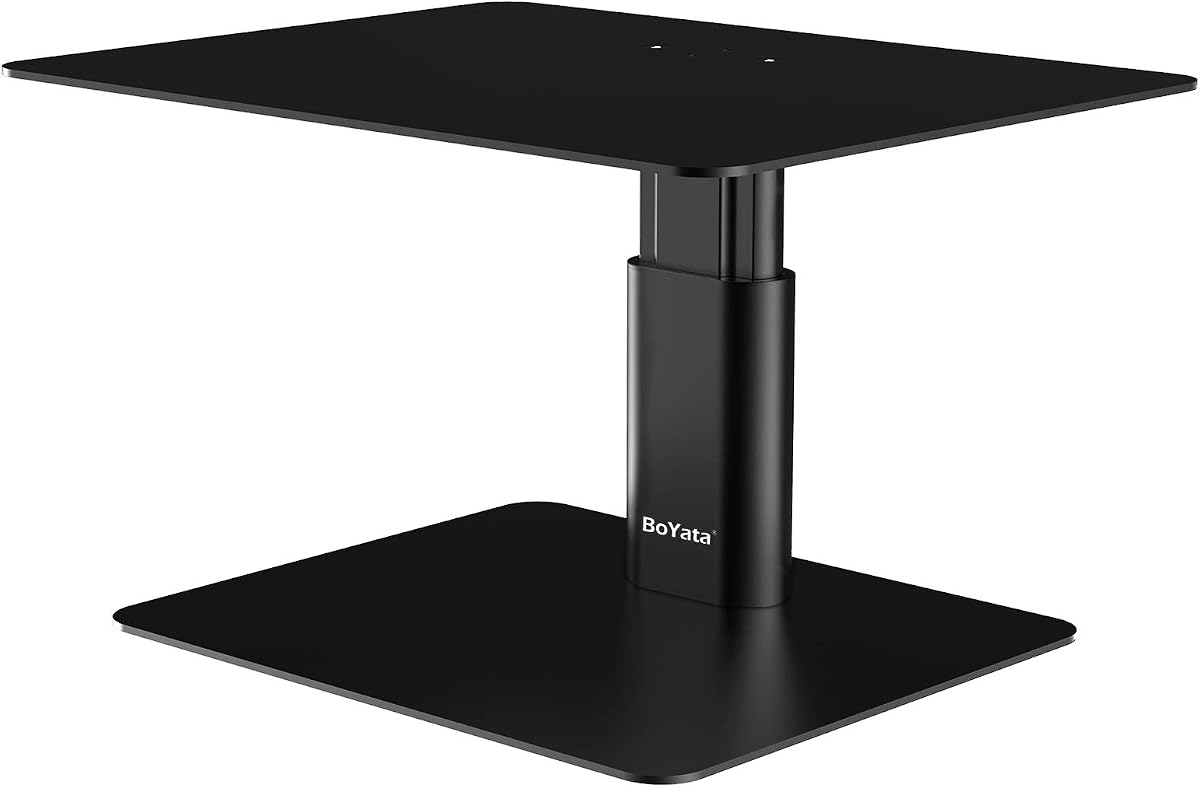
BoYata Monitor Stand earns our Editor's Choice title due to its innovative twist knob height adjustment system that customizes comfort precisely. It supports devices up to 33 pounds with a strong metal build that resists bending or denting.
We may earn a commission when you buy through this link, at no additional cost to you.
The ergonomic design positions your monitor at eye level to relieve shoulder and neck pain during long sessions. Sufficient space between the metal plates allows for easy storage of office items like notebooks and keyboards underneath.
Assembly is straightforward using the included screwdriver and pre-drilled holes making setup quick and hassle-free. The skidproof pads at the bottom ensure the stand stays firmly in place even if the desk surface is smooth.
For users needing specific height adjustments without complex tools this model strikes the ideal balance between performance and ease of use. It is highly recommended for professionals seeking a reliable ergonomic upgrade.
The twist knob allows you to fine-tune the rise to match your exact preference for optimal comfort and posture.
Constructed from durable metal the stand offers a long-lasting solution that withstands daily office tasks reliably.
We may earn a commission when you buy through this link, at no additional cost to you.
The Amazon Basics Height Adjustable Monitor Stand provides a flexible 3-level stackable design that lets you customize height using detachable legs. Made from durable ABS plastic it offers a lightweight yet sturdy solution for standard monitors and laptops up to 22 pounds.
We may earn a commission when you buy through this link, at no additional cost to you.
Its tapered top surface measures about 11.6 by 11 inches which fits many devices comfortably while maintaining a sleek look. The anti-slip feet ensure secure placement on flat surfaces reducing any risk of sliding during daily use.
While the plastic build might not feel as premium as metal or wood it delivers excellent value for budget-conscious buyers. The lightweight nature makes it easy to move or reorganize whenever your workspace needs change.
This model is ideal for temporary setups or smaller devices where portability is key. It serves as a practical entry-level option for those starting to optimize their desk ergonomics.
Adding or removing legs allows you to adjust the height quickly without tools to suit different needs easily.
The plastic construction keeps the unit easy to carry allowing you to move it between rooms or desks effortlessly.
We may earn a commission when you buy through this link, at no additional cost to you.
The YAOHUOO Dual Monitor Stand stands out for its massive 39-inch width and 100-pound capacity making it perfect for multiple screens or heavy setups. The combination of a wooden desktop shelf and heavy-duty steel legs ensures a premium look and rock-solid stability.
We may earn a commission when you buy through this link, at no additional cost to you.
It accommodates dual monitors or a large TV with ease creating a central hub for your workstation. Non-slip pads on the legs protect your desk from scratches while keeping the structure firm during intense gaming or work sessions.
Although it requires more desk space and comes at a higher price it justifies the cost with exceptional durability and versatility. Assembly takes about ten minutes and includes all necessary tools for a straightforward setup experience.
This stand is ideal for power users or creators who need a robust platform for extensive equipment. It transforms cluttered desks into organized command centers with impressive style and function.
The wide design supports two monitors side by side allowing for seamless multitasking without needing multiple risers.
Heavy-duty steel footing prevents wobbling or shaking ensuring your expensive equipment stays safe and secure at all times.
We may earn a commission when you buy through this link, at no additional cost to you.
This 2 Pack of Monitor Stand Risers offers exceptional value by providing two units for the price of one. Each stand features cold rolled steel construction with 150 heat dissipation holes to keep devices cool during extended use.
We may earn a commission when you buy through this link, at no additional cost to you.
You can choose from three ergonomic heights to suit your comfort needs. The waterproof coating protects the metal from rust and adds durability for long-term performance in various environments like offices or kitchens.
With ample space underneath and a phone holder on the side it keeps your desk organized and within easy reach. The rubber pads ensure the stand does not slip or scratch your furniture surfaces during daily operations.
This pack is perfect for families or offices needing multiple setups without spending a fortune. It delivers reliable ergonomic support and versatile functionality for everyone who needs it.
The numerous holes in the shelf allow air to flow freely preventing laptops and PCs from overheating while in use.
Adjusting the height buttons on the legs helps you find the perfect viewing angle to reduce fatigue throughout the day.
We may earn a commission when you buy through this link, at no additional cost to you.
The Klearlook Foldable Monitor Stand offers a unique combination of adjustable widths and a built-in storage drawer for a tidy workspace. Its white finish and foldable legs make it easy to store away when not needed saving valuable room in smaller areas.
We may earn a commission when you buy through this link, at no additional cost to you.
It supports up to 55 pounds with non-slip rubberized legs that ensure a solid and wobble-free surface. The hidden tablet and phone holder provide convenient access to your devices while maintaining a clean desktop aesthetic.
No assembly is required which means you can use it right out of the box immediately. The adjustable leg span fits mechanical keyboards perfectly under the shelf providing extra clearance for typing comfort.
This model is ideal for those who need extra storage and adjustability without complex setups. It is a practical choice for home offices that require versatility and style in equal measure.
The built-in drawer keeps pens and small office supplies organized making it easier to find what you need instantly.
When folded the legs reduce the footprint significantly allowing you to pack it away easily during travel or storage.
We may earn a commission when you buy through this link, at no additional cost to you.
The OPNICE Desk Organizers Stand simplifies workspace management with a built-in drawer and two pen holders right on the shelf. Its sleek black metal construction ensures a premium look while elevating your monitor to reduce eye and neck strain effectively.
We may earn a commission when you buy through this link, at no additional cost to you.
By raising your screen you free up space underneath for keyboards and files keeping your area neat and clutter-free. The stand is ready to use out of the box requiring no assembly steps whatsoever for immediate convenience.
While it does not offer height adjustments it provides a standard ergonomic lift suitable for most users. The metal build offers strong stability for daily use without wobbling or shifting during typical office tasks.
This riser is perfect for those who want instant organization and style without hassle. It is a great choice for professionals looking to optimize their workspace efficiency with minimal effort.
The drawer keeps small items hidden and organized maintaining a clean look and preventing desk clutter effectively.
Solid metal construction ensures the unit can handle heavy loads while maintaining a sturdy and professional appearance always.
We may earn a commission when you buy through this link, at no additional cost to you.
The WESTREE Dual Monitor Stand features a unique rustic brown wood finish with thick steel legs for a distinct look. Designed for two monitors it offers a sturdy platform that supports heavy loads while maintaining stability through anti-slip pads on the bottom.
We may earn a commission when you buy through this link, at no additional cost to you.
It functions as a printer or TV stand too making it a versatile addition to any room. The wide design clears space below for office supplies allowing you to keep essential items organized and accessible easily.
Assembly is simple with pre-drilled holes and included parts ensuring a quick installation process. The ergonomic height helps improve posture and reduces eye strain during prolonged computer use sessions effectively.
Ideal for users seeking a blend of style and function this stand delivers a premium aesthetic and reliable performance. It is a solid investment for creating a productive and visually appealing workspace environment.
The rustic wood finish combined with steel legs adds a touch of elegance to your desk that complements modern decor.
Thick steel legs provide a strong bearing load to keep multiple monitors steady without any shaking or movement.
We may earn a commission when you buy through this link, at no additional cost to you.
The gianotter Dual Monitor Stand offers a patented design that requires no assembly at all for instant desktop transformation. Made from high-strength metal it ensures exceptional support performance while keeping your workspace clear with magnetic pen holders and a drawer.
We may earn a commission when you buy through this link, at no additional cost to you.
Elevating the monitor to eye level helps reduce neck strain and boosts focus and work efficiency significantly. The dual monitor support allows you to arrange screens side by side for seamless multitasking across different applications.
The magnetic holders keep pens secure and accessible without cluttering the main surface. High-quality materials ensure the stand is durable enough to handle daily office tasks without wobbling or slipping during use.
This model is ideal for users who want maximum convenience and premium features without assembly steps. It delivers a sophisticated solution for modern workspaces seeking efficient organization and ergonomic support.
The patented design ensures a unique and efficient setup process that saves time and effort for busy professionals.
Magnetic holders keep pens secure and accessible preventing them from rolling off the desk or getting lost.
We may earn a commission when you buy through this link, at no additional cost to you.
Selecting the right riser involves weighing several factors to ensure it meets your ergonomic and aesthetic needs effectively.
Ensure the stand supports your device weight by checking the listed capacity. Metal or wood options often provide more stability than plastic models for heavier monitors.
Always choose a material that matches your durability needs and weight requirements.
Consider if you need height or width adjustments to fit different setups. Some models offer fixed heights while others have knobs or stacking parts for customization.
Look for adjustable features if you plan to share the desk or switch devices regularly.
Many risers include drawers or open space underneath to store keyboards and accessories. These extra compartments help keep your surface clutter-free and organized.
Prioritize storage if you need to maximize desk space or hide office supplies.
Some models require tools and screws to build while others arrive ready to use out of the box. Evaluate your preference for setup time before purchasing any model.
Select no-assembly options if you need immediate use or dislike using tools.
Choose a finish that complements your office decor such as black metal or rustic wood. A good look enhances your workspace style and personal comfort.
Match the color and material to your existing furniture for a cohesive look.
Rubber pads on the bottom protect your desk and prevent sliding during use. Stability is crucial for maintaining a steady screen position while typing or gaming.
Verify the stand has anti-slip features to ensure safety and security.
Vented shelves help keep devices cool by allowing airflow to circulate underneath. This prevents overheating and extends the life of your monitor or laptop.
Opt for models with holes or open slats if you use high-performance devices.
Measure your desk space to ensure the riser fits comfortably without crowding your keyboard or mouse. The width should match your device size for balanced support.
Check width and depth specifications to guarantee a proper fit for your screen.
To maximize benefits place your screen so the top aligns with your eyes. This positioning reduces strain and keeps your posture healthy throughout the work day.
Clean the surface regularly with a soft dry cloth to remove dust and fingerprints. Avoid harsh chemicals that could scratch the finish or degrade the material over time.
Check all legs and pads periodically to ensure they remain secure. Tighten screws if needed and replace worn pads to maintain stability and protect your desk.
Yes many models like YAOHUOO and WESTREE are designed specifically for dual monitors. They offer wide platforms that support two screens simultaneously for seamless multitasking.
Raising your screen to eye level aligns your head and neck reducing strain. Proper ergonomic positioning helps prevent pain during long work sessions effectively.
Weight capacity varies from 22 pounds for plastic models to 100 pounds for heavy-duty steel options. Always check the manufacturer limits before placing devices.
Some models require simple screw assembly while others arrive fully assembled. Look for no-assembly options if you prefer instant use without extra effort.
Yes many stands support printers and small appliances due to their strong platforms. Just ensure the device fits within the width and weight limits specified.
Metal and wood generally provide superior stability compared to plastic. Look for sturdy frames if you use heavy monitors to prevent wobbling.
Whether you want budget-friendly WALI or premium YAOHUOO the right stand elevates your workspace ergonomically. Each option brings unique features to meet different needs effectively.
Prioritize material stability and adjustability to match your daily routine and comfort goals. These elements ensure long-term satisfaction and health benefits for your posture.
Prices change frequently so verify the latest deal before buying today. A small investment now can improve your daily work experience for years to come.