
Zobirez 420W 10-Port Fast USB Charging Station for Multiple Devices, Black
4.5Editor score
Fast GaN charging tech
One-piece sturdy slots
Includes mixed cables
This guide compares the top charging stations for Chromebooks across ten models featuring open rack designs, mobile carts, and high density ports for schools
Finding the right charging station for Chromebooks is essential for managing fleets in schools and offices. A good unit provides secure storage while keeping devices powered and organized efficiently.
We evaluated ten top models based on capacity, build quality, and safety features. Our list covers desktop racks, mobile carts, and multi-port solutions suitable for diverse environments.
Each pick highlights key strengths and ideal use cases to help you choose wisely. Note that prices and availability change frequently, so verify details before purchasing your final unit.
4.5Editor score

4.7Editor score
The following table offers a side-by-side comparison of all ten reviewed models to help you quickly identify the best fit for your specific classroom or office setup.


The POCHAR 8-Device Universal AC Laptop Charging Station offers a seamless solution for classrooms needing quick setup without tools. With a strong rating and solid build quality, it balances convenience with safety features like surge protection. Its wide-angle slots ensure that even larger Chromebooks fit comfortably without bending or cramping cables.
We may earn a commission when you buy through this link, at no additional cost to you.
This station excels at organization, keeping devices neatly arranged and easily accessible for teachers and students alike. The power strip allows direct plugging into outlets without extra adapters, which simplifies charging routines. The compact design fits well on desks or tables, making it easy to move between shared spaces as needed during the day.
While the price is higher than simpler racks, the durability and lack of assembly time justify the investment for busy environments. The wide slots may limit capacity compared to narrower options, but they prevent damage to devices that are slightly thicker than standard models. This trade-off is acceptable for schools prioritizing device longevity over raw density.
For classrooms that need a reliable, ready-to-use station for up to eight devices, this model stands out. It is ideal for schools or offices where time is scarce and setup speed matters. We recommend it for users who value robust construction and want to avoid assembly tasks entirely.
The slots accommodate laptops and Chromebooks up to fourteen inches wide and 1.4 inches thick, ensuring most devices fit securely.
This unit requires no assembly, allowing users to unbox and start charging devices immediately without tools or instructions.
We may earn a commission when you buy through this link, at no additional cost to you.
The POCHAR 20-Device Laptop Charging Cart is a robust mobile solution designed for high-traffic environments like schools and libraries. Its industrial-grade materials ensure it withstands daily use while keeping twenty devices organized and safe. The open-frame design promotes airflow, which helps prevent overheating during extended charging sessions across large fleets of Chromebooks.
We may earn a commission when you buy through this link, at no additional cost to you.
Key strengths include its mobility, with swivel casters and ergonomic handles that make it easy to transport between classrooms or labs. Adjustable dividers allow customization to fit various device sizes, while the built-in power strip supports convenient multi-device charging without external adapters. The cable management system keeps cords tidy, reducing trip hazards in busy spaces.
While the cart is expensive, the capacity and mobility justify the cost for institutions managing large numbers of devices. It requires ample floor space, which may not suit compact classrooms, but the ability to lock wheels ensures stability when stationary. This trade-off works well for schools that need flexible storage across multiple rooms.
For universities or schools managing large fleets, this cart delivers exceptional organization and durability. We recommend it for users prioritizing high capacity and mobility in shared learning environments. It is a premium choice for those needing a reliable, long-term device management solution.
Durable swivel casters with locking mechanisms allow smooth transport and secure parking in various locations.
The open-frame design improves airflow around devices during charging, helping reduce heat buildup and maintain performance.
We may earn a commission when you buy through this link, at no additional cost to you.
The Zobirez 420W 10-Port Fast USB Charging Station delivers exceptional value for users needing a compact, efficient solution for multiple devices. With GaN technology, it provides fast charging speeds while maintaining safety features like overvoltage and overheat protection. Its one-piece slots hold devices securely, making it ideal for home desks or small offices needing tidy organization.
We may earn a commission when you buy through this link, at no additional cost to you.
This station excels at cable management by including a mix of short charging cables for various devices. The four non-slip rubber pads ensure stability on desktop surfaces, and the compact design saves valuable space. It is perfect for users who prefer USB-C or USB-A charging over traditional AC adapters, offering versatility for modern gadgets.
While it lacks AC outlets for devices with specific power bricks, the included cables cover most USB-powered Chromebooks and tablets. The price is significantly lower than high-capacity carts, though it supports only ten devices. This trade-off is acceptable for users prioritizing speed and affordability over large fleet management.
For users needing a fast, reliable charger for up to ten devices, this station offers the best balance of performance and cost. We recommend it for schools or offices managing smaller groups. It is a smart pick for anyone wanting to declutter their desk with efficient, modern charging tech.
Dual 65W ports power laptops like MacBook series, while other ports support fast charging for phones and tablets efficiently.
The unit comes with ten short mixed charging cables, reducing the need for separate wall chargers and keeping spaces tidy.
We may earn a commission when you buy through this link, at no additional cost to you.
The 10-Device Laptop & Tablet Charging Station offers a versatile solution for environments needing both AC and USB charging options. Its open rack design allows quick access to laptops and tablets without complex doors, while built-in cable routing keeps cords organized. This makes it ideal for libraries or offices where multiple device types share a single charging station.
We may earn a commission when you buy through this link, at no additional cost to you.
Key strengths include the six AC outlets and four USB ports, which cater to diverse device requirements. The surge-protected power strip ensures safe charging for sensitive electronics, and the vertical layout saves counter space. The open design facilitates fast device swaps, which benefits busy workspaces where students or staff rotate frequently.
While assembly may be needed and slots vary slightly in fit, the flexibility outweighs these minor issues for mixed-use scenarios. Users should check device sizes beforehand to ensure compatibility with the open layout. This trade-off works well for offices prioritizing adaptability over rigid, fixed storage.
For offices managing mixed device fleets, this station provides essential flexibility and organization. We recommend it for settings where AC adapters and USB cables coexist. It is a practical choice for anyone needing a reliable, mixed-port charging hub.
With six AC outlets and four USB ports, this unit supports a wide range of laptops, tablets, and accessories simultaneously.
The compact vertical rack helps maximize device storage while minimizing countertop and desk space usage.
We may earn a commission when you buy through this link, at no additional cost to you.
This 14-Slot Open Charging and Storage Rack offers a durable solution for high-density charging in libraries and offices. Its open-frame design allows natural ventilation, preventing overheating during long sessions while keeping cables tidy and organized. The adjustable leveling feet ensure stability on uneven surfaces, which is vital for heavy daily use in active environments.
We may earn a commission when you buy through this link, at no additional cost to you.
The unit excels at organization with its independent slots that eliminate cable clutter while maintaining easy device access. Its solid steel construction ensures load-bearing capacity and resistance to deformation, making it reliable for frequent use. However, users must supply their own power strips, adding a step to setup.
While the lack of an included power strip requires extra effort, the ventilation and capacity justify this for high-traffic settings. The open design means devices are visible, which some may prefer for transparency but less security than enclosed units. This trade-off works well for users prioritizing cooling and cost.
For libraries or conference rooms needing robust, high-capacity storage, this rack delivers excellent value. We recommend it for users who supply their own power solutions. It is a solid pick for those prioritizing stability and airflow in shared device hubs.
The open-frame design enables natural ventilation for heat dissipation, preventing overheating during extended charging sessions.
Four adjustable leveling feet adapt to uneven surfaces to ensure precise balance and device stability.
We may earn a commission when you buy through this link, at no additional cost to you.
The Workington 8-Device Open Desktop School Charging Cart prioritizes device protection with padded shelves and dividers. It includes an UL-approved power strip for safe charging, making it suitable for schools needing reliable and secure storage. The open design allows quick access for students switching tasks, while cord clips keep cables neat at the back.
We may earn a commission when you buy through this link, at no additional cost to you.
This unit shines in safety, with soft padding preventing scratches and UL certification ensuring electrical safety. Adjustable dividers accommodate larger laptops, providing flexibility in storage configurations. However, the assembly requirement may delay immediate use, and the compact footprint limits capacity compared to larger carts.
While assembly adds time and the size limits capacity, the protection features justify this for smaller classrooms. Users must ensure proper setup to avoid wobbling. This trade-off works well for schools prioritizing device safety and small footprint over mobility.
For small classrooms needing protected storage for up to eight devices, this cart is a strong choice. We recommend it for users prioritizing device safety over mobility. It is a practical pick for schools wanting secure and certified charging.
Soft pads on shelves and plastic dividers prevent accidental scratches and damage to devices stored within.
The power strips inside the charging cart are UL approved for safety guarantee during daily charging use.
We may earn a commission when you buy through this link, at no additional cost to you.
The Moezuti 20-Port 600W Charging Station is a powerhouse for home offices needing rapid multi-device charging. With GaN technology, it delivers efficient power without excessive heat, protecting devices overnight. Its mixed ports support everything from phones to laptops, while physical slots keep devices upright and organized effectively.
We may earn a commission when you buy through this link, at no additional cost to you.
Key strengths include the dual 65W ports capable of charging laptops like MacBook Pro, which few stations offer. The included cables reduce clutter significantly, and the flame-retardant ABS material ensures durability. The unit is ideal for families or offices where multiple USB-C and USB-A devices need quick charging.
While the footprint is larger and the price is higher, the wattage and reliability justify the investment for power users. Users must allocate enough space for the unit and cables. This trade-off works well for those prioritizing speed and high capacity over compactness.
For power users needing high-wattage charging for laptops and devices, this station delivers unmatched performance. We recommend it for users prioritizing speed over compactness. It is a top pick for those managing complex device ecosystems at home or work.
Top two USB-C ports reach up to 65W, allowing laptops like MacBook Pro to charge effectively.
Advanced Gallium Nitride technology actively defends against overcharging and overheating for safe device charging.
We may earn a commission when you buy through this link, at no additional cost to you.
The POCHAR 10-Device Open Charging Station combines efficient charging with built-in cable management to keep workspaces tidy. Its steel frame ensures stability for daily use in offices, while dedicated slots secure devices during charging. The open design promotes airflow, preventing overheating for ten devices simultaneously.
We may earn a commission when you buy through this link, at no additional cost to you.
This unit excels in organization, with clips that eliminate tangled cords and a lower tray for accessories. It fits well in hospitals or libraries where safety and accessibility are crucial. The 10-outlet power strip ensures compliance with school or hospital standards for multi-device charging.
While the size is fixed and storage space is limited, the organization benefits outweigh these for users prioritizing tidiness. Users must verify device dimensions before purchasing. This trade-off works well for those prioritizing clean setups over customization.
For hospitals or offices needing tidy and compliant device charging, this station delivers strong organization. We recommend it for users prioritizing tidiness. It is a reliable pick for those wanting neat and safe charging.
Built-in cable clips on the back eliminate tangled cords, ensuring neat storage for multiple devices.
The open-frame structure promotes optimal airflow to reduce overheating risks during charging sessions.
We may earn a commission when you buy through this link, at no additional cost to you.
The Belkin 10-Device Charging Station offers a reliable solution for classrooms needing surge protection and portability. Its wide-angle slots accommodate various mobile devices, even in protective cases, while the surge protector safeguards against voltage spikes. The unit can be mounted to AV carts, providing flexibility for school transport.
We may earn a commission when you buy through this link, at no additional cost to you.
Key strengths include the labeling space for device identification and a robust warranty covering connected equipment. This makes it suitable for educational settings where organization and asset protection are critical. However, it lacks USB ports for modern accessories, relying on AC adapters for power.
While AC-only power may limit compatibility, the warranty and durability justify this for schools with older device fleets. Users must check charger types before purchasing. This trade-off works well for those prioritizing safety and warranty over modern USB convenience.
For schools prioritizing device safety and warranty, this station delivers strong long-term value. We recommend it for users prioritizing safety. It is a solid pick for classrooms wanting robust and branded protection.
This device charging station fits on standard AV carts and can be moved easily between classrooms or mounted securely.
Fits most cases up to 1.18 inches thick, accommodating iPads and Chromebooks effectively.
We may earn a commission when you buy through this link, at no additional cost to you.
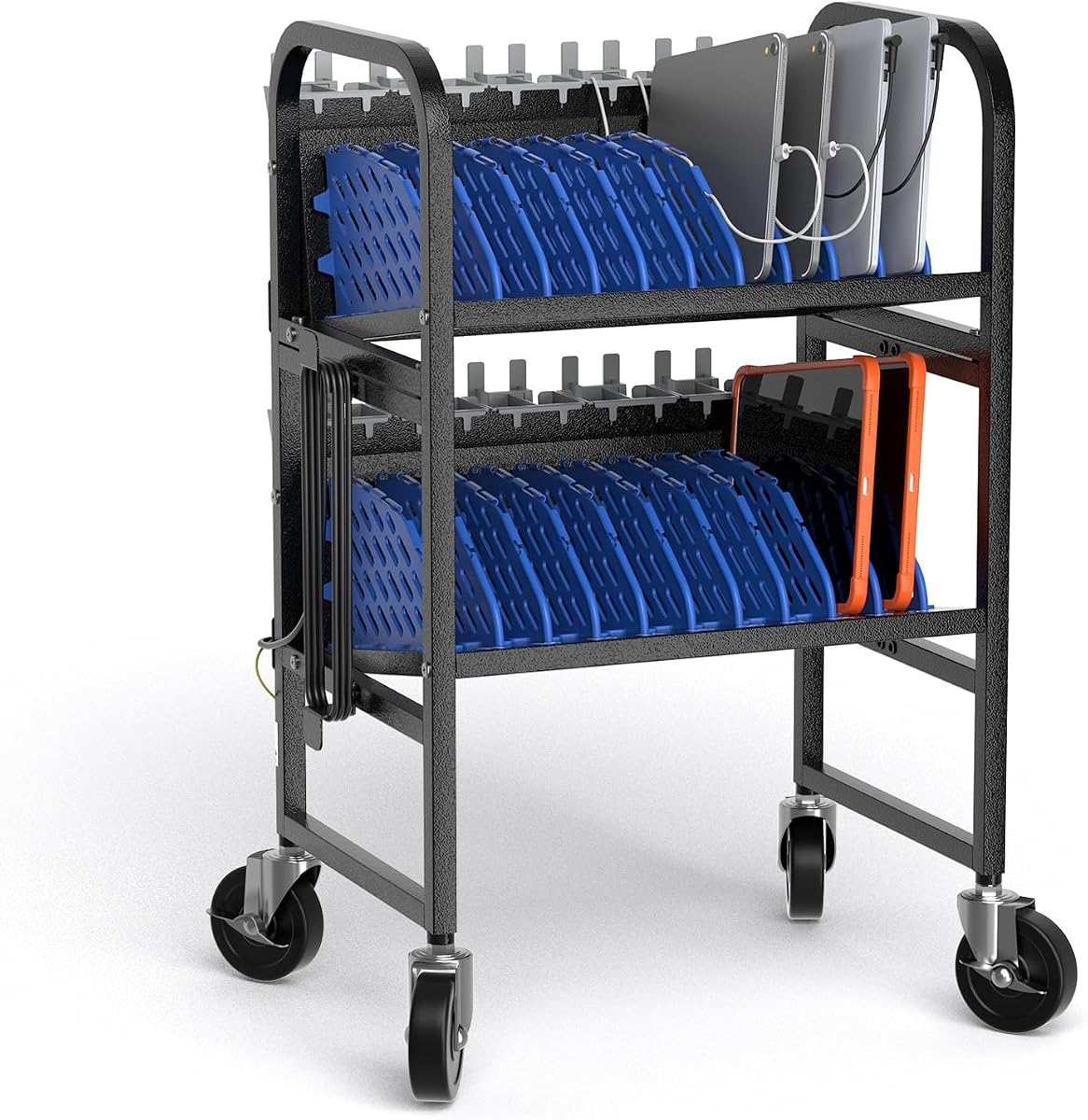
This 10-Device Mobile Charging Station offers a portable and practical solution for classrooms needing quick device movement. With smooth-rolling casters and locking brakes, it provides secure transport between rooms while keeping devices cool with open access. The steel construction ensures durability for daily use in shared spaces like labs.
We may earn a commission when you buy through this link, at no additional cost to you.
Key strengths include tool-free assembly for easy setup and wipe-clean surfaces for low maintenance. The bottom shelf offers bonus storage for adapters, while removable dividers adjust to device sizes. This flexibility is ideal for offices where device sizes vary and mobility is essential for staff.
While some users note the power strip may vary, the portability and build quality remain strong. Users should confirm power requirements before purchasing. This trade-off works well for schools prioritizing mobility over fixed power setups.
For schools and offices prioritizing mobility, this cart offers flexible and durable storage. We recommend it for users prioritizing mobility. It is a reliable pick for shared spaces needing quick device access.
Four smooth-rolling casters with two locking brakes provide secure parking and easy movement between classrooms.
The straightforward assembly process requires no tools, getting you organized quickly for daily use.
We may earn a commission when you buy through this link, at no additional cost to you.
Selecting the right charging station requires evaluating device capacity, build quality, and safety features to suit your specific environment needs.
Determine how many Chromebooks or laptops you need to charge simultaneously. High-capacity stations handle large fleets efficiently, while compact units save space in small rooms.
Assess your fleet size and room layout to find a station that supports all devices without overcrowding or clutter.
Mobile carts with casters allow you to move devices between classrooms or offices easily. Fixed stations are better for permanent setups on desks or counters.
Choose mobile options for shared environments and stationary racks for dedicated workspaces.
Charging generates heat, so look for open-frame designs that promote airflow. Adequate cooling prevents devices from overheating during long sessions.
Prioritize units with open slats or ventilation slots for safety and device longevity.
Tangled cords create hazards and messes. Look for stations with integrated clips, trays, or routing holes to keep cables organized and out of the way.
Select models with built-in cable management features to maintain a tidy workspace.
Check if the station includes a power strip or if you must supply one. Ensure the outlet count matches your device count and that ports support fast charging if needed.
Verify that the power source supports all your devices without overloading circuits.
Industrial-grade steel or flame-retardant materials ensure longevity in high-traffic environments. Avoid fragile plastics that may break with frequent use.
Prioritize sturdy construction and safety certifications like UL or CE for reliability.
Soft padding or dividers protect Chromebooks from scratches and accidental bumps. Overheat and surge protection features safeguard devices from electrical faults.
Look for protective interiors and safety features to extend device life.
Chromebooks often come in protective cases that add thickness. Choose wide-angle slots that accommodate devices with cases to avoid forcing them into tight spaces.
Measure your devices with cases included to ensure proper fit before buying.
When setting up your station, place it on a stable, flat surface away from water sources to prevent accidents. Ensure all cables are securely plugged in and the area around the unit has enough ventilation for airflow.
To maintain cleanliness, wipe down the exterior and slots regularly with a damp cloth to remove dust and smudges. Avoid harsh chemicals that might damage paint or plastic components, and keep the charging area free of clutter.
Periodically inspect cables for wear and replace them if damage is visible. Test the unit by plugging in a few devices to confirm all outlets function correctly before full deployment in classrooms or offices.
Most stations are designed to fit standard Chromebooks up to fourteen or fifteen inches with protective cases. However, thickness varies by model and case, so verify slot dimensions before purchasing to ensure your devices fit securely.
Some models include built-in power strips with surge protection, while others are open racks requiring you to supply your own. Always check the product specifications to confirm if a power source is included.
Some compact units offer mounting options or fit on AV carts, but mobile carts are meant for rolling. Check the product description for mounting hardware or surface mounting features if wall installation is required.
Use a soft, damp cloth to wipe the steel or plastic surfaces. Avoid liquid cleaners that could damage electronics. Clean the slots and cable clips regularly to maintain hygiene and prevent dust buildup.
Look for UL approval, surge protection, and flame-retardant materials. These features ensure the unit meets safety standards for electrical use and protects devices from voltage spikes or overheating.
Advanced models with GaN technology and high-wattage USB-C ports support fast charging for modern Chromebooks. Standard units may only provide basic power speeds suitable for general overnight charging.
Many carts feature removable or adjustable dividers to accommodate different device sizes, while some racks have fixed slots. Review the product details to confirm flexibility for your specific Chromebook models.
Yes, these units work in offices, libraries, and home workspaces. They help organize multiple laptops and tablets securely, reducing clutter and ensuring all devices stay powered for productivity.
In summary, the POCHAR models lead in ease of use and mobility, while the Moezuti station offers top-tier speed for power users. Each option provides distinct strengths depending on your room size and device count needs.
When choosing, prioritize capacity, build quality, and safety features like surge protection and ventilation. Mobility may be essential for shared classrooms, while fixed racks suit dedicated workspaces requiring stability.
Remember that prices and availability can fluctuate, so verify current offers before finalizing your order. These stations will help keep your device fleet organized and powered for years of reliable daily use.