
EMEET C960 1080P Webcam
4.4Editor score
1080P video with cover
Built-in 2 Omnidirectional Mics
Automatic Light Adjustment
This guide compares the top 1080p webcams for streaming and meetings, evaluating video quality, microphones, and privacy features to help you choose.
Choosing the right 1080p webcam ensures clear video for work and streaming. High resolution delivers sharp images while good microphones guarantee clear audio during calls without extra equipment.
We compared ten top-rated models based on video clarity, ease of use, and privacy features. Each pick balances performance and value to suit different needs like remote work or content creation.
Each review highlights standout features and potential trade-offs to help you decide. Prices and availability change frequently so check current listings before purchasing your next webcam setup today.
4.4Editor score

4.6Editor score

4.4Editor score
This side-by-side comparison highlights key specs for all ten models including resolution, microphone type, and special features to help you quickly identify the right fit.




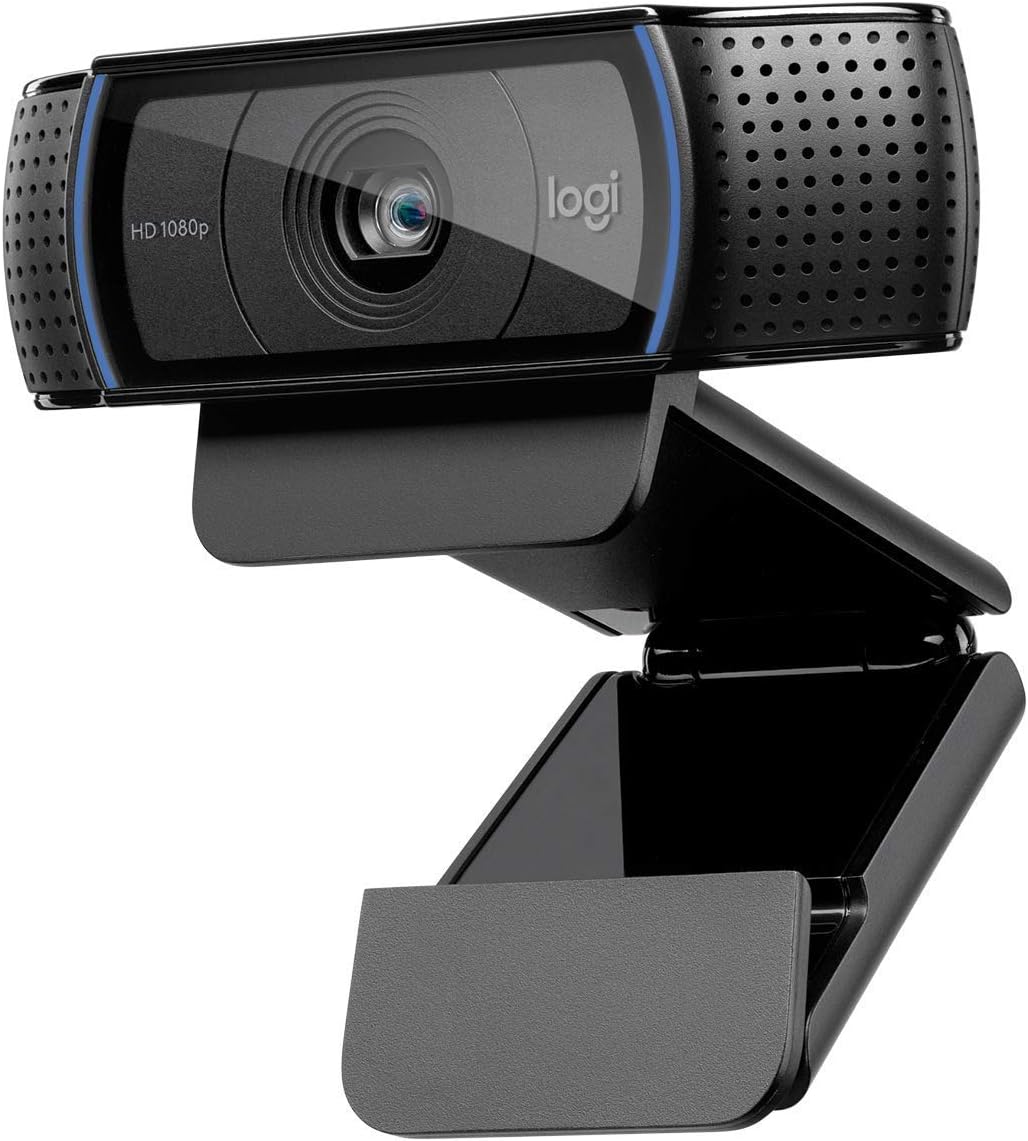


The Logitech C920x is a top choice for users seeking high-definition video at an affordable price point. It delivers crisp 1080p images that make you look sharp during any call or stream.
We may earn a commission when you buy through this link, at no additional cost to you.
Its dual stereo microphones ensure your voice is captured clearly while reducing background noise. The autofocus and light adjustment features adapt automatically to your environment so you always look your best.
While it lacks a privacy shutter, the included XSplit VCam license helps you manage your background easily. This trade-off is acceptable given the excellent video and audio performance it provides daily.
Buy this if you need a reliable webcam for Zoom or Twitch without spending extra. It is an ideal solution for professionals who value clarity and ease of use.
The glass lens and autofocus ensure sharp details in every frame.
Dual mics capture natural sound without needing a separate microphone.
We may earn a commission when you buy through this link, at no additional cost to you.
The Logitech Brio 101 excels in light management and privacy which are critical for home offices. Its RightLight technology boosts brightness to reduce shadows in your video feed significantly.
We may earn a commission when you buy through this link, at no additional cost to you.
You can slide the privacy cover shut when not in use ensuring your privacy is always protected. The Logi Options+ app allows you to adjust framing and zoom to suit your setup.
Though it comes with a fixed cable it offers plug-and-play reliability for most platforms. This is a solid pick for users who prioritize image quality and peace of mind.
Get this model if you work in varied lighting conditions and value privacy. It is a professional choice for those who want a sleek and reliable meeting tool.
Boosts brightness by up to 50% for clear images in low light.
Integrated slide cover gives total control over camera visibility instantly.
We may earn a commission when you buy through this link, at no additional cost to you.
The EMEET C960 offers excellent value for budget-conscious buyers needing reliable 1080p performance. It provides realistic video with a wide angle lens that captures more of your room.
We may earn a commission when you buy through this link, at no additional cost to you.
Two omnidirectional mics ensure clear voice pickup while the automatic light adjustment helps balance exposure. The included cover slides open easily when you are ready to join a call.
While it lacks Windows Hello support it works seamlessly with major apps like Zoom. This makes it a practical choice for students and remote workers on a tight budget.
Choose this if you need a functional webcam without extra costs. It delivers solid quality for everyday video conferencing and casual streaming sessions.
Captures more participants without needing constant camera adjustments.
Clear sound capture ensures your voice comes through without static.
We may earn a commission when you buy through this link, at no additional cost to you.
The Logitech C920S is a reliable workhorse known for its built-in privacy shutter. This feature puts you in control of your privacy while still delivering premium 1080p video.
We may earn a commission when you buy through this link, at no additional cost to you.
Its glass lens ensures crisp recorded videos with vibrant colors that look professional. Stereo audio with dual mics captures natural sound which is ideal for recording content.
Although it misses some software extras found in the X version it remains a strong performer. This is a great choice if you want peace of mind regarding your camera security.
Buy this if privacy is a top concern for your setup. It offers proven quality and durability for long-term daily use in any office.
Fitting cover protects the lens and hides your feed instantly.
Glass optics provide sharp images even in less than ideal lighting.
We may earn a commission when you buy through this link, at no additional cost to you.
The Logitech C920e is designed for corporate environments where reliability and compliance matter. It features a fixed field of view that keeps the frame balanced for professional meetings.
We may earn a commission when you buy through this link, at no additional cost to you.
Certification for Zoom and Microsoft Teams ensures seamless integration without driver issues. The attachable privacy screen flips up or down to protect your lens when you are off.
Its sturdy clip allows for easy mounting on monitors and laptops alike. This makes it a versatile option for shared office spaces that need consistent performance.
Select this if you need a certified device for enterprise needs. It delivers a professional presence with robust connectivity and privacy controls for teams.
Works seamlessly with major business apps for uninterrupted meetings.
Screen cover gives quick visual confirmation of camera status.
We may earn a commission when you buy through this link, at no additional cost to you.
The NexiGo N60 is versatile for users with multiple devices and operating systems. It works with Windows Mac Linux and Chrome OS without needing extra drivers or setup.
We may earn a commission when you buy through this link, at no additional cost to you.
The built-in noise-cancelling microphone reduces ambient noise to enhance sound quality during calls. A privacy cover blocks the lens for added security when you are not using it.
While it lacks advanced software its plug-and-play nature makes it very convenient. This is a solid choice for students or travelers who switch between computers often.
Buy this if you need a simple webcam that works almost everywhere. It delivers reliable performance for everyday video calls and online school sessions.
Works with most systems including Windows Mac and Linux effortlessly.
Physical cover blocks the lens without needing software toggles.
We may earn a commission when you buy through this link, at no additional cost to you.
The EMEET S600 offers a high-end sensor that supports resolutions beyond standard 1080p. Even when used for 1080p calls it delivers sharp images with better light handling.
We may earn a commission when you buy through this link, at no additional cost to you.
Its PDAF autofocus offers speed and precision superior to standard webcams. This helps you stay in focus during movement which is great for active presentations or streaming.
The adjustable FOV lets you focus on yourself or include more surroundings easily. This flexibility is excellent for users who want a bit more control over their setup.
Choose this if you plan to grow into higher resolution streaming. It is a powerful tool for creators who need top-tier optics at a mid-range price.
Phase detection keeps your image sharp even when moving around.
Adjustable angle lets you tailor the view to your specific needs.
We may earn a commission when you buy through this link, at no additional cost to you.
The Logitech HD Pro C920 is a classic that set the standard for HD webcams. It delivers Full HD 1080p video that ensures you look sharp during any conference call.
We may earn a commission when you buy through this link, at no additional cost to you.
Its design supports widescreen formats which makes your feed look modern and professional. The clip mounts easily on desktops or laptops for a stable and secure connection.
While it lacks newer features like privacy shutters it remains reliable for basic needs. This is a great choice if you want a trusted name without paying extra features.
Buy this if you need a simple reliable tool for video calls. It works well for everyday use and supports all major conferencing software.
Trusted by users worldwide for years of consistent performance.
Delivers a modern wide format that fills your screen naturally.
We may earn a commission when you buy through this link, at no additional cost to you.
The Logitech Brio 105 brings professional features to a more affordable price. It produces clear 1080p video that makes meetings feel natural and boosts employee confidence.
We may earn a commission when you buy through this link, at no additional cost to you.
RightLight 2 technology balances shadows and highlights so you look good even in dim rooms. The integrated shutter gives extra confidence that your privacy is protected at home.
It is certified for Google Meet and works with Chromebooks which is vital for school. This model is a strong choice for budget-conscious teams needing reliable daily tools.
Get this if you need a business-grade webcam without the premium cost. It delivers a clean look and solid performance for general meeting needs.
Adjusts automatically to suboptimal conditions for a clearer image.
Certified for major platforms and supported by remote deployment tools.
We may earn a commission when you buy through this link, at no additional cost to you.
The Logitech Brio 100 Renewed offers a cost-effective way to get a solid webcam. It provides up to Full HD 1080p resolution at 30 fps for smooth video.
We may earn a commission when you buy through this link, at no additional cost to you.
With a built-in microphone you do not need extra gear to start calling. It connects easily with popular video conferencing applications for a seamless user experience.
The 58 degree field of view is narrower which focuses on you alone. This is acceptable for solo calls but may be tight for small group setups.
Buy this if you want to save money on a reliable brand. It is a smart choice for simple daily calls where you want to avoid higher costs.
Renewed options provide a cheaper entry point for reliable tech.
Narrower angle keeps attention on you rather than the background.
We may earn a commission when you buy through this link, at no additional cost to you.
Selecting the right 1080p webcam requires considering several factors to ensure it fits your workspace and needs.
Most webcams offer Full HD 1080p at 30fps which is standard for meetings. Higher rates like 60fps offer smoother motion but require more bandwidth.
Look for 1080p at 30fps for a balance of quality and performance.
The Field of View determines how much of your surroundings the camera captures. Wider lenses around 90 degrees are better for group calls or shared spaces.
Choose a narrow view for solo use and a wide view for groups.
Autofocus keeps your face sharp even if you move slightly. Light correction features adjust brightness and color to compensate for poor lighting conditions.
Ensure your model has autofocus and light correction for professional results.
Built-in microphones vary in quality with stereo options often outperforming mono ones. Noise cancellation helps reduce background sounds like typing or traffic.
Select a webcam with dual mics for clearer audio without a headset.
Privacy shutters or covers block the lens physically to ensure security. This is vital for remote workers who want to guarantee the camera is off.
Prioritize models with a physical cover if security is a top priority.
Most webcams use clips to attach to monitors but some offer tripod threads. A tripod mount provides stability and flexibility for desktop setups.
Check for standard tripod mounts if you plan to use a stand.
Webcams should work seamlessly with apps like Zoom Teams and Meet. Certification from these companies ensures drivers are optimized for their platforms.
Choose a certified webcam to avoid driver issues on your OS.
Prices vary based on brand and extra features like software bundles. Budget models often lack premium optics but still deliver acceptable quality for calls.
Compare features against price to find the best value for your budget.
Connect your webcam to a USB port and ensure it is recognized by your system. Select the device in your video app settings to start using it.
Keep the lens clean by wiping it gently with a microfiber cloth. Dust and fingerprints can degrade image quality and make your video look blurry.
Adjust your lighting to face a window or use a soft lamp to reduce shadows. Proper placement ensures your camera captures a clear image of your face.
Yes most modern 1080p webcams are plug and play on both Mac and Windows systems. You usually do not need extra drivers to get video and audio working.
Position yourself facing a light source like a window or ring light. Avoid having strong light behind you as it can make your face look dark.
Most standard webcams are not compatible with game consoles like Xbox or PlayStation. They are designed primarily for PCs and mobile devices for streaming.
A privacy shutter covers the lens physically to prevent unauthorized access. It gives you peace of mind knowing your camera is off when not in use.
Built-in mics are often sufficient for meetings but a headset may sound better. Consider external audio if you are in a noisy environment or hosting events.
Check your connection and ensure you are using a USB 30 port if required. Also verify your camera settings are set to high resolution in the app.
A quality webcam can last several years with normal use. Proper care like avoiding drops and keeping it clean extends its lifespan significantly.
Logitech is known for consistent quality and broad compatibility with apps. EMEET and NexiGo also offer strong budget options with good reviews.
This guide reviewed ten top models including the Logitech C920x and EMEET C960. Each offers distinct strengths for different needs from budget setups to professional streams.
Prioritize features like autofocus and privacy shutters to ensure you get a reliable tool. The right webcam enhances your presence and confidence during every video call.
Remember to check current prices and availability as they change frequently. Select the model that best fits your budget and workspace requirements today.