
HP OfficeJet Pro 8125
3.9Editor score
Affordable entry level
Instant ink trial
Compact home design
This guide compares the top AI printers for home and office, highlighting smart features, printing speed, ink efficiency, and connectivity options for modern
AI printers are reshaping how we handle documents at home and work by integrating smart technology into everyday printing tasks. These devices use artificial intelligence to optimize layouts, manage ink levels, and ensure seamless connectivity across your devices without requiring constant manual intervention or technical expertise.
We evaluated ten leading models based on their AI capabilities, print quality, speed, and overall value for different user needs. Our comparison looks closely at features like automatic document formatting, wireless reliability, and sustainability efforts to help you find the right device for your specific workflow requirements today.
Each pick below shows what makes that model stand out in the crowded market of smart printing solutions available right now. Keep in mind that product availability and pricing can change frequently, so check the latest details on the official product pages before making your final purchasing decision for your office or home setup.
3.9Editor score

4.0Editor score

4.2Editor score
The following table provides a side-by-side comparison of all ten models to help you quickly identify key specifications and capabilities that matter most for your specific printing needs.





The HP OfficeJet Pro 9135 stands out as a top choice for office environments needing reliability and speed. With a solid rating from users, it delivers professional documents quickly while using AI to optimize web layouts and reduce waste during printing tasks.
We may earn a commission when you buy through this link, at no additional cost to you.
Its standout strength lies in the combination of rapid printing speeds and intelligent formatting tools that save time on every job. The dual-band Wi-Fi ensures consistent connectivity, while the Wolf Pro Security suite protects your sensitive business data from potential cyber threats effectively.
Trade-offs include the initial cost and the requirement to subscribe to Instant Ink after the trial period ends. However, the efficiency gains and reduced paper waste often justify these ongoing expenses for busy offices that prioritize productivity and security over upfront savings.
This model is ideal for small to medium businesses that need fast, secure, and smart printing capabilities. If your workflow involves frequent document handling and network protection is a priority, this printer offers a robust solution that balances performance with intelligent features.
The AI tool removes unwanted content from web pages ensuring your prints look professional without wasting paper on awkward layouts.
Wolf Pro Security helps keep your network protected from cyber threats which is critical for businesses handling sensitive client data daily.
We may earn a commission when you buy through this link, at no additional cost to you.
The HP OfficeJet Pro 8125 offers an accessible entry point into AI-enabled printing for home offices. Users appreciate its straightforward setup and the convenience of the included Instant Ink trial which helps manage costs during the first few months of ownership.
We may earn a commission when you buy through this link, at no additional cost to you.
Its key strength is the balance between cost and functionality, providing essential features like automatic document feeding and duplex printing without a steep price tag. The AI formatting feature ensures web pages print cleanly which adds value for remote workers needing quick reports.
While it is not as fast as higher-end models and the build feels lighter than commercial units, it meets the needs of casual users effectively. The wireless connectivity works well for most home networks though occasional glitches may require a quick reset.
This printer is best suited for home users who need reliable printing for bills and occasional reports. If you want smart features without breaking the bank and do not require heavy daily usage this model provides excellent value for money.
With a lower upfront cost and a three month ink trial included this printer helps you start printing professionally without immediate subscription fees.
HP AI easily removes unwanted content from web pages so your prints are just the way you want without wasting pages on ads.
We may earn a commission when you buy through this link, at no additional cost to you.
The Liene PixCut S1 offers a unique premium experience for creators who need high quality stickers and labels. With strong user ratings it combines thermal dye-sublimation printing with precise AI auto-cutting to deliver professional results for DIY projects and custom gifts.
We may earn a commission when you buy through this link, at no additional cost to you.
Its standout strength lies in the AI image extraction feature which automatically recognizes subjects from photos to create flawless cutouts. This technology paired with thermal dye-sublimation ensures vibrant colors that are waterproof and scratch-resistant for long lasting durability in various environments.
While it does not print standard documents and is specialized for craft materials the quality and convenience justify the investment for hobbyists. The lack of a subscription model for apps adds value allowing users to create freely without recurring fees for elements or designs.
This printer is perfect for crafters and small business owners selling custom stickers or gifts. If you want to bring imaginative designs to life with professional precision and durability this device provides a complete all-in-one solution for your creative workflow.
Upload a photo and let AI bring your vision to life instantly by turning selfies into anime characters or fantasy heroes with stunning realism.
Thanks to four layer thermal dye-sublimation the stickers are waterproof and scratch-resistant ensuring they remain vibrant and intact over time.
We may earn a commission when you buy through this link, at no additional cost to you.
The HP Smart Tank 5003 is designed for home users who print frequently and want to avoid the hassle of buying cartridges often. It holds enough ink for up to three years of printing making it a practical choice for families with high volume needs.
We may earn a commission when you buy through this link, at no additional cost to you.
Its key strength is the mess-free refill system that allows you to replenish ink without squeezing or spilling. This feature combined with the long-lasting ink supply significantly reduces the cost per page compared to traditional cartridge-based printers available on the market today.
The trade-off is that it prints slower than some laser alternatives and takes up more space on a desk or shelf. However for users who prioritize savings and convenience over raw speed this model offers a reliable and efficient printing experience.
This printer is ideal for households with multiple students or frequent document needs. If you want to stop worrying about running out of ink and prefer a sustainable solution with lower ongoing costs this tank system is a smart investment.
You get up to three years of HP ink included which means you save money on consumables while maintaining high print quality for daily tasks.
Simply plug the ink bottles into the cartridge-free tank and let them drain without squeezing or spilling ensuring a clean refill every time.
We may earn a commission when you buy through this link, at no additional cost to you.
The HP Envy 6155 is a strong contender for home users who prioritize photo quality and vibrant colors in their prints. It delivers sharp text and rich colors thanks to True-To-Screen technology which ensures your printed photos match what you see on the display.
We may earn a commission when you buy through this link, at no additional cost to you.
Its key strength is the use of advanced color technology that produces professional-looking borderless photos. The sustainable design made with at least 60% recycled plastic also appeals to environmentally conscious buyers looking to reduce their carbon footprint with office equipment.
The trade-offs include a slower print speed and a smaller input tray compared to higher-end models which may require frequent reloading. Despite these minor limitations it excels at household tasks like homework printing and personal projects where visual quality is the main goal.
This printer is best for families and students who print photos and colorful documents regularly. If you want bright and accurate colors without paying a premium price this model offers a great balance of performance and eco-friendly design for your home office.
True-To-Screen tech ensures documents and photos look as vibrant as they do on your screen so your prints match the digital version perfectly.
This printer is made with at least 60% recycled plastic content helping you support sustainability efforts while getting a reliable device for your home.
We may earn a commission when you buy through this link, at no additional cost to you.
The Bambu Lab P2S Combo brings advanced 3D printing to enthusiasts and creators needing multi-color and multi-material capabilities. With a high user rating it stands out for its speed and reliability which makes it accessible even for beginners starting their 3D printing journey.
We may earn a commission when you buy through this link, at no additional cost to you.
Its key strength is the ability to print in multiple colors seamlessly using the AMS 2 Pro system. Combined with AI failure detection this printer minimizes wasted material and ensures consistent results which is critical for complex projects and detailed prototypes.
The trade-off is that it requires understanding 3D modeling and slicing software which might be a barrier for some users. However for those willing to learn the creative potential and precision it offers are unmatched by traditional document printing devices available on the market.
This printer is perfect for makers and engineers who need complex 3D prototypes. If you want to bring designs to life with multiple materials and colors without constant manual adjustments this device provides a powerful and efficient solution for your workspace.
The printer detects issues automatically so you avoid wasted prints and can focus on designing rather than monitoring the machine constantly.
The AMS 2 Pro enables seamless multi-color printing letting you create detailed parts with different materials in one single print job.
We may earn a commission when you buy through this link, at no additional cost to you.
The HP Smart Tank 7603 is built for home offices that need high-volume printing without the burden of frequent cartridge replacements. It includes enough ink for up to eight thousand color pages which supports heavy document processing with minimal interruptions or maintenance.
We may earn a commission when you buy through this link, at no additional cost to you.
Its key strength is the inclusion of fax capabilities alongside scanning and printing making it a versatile office tool. The cartridge-free design ensures you save money on consumables over time while maintaining sharp text and rich colors in every output you produce.
The trade-off is that the unit is physically larger and heavier than standard printers which may require dedicated desk space. Despite this it remains a top choice for those who value low cost per page and reliable performance over compact aesthetics in an office setting.
This printer is ideal for busy home offices that handle daily document streams. If you need a reliable device that can handle faxing and high-volume tasks without expensive ink costs this tank system is a practical and efficient solution for your needs.
Get up to 8000 color pages right out of the box which ensures you can focus on work without constantly checking ink levels.
Includes fax and scanner capabilities alongside printing so you have a complete office solution in one reliable device for your home.
We may earn a commission when you buy through this link, at no additional cost to you.
The HP OfficeJet Pro 8139 stands out with a one-year trial of Instant Ink which is an extended benefit for home office users. This feature helps offset costs significantly during the first year of ownership while providing professional-quality color documents for reports and presentations.
We may earn a commission when you buy through this link, at no additional cost to you.
Its key strength is the combination of fax capabilities and AI layout tools which streamline office workflows effectively. The Wolf Essential Security suite also protects your network from threats ensuring your home office data remains safe while you work remotely from any location.
The trade-offs include mid-range speed and a price point that is higher than basic models but lower than top-tier units. However the extended ink trial and fax functionality make it a balanced choice for home professionals who need extra features without high-end costs.
This printer is best for home professionals who need faxing and security features. If you want a reliable device that saves money on ink for a full year this model offers a solid balance of performance and value for your daily work tasks.
Subscribe to Instant Ink and get ink delivered to your door for one year saving up to 50% on ink costs during that period.
Wolf Essential Security bolsters security and helps keep your network protected from cyber threats while you print sensitive documents at home.
We may earn a commission when you buy through this link, at no additional cost to you.
The HP Smart Tank 7603 provides a cost-effective solution for home offices needing high-volume printing without frequent maintenance. It supports up to three years of ink included which means you can print thousands of pages without worrying about buying new cartridges regularly.
We may earn a commission when you buy through this link, at no additional cost to you.
Its key strength is the mess-free refill system that makes replenishing ink clean and simple. The Magic Touch Control Panel simplifies navigation so you can access fax and scanning features easily even if you are not a tech expert or use the device daily.
The trade-off is that it is a bulky device and may not fit in small spaces easily. Despite its size it remains a reliable workhorse for busy households that need consistent output and low operating costs for both personal and business document printing tasks.
This printer is ideal for high-volume home offices that value convenience. If you want to avoid cartridge hassles and need fax capabilities in one unit this model offers great long-term value for your specific printing needs and workflow.
You get up to three years of HP ink included making this printer perfect for low-cost high-volume printing without worrying about refills.
The mess-free refill system lets you plug in bottles and let them drain without squeezing or spilling ensuring a clean and easy process.
We may earn a commission when you buy through this link, at no additional cost to you.
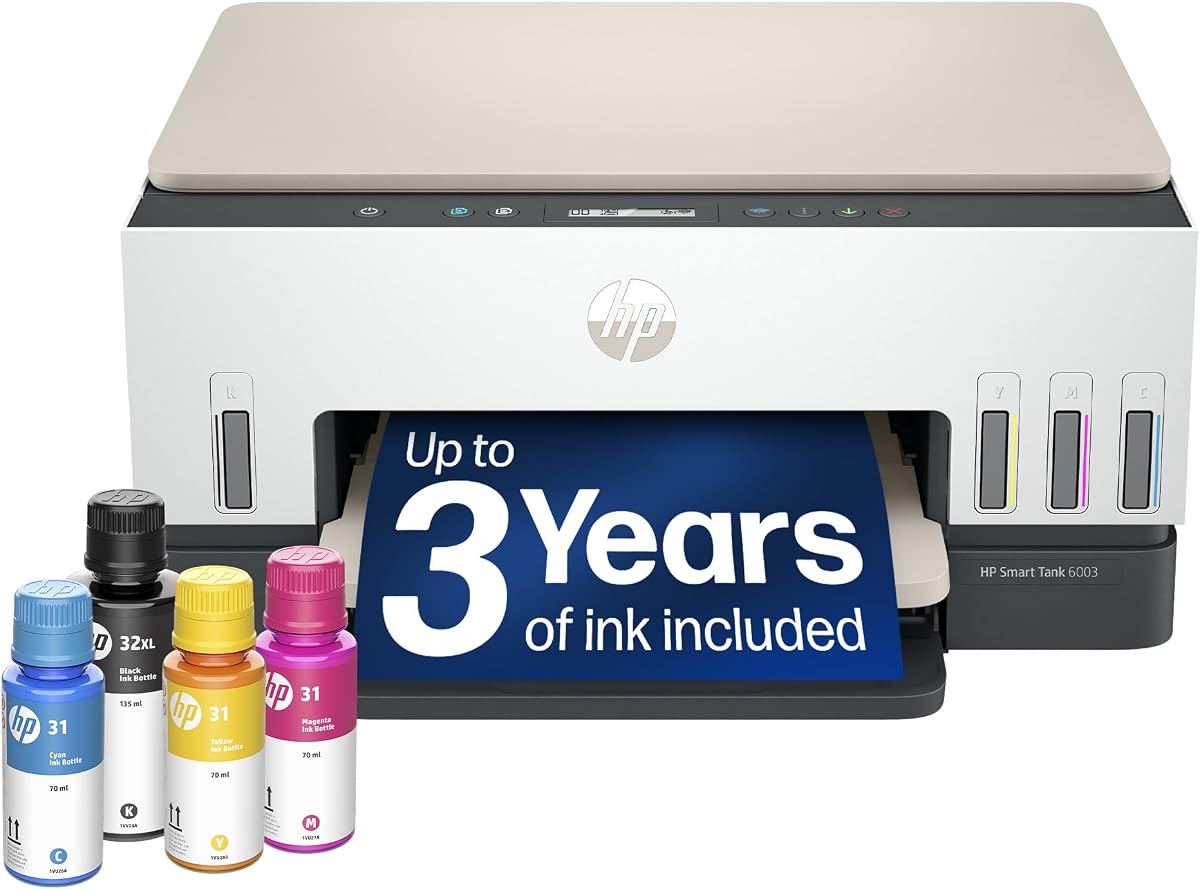
The HP Smart Tank 6003 is a simple reliable option for home users who need consistent printing without constant cartridge changes. It includes enough ink for up to three years and supports wireless printing so you can send documents from your phone easily.
We may earn a commission when you buy through this link, at no additional cost to you.
Its key strength is the borderless printing feature which allows you to create photo-quality images without white margins. The mess-free refill system also makes maintenance easy ensuring you can focus on your work instead of worrying about cleaning up ink spills.
The trade-off is that it lacks fax capability and advanced office features found in higher-end models. However for casual home users who prioritize ease of use and low running costs this model provides a practical and affordable solution for everyday printing tasks.
This printer is best for families needing basic home printing. If you want a reliable device that delivers quality photos and saves money on ink this model offers a straightforward and effective choice for your household needs.
Print borderless images with vibrant colors using the tank system which ensures your photos look professional without wasted white space.
The mess-free refill system means you can replenish ink without spilling making it easy to keep your home office running smoothly.
We may earn a commission when you buy through this link, at no additional cost to you.
Choosing the right AI printer depends on understanding your specific workflow needs and budget constraints for your home or office setup.
Print speed determines how quickly you get your documents while volume capacity ensures you can handle daily demands without constant reloading. Look for a model that offers enough pages per minute and input tray size to match your busy schedule.
If you print often prioritize a model with higher speed and larger trays to keep up with demand efficiently.
AI capabilities like layout optimization and auto-correction help reduce waste and improve document quality automatically. These features save time by ensuring that web pages and emails print cleanly without needing manual adjustments before sending jobs to the printer.
Ensure the printer has smart formatting tools to save time and paper on every job you send to the device.
Ink costs and sustainability features significantly impact the long-term value of your investment. Consider models with high-yield tanks or subscription services that deliver ink before you run out while checking if the device is made with recycled materials to reduce environmental impact.
Calculate the total cost of ownership by factoring in ink replacement costs and sustainability features before purchasing.
Connectivity and app support allow you to print from any device without complex setup steps. A printer with reliable dual-band Wi-Fi and an intuitive mobile app ensures you can print documents and scans directly from your phone or tablet easily.
Prioritize models with strong dual-band Wi-Fi and easy-to-use mobile apps for seamless printing from any device.
Security features are critical for protecting sensitive data in both home and business environments. Look for models with hardware-based encryption and regular security updates to keep your network safe from threats while you share documents across devices.
Choose a printer with built-in security suites to protect your network and sensitive data from potential threats effectively.
Multifunctionality lets you print, scan, copy, and fax from one device which saves space and simplifies workflow. Check if the model supports automatic document feeding and duplex scanning to handle larger jobs without manual intervention during the process.
Select a model that offers all essential functions you need to streamline your daily office tasks efficiently.
Physical dimensions determine how much desk space the printer will consume in your office or home setup. Measure your available area carefully to ensure the device fits without crowding your workspace while allowing enough room for paper handling and maintenance.
Measure your space to ensure the printer fits comfortably without crowding your workspace or limiting paper access.
Warranty and support ensure you get help when issues arise with your device. Check for manufacturer coverage and available support channels so you can resolve hardware problems quickly and minimize downtime during critical work periods.
Verify warranty terms and support availability to ensure quick resolution of any hardware issues that may occur.
Set up your AI printer by connecting it to your Wi-Fi network through the touchscreen or mobile app interface. This ensures that all smart features like remote access and auto-correction work correctly from the start.
Regularly update your printer's firmware to ensure security patches and AI feature improvements are installed. These updates are essential for maintaining the performance of AI tools and protecting your network from vulnerabilities.
Keep the printer clean by wiping the exterior and ensuring the paper trays are free of dust. For tank models ensure ink caps are tightly sealed after refilling to prevent air from entering the system and affecting print quality.
An AI printer uses artificial intelligence to optimize print layouts, manage ink usage, and automate maintenance tasks. It can scan documents to improve clarity, remove unwanted content from web pages, and alert you before ink runs out automatically.
AI printers are worth the investment if you need to save time on formatting and reduce paper waste. The automated features help busy users get professional results faster, which often offsets the initial higher price over time.
Not all AI printers require a subscription, but some offer optional services like Instant Ink for automatic delivery. You can usually use all core functions without subscribing, though some advanced features may be limited to members.
Most AI features are active by default when you connect the printer to the internet. You can manage settings via the printer's touchscreen or mobile app to customize preferences for formatting and paper saving.
The HP OfficeJet Pro 9135 is often recommended for small offices due to its fast speeds and strong security features. It balances professional performance with smart tools that help manage daily document loads effectively.
Yes, many AI printers support borderless and high-quality photo printing using advanced color technology. Look for models with specific photo modes to ensure the best output for visual projects.
The top picks in this guide highlight the best value and performance across different user needs. Whether you need a budget-friendly option or a premium machine with advanced features there is a model that fits your workflow.
Prioritize the features that matter most to your daily work whether that is speed, ink efficiency, or smart formatting tools. Your specific needs will determine which model offers the best balance of cost and capability.
Remember to check current prices and availability before making your final decision. Product details and offers may change so verifying the latest information on the official pages ensures you get the best deal possible.